

Pricing and availability
We compare 600+ stores and found this item at 5 stores. Prices updated .
Store
Reviews
Price






Average Price: $544
Standard/Professional
$200
$1001+
Price Tier
Budget
Standard
High-end
Price History
Based on price data from 4 merchants for "Blackmagic Design ATEM Mini Pro ISO HDMI Video Production Studio with 5-stream Recording Engine". Prices shown reflect NEW condition. Tracking began Apr 2, 2026.
* Product prices and availability are updated by Equipboard every 24hrs and are subject to change. Equipboard may receive compensation for purchases made at participating retailers linked on this site. This compensation does not affect what products or prices are displayed, or the order of prices listed. For more information, please refer to our affiliate disclosure.
Description
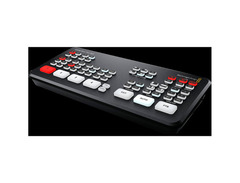
Unleash your creative potential with the Blackmagic Design ATEM Mini Pro ISO, a robust video production studio that brings professional-grade broadcasting to your home or studio. This compact powerhouse is designed for creators who demand flexibility and quality in their livestreams and video productions. With four HDMI inputs, USB output for webcam functionality, and an integrated 5-stream recording engine, you can effortlessly capture and edit every angle of your show.
Imagine streaming live to platforms like YouTube, Twitch, and Facebook without a hitch, thanks to the built-in hardware streaming engine. The ATEM Mini Pro ISO not only streams but also records each input as a separate track for seamless post-production editing — perfect for those who want to polish their content with the included DaVinci Resolve project file.
Enhance your broadcasts with advanced features like chroma key for green screen effects, a Fairlight audio mixer with EQ and dynamics, and various transition effects. The multiview functionality lets you monitor all your feeds on one screen, ensuring you never miss a moment. Whether you're an educator, gamer, or business presenter, this device adapts to your needs, making it a versatile addition to any recording setup.
Key Features:
- Integrated 5-stream recording engine for isolated recording of individual inputs.
- Direct streaming to platforms like YouTube, Twitch, and Facebook.
- USB webcam output for flexible streaming options.
- Fairlight audio mixer with EQ and dynamics.
- Advanced chroma key for green screen effects.
- 4 HDMI inputs with frame rate and format conversion.
- Multiview monitoring of all inputs on a single screen.
- Includes DaVinci Resolve project file for fast editing and Ultra HD finishing.
- Supports direct live streaming via Ethernet and mobile data from Apple or Android phones.
Owner's manual
Blackmagic Design ATEM Mini Pro ISO HDMI Video Production Studio with 5-stream Recording Engine User ManualProduct specs
| Type | Live Video Switcher |
| Channels | 4 Video, 2 Audio |
| Video Format | 1080p/60fps |
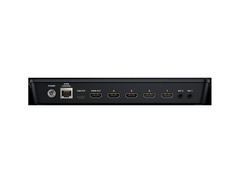
| Video Inputs | 4 x HDMI |
| Video Outputs | 1 x HDMI |
| Audio Inputs | 2 x 1/8" TRS (mic 1, mic 2) |
| USB | 1 x USB-C (3.1) |
| Other I/O | 1 x RJ45 (ATEM Control) |
| Software | ATEM Software Control Panel |
| Features | ISO Recording |
| Power Source | 12V DC Power Supply (included) |
| Height | 1.38" |
| Width | 9.35" |
| Depth | 4.07" |
| Weight | 19.4 oz |
FAQs
-
Can the Blackmagic Design ATEM Mini Pro ISO stream directly to platforms without a computer?
-
Yes, the ATEM Mini Pro ISO has a built-in hardware streaming engine that supports RTMP and SRT protocols, allowing direct streaming to popular social media platforms without additional software.
-
What is the primary video resolution and frame rate supported by the ATEM Mini Pro ISO?
-
The ATEM Mini Pro ISO supports video formats up to 1080p at 60 frames per second, ensuring high-quality live streaming and recording.
-
How many HDMI inputs does the ATEM Mini Pro ISO have?
-
The ATEM Mini Pro ISO features four HDMI video inputs, allowing you to connect multiple cameras or other video sources.
-
Does the ATEM Mini Pro ISO require any specific software for operation?
-
While the ATEM Mini Pro ISO can be operated from its front panel, it also includes the free ATEM Software Control for Mac or Windows, providing additional control options.
-
What are the audio input options on the ATEM Mini Pro ISO?
-
The ATEM Mini Pro ISO offers two 1/8" TRS audio inputs, allowing you to connect microphones or other audio sources directly to the switcher.
Videos

Adam Savage’s Tested
Tested: Blackmagic ATEM Mini Pro ISO Video Switcher!

Tested: Blackmagic ATEM Mini Pro ISO Video Switcher!
Adam Savage’s Tested
Blackmagic Design ATEM Mini Comparison | Mini, Mini Pro, & Mini Pro ISO

1SourceVideo
Reviews
PROS
-
Intuitive interface with professional broadcast features at a consumer price
-
Compact design with ISO recording for each source
-
Streamlines multi-camera video editing workflow
-
Automatic resolution scaling feature is invaluable
-
Built-in streaming encoder simplifies setup and reduces equipment
-
Records ISO files and DaVinci Resolve project files for precise editing
-
Direct streaming capability to platforms like YouTube
-
Useful for both live streaming and recorded content creation
-
Enhances productivity for video podcasts and online teaching
CONS
-
HDMI output limitation: Multi-view or Program, not both simultaneously
-
Inconsistent power supply quality; lacks locking mechanism
-
HDMI ports prone to failure during production
-
Audio time code sync issues with external audio devices
-
Settings do not persist between sessions, requiring manual reconfiguration
-
Mac compatibility issues with the ATEM Software Control app
-
Random camera recording trigger failures
-
Software multiview not available, limiting preview options
-
Requires additional Streaming Bridge for some outputs
Owner Insights
We analyzed real musician discussions from forums and Reddit to find what players love, question, and tweak about Blackmagic Design ATEM Mini Pro ISO HDMI Video Production Studio with 5-stream Recording Engine.
Build quality
-
The ATEM Mini Pro runs warm, leading some users to employ laptop coolers like Opolar to maintain a temperature around 85 degrees.
Source
Features and functionality
-
The device lacks the ability to store streaming target information, requiring users to load an XML file each time it's powered on for custom RTMP destinations.
Source -
The ATEM Mini Pro ISO cannot natively handle stingers, intros, or lower thirds, requiring external software like OBS for such graphics.
Source -
Tricaster's ME channels function like OBS scenes, providing intuitive access to effects and transitions directly from the interface.
Source
Use cases and applications
-
Ideal for portable setups, the ATEM Mini Pro's compact size allows it to fit an entire streaming setup in a backpack, appealing to run-and-gun videographers.
Source -
Users can extend OBS outputs to the ATEM Mini Pro ISO for more professional graphics, such as lower thirds and transitions, enhancing live production quality.
Source -
ATEM Mini Pro is effective for webinars and virtual training, but users note that having physical controls, like those available with Tricaster, can streamline complex setups.
Source
Software and compatibility
-
Audio monitoring is limited to HDMI out, with latency issues reported when using USB-C for monitoring, causing synchronization challenges in live settings.
Source -
OBS can be used as a graphics engine with the ATEM, allowing complex animations from After Effects or Resolve to be integrated via chroma keying.
Source
User experience
-
After extended use, audio and video sync issues may arise, with reports of a drift of up to 10 frames over 24 hours during streams.
Source -
The Tricaster Mini paired with the control surface allows for easier one-button access to effects, which some users find beneficial over using a laptop interface.
Source
Other
-
The inability to output to Facebook Live at 720p is noted, restricting users to 1080p, which may not suit all streaming needs.
Source
Setup and maintenance
-
For OBS integration, users need to connect their laptop to the ATEM via HDMI and perform chroma keying to eliminate background colors for seamless graphics overlay.
Source
Comparisons
-
The Tricaster offers built-in special effects and virtual studios, unlike the ATEM Mini Pro, which requires external software for similar capabilities.
Source
Based on 0 Reviews and 0 Ratings
Genre Usage
Based on how artists on Equipboard use this gear, it is most commonly found in the following genres.
More Blackmagic Design Mixers

$2,875.00 - $3,445.00
in Mixers Rank


$28.00 - $415.00
in Mixers Rank


$677.00 - $989.00
in Mixers Rank


$1,462.00 - $1,999.00
in Mixers Rank


$214.78 - $250.74
in Mixers Rank


$120.00 - $449.99
in Mixers Rank


-m.webp?v=1785130358)
$340.69 - $379.00
in Mixers Rank


$218.00 - $329.99
in Mixers Rank


$45.30 - $89.00
in Mixers Rank


$180.25 - $219.99
in Mixers Rank


$200.00 - $573.74
in Mixers Rank


$129.00 - $209.00
in Mixers Rank


$1,737.36 - $3,299.99
in Mixers Rank


$310.00 - $479.99
in Mixers Rank


$185.00 - $309.00
in Mixers Rank


$75.00 - $329.99
in Mixers Rank


$140.72 - $169.00
in Mixers Rank


$65.00 - $219.50
in Mixers Rank


$277.00 - $382.00
in Mixers Rank


$244.00 - $399.99
in Mixers Rank


$35.00 - $295.00
in Mixers Rank


$205.00 - $329.00
in Mixers Rank


$660.64 - $1,271.95
in Mixers Rank


$99.00 - $179.00
in Mixers Rank


-m.webp?v=1785131102)
$1,900.00 - $2,999.99
in Mixers Rank


$1,006.00 - $1,499.99
in Mixers Rank


$14.60 - $45.00
in Mixers Rank


$659.00 - $1,159.99
in Mixers Rank


$999.00 - $1,049.99
in Mixers Rank


$129.99 - $176.99
in Mixers Rank


$190.00 - $229.99
in Mixers Rank


$416.00 - $679.99
in Mixers Rank


$969.00 - $1,199.00
in Mixers Rank


$1,049.00 - $1,649.00
in Mixers Rank


Accessories & Related Items


Artist usage

Community setups


Similar


Gear Guides






Most Popular Mixers
Most Popular Brands
-
Added to Equipboard on by
 jimigrok
GearIQ 73
-


