

Pricing and availability




* Product prices and availability are updated by Equipboard every 24hrs and are subject to change. Equipboard may receive compensation for purchases made at participating retailers linked on this site. This compensation does not affect what products or prices are displayed, or the order of prices listed. For more information, please refer to our affiliate disclosure.
Description
The ERM midiclock+ is the ultimate solution for musicians and producers who require precise synchronization for their MIDI devices. Designed to tackle the common issue of latency in digital audio workstations, the midiclock+ provides ultra-stable MIDI clock signals, ensuring that your electronic instruments and computer-based setups are always in perfect sync. Whether you're working in a studio or performing live, this compact yet powerful device is a must-have for maintaining seamless timing across your gear.
The midiclock+ features a straightforward, user-friendly interface, making it easy to integrate into any setup. It includes two separate MIDI outputs, allowing you to send clock signals to multiple devices simultaneously. The intuitive rotary encoder and display allow you to adjust the tempo with precision, giving you full control over your musical arrangements. Its robust construction guarantees reliability, even in the most demanding environments.
For those who work with analog equipment, the midiclock+ offers the flexibility of synchronizing with DIN sync devices, giving you the best of both worlds in digital and analog domains. This versatile tool is perfect for anyone serious about their craft and who needs a reliable way to keep everything on beat.
Key Features:
- Generates ultra-stable MIDI clock signals for precise synchronization
- Two separate MIDI outputs for connecting multiple devices
- User-friendly interface with rotary encoder and display for easy tempo adjustments
- Supports synchronization with DIN sync devices for analog compatibility
- Compact and robust design suitable for studio and live performance settings
Videos

Tutorials For KORG Arranger Keyboards
E-RM midiclock overview-External Midi Clock for syncing Midi devices
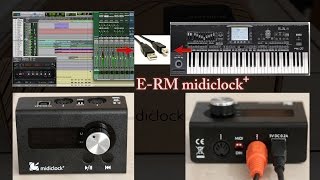
E-RM midiclock overview-External Midi Clock for syncing Midi devices
Tutorials For KORG Arranger Keyboards
Reviews
Owner Insights
We analyzed real musician discussions from forums and Reddit to find what players love, question, and tweak about ERM midiclock+.
Features and functionality
-
The ERM Multi-Clock offers audio syncing and latency adjustment directly on the device, allowing for quick compensation during live performances.
Source -
It's crucial to set the Minilogue XD's global settings to "En Rx Transport" to ensure it starts with the ERM Midiclock+.
Source -
When a cable is plugged into the SYNC IN jack, the Minilogue XD prioritizes the SYNC IN jack clock over MIDI clock settings, impacting synchronization with external devices.
Source -
When using a MIDI clock, connecting it after the keyboard controller can optimize sync across devices.
Source
Comparisons
-
The Retrokits RK-006 is preferred by some for additional functionalities compared to the ERM, despite both solving sync issues effectively.
Source
Software and compatibility
-
The Innerclock Systems Sync Gen can automatically follow tempo changes in Ableton, making it a strong contender for those needing dynamic tempo adjustments.
Source -
The Minilogue XD requires selecting the correct clock source (Auto USB, Auto MIDI) to synchronize effectively with an external MIDI clock like the ERM Midiclock+.
Source
Use cases and applications
User experience
-
Some users experienced noticeable timing shifts in live sets when changing tempos, indicating a need for a dedicated MIDI clock to maintain sync.
Source
5.0 out of 5
Based on 1 Review and 6 Ratings

68
Great tool especially for spontaneous jams with other musicians
Sturdy build works exactly as advertised. Bit pricey for what you get, but still the best way to prevent midi sync issues.
Artist usage
Add artist

in response to LIAM Hennessy requesting what gear was in his studio, as seen in the above video CHRISTIAN wrote this response;
Audio-Interface: RME Fireface UCX Midi-Clock: E-RM Multiclock USB Midi-Controller: Akai APC 40 MK2 Drum-Machines: Elektron Rytm, Elektron Digitakt Synth: Clavia Nord-Lead 2x Microphone: Neumann TLM 102 Speaker + Sub: Neumann KH 120 A + Neumann KH 805 Computer: Macbook Pro
Studio: Arturia Microbrute Arturia Drumbrute Korg Polysix Prophet 6

Genre Usage
Based on how artists on Equipboard use this gear, it is most commonly found in the following genres.
Used With
Based on how musicians on Equipboard use ERM midiclock+, it is most commonly used with the following gear.

-s.webp?v=1783436217)


Community setups
Show yours
Similar
Add recommendation1 alternative for ERM midiclock+, curated by the Equipboard community.

$545.00
Depending on your gear and how much you have to rely on midi sync I would consider to buy the bigger one. Way more options and at some point the midiclock+ may not be sufficient.
More MIDI Interfaces

$89.44 - $285.00
in MIDI Interfaces Rank


$54.99 - $69.00
in MIDI Interfaces Rank


$177.00 - $199.99
in MIDI Interfaces Rank

$99.95 - $549.96
in MIDI Interfaces Rank


$353.00 - $616.89
in MIDI Interfaces Rank


$173.00 - $226.57
in MIDI Interfaces Rank


$48.99 - $324.63
in MIDI Interfaces Rank


$129.99 - $139.00
in MIDI Interfaces Rank


$348.00 - $399.99
in MIDI Interfaces Rank
.jpeg?v=1783465548)


$222.00
in MIDI Interfaces Rank


$29.99 - $48.00
in MIDI Interfaces Rank


$115.00 - $139.00
in MIDI Interfaces Rank


$628.16
in MIDI Interfaces Rank


$80.00
in MIDI Interfaces Rank


$69.95 - $89.00
in MIDI Interfaces Rank


$95.00 - $130.90
in MIDI Interfaces Rank

$34.99 - $39.99
in MIDI Interfaces Rank


$56.00 - $78.40
in MIDI Interfaces Rank

$40.00 - $124.95
in MIDI Interfaces Rank

$19.00 - $82.17
in MIDI Interfaces Rank


$95.00 - $130.90
in MIDI Interfaces Rank

$44.45 - $52.94
in MIDI Interfaces Rank

$73.00 - $99.99
in MIDI Interfaces Rank


$39.00 - $39.99
in MIDI Interfaces Rank
$545.00
in MIDI Interfaces Rank


$168.00 - $240.90
in MIDI Interfaces Rank

$169.99 - $219.00
in MIDI Interfaces Rank


$39.00 - $451.07
in MIDI Interfaces Rank


$100.94
in MIDI Interfaces Rank


$148.24 - $157.00
in MIDI Interfaces Rank


$99.95
in MIDI Interfaces Rank


$189.00
in MIDI Interfaces Rank


$29.95 - $58.95
in MIDI Interfaces Rank

$44.06 - $99.99
in MIDI Interfaces Rank

$48.38 - $149.00
in MIDI Interfaces Rank

$55.99 - $69.00
in MIDI Interfaces Rank

$215.00 - $249.99
in MIDI Interfaces Rank


$99.99
in MIDI Interfaces Rank


$88.12 - $99.99
in MIDI Interfaces Rank
Most Popular Brands


