


Pricing and availability
We compare 600+ stores and found this item at 9 stores. Prices updated .
Store
Reviews
Price









Price History
Based on price data from 6 merchants for "iConnectivity mioXL". Prices shown reflect NEW condition. Tracking began Apr 2, 2026.
* Product prices and availability are updated by Equipboard every 24hrs and are subject to change. Equipboard may receive compensation for purchases made at participating retailers linked on this site. This compensation does not affect what products or prices are displayed, or the order of prices listed. For more information, please refer to our affiliate disclosure.
Description
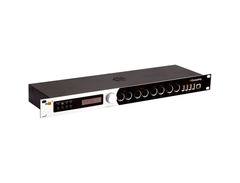
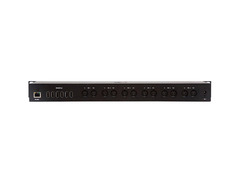
Unleash the full potential of your studio or stage setup with the iConnectivity mioXL. This flagship MIDI interface is designed to bring unprecedented connectivity and flexibility to your MIDI gear. Featuring 8 MIDI inputs and 12 outputs, the mioXL effortlessly integrates synthesizers, drum machines, and controllers. With 10 USB-MIDI host ports, it supports multiple Class Compliant USB devices, making it a versatile hub for your virtual libraries, sound modules, and more.
The real game-changer, however, is its Ethernet RTP-MIDI Network port, allowing up to 22 virtual network ports. This feature lets you connect and sync multiple devices across vast distances — up to 330 feet — providing unparalleled scalability and flexibility. Imagine sending MIDI signals from a stage controller to a sound module at FOH; with mioXL, it’s seamlessly possible.
The mioXL also comes with iConnectivity's Auracle software, offering deep configuration options like MIDI merging, filtering, and routing with just a few clicks. Plus, its OLED display and rotary encoder provide clear, hands-on control for browsing presets and monitoring MIDI traffic in real time.
For those who need to switch between different setups swiftly, the mioXL offers the convenience of up to 32 storable presets, accessible directly from the interface’s front panel. Whether in a professional studio or a live venue, the mioXL brings your entire MIDI arsenal together in one cohesive ecosystem.
Key Features:
- 8 MIDI inputs and 12 MIDI outputs
- 10 USB-MIDI host ports with class-compliant support
- Ethernet RTP-MIDI Network port with 22 virtual network ports
- Supports Mac, PC, and iOS connectivity
- No drivers required; plug and play
- OLED display with rotary encoder for real-time monitoring
- Up to 32 storable presets for quick access
- Auracle software for advanced configuration options
- Connect iOS devices via CCK, WiFi, or wired Ethernet connections
Product specs
| Type | MIDI Interface |
| Ports | 8 x 12 |
| MIDI I/O | 8 x 5-pin DIN (In), 12 x 5-pin DIN (Out), 10 x USB Type A, 1 x Ethernet (RTP-MIDI) |
| USB | 10 x Type A, 1 x Type B |
| Computer Connectivity | USB, Ethernet |
| Software | iConnectivity Auracle 2.0 (Windows/Mac) |
| Compatibility - Mac | OS X 10.11 or later, iOS (camera connection kit / Ethernet adapter required) |
| Compatibility - Windows | Windows 7 SP1 or later |
| Power | 12V DC power supply (included) |
| Height | 1.75" |
| Width | 19" |
| Depth | 5.725" |
| Weight | 4.18 lbs. |
FAQs
-
What are the main connectivity options for the iConnectivity mioXL?
-
The iConnectivity mioXL offers connectivity through USB, Ethernet, and 5-pin DIN MIDI ports, including 8 MIDI inputs and 12 MIDI outputs, as well as 10 USB Type A ports and 1 USB Type B port.
-
Is the iConnectivity mioXL compatible with both Mac and Windows systems?
-
Yes, the iConnectivity mioXL is compatible with Mac OS X 10.11 or later and Windows 7 SP1 or later. It also supports iOS devices when using a camera connection kit or Ethernet adapter.
-
Can the iConnectivity mioXL be used for networked MIDI setups?
-
Yes, the iConnectivity mioXL supports RTP-MIDI over Ethernet, allowing for networked MIDI setups, which is ideal for complex studio environments or live performance configurations.
-
Does the iConnectivity mioXL require any specific software for operation?
-
The iConnectivity mioXL utilizes iConnectivity's Auracle 2.0 software for configuration, which is compatible with both Windows and Mac systems, enabling easy setup and management of MIDI routing.
-
What power supply is needed for the iConnectivity mioXL?
-
The iConnectivity mioXL requires a 12V DC power supply, which is included with the unit.
Videos

John Trasher
Best Midi Box For A Complex Hardwaresynth Setup (Kenton MIDI Thru vs. mioXL Comparison/Review)
Best Midi Box For A Complex Hardwaresynth Setup (Kenton MIDI Thru vs. mioXL Comparison/Review)
John Trasher

Advanced MIDI Routing: Configuring and Using the iConnectivity mioXL

Scott's Synth Stuff

Upgrade your Studio with THIS gear: How to connect ALL your MIDI gear with the MioXL

iConnectivity

Henry Strange introduces the new mioXM and mioXL from iConnectivity | Westlake Pro

Westlake Pro
How to Setup and Use mioXL Without a Computer (Step-by-Step Guide)
iConnectivity
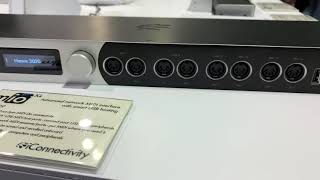
IConnectivity: Everything you need for Perfect Playback!

fromstudiotostage
Reviews
PROS
-
Extensive connectivity with 8 pairs of MIDI I/O, totaling 64 MIDI channels
-
Ethernet connectivity for network MIDI and integrating multiple units
-
Advanced routing capabilities allow custom configurations
-
Merge MIDI data from multiple sources into a single stream
-
Save routing presets for computer-free operation
-
Class-compliant for easy plug-and-play setup
-
USB-C and USB-A compatibility future-proof your setup
-
Solid build quality and professional design
-
Efficient user-friendly software for routing and configuration
-
Expansive MIDI filtering and message processing options
CONS
-
Auracle software struggles with complex setups and can be unstable
-
Lack of comprehensive documentation and reliance on basic tutorial videos
-
Incompatibility with non-class-compliant devices like some Native Instruments gear
-
Renamed ports in software don't display elsewhere, causing confusion
-
Issues with USB power supply for certain devices
Owner Insights
We analyzed real musician discussions from forums and Reddit to find what players love, question, and tweak about iConnectivity mioXL.
Features and functionality
-
The mioXL supports MIDI over Ethernet, a feature appreciated for larger studio setups.
Source -
The mioXL provides 500mA max current per USB port, with a total of 3A for the unit, accommodating most USB-powered devices.
Source -
Auracle X configures routing and behavior of all MioXL ports, allowing named devices to appear in Audio MIDI Setup on Mac.
Source -
The mioXL benefits from consistent timing between all ports, which is advantageous over separate USB-connected synths for reducing timing inconsistencies.
Source -
The ERM Multiclock is primarily useful for accurate DIN MIDI clock creation from a DAW, but may not fully resolve timing lock issues with certain sequencers.
Source
Software and compatibility
-
The desktop app used for configuration has had bugs that were reportedly fixed, though RTP configuration can be unstable for some users.
Source -
Auracle software is noted for being buggy and prone to crashes on Mac, which may affect setup stability.
Source -
On Mac, multiport MIDI interfaces require instrument definition in Audio MIDI Setup for routing within DAWs like Logic and potentially Cubase.
Source -
Using a Tascam Model 24 interface with the mioXL might necessitate creating an aggregate device for additional outputs, potentially introducing more latency.
Source
Use cases and applications
-
Users connect the mioXL to sync delays with clocks, even connecting pedals along with synths for more expansive setups.
Source -
For bidirectional DAW connections, it's recommended to disable MIDI THRU to prevent redundant data from re-entering the DAW.
Source -
Sending Sample Accurate Clock via a device like CLOCKstep:MULTI can enhance MIDI clock stability over DAW-generated clock.
Source -
The mioXL can be effectively used with the ERM Multiclock to address MIDI jitter and latency issues in setups involving Ableton and analog gear.
Source
Setup and maintenance
-
Using DIN MIDI can circumvent issues like MIDI clock not passing to certain synths, as reported with the Sub 37.
Source
5.0 out of 5
Based on 0 Reviews and 1 Rating
Artist usage
Add artist.jpeg?v=1784214915)

In the "Blink-182 Rig Rundown" video by Premier Guitar on YouTube, the iConnectivity mioXL MIDI interface is visible within Mark Hoppus' rack at the 46:54 mark, confirming its use in his setup.


At 2:08 in the video "A Look Inside Zaytoven's Studio" by Splice Music, an iConnectivity mioXL MIDI interface is clearly visible in a rack that is part of Zaytoven's work desk setup.


In a Twitter post, Chipzel showcases the iConnectivity mioXL, highlighting its role as a patchbay in her professional setup.


In the video titled "Spatial Moon Studios | My ultimate 2025 studio tour" by NIVIRO, at timestamp 7:56, the iConnectivity mioXL MIDI interface is visibly positioned above the TC Electronic M-One XL Reverb, confirming its use in the studio setup.


In a post on Twitter, Yumeto shared a detailed setup of his live gear, where it is clearly visible that he is using the iConnectivity mioXL. The tweet, authored by @yumeto_dexcore, describes the completion of a new system with the support of Okada International, highlighting enhancements to their setup.
Genre Usage
Based on how artists on Equipboard use this gear, it is most commonly found in the following genres.
Used With
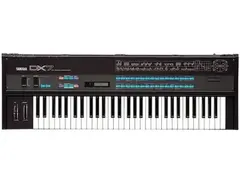
Based on how musicians on Equipboard use iConnectivity mioXL, it is most commonly used with the following gear.

-s.webp?v=1784213869)



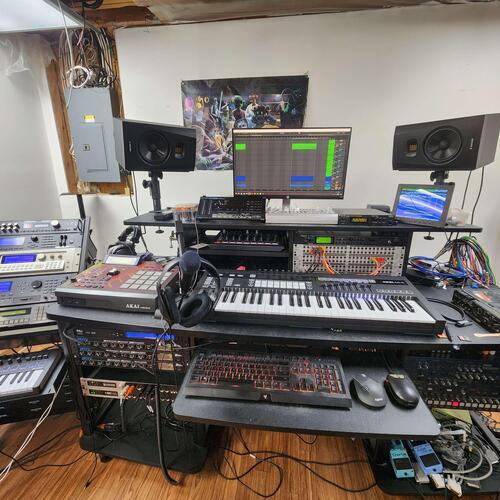
Community setups
Show yours



.jpg?v=1780693835)


More iConnectivity MIDI Interfaces

$34.99 - $39.99
in MIDI Interfaces Rank


$269.15
in MIDI Interfaces Rank


$215.00 - $249.99
in MIDI Interfaces Rank


$6.99 - $82.54
in MIDI Interfaces Rank


$82.54
in MIDI Interfaces Rank


$89.72 - $285.00
in MIDI Interfaces Rank
.jpeg?v=1784214915)
.png?v=1784107687)


$54.99 - $69.00
in MIDI Interfaces Rank


$99.95 - $549.96
in MIDI Interfaces Rank


$354.00 - $499.00
in MIDI Interfaces Rank


$174.00 - $227.28
in MIDI Interfaces Rank


$177.00 - $199.99
in MIDI Interfaces Rank

$45.99 - $324.63
in MIDI Interfaces Rank


$129.99 - $139.00
in MIDI Interfaces Rank


$222.00
in MIDI Interfaces Rank


$29.99 - $48.00
in MIDI Interfaces Rank


$118.00 - $139.00
in MIDI Interfaces Rank


$635.71
in MIDI Interfaces Rank


$80.00
in MIDI Interfaces Rank


$69.95 - $89.00
in MIDI Interfaces Rank


$95.00 - $130.90
in MIDI Interfaces Rank

$56.00 - $78.40
in MIDI Interfaces Rank

$40.00 - $124.95
in MIDI Interfaces Rank

$19.00 - $82.43
in MIDI Interfaces Rank


$95.00 - $130.90
in MIDI Interfaces Rank

$44.45 - $52.94
in MIDI Interfaces Rank

$544.00
in MIDI Interfaces Rank


$73.00 - $99.99
in MIDI Interfaces Rank


$39.00 - $39.99
in MIDI Interfaces Rank

$168.00 - $240.90
in MIDI Interfaces Rank

$169.99 - $219.00
in MIDI Interfaces Rank


$39.00 - $451.07
in MIDI Interfaces Rank


$101.26
in MIDI Interfaces Rank


$148.24 - $158.00
in MIDI Interfaces Rank


$99.95
in MIDI Interfaces Rank


$29.95 - $58.95
in MIDI Interfaces Rank
Accessories & Related Items


Similar


Most Popular MIDI Interfaces
Most Popular Brands
-
Added to Equipboard on by
 antoan_x_graham
GearIQ 54
-


