

Pricing and availability
We compare 600+ stores and found this item at 8 stores. Prices updated .
Store
Reviews
Price







Price History
Based on price data from 5 merchants for "iConnectivity mio - MIDI to USB Interface". Prices shown reflect NEW condition. Tracking began Apr 2, 2026.
* Product prices and availability are updated by Equipboard every 24hrs and are subject to change. Equipboard may receive compensation for purchases made at participating retailers linked on this site. This compensation does not affect what products or prices are displayed, or the order of prices listed. For more information, please refer to our affiliate disclosure.
Description
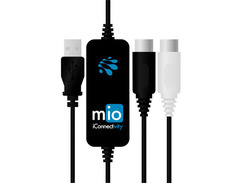
For musicians seeking a streamlined and dependable connection between their MIDI gear and computer, the iConnectivity mio - MIDI to USB Interface is the perfect solution. This plug-and-play device eliminates the need for drivers, making it incredibly easy to connect your MIDI-compatible controllers, keyboards, synthesizers, or drum machines to both Mac and Windows systems. With a single input and output, the mio interface enables seamless communication across up to 16 channels of MIDI data, allowing for precise control and creativity in your music production setup.
The mio is USB bus-powered, removing the hassle of an extra power supply and ensuring that your setup remains clean and efficient. The integrated 5-foot USB to MIDI DIN cable provides ample reach for most configurations, giving you the flexibility to arrange your equipment as needed. Whether you're a seasoned pro or a budding enthusiast, the iConnectivity mio offers a fuss-free, reliable, and compact MIDI interface that keeps your creative workflow smooth and uninterrupted.
Key Features:
- 1-in/1-out USB MIDI interface for Mac and PC
- Supports up to 16 channels of MIDI data
- USB bus powered for added convenience
- Plug-and-play compatibility, no drivers needed
- Integrated 5-foot USB to MIDI DIN cable for flexible setup
- Standard MIDI DIN ports for connecting keyboards, drum machines, and other MIDI devices
Product specs
| Type | Portable |
| Ports | 1 x 1 |
| MIDI I/O | In/Out |
| USB | 1 x Type A |
| Computer Connectivity | USB |
| Compatibility - Mac | OS X 10.4 or later |
| Compatibility - Windows | Windows 7, Windows 8 |
| Power | Bus powered |
FAQs
-
Is the iConnectivity mio compatible with both Mac and PC?
-
Yes, the iConnectivity mio is compatible with Mac OS X 10.4 or later and Windows 7 and Windows 8, allowing seamless integration with your computer setup.
-
How many MIDI connections does the iConnectivity mio support?
-
The iConnectivity mio supports 1 MIDI input and 1 MIDI output, making it ideal for connecting a single MIDI device to your computer.
-
Does the iConnectivity mio require an external power source?
-
No, the iConnectivity mio is bus-powered, meaning it draws power directly from the USB connection to your computer, eliminating the need for an external power source.
-
What type of USB connection does the iConnectivity mio use?
-
The iConnectivity mio uses a USB Type A connection for easy integration with your computer's USB ports.
-
Can the iConnectivity mio be used with older MIDI devices?
-
Yes, the iConnectivity mio can connect older MIDI devices with 5-pin MIDI ports to your computer, facilitating communication between legacy gear and modern digital setups.
Videos

Tayvon Gwira
iConnectivity Mio 1x1 Midi To Usb Product Review
iConnectivity Mio 1x1 Midi To Usb Product Review
Tayvon Gwira

mio | iConnectivity MIDI to USB interface

HalLeonardTech
Reviews
PROS
-
Truly plug and play, no drivers needed for setup
-
Compatible with multiple devices: Mac, Windows, iOS, and Android
-
Excellent sound quality compared to cheaper alternatives
-
Reliable and sturdy construction for long-term use
-
Effective MIDI synchronization for complex live settings
-
Simple inline cable design minimizes desk clutter
-
Zero latency and responsive key registration
-
Solves USB compatibility issues with older MIDI gear
-
Highly praised for ease of use and hassle-free operation
-
Supports a wide range of applications, from live shows to studio work
CONS
-
Limited cable length of 5 feet may not suit all setups
-
Price may be higher than some alternatives
-
Cannot use two units simultaneously on Windows
-
Initial software interface can be confusing for some users
-
Static IP connection requires re-plugging after boot for recognition
Owner Insights
We analyzed real musician discussions from forums and Reddit to find what players love, question, and tweak about iConnectivity mio - MIDI to USB Interface.
Features and functionality
-
The iConnectivity mio XL's ability to create presets and its 1U rack format with numerous connectors and a front screen are major attractions for users managing multiple devices.
Source -
The mio allows FL Studio to control the ASR-10 as if you were playing its keys, enhancing integration between hardware and software.
Source -
The iConnectivity mio is reliable for handling extended SysEx transfers where other cheaper dongles may fail, due to a larger data buffer.
Source
User experience
-
Owners report no noticeable latency when connecting multiple devices to the mio XL, with differences between USB, DIN, and Ethernet being in microseconds.
Source -
Owners have used the iConnectivity mio extensively with patch editors and librarians, noting consistent reliability over long-term use.
Source
Comparisons
-
Users often compare the mio XL with MOTU MIDI interfaces, noting that both handle connections efficiently without latency issues, but mio XL's preset capability is a significant advantage.
Source -
The iConnectivity mio is preferred over cheaper dongles like DoReMIDI for complex data tasks, highlighting its superior data handling capabilities.
Source
Setup and maintenance
-
Connect the plug labeled Out on the mio to the In on the ASR-10 and the In plug to the Out port on the ASR-10 for proper functionality.
Source
Use cases and applications
-
The mio is suitable for setups where FL Studio handles drum sequences and the ASR-10 is used for sample chops, bridging MIDI control across devices.
Source
Software and compatibility
-
The mio interface won't transmit audio; users need an audio interface to record sounds into FL Studio, highlighting its MIDI-only capabilities.
Source -
Users should ensure that MIDI out on the interface connects to MIDI in on the synth, as matching labels can lead to connection errors.
Source -
Older USB MIDI interfaces like original MIDISport may not work with newer drivers, making the mio a more reliable choice for modern systems.
Source
4.0 out of 5
Based on 3 Reviews and 6 Ratings

377
I have 2 of these actually
Charlie.EXE owns 2 of these, one for his Yamaha S30 keyboard, and the other for his modded Behringer FCB1010 midi foot controller

653
Works perfectly but I'm sure you can get the same for less money
Works perfectly, but it's too expensive. This was the only one available on Guitar Center, but then I realized I got bamboozled when I looked for alternatives on Amazon.

124
Na
Every 1x1 midi interface uses the same chip and strangely enough they all have quality control issues. I have gone through like 3 of these. no thanks
Artist usage
Add artist

Album Usage
The iConnectivity mio - MIDI to USB Interface has been featured on the following albums:

Genre Usage
Based on how artists on Equipboard use this gear, it is most commonly found in the following genres.
More iConnectivity MIDI Interfaces

$348.00 - $399.99
in MIDI Interfaces Rank
.jpeg?v=1784640200)


$267.72
in MIDI Interfaces Rank


$215.00 - $249.99
in MIDI Interfaces Rank


$99.00 - $285.00
in MIDI Interfaces Rank
.png?v=1784755332)


$54.99 - $69.00
in MIDI Interfaces Rank


$89.00 - $549.96
in MIDI Interfaces Rank


$354.00 - $500.00
in MIDI Interfaces Rank


$182.50 - $226.08
in MIDI Interfaces Rank


$45.99 - $324.63
in MIDI Interfaces Rank


$177.00 - $199.99
in MIDI Interfaces Rank

$109.99 - $139.00
in MIDI Interfaces Rank


$222.00
in MIDI Interfaces Rank


$29.99 - $47.90
in MIDI Interfaces Rank


$115.00 - $139.00
in MIDI Interfaces Rank


$475.00
in MIDI Interfaces Rank


$80.00
in MIDI Interfaces Rank


$69.95 - $89.00
in MIDI Interfaces Rank


$95.00 - $130.90
in MIDI Interfaces Rank

$56.00 - $78.40
in MIDI Interfaces Rank

$40.00 - $124.95
in MIDI Interfaces Rank

$19.00 - $81.99
in MIDI Interfaces Rank


$95.00 - $130.90
in MIDI Interfaces Rank

$44.45 - $52.94
in MIDI Interfaces Rank

$544.00
in MIDI Interfaces Rank


$73.00 - $99.99
in MIDI Interfaces Rank


$39.00 - $39.99
in MIDI Interfaces Rank

$168.00 - $240.90
in MIDI Interfaces Rank

$169.99 - $219.00
in MIDI Interfaces Rank


$39.00 - $451.07
in MIDI Interfaces Rank


$100.72
in MIDI Interfaces Rank


$148.24 - $158.00
in MIDI Interfaces Rank


$89.00
in MIDI Interfaces Rank


$29.95 - $58.95
in MIDI Interfaces Rank
Accessories & Related Items



Community setups


Similar


Gear Guides







Most Popular MIDI Interfaces
Most Popular Brands
-
Added to Equipboard on by
xwayofficialGearIQ 653
-


