

Pricing and availability
We compare 600+ stores and found this item at 7 stores. Prices updated .
Store
Reviews
Price








Average Price: $137
Standard/Professional
$50
$176+
Price Tier
Budget
Standard
High-end
Price History
Based on price data from 5 merchants for "Hotone Omni AC Acoustic Simulator". Prices shown reflect NEW condition. Tracking began Apr 2, 2026.
* Product prices and availability are updated by Equipboard every 24hrs and are subject to change. Equipboard may receive compensation for purchases made at participating retailers linked on this site. This compensation does not affect what products or prices are displayed, or the order of prices listed. For more information, please refer to our affiliate disclosure.
Description
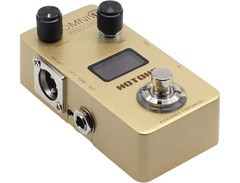
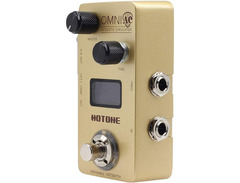
Transform your electric guitar into a symphony of acoustic sounds with the Hotone Omni AC Acoustic Simulator. This versatile pedal is a must-have for any guitarist looking to diversify their sound palette. With 15 unique acoustic simulations that range from steel-string and classical guitars to acoustic basses and even double basses, you can effortlessly switch between genres and styles. The internal voltage boost provides extra headroom, ensuring your tone remains crystal clear and dynamic.
The Omni AC features a powerful 4-band EQ with a flexible frequency range, allowing for a 12 dB maximum boost or cut. This ensures you can fine-tune your sound to perfection, whether you're on stage or in the studio. Thanks to the high-resolution OLED display, you'll have all the information you need at a glance, making it easy to manage your sound settings. Plus, the USB connection allows for seamless firmware updates and preset management through free PC/Mac software, keeping your pedal fresh and up-to-date.
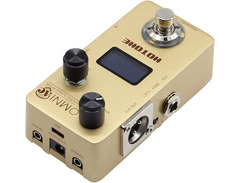
Designed with practicality in mind, this pedal includes a switch for ground lift, true bypass, and multiple connectivity options, including XLR output and an AUX input. Whether you're using headphones or plugging into a PA system, the Omni AC has got you covered.
Key Features:
- 15 acoustic simulations including steel-string guitars and double basses
- 4-band EQ with 12 dB max boost/cut
- High-resolution OLED display
- Internal voltage boost for extra headroom
- USB jack for firmware updates and preset management
- True bypass footswitch
- Multiple outputs: 6.3 mm jack, XLR, and headphone
- AUX input and micro USB
- Includes power supply unit
Owner's manual
Hotone Omni AC Acoustic Simulator User ManualProduct specs
| Pedal Type | Acoustic Simulator |
| Analog/Digital | Digital |
| Presets | 15 x Acoustic simulations, 15 x User presets |
| Inputs | 1 x 1/4" (instrument), 1 x 1/8" (aux in) |
| Outputs | 1 x XLR (balanced out), 2 x 1/4" (unbalanced out, thru) |
| USB | 1 x USB-C |
| Other I/O | 1 x 1/8" (headphones) |
| Bypass Switching | Bypass, Mute |
| Software | Omni Editor |
| Power Source | 9V DC 200mA power supply (Sold Separately) |
| Height | 1.85" |
| Width | 2.28" |
| Depth | 3.97" |
| Weight | 0.49 lbs. |
FAQs
-
What types of acoustic simulations are available on the Hotone Omni AC Acoustic Simulator?
-
The Hotone Omni AC Acoustic Simulator offers 15 acoustic simulations, allowing you to transform your electric guitar sound into a variety of acoustic tones, ranging from classic steel-string sounds to more exotic acoustic timbres.
-
Can I create and save my own presets on the Hotone Omni AC Acoustic Simulator?
-
Yes, the Hotone Omni AC Acoustic Simulator allows you to save up to 15 user presets, enabling you to customize and store your preferred acoustic tones for quick access during performances.
-
Does the Hotone Omni AC Acoustic Simulator work with bass guitars?
-
While primarily designed for electric guitars, the Hotone Omni AC Acoustic Simulator can be used with bass guitars, though the acoustic simulations may not be specifically tailored to bass frequencies.
-
What are the connectivity options on the Hotone Omni AC Acoustic Simulator?
-
The Hotone Omni AC Acoustic Simulator features a 1/4" instrument input, 1/8" aux input, XLR balanced output, two 1/4" unbalanced outputs, and a 1/8" headphone output, providing versatile connectivity for various setups.
-
Is there a software editor available for the Hotone Omni AC Acoustic Simulator?
-
Yes, the Hotone Omni AC Acoustic Simulator can be connected to the Omni Editor software via USB-C, allowing you to fine-tune and manage your presets with ease.


Reviews
PROS
-
Offers both acoustic and electric settings for versatility
-
Provides tonal options effective with other pedals/effects
-
USB connection available for app integration
-
Some presets are very usable when adjusted to your rig
-
Editor interface preferred over pedal menu for ease of use
-
Can produce excellent sounds in a mix
-
Constructed with appealing design and solid build quality
-
Allows programming for personalized sound shaping
-
Works well with single coil pickups and piezo for varied tonal outcomes
CONS
-
Produces synthetic, shallow sound with unwanted noise
-
Built-in EQ unable to fully eliminate bass boom on lower strings
-
Metallic jangle can produce strange, high frequencies
-
USB cable provided is too short for practical use
-
Requires careful placement in pedal chain for optimal performance
-
Some presets may distort without EQ adjustment
-
Defaults some settings after power down, requiring resets
-
Initial setup issues reported, including misordered presets
-
Does not convincingly simulate acoustic guitar with all guitar types
-
Not MIDI switchable, limiting live performance flexibility
Owner Insights
We analyzed real musician discussions from forums and Reddit to find what players love, question, and tweak about Hotone Omni AC Acoustic Simulator.
Features and functionality
-
The Hotone Omni AC Acoustic Simulator is compact yet sturdy, featuring an XLR output for direct connection to mixing consoles or audio interfaces.
Source -
This pedal includes five or six bands of EQ with variable parameters, which can be complex and time-consuming to dial in for precise acoustic simulation.
Source -
Includes a computer interface to edit and save presets, providing a tailored sound experience for different performance settings.
Source -
Allows blending IR with clean signal, offering customization of acoustic tones to suit personal preferences or venue acoustics.
Source
Use cases and applications
-
On a fretless bass, the pedal can emulate double/upright bass tones, especially effective on low B strings for a bellowing acoustic vibe.
Source -
Works best with guitars using large single-coil pickups like Jazzmasters and P-90s; struggles with humbuckers and thinner single coils like those in Strats or Teles.
Source -
Offers a versatile solution for session and pit musicians seeking reliable acoustic simulation across various gig environments.
Source -
Works well with Fishman Loudbox Mini, enhancing the mic'ed up sound experience with IR simulations for a more natural acoustic tone.
Source
User experience
-
Users have found that pairing this simulator with a Mooer Slow Engine effectively emulates a bowed string swell effect, adding versatility to the setup.
Source -
Owners have successfully run the acoustic simulator through a Strymon Deco in stereo mode, enhancing the upright tone with subtle tape effects for a rich sound.
Source
Comparisons
-
While similar pedals exist, this model's steel guitar setting is notably appreciated for use with bass guitars, offering distinct tonal options not found in others.
Source -
The Hotone Omni AC is noted for sounding more realistic in demos compared to the Boss AC-3, which some find unnaturally dark.
Source -
Users find the Boss AC-2 superior in sound quality compared to both the Mooer Acoustikar and Boss AC-3 models.
Source
Critic Reviews
4.0 out of 5
Based on 0 Reviews and 1 Rating
Genre Usage
Based on how artists on Equipboard use this gear, it is most commonly found in the following genres.
More Hotone Equalizer Effects Pedals


$10.00 - $159.99
in Equalizer Effects Pedals Rank
.jpeg?v=1785038938)


$79.00
in Equalizer Effects Pedals Rank


$100.50 - $131.99
in Equalizer Effects Pedals Rank


$125.99
in Equalizer Effects Pedals Rank


$59.99
in Equalizer Effects Pedals Rank
.jpg?v=1784922068)


$150.00
in Equalizer Effects Pedals Rank


$125.17 - $164.99
in Equalizer Effects Pedals Rank

.jpg?v=1784895999)

$137.08 - $216.00
in Equalizer Effects Pedals Rank


$150.00
in Equalizer Effects Pedals Rank


$110.00 - $125.99
in Equalizer Effects Pedals Rank


$49.00 - $55.00
in Equalizer Effects Pedals Rank


$218.50 - $252.99
in Equalizer Effects Pedals Rank


$118.50
in Equalizer Effects Pedals Rank


$275.00 - $289.00
in Equalizer Effects Pedals Rank


$18.17 - $31.90
in Equalizer Effects Pedals Rank
.JPG?v=1784934260)


-m.webp?v=1785020826)
$335.00 - $353.00
in Equalizer Effects Pedals Rank


$79.00 - $125.99
in Equalizer Effects Pedals Rank


$136.00 - $149.00
in Equalizer Effects Pedals Rank
.jpg?v=1784940345)

-m.webp?v=1785065666)
$55.00 - $83.90
in Equalizer Effects Pedals Rank


$79.00 - $159.99
in Equalizer Effects Pedals Rank


$42.02
in Equalizer Effects Pedals Rank


$79.00 - $159.99
in Equalizer Effects Pedals Rank


$205.00
in Equalizer Effects Pedals Rank


$250.35
in Equalizer Effects Pedals Rank

.jpg?v=1785033483)


$74.00
in Equalizer Effects Pedals Rank


$50.20 - $247.00
in Equalizer Effects Pedals Rank


$177.00 - $199.97
in Equalizer Effects Pedals Rank
.png?v=1785038939)


$199.00 - $228.00
in Equalizer Effects Pedals Rank
.webp?v=1784473994)


$115.97 - $139.99
in Equalizer Effects Pedals Rank

$95.31
in Equalizer Effects Pedals Rank


$1,200.00
in Equalizer Effects Pedals Rank


$39.99 - $52.40
in Equalizer Effects Pedals Rank


$37.77 - $37.99
in Equalizer Effects Pedals Rank

$264.00 - $369.95
in Equalizer Effects Pedals Rank


$56.00 - $63.00
in Equalizer Effects Pedals Rank


$133.00
in Equalizer Effects Pedals Rank


$338.00
in Equalizer Effects Pedals Rank

.jpg?v=1784985823)

$275.00
in Equalizer Effects Pedals Rank


$69.00 - $86.60
in Equalizer Effects Pedals Rank
Accessories & Related Items


Artist usage


Community setups


Similar


Gear Guides





.jpg)

Most Popular Equalizer Effects Pedals
Most Popular Brands
-
Added to Equipboard on by
 emrage
GearIQ 120
-


