
Pricing and availability


* Product prices and availability are updated by Equipboard every 24hrs and are subject to change. Equipboard may receive compensation for purchases made at participating retailers linked on this site. This compensation does not affect what products or prices are displayed, or the order of prices listed. For more information, please refer to our affiliate disclosure.
Description
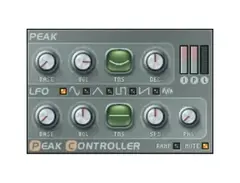
Unleash the power of dynamic audio shaping with the Image Line Fruity Peak Controller, a versatile plugin designed to integrate seamlessly into your music production workflow. This dynamic utility tool is perfect for musicians and producers looking to achieve precise volume modulation and creative effects. Whether you're managing complex sidechain effects or simply aiming for cleaner mixes, the Fruity Peak Controller provides an intuitive interface and robust functionality to meet your needs.
The Fruity Peak Controller operates by using audio peak levels to control parameters in your project, allowing you to create everything from subtle volume adjustments to dramatic audio transformations. Its low CPU usage means you can utilize its capabilities without compromising your system's performance, making it an essential addition to any producer's toolkit. With the ability to generate envelope and LFO signals, this plugin extends beyond basic limiting, offering a range of modulation possibilities for your sound design.
Key Features:
- Dynamic volume control using audio peak levels
- Low CPU footprint for efficient processing
- Supports envelope and LFO signal generation
- Ideal for sidechaining and modulation effects
- Compatible with most DAWs using VST or AU formats
- Intuitive interface for easy integration into your workflow
Videos

Joey Shigrov
How to sidechain in FL using the Peak Controller
How to sidechain in FL using the Peak Controller
Joey Shigrov

How to use Fruity Peak controller in Fl studio 12

Beatfactory Academy
Fl Studio Basics 24: Peak Controller

SeamlessR
What is The Peak Controller?? | How to Use Fruity Peak Controller (Peak Controller in Depth)

Scale Audio
![Video thumbnail for Sidechain mit dem Peak Controller - FL Studio 20/12/11 [Tutorial/Deutsch] by Fl Studio Tutorial German](https://img.youtube.com/vi/u7-znXgtRFU/mqdefault.jpg)
Sidechain mit dem Peak Controller - FL Studio 20/12/11 [Tutorial/Deutsch]

Fl Studio Tutorial German
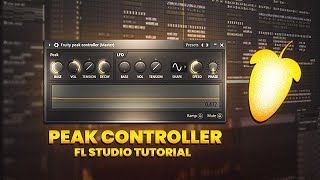
Fruity Peak Controller Side-Chain Tutorial

Dj Nik Official
FL 12 Effects 31 - Fruity Peak Controller

Composing Gloves
Reviews
Owner Insights
We analyzed real musician discussions from forums and Reddit to find what players love, question, and tweak about Image-Line Fruity Peak Controller.
Features and functionality
-
Patcher has both Effect and Generator versions; Effect Patcher can accept audio and MIDI signals, unlike Generator Patcher.
Source -
The Fruity Formula can be used to create a seeded random value, allowing for desynchronized LFOs across multiple instances of Fruity Peak Controller.
Source -
The BASE knob on Fruity Peak Controller is crucial for setting dynamic EQ/sidechain levels, with 20% being ideal when paired with Fruity Balance for gain control.
Source -
By adjusting the 'volume', 'tension', and 'decay' knobs on Fruity Peak Controller, users can simulate 'attack' and 'release' settings for more nuanced control.
Source
User experience
-
Transitioning a setup to Effect Patcher involves replicating patches manually, which can be cumbersome without group copy-paste functions.
Source -
Users often find Patcher less user-friendly compared to Max4Live, citing a lack of streamlined processes for managing patches.
Source -
Users report that increasing the integer in the formula (e.g., 1000, 1001) for each instance can effectively keep seeds different while controlling speeds with a macro.
Source
Software and compatibility
-
Patcher can be used to create complex effect chains similar to Ableton’s effect racks, allowing for innovative sound design.
Source -
There's a consensus that all instances of the Fruity Peak Controller share a single random source, lacking individual seed settings, which users feel should be addressed by Image-Line.
Source -
Fruity Peak Controller is highly regarded for its flexibility in linking to various parameters, making it a favorite for those preferring stock plugins in FL Studio.
Source
Use cases and applications
-
A seeded random formula like "SeededRand(Int(Time/(1000 - a*999)))" can control LFO speeds while maintaining desynchronization, useful for complex EQ setups.
Source -
Linking Fruity Formula outputs to X-Y controllers allows for smooth LFO control, demonstrating advanced routing possibilities in Patcher for creative effects.
Source -
Fruity Peak Controller can be used as a dynamic EQ/sidechain signal, particularly effective for ducking specific EQ bands like low-end frequencies without causing a pumping effect.
Source -
It's possible to apply sidechain processing to any parameter, allowing users to link a sidechain signal to a single EQ band for precise mix clarity.
Source
4.0 out of 5
Based on 1 Review and 12 Ratings

Artist usage
Add artist

At about 10:30 in this video, Avicii says ''Here in FL I use the Peak Controller, no compressor."


At 25:35, Cazzette explains his method of side chaining using a Fruity Peak Controller to automate the volume sliders.


Tristam is explaining his method of side-chaining, stating "Side-chaining is going to be on 12 ...and Peak Controller" at 0:57 in the video.


Genre Usage
Based on how artists on Equipboard use this gear, it is most commonly found in the following genres.
Used With
Based on how musicians on Equipboard use Image-Line Fruity Peak Controller, it is most commonly used with the following gear.



More Image-Line Limiter Plugins


$179.00 - $199.00
in Limiter Plugins Rank


$63.00 - $264.00
in Limiter Plugins Rank


$47.00 - $199.00
in Limiter Plugins Rank


$36.00 - $399.00
in Limiter Plugins Rank
.jpg?v=1784495045)


-m.webp?v=1784525651)
$83.50 - $99.00
in Limiter Plugins Rank


$34.99
in Limiter Plugins Rank


-m.webp?v=1784556103)
$33.00 - $35.99
in Limiter Plugins Rank


$28.00 - $99.00
in Limiter Plugins Rank


$43.00
in Limiter Plugins Rank


$34.99 - $39.99
in Limiter Plugins Rank


$0.00
in Limiter Plugins Rank


$0.00
in Limiter Plugins Rank


$52.00 - $60.00
in Limiter Plugins Rank


$15.00 - $69.00
in Limiter Plugins Rank

$35.99 - $39.99
in Limiter Plugins Rank


$59.00
in Limiter Plugins Rank


$49.00
in Limiter Plugins Rank
.jpeg?v=1784399641)


$19.99 - $149.00
in Limiter Plugins Rank


$105.00 - $109.00
in Limiter Plugins Rank

$39.99 - $40.00
in Limiter Plugins Rank

$191.00 - $199.00
in Limiter Plugins Rank


$191.00 - $199.00
in Limiter Plugins Rank


$49.99
in Limiter Plugins Rank


$9.99 - $89.00
in Limiter Plugins Rank


$54.00 - $55.00
in Limiter Plugins Rank


$43.00
in Limiter Plugins Rank


$79.00 - $149.00
in Limiter Plugins Rank

$47.00 - $99.99
in Limiter Plugins Rank

$99.99 - $124.99
in Limiter Plugins Rank

$59.00 - $129.00
in Limiter Plugins Rank

$40.00 - $124.00
in Limiter Plugins Rank


$299.00
in Limiter Plugins Rank

Community setups


Similar


Most Popular Limiter Plugins
Most Popular Brands
-
Added to Equipboard on by
 austinmw
GearIQ 5227
-


