-s.webp?v=1784556103)
-xl.webp?v=1784556103)
Pricing and availability
We compare 600+ stores and found this item at 6 stores. Prices updated .
Store
Reviews
Price






Price History
Based on price data from 5 merchants for "Waves L1 Ultramaximizer". Prices shown reflect NEW condition. Tracking began Apr 2, 2026.
* Product prices and availability are updated by Equipboard every 24hrs and are subject to change. Equipboard may receive compensation for purchases made at participating retailers linked on this site. This compensation does not affect what products or prices are displayed, or the order of prices listed. For more information, please refer to our affiliate disclosure.
Description
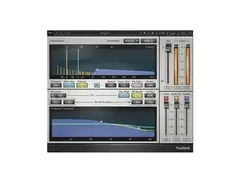
Achieve unparalleled audio clarity with the Waves L1 Ultramaximizer, a renowned industry-standard for mixing and mastering. Whether you're polishing multimedia projects or perfecting a music track, this plug-in offers unmatched dynamics control with its look-ahead peak limiting, level maximization, and high-resolution re-quantization. Its key strength lies in its transparency and ability to maintain the punch of your audio.
The L1 Ultramaximizer includes two components: the L1 Limiter and L1+ Ultramaximizer, both equipped with the Increased Digital Resolution (IDR) dither and noise shaping to ensure ultra-clean output. With double-precision bit resolution processing up to 24-bit/192kHz, this plug-in is designed to provide pristine audio results. Featuring a user-friendly interface, choose between Legacy and Modern styles, while the Automatic Release Control and True Peak domain setting make it versatile for any project.
From keeping levels in check to creatively crushing tracks, the L1 Ultramaximizer's full set of controls—including input gain, threshold, and output ceiling—allow for precise sonic sculpting. Its input, output, and attenuation meters, along with a peak hold indicator, give you complete oversight of your signal, ensuring a masterful finish for any audio endeavor.
Key Features:
- Look-ahead peak limiting, level maximization, and high-resolution re-quantization
- Two components: L1 Limiter and L1+ Ultramaximizer
- Increased Digital Resolution (IDR) dither with noise shaping
- Double-precision bit resolution up to 24-bit/192kHz
- Choose between Legacy and Modern interfaces
- True Peak domain setting to eliminate inter-sample clipping
- Automatic Release Control for adaptive release timing
- SoundGrid license compatibility with various platforms
- Mono and stereo components for versatile use
Owner's manual
Waves L1 Ultramaximizer User ManualProduct specs
| Software Type | Limiter/Level Maximizer |
| Platform | Mac, PC |
| Upgrade/Full | Full |
| Download/Boxed | Download |
| Bit Depth | 64-bit |
| Format | AAX Native, AudioSuite, VST, AU, SoundGrid |
| Hardware Requirements - Mac | Intel Core i7 or higher (M1 support), 8GB RAM minimum |
| Hardware Requirements - PC | Intel Core i5 / AMD Quad-core or higher (AVX required), 8GB RAM minimum |
| OS Requirements - Mac | macOS 10.15.7 or later |
| OS Requirements - PC | Windows 10 or later (21H2), 64-bit |
FAQs
-
What does the Waves L1 Ultramaximizer plugin do?
-
The Waves L1 Ultramaximizer is a limiter and level maximizer plugin that increases the loudness of audio tracks while preventing distortion. It features advanced peak limiting and re-quantization to ensure high-quality sound output.
-
Is the Waves L1 Ultramaximizer compatible with my DAW?
-
The Waves L1 Ultramaximizer is compatible with most major DAWs, as it supports AAX Native, AudioSuite, VST, AU, and SoundGrid formats. Check your DAW's plugin compatibility to ensure it supports these formats.
-
What are the system requirements for the Waves L1 Ultramaximizer?
-
For Mac, an Intel Core i7 or higher (M1 supported) with macOS 10.15.7 or later is required. For PC, an Intel Core i5/AMD Quad-core or higher with Windows 10 or later (21H2) is needed. Both systems require a minimum of 8GB RAM.
-
Does the Waves L1 Ultramaximizer offer true peak limiting?
-
Yes, the Waves L1 Ultramaximizer provides true peak limiting, which helps eliminate inter-sample clipping and maximizes the digital signal level and resolution.
-
Can the Waves L1 Ultramaximizer be used for mastering?
-
The Waves L1 Ultramaximizer is commonly used in mastering to increase track loudness while maintaining audio quality and preventing distortion, making it a popular choice for this purpose.
Videos

The Sound Test Room
CUBASIS 2.3 - Let's Explore the WAVES L1 Ultramaximizer - Tutorial for the iPad
CUBASIS 2.3 - Let's Explore the WAVES L1 Ultramaximizer - Tutorial for the iPad
The Sound Test Room
The WAVES L1 Ultramaximizer

Daily Beats

Waves L1 Ultramaximizer Is A Welcome Friend For Multitasking Sam Rosenthal Of Black Tape For A Blue

gearwire
How I'm using Waves L1 now

Andrei Martinez Agras
Does the Waves L1 Ultramaximizer live up to the Hype

Mixed By Jellz
Reviews
PROS
-
Excellent for final mixdown and volume adjustment
-
Simple and effective interface for beginners
-
Smooth limiting with clear signal adjustment
-
Versatile sound coloring capabilities
-
Essential tool for subtle instrument placement
CONS
-
Inconsistent activation across different applications
-
Anti-piracy system can be unreliable
-
Not ideal for heavy limiting tasks
Owner Insights
We analyzed real musician discussions from forums and Reddit to find what players love, question, and tweak about Waves L1 Ultramaximizer.
Features and functionality
-
The L1 has an immediate attack time with lookahead to avoid distortion, and a release that can extend up to 1000ms, differentiating it from clippers.
Source
Software and compatibility
-
Massey plugins are AAX only, with some older releases available as VSTs, limiting their use outside Pro Tools.
Source -
Plugin Alliance's bx_limiter is not yet AAX Apple Silicon native, requiring Rosetta for compatibility, unlike other plugins that have updated.
Source -
Initially, the L1 required PCI cards filled with processors to run on Pro Tools systems, resembling modern UAD setups.
Source
Comparisons
-
The D16 Frontier is mentioned as a free alternative to L1, compatible with Apple Silicon, offering similar functionality.
Source -
ToneBoosters' Barricade is highlighted as an easy-to-use option with superior sound compared to older plugins like L1.
Source -
The L1 was preferred by some over TC Electronics' Finalizer for its straightforward approach and clear feedback when overused.
Source
User experience
Use cases and applications
-
L1 is commonly used for quick 1-6 dB gain reduction, particularly effective at 2-3 dB in loud parts, providing a soft limiting effect.
Source -
The L1 was crucial during the loudness wars, often being used to make mixes sound louder and more aggressive, notably on Oasis’s "Definitely Maybe" album.
Source -
The L1 was frequently used in TV work to heavily compress music for a more forward and heavier sound, aligning with the industry's demand for loudness.
Source
5.0 out of 5
Based on 2 Reviews and 13 Ratings

787
Most transparent, helpful limiter
L1 is the best limiter I have ever used. It is so smooth but can show you exactly where you need to adjust your signal to either give it a little more umph, or tame it down.

Artist usage
Add artist

In this photo Afrojack has the Waves L1 Ultramaximizer plugin opened on his screen


Waves L1 Ultramaximizer can be seen in this video at 2:50 as the third plugin used on the channel.


Another plug in Andrew mentions in his home mastering blog post. "For simpler material where loudness is more important than dynamics - sparse hip-hop beats, driving dance tracks - I'll use this instead of the Precision Maximizer. You can push stuff quite far without the audio breaking up."

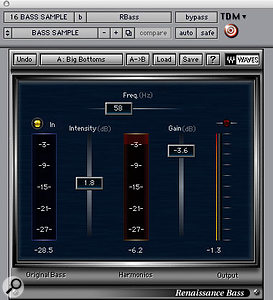
Used for the vocals on "Save Room", as stated by mix engineer Tony Maserati in this March 2007 Sound on Sound interview. Image of the settings can be found here and here.
Vocals: McDSP Filter Bank E6, Waves Renaissance Compressor, Renaissance EQ, L1 Ultramaximiser
"The song has two lead vocal comps, on tracks 48 and 49. You can see that I'm using a lot of plug-ins on those: I'm doing a lot of drastic stuff. They were probably recorded on two different occasions with two different engineers who didn't take the time to match the performances by using the same microphone and signal chains. I get really pissed at this lack of effort on the part of recordists — there are standards in engineering. John Legend is a phenomenal vocalist and before he comes into your room to record, you should reach out to other engineers who have recorded with him to find out what they used — especially, of course, the guy who recorded the song that you're going to be overdubbing onto! That's what I did, the first time I recorded John.
"We liked the lead vocal, it had an energy that we did not want to give up, but it's not recorded consistently. You can even see on the screen that the levels are all over the place. So I spent a lot of time and energy pushing and pulling all over the place to compensate for frequency anomalies and to make the two takes sound the same, as well as to force all the energy out of the vocals that is in there. On track 48 I have a Filter Bank EQ that's pushing a ton of bottom and taking off some top. The Renaissance Compressor is trying to make sense of that, levelling things out a bit with a really slow attack.
"I don't normally use the L1 Ultramaximiser on a lead voice, but it was probably already there, and I'm using it to get some intelligibility and energy from the vocal. The Renaissance is boosting above 9k and the McDSP is cutting around there as well. I think it's because I'm compensating for the L1, which is doing something I'm not entirely happy with. A lot of what I'm doing is simply compensating for a poor recording.
"Lastly I throw on the R4 Renaissance EQ, probably because after mixing for a couple of days, I felt that it needed a little bit more top, and I did not want to change my settings on the outboard, which was probably my GML 8200. I'm also EQ-ing on the board. So I'm being heavy-handed, also with the effects on track 49, in trying to match these two tracks. I was really fighting until we got something out of it, and I think we accomplished that. The end result sounds pretty good."


In the "In The Studio With Future Music" video by MusicRadar Tech, Sébastien Léger demonstrates his use of the Waves L1 Ultramaximizer plugin.


When it comes to effects plug-ins, Moulder fancies Waves. “I use the L1 a lot for getting things to cut through and sit in mixes,” he says. “The Renaissance EQ I like for digital equalizing and their De-esser works well. I use the McDSP stuff a lot for filtering and their new multi-band compressors and analog channels are good, too.


In a YouTube video, at 1:34, audio engineer Manny Marroquin states that the Waves L1 Ultramaximizer is his favorite Waves plugin.


"I think having a few workhorses is better than running down pages of plugins to choose from. It helps me create quick presets for more consistency across projects. These are the plugins I use, very basic: [...]"

The plugin can be spotted in the video at minute 17.10.


Genre Usage
Based on how artists on Equipboard use this gear, it is most commonly found in the following genres.
Used With
Based on how musicians on Equipboard use Waves L1 Ultramaximizer, it is most commonly used with the following gear.

-s.webp?v=1784526161)


More Waves Limiter Plugins

$34.99
in Limiter Plugins Rank


$34.99 - $39.99
in Limiter Plugins Rank


$35.99 - $39.99
in Limiter Plugins Rank


-m.webp?v=1784333865)


$179.00 - $199.00
in Limiter Plugins Rank


$63.00 - $264.00
in Limiter Plugins Rank


$47.00 - $199.00
in Limiter Plugins Rank


$36.00 - $399.00
in Limiter Plugins Rank
.jpg?v=1784495045)


-m.webp?v=1784525651)
$83.50 - $99.00
in Limiter Plugins Rank


$28.00 - $99.00
in Limiter Plugins Rank


$43.00
in Limiter Plugins Rank


$0.00
in Limiter Plugins Rank


$0.00
in Limiter Plugins Rank


$52.00 - $60.00
in Limiter Plugins Rank


$15.00 - $69.00
in Limiter Plugins Rank

$59.00
in Limiter Plugins Rank


$49.00
in Limiter Plugins Rank
.jpeg?v=1784399641)


$19.99 - $149.00
in Limiter Plugins Rank


$105.00 - $109.00
in Limiter Plugins Rank

$39.99 - $40.00
in Limiter Plugins Rank

$191.00 - $199.00
in Limiter Plugins Rank


$191.00 - $199.00
in Limiter Plugins Rank


$49.99
in Limiter Plugins Rank


$9.99 - $89.00
in Limiter Plugins Rank


$54.00 - $55.00
in Limiter Plugins Rank


$43.00
in Limiter Plugins Rank


$79.00 - $149.00
in Limiter Plugins Rank

$47.00 - $99.99
in Limiter Plugins Rank

$99.99 - $124.99
in Limiter Plugins Rank

$59.00 - $129.00
in Limiter Plugins Rank


$40.00 - $124.00
in Limiter Plugins Rank


$299.00
in Limiter Plugins Rank

Accessories & Related Items


-s.webp?v=1784556143)
-s.webp?v=1784556112)
-s.webp?v=1784556073)


-s.webp?v=1784526671)




Community setups


Similar


Most Popular Limiter Plugins
Most Popular Brands
-
Added to Equipboard on by
 equipboard
GearIQ 4934
-