

Pricing and availability
We compare 600+ stores and found this item at 5 stores. Prices updated .
Store
Reviews
Price




Average Price: $149
Standard/Professional
$59
$200+
Price Tier
Budget
Standard
High-end
Price History
Based on price data from 5 merchants for "McDSP Channel G Native v7". Prices shown reflect NEW condition. Tracking began Apr 2, 2026.
* Product prices and availability are updated by Equipboard every 24hrs and are subject to change. Equipboard may receive compensation for purchases made at participating retailers linked on this site. This compensation does not affect what products or prices are displayed, or the order of prices listed. For more information, please refer to our affiliate disclosure.
Description
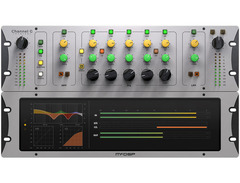
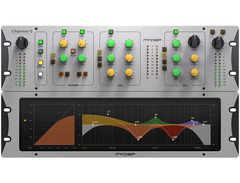
Unleash the power of professional audio engineering with the McDSP Channel G Native v7, a standout in the realm of channel strip plugins. This versatile plugin suite seamlessly integrates with your Avid control surfaces and VENUE live sound systems, delivering that coveted big board sound directly to your digital audio workstation. Whether you're shaping sound in a bustling studio or perfecting live mixes, Channel G offers the tools to elevate your audio with precision.
Channel G Native v7 comprises three sophisticated plugins: G Dynamics, G Equalizer, and G Console. The G Dynamics plugin offers a fully featured console-style dynamics section, complete with an Expander/Gate, Compressor/Limiter, and a versatile filter section. Meanwhile, the G Equalizer brings a five-band professional-grade console-style EQ to your toolkit, allowing for meticulous frequency shaping. Finally, G Console combines the best of both worlds, integrating Dynamics and Equalizer capabilities for an all-in-one solution.
Optimized for the latest Apple Silicon and Intel processors, Channel G ensures you work efficiently with zero latency algorithms and real-time analyzers. Whether you're working in music production, post-production, or live sound, the plugin's calibration modes adapt to your needs, modeling the world's most popular analog mixing desks to bring your mixes to life.
Key Features:
- Three plugins: G Dynamics, G Equalizer, G Console
- Optimized for Apple Silicon and Intel processors
- Zero latency algorithms with double precision processing
- Real-time analyzers for accurate monitoring
- Multi-mode filters with selectable slopes (6 to 24 dB/Oct)
- Five-band EQ with shelving and parametric options
- Analog saturation modeling for authentic sound warmth
- Compatible with major DAWs: Pro Tools, Logic Pro, Cubase, and more
- Requires iLok2 or iLok3 USB Smart Key, or iLok Cloud for activation
- Two activations per license for flexible use
Product specs
| Software Type | Channel G Analog Emulation |
| Platform | Mac, PC |
| Upgrade/Full | Full |
| Download/Boxed | Download |
| Bit Depth | 32-bit, 64-bit |
| Format | AAX Native, VST3, AU |
| Authorization Type | iLok 2/3 or iLok Cloud (continuous internet connection) |
| Hardware Requirements - Mac | Intel Core 2 Duo or higher, 4GB RAM minimum |
| Hardware Requirements - PC | Intel Core 2 Duo / AMD Athlon 64 X2 or higher, 4GB RAM minimum |
| OS Requirements - Mac | macOS 10.13 or later |
| OS Requirements - PC | Windows 10 or later |
FAQs
-
What are the main features of the McDSP Channel G Native v7?
-
The McDSP Channel G Native v7 is a channel strip plugin that emulates analog consoles, offering comprehensive EQ, compression, and gating options. It is available in AAX Native, VST3, and AU formats, suitable for both Mac and PC platforms.
-
Is the McDSP Channel G Native v7 compatible with my DAW?
-
The McDSP Channel G Native v7 is compatible with DAWs that support AAX Native, VST3, or AU plugin formats, making it versatile for use with popular software like Pro Tools, Logic Pro, and Ableton Live.
-
What are the system requirements for installing McDSP Channel G Native v7 on a Mac?
-
To install McDSP Channel G Native v7 on a Mac, you need macOS 10.13 or later, an Intel Core 2 Duo processor or higher, and at least 4GB of RAM.
-
Does McDSP Channel G Native v7 require an iLok for authorization?
-
Yes, McDSP Channel G Native v7 requires an iLok 2/3 or iLok Cloud for authorization, which involves either a physical iLok dongle or a continuous internet connection for cloud-based authorization.
-
Can I use McDSP Channel G Native v7 on both Mac and PC?
-
Yes, McDSP Channel G Native v7 is designed for use on both Mac and PC platforms, with specific system requirements for each to ensure optimal performance.
Videos

Produce Like A Pro
MIXING with the NEW McDSP v7 Plugins
MIXING with the NEW McDSP v7 Plugins
Produce Like A Pro
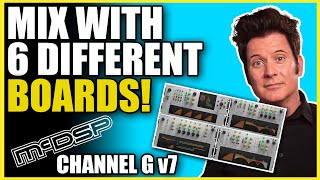
Most Versatile Channel Strip? - McDSP Channel G Sounds AWESOME
Produce Like A Pro
Reviews
Based on 0 Reviews and 0 Ratings
More McDSP Channel Strip Plugins


$220.00 - $249.00
in Channel Strip Plugins Rank

$138.00 - $179.00
in Channel Strip Plugins Rank

$268.00 - $299.00
in Channel Strip Plugins Rank

$181.00 - $229.00
in Channel Strip Plugins Rank

$129.00
in Channel Strip Plugins Rank


$37.00 - $149.00
in Channel Strip Plugins Rank


.jpg?v=1784758771)

$39.99 - $172.00
in Channel Strip Plugins Rank


$79.00 - $399.00
in Channel Strip Plugins Rank


$33.00 - $34.99
in Channel Strip Plugins Rank


$37.00 - $39.99
in Channel Strip Plugins Rank


$91.00 - $249.00
in Channel Strip Plugins Rank


$33.00 - $34.99
in Channel Strip Plugins Rank


$39.99 - $40.00
in Channel Strip Plugins Rank


$49.00 - $216.00
in Channel Strip Plugins Rank


$39.99 - $149.00
in Channel Strip Plugins Rank


$39.99 - $172.00
in Channel Strip Plugins Rank

$39.99 - $172.00
in Channel Strip Plugins Rank

$38.00 - $39.00
in Channel Strip Plugins Rank


$99.00 - $169.00
in Channel Strip Plugins Rank


$37.00 - $79.00
in Channel Strip Plugins Rank


$99.00 - $199.99
in Channel Strip Plugins Rank

$37.00 - $39.99
in Channel Strip Plugins Rank


$19.99 - $159.00
in Channel Strip Plugins Rank

$19.99 - $75.00
in Channel Strip Plugins Rank


$37.00 - $39.99
in Channel Strip Plugins Rank

$39.00 - $149.00
in Channel Strip Plugins Rank


$33.00 - $34.99
in Channel Strip Plugins Rank


$29.99 - $34.99
in Channel Strip Plugins Rank


$29.99 - $34.99
in Channel Strip Plugins Rank


$181.00 - $199.00
in Channel Strip Plugins Rank

$39.99 - $172.00
in Channel Strip Plugins Rank

$149.00 - $162.00
in Channel Strip Plugins Rank
Accessories & Related Items


Artist usage


Community setups


Similar


Gear Guides









Most Popular Channel Strip Plugins
Most Popular Brands
-
Added to Equipboard on by
 equipboard
GearIQ 4934
-


