

Pricing and availability
We compare 600+ stores and found this item at 2 stores. Prices updated .


Average Price: $149
Standard/Professional
$49
$150+
Price Tier
Budget
Standard
High-end
Price History
Based on price data from 2 merchants for "Native Instruments Choir Essentials - Omnia". Prices shown reflect NEW condition. Tracking began Apr 2, 2026.
* Product prices and availability are updated by Equipboard every 24hrs and are subject to change. Equipboard may receive compensation for purchases made at participating retailers linked on this site. This compensation does not affect what products or prices are displayed, or the order of prices listed. For more information, please refer to our affiliate disclosure.
Description
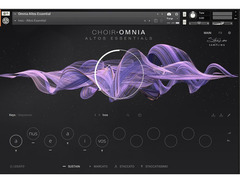
Unleash the power of a full choir from your fingertips with the Native Instruments Choir Essentials - Omnia. This streamlined Kontakt instrument captures the essence of 40 vocalists in stunning detail, providing an ultra-realistic choral experience that seamlessly integrates into any music production. Whether you're working on cinematic scores, electronic tracks, or experimental compositions, Omnia gives you the tools to create with ease and precision.
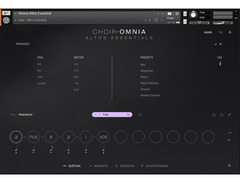
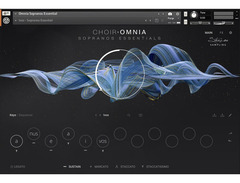
Dive into rich, expressive sounds with four independent sections: soprano, alto, tenor, and bass. With the innovative Syllabuilder engine, crafting complex vocal phrases becomes intuitive, allowing you to merge phonemes and explore endless vocal possibilities. Omnia's Polyphonic True Legato ensures smooth transitions and natural voice leading, keeping your melodies fluid and lifelike.
Designed for full integration with Kontrol keyboards, this plugin offers dynamic control, letting you switch syllables, adjust sound with the mod wheel, and visualize key ranges using the Light Guide. Created in collaboration with Strezov Sampling, renowned for their authentic and globally sourced samples, Omnia brings unparalleled realism and depth to your compositions.
Key Features:
- Intuitive 40-piece choir with four independent soprano, alto, tenor, and bass sections
- Polyphonic True Legato for detailed choir arrangements with a wide range of vowels
- Lightweight version of the full Choir: Omnia library with a single mic position
- Syllabuilder engine for crafting unique vocal expressions with ease
- Full Kontrol keyboard integration for enhanced performance control
- Compatible with macOS and Windows, requiring Kontakt 7.1.05 Player or higher
Product specs
| Software Type | Instrument and Effects library |
| Platform | Mac, PC |
| Upgrade/Full | Full |
| Download/Boxed | Download |
| Bit Depth | 64-bit |
| Format | Standalone, AAX, VST3, AU |
| Software Player | Kontakt Player or Kontakt |
| Hardware Requirements - Mac | Intel Core i5 / Apple Silicon or higher, 4GB RAM or more recommended |
| Hardware Requirements - PC | Intel Core i5 / AMD Ryzen 5 or higher, 4GB RAM or more recommended |
| OS Requirements - Mac | macOS 11 or later, Kontakt Player Required |
| OS Requirements - PC | Windows 10 or later, Kontakt Player Required |
FAQs
-
Is Native Instruments Choir Essentials - Omnia compatible with my DAW?
-
Native Instruments Choir Essentials - Omnia is compatible with any DAW that supports AAX, VST3, or AU formats, as it requires the Kontakt Player or Kontakt software.
-
What are the minimum system requirements to run Native Instruments Choir Essentials - Omnia?
-
For Mac, you'll need macOS 11 or later with an Intel Core i5/Apple Silicon processor and 4GB RAM. For PC, Windows 10 or later with an Intel Core i5/AMD Ryzen 5 processor and 4GB RAM is required.
-
Does Native Instruments Choir Essentials - Omnia include different vocal sections?
-
Yes, it includes separate Soprano, Alto, Tenor, and Bass sections, allowing for versatile choir arrangements.
-
Can I use Native Instruments Choir Essentials - Omnia without the full version of Kontakt?
-
Yes, it can be used with the free Kontakt Player, so you don't need the full version of Kontakt to run this library.
-
Is Native Instruments Choir Essentials - Omnia suitable for both Mac and PC?
-
Yes, the software is designed for both Mac and PC platforms, supporting standalone, AAX, VST3, and AU formats.


Reviews
Owner Insights
We analyzed real musician discussions from forums and Reddit to find what players love, question, and tweak about Native Instruments Choir Essentials - Omnia.
Setup and maintenance
-
Using "bottom C" key switch notes in MIDI can reset Omnia's sequencer to start on the first syllable, preventing playback issues.
Source -
Installation delays are reported, with Native Access showing prolonged install times, yet sometimes falsely indicating completion, suggesting a need for patience or alternative methods.
Source
Features and functionality
-
Omnia allows users to adjust the volume of each syllable individually, clarifying volume discrepancies in presets are not errors.
Source -
The marks (X and -) between syllables control syllable continuation and require user testing, as they are not well-documented in the manual.
Source -
Choir: Omnia requires significant storage space, with the plugin itself being 65 GB, leading some users to defer installation due to limited drive capacity.
Source
User experience
-
Users note that Omnia lacks a full choir option, requiring a multi-instance setup for comprehensive choir sounds.
Source
Use cases and applications
-
Some users find the syllable function basic compared to other offerings, suggesting a preference for simpler setups or single-syllable sustains.
Source -
The plugin is frequently compared to EastWest's Symphonic Choirs, which features a wordbuilder for phoneme selection, highlighting potential limitations of Omnia in detailed vocal editing.
Source
Value and pricing
-
Some users new to DAWs find the $400 price tag surprising, though it's noted that Kontakt libraries often exceed $200.
Source
Software and compatibility
-
Users suggest utilizing rent-to-own services like Splice to manage high costs, as these options allow ownership after completing payments.
Source -
A common issue involves missing files during installation, possibly due to a 255-character path limitation on Windows, which may fail installations silently.
Source -
Some users resolved installation issues by switching from Native Access 2 to the legacy Native Access 1, indicating potential compatibility problems with the newer software.
Source -
Updating Kontakt 7 to its latest version has helped some users resolve loading issues, highlighting the importance of keeping software current for optimal performance.
Source
Based on 0 Reviews and 0 Ratings
Genre Usage
Based on how artists on Equipboard use this gear, it is most commonly found in the following genres.
More Native Instruments Kontakt Instrument

$99.34 - $142.00
in Kontakt Instrument Rank


$94.00 - $99.00
in Kontakt Instrument Rank


$99.00
in Kontakt Instrument Rank


-m.webp?v=1784094168)
$168.00 - $199.00
in Kontakt Instrument Rank


$275.00 - $299.00
in Kontakt Instrument Rank


$28.00
in Kontakt Instrument Rank

$49.50 - $99.00
in Kontakt Instrument Rank

$28.00
in Kontakt Instrument Rank


$29.70 - $94.00




$149.50 - $272.00


Accessories & Related Items
-s.webp?v=1784094168)




Artist usage


Community setups


Similar


Most Popular Kontakt Instrument
Most Popular Brands
-
Added to Equipboard on by
 equipboard
GearIQ 4934
-


