By Gear Experts
Table of Contents

Equipboard
Equipboard is the world's largest community of artists and their gear. Read our review process.
We are reader-supported. When you buy through links on our site, we may earn an affiliate commission. Learn more.


The Novation Launchpad has in recent years become the low-budget icon of electronic music performance. The Launchpad can be found in viral YouTube videos ranging from light shows to finger drumming to DJing, as well as in many studios and production setups around the globe. With the recent release of the new RGB Launchpad Mk2 and Launchpad Pro, it’s time to revisit the Launchpad line as a whole and see why these new models are the go-to devices for live performance as well as studio work.
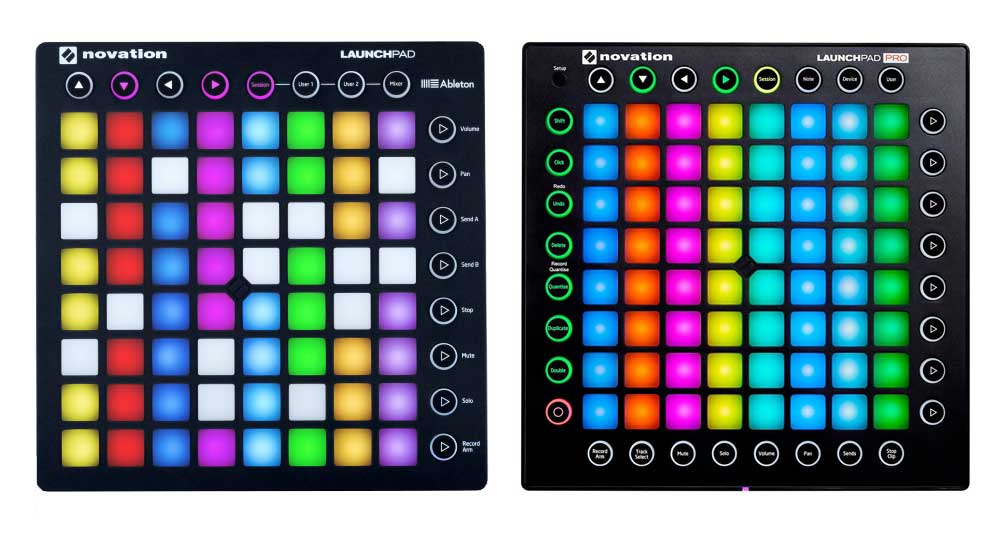
Originally, the Launchpad was capable of three colors and two blended colors with varying levels of luminosity (red, yellow, green, orange, and yellow-green to be exact). At the time, it offered a unique control scheme as well as plug-and-play functionality with Ableton Live; something more expensive competitors like the Monome couldn’t offer. Over the next few years, the little grid controller was seen as a must-have after producers like Madeon proved it to be an effective live instrument and production tool.
As time went on, limitations like low-brightness LEDs, a range of only 5 colors, and a lack of velocity sensitivity were met with criticism. In contrast, the unveiling of the Ableton Push seemed like the ultimate manifestation of what people wanted in a drumpad-based workstation, notably including the signature 8x8 Launchpad-esque grid. While the Push offers tons of scale modes, a screen, encoders, and enough functionality to make QWERTY keyboard shortcuts obsolete, it isn’t portable enough or cheap enough to reach the same masses of producers and performers as the Launchpad. Now, Novation has the Launchpad Mk2 and Launchpad Pro once again leading the forefront on what it means to be stylish, functional and affordable.
Stylish
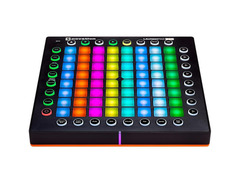
The most impressive change in the new line of Launchpad is the vibrant color palette. From deep dark reds to vibrant violets, a full spectrum of expression is at your fingertips. What’s so great about the color improvement is that it allows you to determine what clip is being played or recorded through its correlating clip color in Ableton Live. This means you can close the laptop lid and get lost in the music, or at least navigate a live set without having to read tiny text on your computer screen.
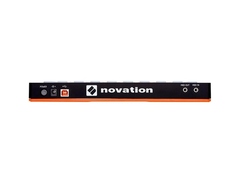
Additionally, the pads can be fed RGB data via note velocities, allowing you to program your own lightshow that can help you enhance your performance. Other aesthetic changes include the Novation logo in the middle of the grid, USB and other ports being moved to the top of the device, and recessed parts of the case making the device easy to grab off the table. It also features a separate RGB LED at the base of the unit. However, these are not even the bread and butter of what makes the Launchpad so useful.
Functional
The different modes and styles of control offered by the Launchpad are essential and useful for anyone working with digital music, either as a performer or producer. The ability to quickly change recording modes, volume levels, bus/send channels, soloing, and panning, allow for the user to stay on the Launchpad and keep their hands off the keyboard. This allows for the Launchpad not only to function as a drumpad, but a fully capable and portable workstation. With the Launchpad Pro, you also gain access to metronome, delete, quantization, duplication, and dedicated record buttons, which allows for Push-like control over Ableton and other software.
Additionally, the Launchpad Pro model has velocity sensitive pads, making any instrument have a varied dynamic range. As far as other special features go, the Launchpad Pro has scale and chord features much like those seen on the Ableton Push. This provides incredible range in a very small form factor which is achieved via a guitar-styled “fretting” where notes overlap from row to row so that the hand can move vertically or horizontally to play (unlike a piano which only allows for horizontal movement to change range).
Affordable
You can find the Launchpad Mk2 and Pro for $169.99 and $299.99 USD, respectively, and you can find the older legacy models like the “S” and Mini for as low as $100 or even lower.
Conclusion
With new features, brighter and more expressive pads, the option for velocity control, and scale/note mode, the Launchpad line has finally grown out of its shell and into something better. Six years ago, the Launchpad was something radical, new, and defined a whole new form factor and approach to music. Now it has borrowed from the devices which borrowed from it and is back to stay as the go-to, low-budget MIDI controller for electronic music, either in the studio or on the stage.
Novation Launchpad Pro
4.5 (90)






Average Price: $232
Standard/Professional
$99
$300+
Budget
Standard
High-end
- Exceptional integration with Ableton Live
- Includes unexpected additional software
- Features like Scale Mode after firmware upgrade
- Compatible with a variety of DAWs and external MIDI devices
- See 6 more
- Original Pro version lacks built-in step sequencer
- Some features less optimized for non-Ableton DAWs like FL Studio
- Slight lag noticed when triggering samples, requiring timing adjustment
See how artists use this


.jpg)




Top Ranked MIDI Pad Controllers on Equipboard
-m.webp?v=1785164595)


$23.75 - $215.22
4.5 (226)
4.5 (226)
About the authors
Mason is a freelance music gear writer that contributes to Equipboard, Reverb, TuneCore, Music Aficionado, and more. He plays the guitar and mandolin and resides in Wyoming. Read more
New in MIDI Pad Controllers

$189.99 - $249.99
in MIDI Pad Controllers Rank

$745.00 - $1,422.86
in MIDI Pad Controllers Rank