

Pricing and availability
We compare 600+ stores and found this item at 8 stores. Prices updated .
Store
Reviews
Price









Average Price: $243
Standard/Professional
$99
$300+
Price Tier
Budget
Standard
High-end
Price History
Based on price data from 6 merchants for "Novation Launch Control XL 3 MIDI Control Surface". Prices shown reflect NEW condition. Tracking began Apr 2, 2026.
* Product prices and availability are updated by Equipboard every 24hrs and are subject to change. Equipboard may receive compensation for purchases made at participating retailers linked on this site. This compensation does not affect what products or prices are displayed, or the order of prices listed. For more information, please refer to our affiliate disclosure.
Description
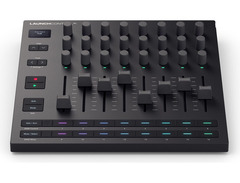
Unleash your creativity with the Novation Launch Control XL 3 MIDI Control Surface, an all-in-one powerhouse packed with features to streamline your music production process. Designed for musicians who need precise and customizable control, this control surface offers unparalleled versatility. Whether you're mixing in the studio or performing live, the Launch Control XL 3 connects seamlessly with all major DAWs and MIDI-enabled hardware, thanks to its class-compliant architecture and USB-C connectivity.
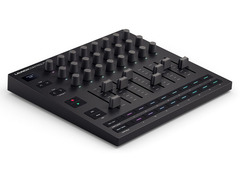
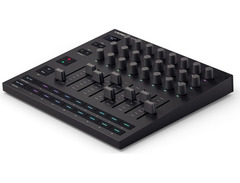
This control surface is your gateway to a more tactile and intuitive music-making experience. With eight 60mm faders, 24 endless rotary encoders, and 16 customizable buttons, you have all the tools at your fingertips to manipulate sound with precision. The OLED display offers clear, real-time feedback, ensuring you're always in control without distraction. Additionally, the RGB LEDs on each control allow for instant visual feedback, adapting to your workflow effortlessly.
The Novation Launch Control XL 3 doesn’t just stop at hardware. It comes bundled with a suite of software, including Ableton Live 12 Lite and plugins from Klevgrand, Baby Audio, and Output, giving you a creative edge right out of the box. Create up to 15 user-defined templates with Novation Components, enabling you to tailor your setup for any performance or production scenario.
Key Features:
- Seamless integration with major DAWs like Ableton Live, Logic Pro, FL Studio, and Cubase
- 8x 60mm faders, 24x endless rotary encoders, and 16x customizable buttons
- 15 user-defined Custom Modes for personalized control setups
- RGB LEDs for visual feedback on controls
- Crisp OLED display for real-time information
- USB-C powered with 5-pin MIDI In, Out, and Out2/Thru ports
- Includes Ableton Live 12 Lite and additional software from Klevgrand, Baby Audio, and Output
Product specs
| Type | Launch Control XL 3 DAW Mixer |
| Other Controllers | 16 x Assignable Buttons |
| Encoders/Pots | 24 x Endless Rotary Encoders |
| Faders | 8 x 60mm Faders |
| Dedicated Transport Control | Yes |
| MIDI I/O | In/Out/Thru/USB |
| USB | 1 x USB-C |
| Computer Connectivity | USB |
| Features | OLED Display |
| Software | Ableton Live 12 Lite |
| Format | Standalone |
| Power Supply | USB Powered |
| Height | 1.53" |
| Width | 9.44" |
| Depth | 9.44" |
FAQs
-
How does the Novation Launch Control XL 3 integrate with Ableton Live?
-
The Novation Launch Control XL 3 offers pre-mapped integration with Ableton Live, allowing users to control key functions such as volume, pan, and effects seamlessly. This integration reduces the need for a mouse, enabling more hands-on control during music production.
-
What are the connectivity options for the Novation Launch Control XL 3?
-
The Novation Launch Control XL 3 features USB-C connectivity for computer integration and 5-pin MIDI I/O for connecting to hardware synths and effects, providing versatile options for both studio and live setups.
-
Can I customize the controls on the Novation Launch Control XL 3?
-
Yes, the Novation Launch Control XL 3 allows for custom mappings using Novation Components, enabling users to tailor the control surface to their specific workflow and performance needs.
-
Does the Novation Launch Control XL 3 require an external power supply?
-
No, the Novation Launch Control XL 3 is USB-powered, making it convenient for both studio and live performances without the need for an additional power adapter.
-
What kind of feedback does the Novation Launch Control XL 3 provide during use?
-
The Novation Launch Control XL 3 features a crisp OLED display that delivers real-time parameter feedback, ensuring a seamless workflow and allowing users to make precise adjustments quickly.
Videos

SYNTH ANATOMY
Novation Launch Control XL 3 MIDI Controller, Bass Station 2 Swifty Edition | Superbooth 2025
Novation Launch Control XL 3 MIDI Controller, Bass Station 2 Swifty Edition | Superbooth 2025
SYNTH ANATOMY
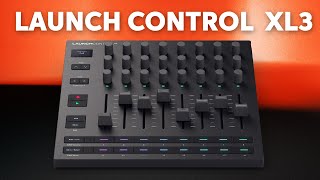
Novation Launch Control XL 3 MIDI Control Surface Overview

Sweetwater Soundcheck
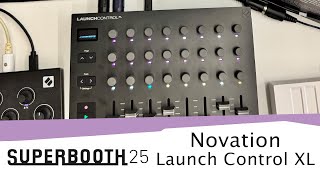
SUPERBOOTH 25: Novation Launch Control XL 3

Sound On Sound magazine
Reviews
Owner Insights
We analyzed real musician discussions from forums and Reddit to find what players love, question, and tweak about Novation Launch Control XL 3 MIDI Control Surface.
Features and functionality
Software and compatibility
-
The controller is CC mappable, allowing users to map controls to Logic Pro on iPad, enhancing its integration with various DAWs.
Source -
Some users experience recognition issues with Ableton 12; ensuring the Launch_Control_XL_3 folder is in the MIDI Remote Scripts directory may resolve this.
Source -
Updating Ableton to version 12.2.1 or later is necessary to gain full Control Surface support for the Launch Control XL 3.
Source -
Users experienced improved functionality after ensuring the Launch Control XL is not auto-populated in Ableton's control surface slots, which can interfere with MIDI updates.
Source
Use cases and applications
-
It's ideal for controlling Elektron devices with volume faders, FX sends, and macro controls, mimicking classic Roland interfaces.
Source -
In DAW control mode, when pan controls are adjusted within Ableton, the LC updates its position correctly, suggesting this mode may mitigate pickup issues.
Source
User experience
Comparisons
-
Some users feel the MK3 is not a worthy successor to the MK2 but acknowledge the added capability with MIDI ports.
Source
Mods and upgrades
-
Endless encoders with LEDs and motorized faders are suggested for preventing parameter jumps common in live situations.
Source
Setup and maintenance
-
Owners have resolved setup issues by copying missing script folders between machines, indicating a potential solution for unrecognized devices.
Source -
Resolving bidirectional MIDI issues involves removing the control surface from Ableton settings, disabling and re-enabling input/output ports, and restarting Ableton after reconnecting the LC.
Source
Critic Reviews
5.0 out of 5
Based on 1 Review and 1 Rating

186
Best midi controller to control your software synths and maybe even some hardware
Eight faders, 24 knobs, buttons across the bottom. That's the whole pitch and it's why this thing is the best way to get a hardware feel out of softsynths. Stop mousing parameters, put your hands on actual controls, and the plugin starts behaving like a real instrument.
The endless encoders deserve a special mention. They feel weirdly analog. If they weren't endless I'd swear I was turning Alpha pots. Smooth, weighted, no plastic wobble. Good job Novation. MK3 finally adds an OLED display, which sounds like a small thing until you use it. You see what you're tweaking instead of guessing or staring at the screen. The MIDI out is the other big upgrade. Same surface drives your VSTs or your hardware, your call.
Only real competition I can think of is the SHIK S32 (three times the price) or Neuzeit The Drop (four times the price), and both are aimed more at modular folks anyway. If you live in the MIDI CC world with softsynths and outboard, nothing else gives you this much control for the money.
Best bang for the buck, period.
Genre Usage
Based on how artists on Equipboard use this gear, it is most commonly found in the following genres.
More Novation MIDI Pad Controllers

$238.31 - $349.99
in MIDI Pad Controllers Rank


$23.83 - $215.22
in MIDI Pad Controllers Rank


$30.98 - $129.99
in MIDI Pad Controllers Rank


$118.00 - $124.27
in MIDI Pad Controllers Rank


$25.00
in MIDI Pad Controllers Rank


$129.99 - $138.15
in MIDI Pad Controllers Rank


$80.79 - $129.99
in MIDI Pad Controllers Rank


$152.00 - $219.99
in MIDI Pad Controllers Rank


$266.00 - $349.99
in MIDI Pad Controllers Rank


$80.79 - $99.99
in MIDI Pad Controllers Rank


$266.00 - $349.99
in MIDI Pad Controllers Rank

$152.00 - $199.99
in MIDI Pad Controllers Rank


$124.27
in MIDI Pad Controllers Rank


-m.webp?v=1784905381)
$101.27 - $799.00
in MIDI Pad Controllers Rank


.jpg?v=1784640202)

$407.62
in MIDI Pad Controllers Rank


$299.00 - $350.00
in MIDI Pad Controllers Rank


$150.00 - $229.99
in MIDI Pad Controllers Rank

.jpeg?v=1784860561)

$40.00 - $299.00
in MIDI Pad Controllers Rank


-m.webp?v=1784905380)
$69.50 - $119.00
in MIDI Pad Controllers Rank


$476.57
in MIDI Pad Controllers Rank


$39.00 - $177.00
in MIDI Pad Controllers Rank


$65.53 - $275.77
in MIDI Pad Controllers Rank


$180.00 - $777.00
in MIDI Pad Controllers Rank


$55.81 - $257.00
in MIDI Pad Controllers Rank


$29.95
in MIDI Pad Controllers Rank


$50.00
in MIDI Pad Controllers Rank


$82.21 - $269.00
in MIDI Pad Controllers Rank


$178.72 - $189.99
in MIDI Pad Controllers Rank


$135.00 - $269.99
in MIDI Pad Controllers Rank


$95.32
in MIDI Pad Controllers Rank


$40.19 - $89.99
in MIDI Pad Controllers Rank


$793.50 - $999.00
in MIDI Pad Controllers Rank


$65.00
in MIDI Pad Controllers Rank


$90.00 - $295.00
in MIDI Pad Controllers Rank


$1,099.00 - $1,538.00
in MIDI Pad Controllers Rank


Accessories & Related Items


Artist usage


Community setups


Similar


Gear Guides








Most Popular MIDI Pad Controllers
Most Popular Brands
-
Added to Equipboard on by
 equipboard
GearIQ 4934
-


