
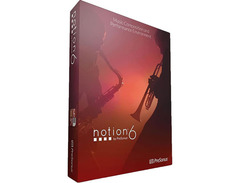

Pricing and availability
We compare 600+ stores and found this item at 4 stores. Prices updated .
Store
Reviews
Price


Price History
Based on price data from 3 merchants for "PreSonus Notion 6". Prices shown reflect NEW condition. Tracking began Apr 2, 2026.
* Product prices and availability are updated by Equipboard every 24hrs and are subject to change. Equipboard may receive compensation for purchases made at participating retailers linked on this site. This compensation does not affect what products or prices are displayed, or the order of prices listed. For more information, please refer to our affiliate disclosure.
Description
Unleash the full potential of your musical creativity with the PreSonus Notion 6, a powerhouse in the realm of music notation software. Whether you’re composing orchestral masterpieces or simple lead sheets, Notion 6 offers a seamless blend of tradition and innovation. Its intuitive interface makes it easy to craft your compositions, be it through traditional notation, tablature, or even handwriting on a tablet. Dive into a vast sound library featuring samples from the illustrious London Symphony Orchestra, recorded at the legendary Abbey Road Studios, alongside performances by renowned artists like guitarist Neil Zaza and bassist Victor Wooten.
Notion 6 isn't just about composition; it's also a tool for live performance and recording, allowing you to input music through MIDI devices while retaining all the expressive nuances. The eight-channel mixer and integrated effects, including reverb and amp simulation, ensure your compositions sound polished and professional. Its ReWire integration makes collaboration with other DAWs a breeze, and the video window feature is perfect for film scoring.
Compatible with both Mac and PC, Notion 6 supports cross-platform use and integrates smoothly with PreSonus Studio One, enabling a comprehensive music production experience. Whether you're a seasoned composer or a budding musician, Notion 6 is designed to elevate your musical journey.
Key Features:
- Intuitive interface for easy notation and composing
- Extensive sound library with samples from the London Symphony Orchestra
- Cross-platform handwriting recognition
- Integrated virtual keyboard, fretboard, and drum pad for interactive input
- Eight-channel mixer with effects like reverb, compressor, and EQ
- Video window for precise scoring to picture
- ReWire support for seamless DAW integration
- Compatible with Mac and PC, with Studio One DAW integration
- Export scores as PDF and audio as WAV or MP3 files
Owner's manual
PreSonus Notion 6 User ManualProduct specs
| Software Type | Notation and Composition tools |
| Platform | Mac, PC |
| Upgrade/Full | Full |
| Download/Boxed | Download |
| Bit Depth | 64-bit |
| Format | VST |
| Hardware Requirements - Mac | Intel Core i3 or higher, 4GB RAM minimum, 8GB drive space |
| Hardware Requirements - PC | Intel Core i3 / AMD A10 or higher, 4GB RAM minimum, 8GB drive space |
| OS Requirements - Mac | macOS 10.13 or later |
| OS Requirements - PC | Windows 10 or later |
FAQs
-
Is PreSonus Notion 6 compatible with both Mac and PC?
-
Yes, PreSonus Notion 6 is compatible with both Mac and PC platforms, requiring macOS 10.13 or later for Mac and Windows 10 or later for PC.
-
Can I use PreSonus Notion 6 for live performances?
-
Yes, PreSonus Notion 6 can be used as a live instrument, allowing you to compose, play back, and edit music in real-time.
-
Does PreSonus Notion 6 support handwriting recognition?
-
Yes, PreSonus Notion 6 includes cross-platform handwriting recognition powered by MyScript, enabling written music entry.
-
What are the system requirements for running PreSonus Notion 6 on a PC?
-
To run PreSonus Notion 6 on a PC, you need at least an Intel Core i3 or AMD A10 processor, 4GB of RAM, and 8GB of available drive space.
-
Can I edit my scores on different devices with PreSonus Notion 6?
-
Yes, you can create scores on your Mac or Windows computer and continue editing them on an iPad or iPhone, and vice versa.
-
Does PreSonus Notion 6 offer multilingual support?
-
Yes, PreSonus Notion 6 offers interface options in several languages, including English, French, German, Italian, Japanese, Korean, Spanish, and Simplified Chinese.
Videos

PreSonus Audio Electronics
Introducing Notion 6
Introducing Notion 6
PreSonus Audio Electronics
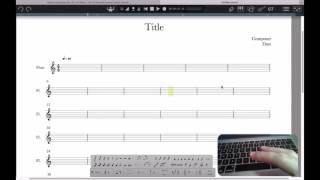
Notion 6 Training: Keyboard Note Entry
PreSonus Audio Electronics
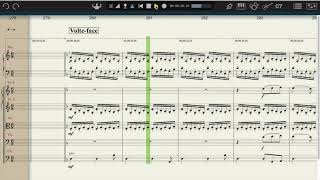
Cinematic Studio Strings & Presonus Notion 6 - Amazing Results !

MatthieuD Tutorials
Notion 6 QuickStart 2: Score Setup and Note Entry
PreSonus Audio Electronics
Notion 6 QuickStart 7: Text, Lyrics and Chords
PreSonus Audio Electronics
Notion 6 QuickStart 3: Playback and Live Performing
PreSonus Audio Electronics
Reviews
PROS
-
Seamless integration with Studio ONE enhances functionality
-
Piano keyboard display helps detect disharmonies quickly
-
Intuitive interface facilitates easy music notation
-
Excellent sound quality for non-Piano/Harpe instruments
-
Comes with a capable mixing console for instrument arrangement
-
Users report high satisfaction with music notation results
-
Great value for price with extensive features
-
Highly functional for orchestral scoring tasks
CONS
-
Lacks recent updates, creating concern about future support
-
Difficult installation process with inadequate customer support
-
Known bugs and unintuitive aspects need addressing
-
Limited sound quality for Piano and Harp without additional purchases
Owner Insights
We analyzed real musician discussions from forums and Reddit to find what players love, question, and tweak about PreSonus Notion 6.
Features and functionality
-
Notion 6 lacks VST3 support, which limits its compatibility with certain plugins, a significant drawback for users seeking advanced audio processing.
Source -
Notion 6 is praised for a simple drag-and-drop interface, contrasting with other software that autoformats, often against user preferences.
Source -
Users report that Notion 6 struggles with creating separate voices, often resulting in rests positioned awkwardly within notes or staves, affecting score clarity.
Source -
On long runs, Notion 6 may automatically group notes in unexpected ways, complicating desired musical phrasing adjustments.
Source -
Notion's sound library includes unique capabilities, like altering the electric bass tone based on string selection in tablature, offering a level of detail not seen in other notation programs.
Source
Software and compatibility
-
Users note that Notion 6 requires significant effort to produce clean-looking scores, a downside for those prioritizing visual presentation.
Source -
Playback issues in Notion 6 can often be resolved by checking the Audio Preferences to ensure instrument sound files are correctly located.
Source -
Notion 6 lacks MusicXML import support, which can be a limitation for those needing seamless integration with Studio One.
Source -
Notion 6 cannot automatically load plugins from Studio One, necessitating manual plugin setup for each track, which can be cumbersome for large projects.
Source
Use cases and applications
-
Notion 6 is favored for quick, intuitive score creation, making it ideal for fast project turnarounds where time is a critical factor.
Source -
Notion 6 is not recommended for professional-level engraving compared to Finale, Sibelius, and Dorico, making it less suitable for high-quality publishing needs.
Source -
Notion 6 excels in transforming DAW compositions into printable sheet music, highlighting its strength in notation over DAW-like plugin integration and automation.
Source
User experience
-
Notion 6 is described as 99% intuitive, allowing even younger users to master it quickly, which appeals to beginners or those seeking ease of use.
Source -
Users often find that Notion 6 does not recognize certain VST plugins, even if they appear in the list, indicating potential reliability issues with plugin loading.
Source
Critic Reviews
4.5 out of 5
Based on 1 Review and 10 Ratings

609
Wonderful Notation Software!
For myself, it is a great utility tool. A nice program for doing transcriptions and printing music notation. ...although I realize (from using it) that this software package is way more powerful and has much more potential than in the way I am am utilizing it.
Genre Usage
Based on how artists on Equipboard use this gear, it is most commonly found in the following genres.
More PreSonus DAW Software
-m.webp?v=1784455242)
$99.99 - $344.00
in DAW Software Rank


$139.99 - $199.99
in DAW Software Rank


$145.00 - $179.99
in DAW Software Rank


$225.00 - $599.00
in DAW Software Rank


$268.00 - $349.00
in DAW Software Rank


$99.00 - $399.99
in DAW Software Rank


$179.00
in DAW Software Rank


$398.00
in DAW Software Rank
-m.webp?v=1784455238)
$409.00 - $499.00
in DAW Software Rank


$119.00 - $295.00
in DAW Software Rank


$209.00 - $329.99
in DAW Software Rank


$199.00
in DAW Software Rank


$0.00
in DAW Software Rank


$515.00 - $579.99
in DAW Software Rank


.png?v=1784755332)


$75.00
in DAW Software Rank


$449.00 - $479.00
in DAW Software Rank


$199.99
in DAW Software Rank
.jpg?v=1784450238)


$129.00 - $189.00
in DAW Software Rank


$395.00 - $499.00
in DAW Software Rank


$366.00 - $579.99
in DAW Software Rank


$579.99
in DAW Software Rank


$245.00 - $285.00
in DAW Software Rank


$149.00 - $201.00
in DAW Software Rank


$579.99
in DAW Software Rank


$375.00 - $399.95
in DAW Software Rank

$139.00 - $249.00
in DAW Software Rank


Accessories & Related Items
-s.webp?v=1784815307)


Artist usage


Community setups


Similar


Gear Guides










Most Popular DAW Software
Most Popular Brands
-
Added to Equipboard on by
 rick_felgate
GearIQ 193
-



