

Pricing and availability
We compare 600+ stores and found this item at 8 stores. Prices updated .
Store
Reviews
Price






Price History
Based on price data from 6 merchants for "SoundSwitch". Prices shown reflect NEW condition. Tracking began Apr 2, 2026.
* Product prices and availability are updated by Equipboard every 24hrs and are subject to change. Equipboard may receive compensation for purchases made at participating retailers linked on this site. This compensation does not affect what products or prices are displayed, or the order of prices listed. For more information, please refer to our affiliate disclosure.
Description
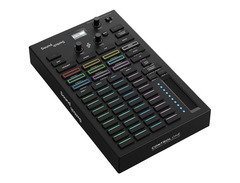
Elevate your DJ performances with the SoundSwitch Control One, a revolutionary lighting interface that seamlessly harmonizes audio and visuals. This professional-grade controller empowers DJs and event designers to craft captivating light shows that sync perfectly with the beat, adding an immersive dimension to any set. Whether you're orchestrating a high-energy club night or a sophisticated wedding reception, Control One delivers precision control, allowing you to manipulate lighting fixture movements, color changes, and dynamic effects with ease.
The SoundSwitch Control One pairs effortlessly with the SoundSwitch software, known for its advanced lighting automation. Design custom lighting displays in the Digital Lighting Workstation (DLW) or let the software's automation features handle the heavy lifting with pre-built scenes and Autoloops. This versatile controller supports both DMX and Philips HUE lighting systems, offering flexible integration options for any venue. With dual DMX universes and robust USB connectivity, Control One ensures seamless transitions and compatibility with leading DJ software including Engine DJ, Serato DJ, and Virtual DJ.
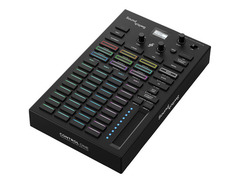
The tactile interface features responsive performance pads with customizable RGB, making real-time adjustments intuitive and precise. Onboard memory stores your settings, ensuring that you can hit the ground running at every gig. Whether you prefer a standalone setup with Engine DJ hardware or a computer-linked configuration, Control One adapts to meet your needs, providing the ultimate lighting control experience.
Key Features:
- Dual DMX universes with 1024 channels
- Supports DMX and Philips HUE lighting systems
- Compatible with Engine DJ, Serato DJ, Virtual DJ, and more
- Customizable Autoloops and Static Looks
- Plug-and-play with Engine DJ hardware
- Built-in OLED display for real-time feedback
- Dual USB for seamless DJ transitions
- Tactile control with customizable RGB performance pads
- Onboard memory for storing lighting patches and settings
- Three months of free SoundSwitch software access
Owner's manual
SoundSwitch User ManualProduct specs
| Type | Lighting Controller |
| Connectivity | 2 x USB Type-B, 4 x DMX |
| Compatibility | DMX, Philips HUE |
| DMX Modes | 2 x DMX Universes |
| Software | SoundSwitch Control One |
| Power Source | USB Powered |
| Height | 1.77" |
| Width | 6.5" |
| Depth | 8.15" |
| Weight | 1.77 lbs |
FAQs
-
What types of connectivity does the SoundSwitch Control One offer?
-
The SoundSwitch Control One offers connectivity through 2 USB Type-B ports and 4 DMX outputs, allowing integration with various lighting setups.
-
Is the SoundSwitch Control One compatible with Philips HUE lighting systems?
-
Yes, the SoundSwitch Control One is compatible with Philips HUE, enabling seamless integration with smart lighting systems.
-
Does the SoundSwitch Control One require an external power source?
-
No, the SoundSwitch Control One is USB powered, making it convenient for use with a laptop or desktop without needing additional power adapters.
-
How many DMX universes can the SoundSwitch Control One control?
-
The SoundSwitch Control One can control up to 2 DMX universes, providing flexibility for complex lighting arrangements.
-
What software is used with the SoundSwitch Control One?
-
The SoundSwitch Control One utilizes the SoundSwitch Control One software, specifically designed for creating music-synchronized light shows.
Videos

GetintheMix
What is SoundSwitch? - DMX Lighting Interface Overview | Tutorial

What is SoundSwitch? - DMX Lighting Interface Overview | Tutorial
GetintheMix
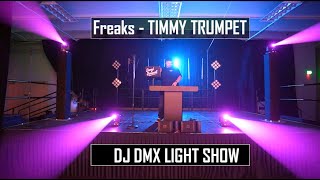
Freaks - Timmy Trumpet | SoundSwitch DMX Light Show

DJ Daryl Bennett
What is SoundSwitch?

SoundSwitch
DJ Lighting - SoundSwitch Control ONE Tutorial (SO EASY - NO DMX Programing)

DJ Rick Web
SoundSwitch for Dummies: A Complete Crash Course DMX Tutorial
DJ Daryl Bennett
SoundSwitch: How to Script a Song From Start to Finish

Danyn
How I Use SoundSwitch and The Control One 7-10-24

DJ 2Legit
Reviews
PROS
-
Affordable entry point for professional DMX lighting control
-
Software creates dynamic, music-synced light shows automatically
-
Compatible with a wide range of lighting brands and models
-
Allows integration with DJ software without interference
-
USB dongle simplifies setup and connectivity
CONS
-
Steep learning curve for software setup and operation
-
Inconsistent performance during live shows
-
Limited documentation and outdated tutorials
-
Subscription model can be misleading and problematic
-
Software customization options are lacking for advanced users
Owner Insights
We analyzed real musician discussions from forums and Reddit to find what players love, question, and tweak about SoundSwitch.
Features and functionality
-
Auto loops don't depend on beatgrid changes, listening instead to DJ software timing, making SoundSwitch adaptable for irregular beats.
Source -
The Control One enhances light control, supporting Autoloops, Autoscript, and Performance Mode without needing additional hardware like the Akai APC Mini or DMX USB Pro.
Source -
SoundSwitch has been criticized for its basic and unintuitive UI design, with users reporting frequent crashes and data loss, especially on Windows.
Source
Software and compatibility
-
Control One efficiently manages various lighting setups, including RGB LEDs, par64 LEDs, and Aura moving heads, using minimal computer resources.
Source -
Running SoundSwitch with DJ software on the same computer can be unstable; some users prefer standalone units like WMX1 for reliability.
Source -
SoundSwitch's dongle is reportedly not recognized by other DMX software, indicating it may be uniquely coded for SoundSwitch's ecosystem.
Source
Use cases and applications
-
Control One is praised for integrating with Serato, allowing DJs to focus on music without manual lighting adjustments.
Source -
Building a library of auto loops that rely less on beatgrids, like slow circles, can enhance performances without exhaustive track adjustments.
Source -
SoundSwitch struggles with complex use cases like controlling musical fountains, where users note limitations without custom scripting or additional software tweaks.
Source
Build quality
-
Some users found the touch strip on the Control One to be less responsive, though firmware updates may improve this.
Source
User experience
-
Owners recommend linking DJ software to SoundSwitch and ensuring proper wireless DMX communication for seamless Control One performance.
Source -
Users report that auto loops often favor excessive strobing, requiring manual scripting for a more tailored lighting experience.
Source -
Owners report that once lights are mapped, SoundSwitch provides quick and effective results, though initial setup can require significant time investment and experimentation.
Source
Setup and maintenance
-
Users suggest testing dimming curves using DMX software with faders to diagnose fixture behavior and identify any issues with lights not responding correctly.
Source -
Fine-tuning beatgrids is crucial as SoundSwitch locks them upon first editing; later changes in DJ software won't sync automatically.
Source
Comparisons
-
Users transitioning from DMX Joker Software praise SoundSwitch for its broader capabilities but note a steeper learning curve and potential setup challenges.
Source
5.0 out of 5
Based on 0 Reviews and 2 Ratings
Genre Usage
Based on how artists on Equipboard use this gear, it is most commonly found in the following genres.
More DAW Software

$225.00 - $599.00
in DAW Software Rank


$268.00 - $349.00
in DAW Software Rank


-m.webp?v=1784332758)
$99.99 - $344.00
in DAW Software Rank


$398.00
in DAW Software Rank

$99.00 - $399.99
in DAW Software Rank


$179.00
in DAW Software Rank


-m.webp?v=1784332727)
$409.00 - $499.00
in DAW Software Rank


$119.00 - $298.00
in DAW Software Rank


$209.00 - $329.99
in DAW Software Rank


$199.00
in DAW Software Rank


$0.00
in DAW Software Rank


$359.00 - $579.99
in DAW Software Rank


$199.99
in DAW Software Rank
.jpg?v=1784295595)


.png?v=1784328024)


$75.00
in DAW Software Rank


$449.00 - $479.00
in DAW Software Rank


$129.00 - $189.00
in DAW Software Rank


$395.00 - $499.00
in DAW Software Rank


$136.00 - $179.00
in DAW Software Rank

$139.99 - $199.99
in DAW Software Rank


$366.00 - $579.99
in DAW Software Rank


$579.99
in DAW Software Rank


$245.00 - $285.00
in DAW Software Rank


$149.00 - $201.00
in DAW Software Rank

$477.00 - $528.00
in DAW Software Rank


$375.00 - $399.95
in DAW Software Rank

$579.99
in DAW Software Rank


$138.00 - $249.00
in DAW Software Rank


$79.00
in DAW Software Rank

$206.00
in DAW Software Rank

Accessories & Related Items


Artist usage


Community setups


Similar


Gear Guides










Most Popular Brands
-
Added to Equipboard on by
 thatlkjguy
GearIQ 4716
-


