
Pricing and availability
We compare 600+ stores and found this item at 1 store. Prices updated .


Price History
Based on price data from 1 merchant for "Tracktion Waveform". Prices shown reflect NEW condition. Tracking began Apr 22, 2026.
* Product prices and availability are updated by Equipboard every 24hrs and are subject to change. Equipboard may receive compensation for purchases made at participating retailers linked on this site. This compensation does not affect what products or prices are displayed, or the order of prices listed. For more information, please refer to our affiliate disclosure.
Description
Meet Tracktion Waveform, your ultimate companion in crafting musical masterpieces. Whether you're a seasoned producer or just starting out, this feature-packed DAW offers a seamless platform to bring your sonic ideas to life. Waveform is celebrated for its unrestricted creative freedom, providing you with an environment that’s free from the common limitations of other digital audio workstations.
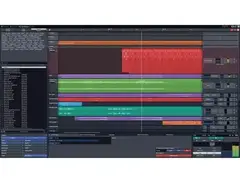
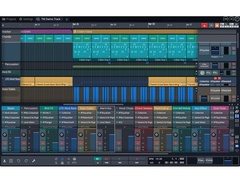
Waveform stands out with its completely rewritten audio engine, ensuring minimal CPU load and precise performance across all routing configurations. Its intuitive interface, available in both sleek light and dark themes, allows you to focus entirely on your music, while the unified properties and actions panel streamline workflow without cluttering your workspace.
Dive into an impressive suite of refreshed audio effects, including a range of compressors, reverb options, and EQs, all designed to give your tracks the polish they deserve. Plus, with its entirely new browser system, you can effortlessly sort through plugins, presets, and samples with ease.
Waveform's customizable UI and extensive utility plugins, such as the AB Switch and Spectrum Analyser, provide even more ways to tailor your music-making process. Designed for modern machines, this DAW supports both macOS and Windows platforms, making it accessible for creators everywhere.
Key Features:
- Unrestricted track count and no export/render restrictions
- 14 built-in audio effects and 11 utility plugins
- Completely rewritten audio engine for reduced CPU load
- Customizable light and dark UI themes
- New browser with tags, favorites, and smart lists
- Compatible with macOS 10.15 or later and Windows 10, 11 (64-bit)
Product specs
| Operating Systems | Mac, Windows |
Videos

Audio Tech TV
Tracktion Waveform Free Tutorial - How to Start Making Music
Tracktion Waveform Free Tutorial - How to Start Making Music
Audio Tech TV
Tracktion Waveform Free 2021 Overview

TracktionSoftware
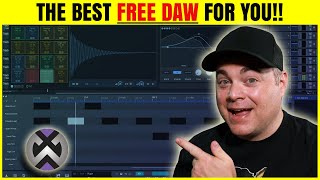
Tracktion Waveform 12 Free Overview
Audio Tech TV
Tracktion Waveform Tutorial (Part 4) – Mixing, Signal Routing, and Plugins

Your Home Recording
Tracktion Waveform Settings You Should Change Right Away
Audio Tech TV
Tracktion Waveform 13 - What's New?
Audio Tech TV
Reviews
PROS
-
Affordable DAW with attractive bundles including Melodyne and Antares Autotune
-
Unique, fast workflow, blending features from Studio One and Ableton
-
Excellent sidechain and modulation options, reminiscent of Studio One and Ableton
-
All-in-one solution with synths, plugins, and effects for electronic music
-
Unrestricted free version, ideal for beginners on a budget
-
Cross-platform compatibility, potential for use on Windows, MacOS, and Linux
CONS
-
Buggy performance, especially on Linux, causing frequent crashes
-
Limited built-in plugins and effects, requiring external installations
-
Inadequate for live music production and extensive collaborations
-
Lacks support for hardware synths and post-production tasks like sound restoration
-
Micro drum sampler has subpar sound quality
Owner Insights
We analyzed real musician discussions from forums and Reddit to find what players love, question, and tweak about Tracktion Waveform.
Features and functionality
-
Users note that Waveform's plugin management is different, with plugins listed horizontally rather than vertically, requiring a brief adjustment period.
Source -
Waveform is described as intuitive and fast, making it appealing for those who prioritize a quick workflow despite occasional stability issues.
Source -
Some users find the provision of updates and bug fixes to be sluggish, impacting the overall usability and experience.
Source -
Waveform's advanced MIDI functionality is praised for allowing direct editing in the sequencer without additional windows, simplifying the workflow.
Source -
The global pitch tuning feature simplifies keeping all elements in key, appealing to users who prioritize musical coherence.
Source
User experience
-
Some long-term users report increased crash frequency over time, which led them to switch to other DAWs like Logic Pro or Studio One.
Source -
Certain users report that less intuitive usability and user-friendliness can hinder creative flow, affecting personal workflows.
Source -
Some users experience high CPU usage and instability with Waveform's native plugins, causing frequent crashes, especially on Linux systems.
Source
Comparisons
Use cases and applications
-
Despite being free, Waveform is noted for being a capable DAW but with limited stock plugins, encouraging users to explore external plugins.
Source -
The DAW's capability to separate mixed samples into individual tracks (drums, bass, vocals) is highlighted as a significant advantage for users working with complex samples.
Source
Value and pricing
-
The full package of Waveform is noted to have a hefty price tag, which may deter those seeking cost-effective solutions.
Source
Software and compatibility
-
Slow support response times have been mentioned, potentially impacting users who need quick resolutions for technical issues.
Source -
Users report Waveform's poor Linux compatibility, especially with JACK and Pipewire, causing inconsistent sound wiring and connection issues.
Source -
The lack of a current Flatpak version and reliance on .deb files poses challenges for non-Debian-based Linux users, requiring workarounds like 'debtap' for Arch Linux.
Source
4.0 out of 5
Based on 5 Reviews and 13 Ratings

74
underrated Daw
Im using WF10 on a windows PC and its working very well.
In my opinion Its have a unique and fast workflow. For example the Sidechain is similar easy like it is in Studio One (just one click) and you can use ASDR and LFO modulators a´la ableton Live. I would say WF10 is a mix of Studio One and Ableton.
Nothing beats the price. I bougt WF10 on blackfriday for just 60 USD and i got WF10 + Melodyne + Antares Autotune. (if you buy Melodyne alone its cost 99 USD) Still if you buy WF10 for the normal price (119 USD) its amazing cheap and inspiring DAW.
I would recommend WF10 if you want... ... an all-in-one solution DAW with Synths, plugins, fx and more. ... a cheap DAW ... to make electronic music ... to make modular SoundFX ... a linear sequenzer workflow
i wouldnt recommand if you... ...want to make live music ... prefer a regular Studio DAW ... want to do many collaborations (it would be better if you use the mainstream daws for changing project files ect.) ... wanna use hardware Synths ... need a daw for post production like sound restoration.
So have a look and try out the demo, or the similar free DAW Tracktion 7.
Amazing
While it's not a popular daw, it can do anything you need. I have produce ton of tracks on this amazing daw. Good thing about waveform is that it bring freedom to your work.

109
This DAW is okay...
When I first started music production, I decided to use Waveform to make my music. I'd say this DAW is great for beginners because if you have a tight budget, Waveform is completely free. It has no limitations, no track limits, no exporting restrictions, VST plugin support, etc. This is a good DAW but at the same time, I don't like using this. Waveform only comes with a micro drum sampler and the drums in there don't really have great sounds. Also, it does not come with too many plugins, effects, and does not come with a guitar amp sim. Kinda frustrated that I have to install my own plugins and effects from other websites. I rate this a 3 star.

192
Humm... Not so good...
It was a compulsive move to buy this DAW. Initially, I wanted to get a affordable and professional DAW running under Linux (Ubuntu/Fedora). Waveform 9 seemed to fit all my requirements, but honestly, I really can't tell as I've not been able to work with it so far: this thing is buggy as hell. The application and the plugins crash every time, I've tried several configuration and distro but to no avail so far... Hopefully , the license is cross platform and I can try to run this on Windows or MacOS, maybe I'll find some luck with those OSs... But then I am far from my first intend: having a pro DAW running smooth on Linux... Never buy a software without thoroughly trying it. Back to square one.

ok
buggy but functions and is free, there is a character limit so bla bla bla bla bla ok that is good I met the limit
Artist usage
Add artist

Genre Usage
Based on how artists on Equipboard use this gear, it is most commonly found in the following genres.
Used With
Based on how musicians on Equipboard use Tracktion Waveform, it is most commonly used with the following gear.


More Tracktion DAW Software


$225.00 - $599.00
in DAW Software Rank


$268.00 - $349.00
in DAW Software Rank


-m.webp?v=1784332758)
$99.99 - $344.00
in DAW Software Rank


$398.00
in DAW Software Rank

$99.00 - $399.99
in DAW Software Rank


$179.00
in DAW Software Rank


-m.webp?v=1784332727)
$409.00 - $499.00
in DAW Software Rank


$119.00 - $298.00
in DAW Software Rank


$209.00 - $329.99
in DAW Software Rank


$199.00
in DAW Software Rank


$359.00 - $579.99
in DAW Software Rank


$199.99
in DAW Software Rank
.jpg?v=1784295595)


.png?v=1784295594)


$75.00
in DAW Software Rank


$449.00 - $479.00
in DAW Software Rank


$129.00 - $189.00
in DAW Software Rank


$395.00 - $499.00
in DAW Software Rank


$136.00 - $179.00
in DAW Software Rank

$139.99 - $199.99
in DAW Software Rank


$366.00 - $579.99
in DAW Software Rank


$579.99
in DAW Software Rank


$245.00 - $285.00
in DAW Software Rank


$149.00 - $201.00
in DAW Software Rank

$477.00 - $528.00
in DAW Software Rank


$375.00 - $399.95
in DAW Software Rank
Community setups


Similar


Gear Guides










Most Popular DAW Software
Most Popular Brands
-
Added to Equipboard on by
 high_art
GearIQ 139
-

