

Pricing and availability
We compare 600+ stores and found this item at 7 stores. Prices updated .
Store
Reviews
Price









Price History
Based on price data from 5 merchants for "Serato Studio". Prices shown reflect NEW condition. Tracking began Apr 2, 2026.
* Product prices and availability are updated by Equipboard every 24hrs and are subject to change. Equipboard may receive compensation for purchases made at participating retailers linked on this site. This compensation does not affect what products or prices are displayed, or the order of prices listed. For more information, please refer to our affiliate disclosure.
Description
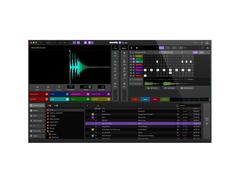
Unleash your creativity with the Serato Studio, a dynamic DAW software designed for music producers, DJs, and sound designers of all levels. Whether you're an aspiring musician or a seasoned pro, this intuitive software is crafted to remove barriers and let your musical ideas flow seamlessly. The Serato Studio integrates seamlessly with your existing Serato DJ library, presenting a familiar interface with waveforms, a mixing channel, and a plethora of high-quality FX.
Dive into music production with ease, thanks to pre-made drum patterns and an 808-style step sequencer. You'll find over 20 sound packs that span a wide range of genres, ensuring you're never short on inspiration. The software supports VST and AU plugins, allowing you to use external instruments or stick with the comprehensive built-in options. Plus, with features like BPM-sync, one-click key shifting, and play-in-key mode, you can focus on crafting your sound without getting bogged down by technicalities.
Serato Studio also offers advanced features like automation, stem exporting, and a DJ-style mixing strip, helping you to polish your tracks to professional standards. Mix and arrange your scenes effortlessly, and watch your song come to life with the master waveform visualizer. Included with your purchase is a free copy of iZotope Elements, adding even more polish to your productions.
Key Features:
- Seamless integration with Serato DJ library
- Over 20 sound packs available
- Supports VST and AU plugins
- One-click key shifting and BPM-sync
- 808-style step sequencer
- Automation and stem exporting capabilities
- Free iZotope Elements included
Product specs
| Software Type | Beat Production |
| Platform | Mac, PC |
| Upgrade/Full | Full |
| Download/Boxed | Download |
| Bit Depth | 64-bit |
| Format | VST2, AU |
| Hardware Requirements - Mac | Intel Core i3 / Apple M1 or higher, 4GB RAM minimum |
| Hardware Requirements - PC | Intel Core i3 / AMD Ryzen or higher, 4GB RAM minimum |
| OS Requirements - Mac | macOS 10.14 or later |
| OS Requirements - PC | Windows 10 or later |
FAQs
-
What are the system requirements for running Serato Studio on a Mac?
-
Serato Studio requires a Mac with macOS 10.14 or later, an Intel Core i3 or Apple M1 processor, and a minimum of 4GB RAM.
-
Is Serato Studio compatible with Windows operating systems?
-
Yes, Serato Studio is compatible with Windows 10 or later and requires an Intel Core i3 or AMD Ryzen processor with at least 4GB of RAM.
-
What type of music production is Serato Studio best suited for?
-
Serato Studio is designed for beat production, offering a user-friendly interface and tools tailored for creating beats and electronic music.
-
Does Serato Studio support VST and AU plugins?
-
Yes, Serato Studio supports VST2 and AU plugin formats, allowing you to integrate various third-party instruments and effects into your projects.
-
Can I use Serato Studio with my existing DJ software?
-
Serato Studio integrates seamlessly with Serato DJ software, enabling a smooth workflow for DJs looking to produce and edit tracks within the same ecosystem.
Videos

Beat Academy
Making a beat from scratch using Serato Studio - Tutorial
Making a beat from scratch using Serato Studio - Tutorial
Beat Academy

How to use Serato Studio

DJ Carlo
What is Serato Studio - Overview

Serato
How To Make A Remix in Serato Studio
Serato
Using Scenes and Building a Song in Serato Studio
Serato

How to Make a Beat in Serato Studio
Serato
How to make an old song sound modern with Serato Studio

Cleveland Terry
Using your Serato DJ Library in Serato Studio
Serato
I Only Used Serato Studio For 1 YEAR... Is It Worth It? | Serato Studio Review 2022

imLowKey
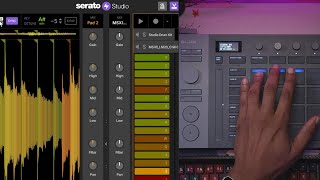
Serato Studio Sampling Features that Save Hours in Production

Ave Mcree
Reviews
PROS
-
Excellent handling of VSTs with minimal CPU consumption
-
Quick composition and workflow for electronic music styles
-
Real-time automation for each sample, enhancing creativity
-
High-quality built-in effects though limited in-depth editing
-
Fast project save and recall without losing samples
-
Unique approach to music production, differing from other DAWs
-
Seamless export of stems for separate mastering
-
Constant updates with user-requested features
CONS
-
Limited in-depth editing of built-in effects
Owner Insights
We analyzed real musician discussions from forums and Reddit to find what players love, question, and tweak about Serato Studio.
Features and functionality
-
Serato Studio is limited to 8-bar sequences, which some users find restrictive compared to other DAWs with longer pattern capabilities.
Source -
Serato Studio lacks mix buss capabilities, requiring effects to be applied individually to each channel, which can complicate mixing.
Source -
The built-in sample separation tool in Serato Studio is praised for its efficiency in extracting samples from full tracks, enhancing its appeal for sample-based producers.
Source -
Despite its strengths, Serato Studio's sampler decks are noted to be less advanced than the standalone Serato Sample VST, impacting feature expectations for some users.
Source -
Users report transitioning from SliceX to Serato within FL Studio for more intuitive beat-making, highlighting Serato's user-friendly interface for sampling.
Source
Software and compatibility
-
On M1 Macs, some users report stability issues with Serato Studio, impacting its reliability for consistent use.
Source -
VST support in Serato Studio is limited, allowing only three effects in a chain, which can be a drawback for users needing extensive plugin use.
Source -
Some users find FL Studio buggy on MacBooks, while Serato Studio offers a smoother experience on the same platform.
Source
Use cases and applications
-
Ideal for quick beat creation and sample-based workflow, Serato Studio excels in getting ideas flowing rapidly, particularly for producers with a looper mindset.
Source -
Serato Studio excels in sample-based production, offering features like automatic key detection and tempo adjustments that streamline the creative process.
Source -
Serato Studio allows direct recording of external sources like vocals and scratches, which can be immediately sampled and manipulated within the DAW.
Source -
Serato Studio allows the use of Bluetooth headphones for music creation, unlike FL Studio which requires wired studio headphones.
Source
Comparisons
-
Users transitioning from Serato Studio to Ableton often do so for advanced mixing and mastering capabilities, highlighting Serato's limitations in these areas.
Source
User experience
-
Beginners find Serato Studio intuitive for starting beat-making, and it's often recommended as an entry point before exploring more complex DAWs.
Source -
Some users find Serato Studio's interface more intuitive and faster for beat-making compared to Logic, especially for sample-based hip-hop production.
Source
Critic Reviews
Based on 0 Reviews and 0 Ratings
Artist usage
Add artist
In this video, Dj Jazzy Jeff Remixes a song using Serato Studio Software.


Genre Usage
Based on how artists on Equipboard use this gear, it is most commonly found in the following genres.
Used With
Based on how musicians on Equipboard use Serato Studio, it is most commonly used with the following gear.


More Serato DAW Software

$225.00 - $599.00
in DAW Software Rank


$268.00 - $349.00
in DAW Software Rank


-m.webp?v=1783936843)
$99.99 - $344.00
in DAW Software Rank


$398.00
in DAW Software Rank

$99.00 - $399.99
in DAW Software Rank


$179.00
in DAW Software Rank


-m.webp?v=1783936839)
$409.00 - $499.00
in DAW Software Rank


$119.00 - $298.00
in DAW Software Rank


$209.00 - $329.99
in DAW Software Rank


$199.00
in DAW Software Rank


$0.00
in DAW Software Rank


$359.00 - $579.99
in DAW Software Rank


$199.99
in DAW Software Rank
.jpg?v=1783709979)


.png?v=1784107687)


$75.00
in DAW Software Rank


$449.00 - $479.00
in DAW Software Rank


$129.00 - $189.00
in DAW Software Rank


$395.00 - $499.00
in DAW Software Rank


$136.00 - $179.00
in DAW Software Rank

$139.99 - $199.99
in DAW Software Rank


$366.00 - $579.99
in DAW Software Rank


$579.99
in DAW Software Rank


$245.00 - $285.00
in DAW Software Rank


$149.00 - $201.00
in DAW Software Rank

$477.00 - $528.00
in DAW Software Rank


$375.00 - $399.95
in DAW Software Rank

$579.99
in DAW Software Rank


$79.00
in DAW Software Rank

$206.00
in DAW Software Rank

Accessories & Related Items




Community setups


Similar


Gear Guides










Most Popular DAW Software
Most Popular Brands


