

Pricing and availability
We compare 600+ stores and found this item at 1 store. Prices updated .


* Product prices and availability are updated by Equipboard every 24hrs and are subject to change. Equipboard may receive compensation for purchases made at participating retailers linked on this site. This compensation does not affect what products or prices are displayed, or the order of prices listed. For more information, please refer to our affiliate disclosure.
Description
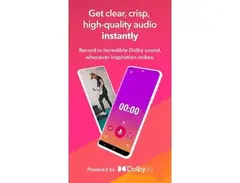
Dolby On Just tap record to .... and Hear the details
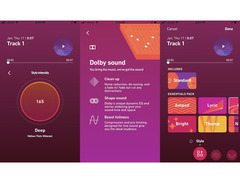
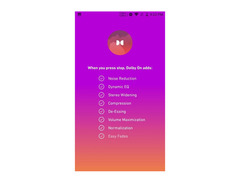
Lose the background noise with Dolby’s original contribution to music: noise reduction. No more electrical hum, amp buzz, or fan noise. Add shape and depth
Hear every instrument with Dolby On’s proprietary, dynamic EQ which automatically adapts to your music, and stereo widening which expands your sound beyond mono.
Stand out on music platforms like Facebook, Soundcloud, and Instagram with compression and pro-limiting that optimizes your volume. Make it your own
Colour your sound, or go deeper with bass, treble, boost, and track trim controls with our custom-designed Styles — like photo filters for audio. Recording tips
Find out how to get the most out of Dolby On. Check out our tips for how to record, edit, and livestream your performances, rehearsals, song ideas, and more from your mobile device.
Product specs
| Downloadable | free |
Videos

Dolby
Dolby On x Nikhita Gandhi
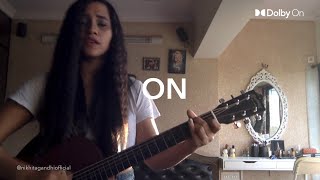
Dolby On x Nikhita Gandhi
Dolby
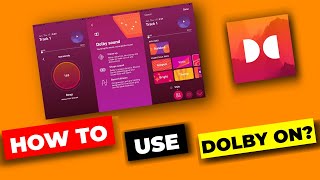
How to use Dolby on app | Dolby on tutorial | Dolby on app tutorial in Hindi | Dolby on use

Tech Trench
Dolby On – Full Walkthrough Tutorial
Dolby
Dolby On - App Review | Video/Audio Recording/Live Streaming, Noise Reduction | Recording App

Lynn Kuo - Violin With Dr. Lynn
How To Record Audio And Music For Free Using Dolby On Sound Recording App

Websplaining
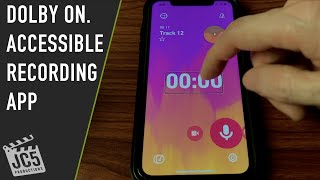
Dolby On. Accessible audio recording app

Juan Alcazar
Reviews
Owner Insights
We analyzed real musician discussions from forums and Reddit to find what players love, question, and tweak about Dolby On.
Features and functionality
-
Exporting recordings from Dolby On requires a time-consuming process as recordings must be exported one-by-one, often taking up to 20 minutes per track.
Source
Software and compatibility
-
Dolby On saves recordings in inaccessible locations on unrooted devices, requiring root access to retrieve them directly from internal folders.
Source -
Exported recordings from Dolby On have improved audio quality, with original files at 700Kbps (1 channel) and exported files at 1400Kbps (2 channels), enhancing sound quality.
Source
User experience
-
Users with locked bootloaders face challenges retrieving Dolby On recordings, as unlocking erases all data, posing a risk to stored audio files.
Source
Use cases and applications
-
The app records concerts well, capturing audio without distortion, but requires external software like Audition to remove occasional crackles.
Source
Critic Reviews
5.0 out of 5
Based on 1 Review and 1 Rating

855
Simplify recording without sacrificing excellent audio quality
I use the Dolby On app on an iPad to record videos of myself playing. These are helpful to keep track of my progress over time, and sporadically sharing with family and friends.
I found this app as I was looking for alternatives to the limited recording capabilities of the Spark app, which cannot be used with an audio interface.
The Dolby On app takes the audio from external sources, when those are available. Thus, it is possible to record the audio from an audio interface. While other apps are limited to recording only from the device microphone, Dolby On picks up the audio automatically with no issues.
I use the app with the Blackstar Polar 2 audio interface, and the audio quality of the resulting videos is great with no noises.
One consideration is that the app does not allow to select specific audio input channels for recording. Instead, when detecting an audio source, the app uses channels 1 and 2 for recording in stereo. The signal from input one goes to the left channel and the signal from input 2 goes to the right channel. To simplify the process, I use a Y cable to split the guitar signal to connect it with both inputs.
The app is simple and easy to use. Sound enhancing features (EQ, noise reduction), and basic editing (trimming) provide good control. With all these features based on Dolby's audio expertise, it is amazing that this app is free.
The only feature I miss is the ability to "retake" a video in the middle of the recording.
Genre Usage
Based on how artists on Equipboard use this gear, it is most commonly found in the following genres.
Used With
Based on how musicians on Equipboard use Dolby On, it is most commonly used with the following gear.


-s.webp?v=1784991670)


Community setups
Show yoursMore DJ Software

$189.00 - $349.99
in DJ Software Rank


$99.00 - $199.00
in DJ Software Rank


$649.00 - $1,099.96
in DJ Software Rank


$74.50 - $149.00
in DJ Software Rank


$199.99
in DJ Software Rank


$299.00
in DJ Software Rank

$119.00
in DJ Software Rank


in DJ Software Rank


in DJ Software Rank


in DJ Software Rank


$45.00
in DJ Software Rank


Artist usage


Similar


Gear Guides









Most Popular DJ Software
Most Popular Brands
-
Added to Equipboard on by
 hashimoto
GearIQ 14956
-

