

Pricing and availability
We compare 600+ stores and found this item at 4 stores. Prices updated .
Store
Reviews
Price




* Product prices and availability are updated by Equipboard every 24hrs and are subject to change. Equipboard may receive compensation for purchases made at participating retailers linked on this site. This compensation does not affect what products or prices are displayed, or the order of prices listed. For more information, please refer to our affiliate disclosure.
Description
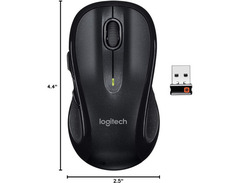
Discover the Logitech M510, a wireless mouse that seamlessly bridges the gap between performance and comfort, making it an essential tool for musicians and digital creators navigating the digital soundscape. Its ergonomic design features gently curved sides and a broad palm area, ensuring that extended sessions at your digital audio workstation remain comfortable and pain-free. The soft rubber grips provide a secure hold, letting you focus on creating and editing music without distraction.
For those who thrive on multitasking, the M510 offers Back/Forward buttons and side-to-side scrolling, allowing you to navigate through pages and spreadsheets with ease. The zoom function can be a lifesaver when you're fine-tuning those intricate music tracks or adjusting waveforms. With its intuitive controls, the M510 becomes an extension of your creative process.
Equipped with an On/Off switch and smart sleep mode, this mouse is designed to conserve energy, ensuring that you spend more time on your craft and less time hunting for batteries. The battery life indicator keeps you informed, so you're never caught off guard in the middle of an important project. Whether you're mixing, composing, or simply managing your music collection, the Logitech M510 is your reliable partner in creativity.
Key Features:
- Ergonomic design with contoured shape and rubber grips
- Back/Forward buttons for enhanced navigation
- Side-to-side scrolling and zoom function
- On/Off switch and smart sleep mode for energy conservation
- Battery life indicator for continuous productivity


Reviews
Owner Insights
We analyzed real musician discussions from forums and Reddit to find what players love, question, and tweak about Logitech M510.
Features and functionality
-
The M650's side buttons are closer together, making them easier to hit for actions like copy/paste compared to the M510.
Source -
The M550 L offers a similar feel to the M510 for users who do not require side buttons.
Source -
The M510 can be paired with a new unifying receiver if the mouse is replaced, but buying it separately without a keyboard may be difficult.
Source
User experience
-
Owners switching from the M510 to the M650 note that the button sensitivity can make it difficult to rest fingers without accidental clicks.
Source -
An owner notes that the M510 allows for resting fingers near the button tops without bending, unlike the M650.
Source -
Users with 7.3125"/18.57cm long and 4"/10.16cm wide hands appreciate the M510's shape, side grips, and size for claw grip use.
Source
Comparisons
-
The M650 is similar in size and shape to the M510 but differs in button resistance and border design, impacting ease of finger resting.
Source -
The Razer Viper Ultimate is favored for its optical switches that prevent double clicking, a common issue with the M510.
Source -
The ELECOM M-XGL10DBSBK-US is noted for being a cost-effective alternative, offering similar features at about half the price of the M510.
Source
Build quality
-
Scroll wheel button on the M510 often requires multiple or hard presses after 1.5 years; the scroll wheel may become sluggish over time.
Source
Use cases and applications
-
The M510 is ideal for precise tasks due to its form and side grips, even for non-gamers who frequently pinpoint screen areas.
Source
Setup and maintenance
-
Desoldering the M510's switches can resolve double-click issues, requiring an $0.80 replacement part, though it's challenging without proper flux for solder wick.
Source -
Cleaning the contacts inside the M510 can fix inconsistent clicks, but may require disassembly, which some users find easier than expected.
Source
Critic Reviews
5.0 out of 5
Based on 1 Review and 1 Rating

Genre Usage
Based on how artists on Equipboard use this gear, it is most commonly found in the following genres.
More Logitech Computers & Peripherals

$149.95 - $179.99
in Computers & Peripherals Rank

$119.98 - $119.99
in Computers & Peripherals Rank


$32.99 - $189.95
in Computers & Peripherals Rank


$90.08 - $127.91
in Computers & Peripherals Rank


$119.99 - $129.99
in Computers & Peripherals Rank

$89.99 - $119.99
in Computers & Peripherals Rank


$23.99 - $24.99
in Computers & Peripherals Rank


$13.99 - $22.99
in Computers & Peripherals Rank


$151.99 - $159.99
in Computers & Peripherals Rank


$206.70 - $239.99
in Computers & Peripherals Rank


$26.99 - $40.99
in Computers & Peripherals Rank


$34.99 - $69.99
in Computers & Peripherals Rank


$119.99 - $129.99
in Computers & Peripherals Rank


$44.90 - $59.99


$69.99 - $89.90


$59.99 - $64.99


Artist usage


Community setups


Similar


Gear Guides









Most Popular Computers & Peripherals
Most Popular Brands
-
Added to Equipboard on by
 samueldutoit
Gear IQ 118
-