Top USB Microphones: Mic Options for Excellent Audio


By Gear Experts

By Gear Experts
Table of Contents

Equipboard
Equipboard is the world's largest community of artists and their gear. Read our review process.
We are reader-supported. When you buy through links on our site, we may earn an affiliate commission. Learn more.
Our Picks

If you need a feature-laden USB mic that can handle anything from voice podcasts to instruments, it's hard to recommend anything other than the Blue Yeti. A bargain considering the quality you get.
Read more


The Best Bang for Your Buck award goes to the Blue Snowball. Solid sound and build quality, but we'd say best suited for voice recordings.
Read more

Reliable, high-quality USB mic that's perfect for podcasters and musicians. Major points for having both USB-C and XLR outputs. The included stand is low quality, but aside from that this is a phenomenal value.
Read more
Perfect budget option for getting started podcasting or streaming, not the most ideal for mic'ing up instruments.
Read moreBuying the right USB Microphone isn’t easy, as is the case with most purchases for your computer setup or studio where you have dozens of options available to you. Lucky for you, we did a massive amount of research, tested some models, and put together this guide to help you choose the right USB mic for your needs.
Why a USB Microphone? Applications and Uses
If you’re reading this guide, chances are you already know why you’re going with a USB mic, as opposed to an XLR microphone. If not, let’s talk about it for a bit. It’s important that you know what the benefits and drawbacks are of choosing this type of microphone.
If we had to sum it up in one sentence, a USB mics are a great choice for their simplicity and ease-of-use. The world of prosumer and pro audio can be quite complicated. Getting into recording using microphones has a steep learning curve that could make a beginner’s head spin. Non-USB microphones typically have an XLR connection, and need to be plugged into an audio interface. Audio interfaces deserve their own buyer’s guide... and you’re in luck! Check out our guide to buying the best audio interface. Audio interfaces contain mic preamps, which power and amplify the mic. So you have dozens of choices for interfaces, hundreds of choices for microphones... you can see how it gets complicated quickly.
Enter the USB mic. USB mics 1) have a built-in preamp, and 2) connect to your computer via USB in easy plug-and-play fashion, eliminating the need for an interface.
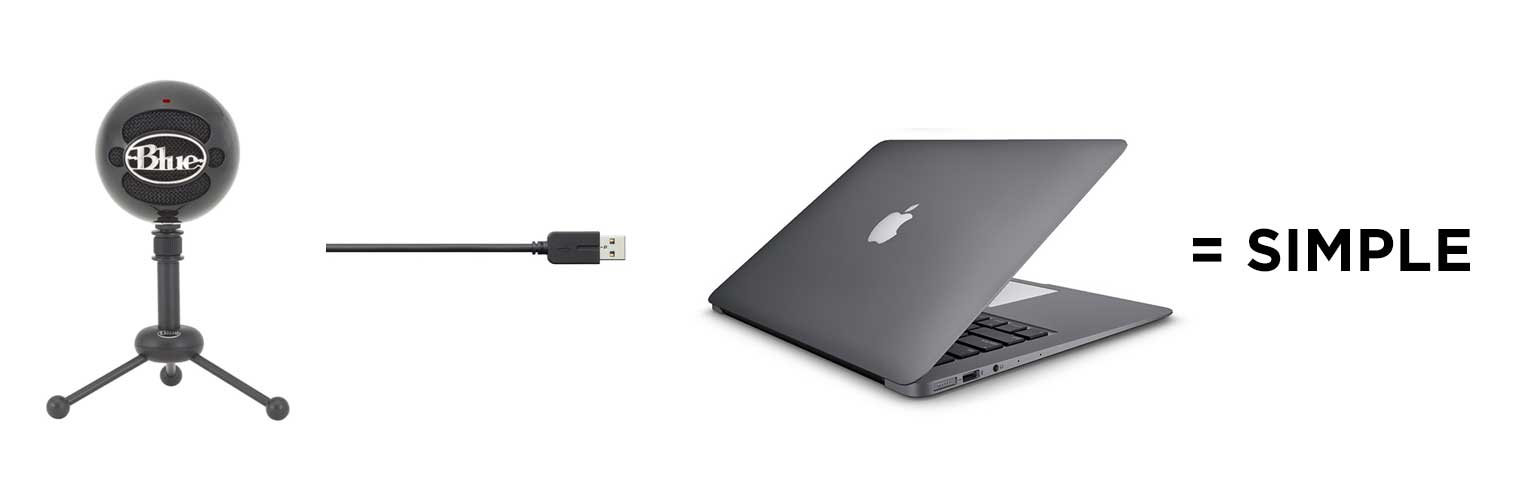
Reasons to get a USB microphone:
- Your mic’ing needs are not complex - podcasting, voice acting, streaming, recording voice-overs over a mix/podcast, getting started with singing and acoustic guitar recording, or you’re generally just looking for simplicity and ease of use.
- You don’t have or want an audio interface.
- Budget is important.
- You want something that just gets the job done, so you can get on with your creative work.
Reasons to not get a USB microphone:
- Recording quality 8 out of 10 won’t cut it, you need 10 out of 10.
- You already have a good audio interface or mic preamp.
- You have a good amount of money to spend.
- You have ample time to research dozens of interfaces and dynamic microphones.
Key Factors to Consider
When shopping for a USB microphone, especially as a musician, podcaster, or streamer, it’s important to understand what features to look for to get the best quality and functionality. Here are the most important factors to consider:
1. Connection Types: USB vs. USB/XLR Combo
Most USB microphones connect directly to your computer with a USB cable, making them easy to use and set up. However, some models offer both USB and XLR connections. The XLR connection is more versatile and professional, allowing you to connect to audio interfaces and mixers. This dual functionality can be beneficial if you plan to expand your setup in the future.
2. Headphone Jack
A built-in headphone jack allows you to monitor your audio in real time without any delay. This is crucial for musicians who need to hear themselves accurately while recording and for podcasters and streamers who need to ensure their audio levels are correct. Look for microphones with zero-latency monitoring to avoid any lag.
3. Included Accessories
Check if the microphone comes with useful accessories like a stand or mount, a pop filter, or a shock mount. A good stand or mount ensures that your microphone is positioned correctly and stays steady during use. A pop filter helps reduce unwanted plosive sounds (like the "p" and "b" sounds), and a shock mount minimizes vibrations and handling noise.
4. Condenser vs. Dynamic Microphones
USB microphones come in two main types: condenser and dynamic. Condenser microphones are sensitive and capture a wide range of frequencies, making them ideal for studio recording and capturing detailed vocals and instruments. Dynamic microphones are more rugged and can handle louder sounds without distortion, making them great for live performances and streaming.
By keeping these factors in mind, you can choose a USB microphone that meets your needs and helps you sound your best, whether you’re recording music, podcasting, or streaming.
Before we get to our recommendations, some words of advice: USB mics are very convenient and have significantly improved in sound quality over recent years. Some still argue that USB mics have limitations compared to XLR mics, which offer greater flexibility and potential for higher audio fidelity. In the end, there’s probably no such thing as the best microphone. You need to choose the best mic for your specific recording needs and price range. With advancements in technology, high-quality recording is more accessible than ever, even on a budget. Happy recording!
Blue Microphones Yeti
4.0 (157)









Average Price: $114
Standard/Professional
$100
$401+
Budget
Standard
High-end
- Exceptional sound quality for the price
- Versatile with multiple recording patterns: cardioid, bidirectional, omnidirectional, stereo
- Plug-and-play setup, no drivers needed
- Sturdy, well-built design
- See 6 more
- Picks up background noise with minimal gain
- USB connector issues reported by some users
- Heavy and bulky, might need a mic arm
- Factory stand transmits desk vibrations
- See 4 more
Best suited for: singing, podcasting, streaming, online tutorials, live performance, home studio recording - vocals, home studio recording - guitar, voiceover use
The overall most recommended USB microphone is the Blue Microphones Yeti. With nearly ten product offerings for USB mics alone, Blue Microphones is solidifying its place as the king of USB desktop mics. And none in the lineup are more impressive than the Yeti. You’ll be hard-pressed to find a better USB mic, especially at this price point.
The Yeti is a winner on several fronts - sound quality, versatility, build quality, and of course the very budget-friendly price point.
Sound quality: For a USB mic, the Blue Yeti is praised for how good it sounds. Now, remember, we’re not comparing this to a $4000 Neumann mic! But compared to its competition, it’s powerful and clear. One reddit user remarked, "I've done some recording videos with a friend who has a Yeti Blue, and he sounds like he's in the room next to me."
Versatility: The Blue Microphones Yeti is amazingly versatile. The built-in gain control is a particularly important feature. Imagine you’re recording various sources - different speakers with differing voice volumes, or a loud instrument that’s causing distortion or feedback- you can simply adjust this mic’s sensitivity with the gain control. Another standout feature is the included 3.5-millimeter headphone jack. You’ll see the description of the Blue Yeti talk about “Zero-latency monitoring”... what exactly does that mean? Well, imagine if you were singing into the mic and had headphones on to listen to yourself. If there was latency, you would hear your voice with a slight delay after you spoke into the mic. As you can imagine, that would be extremely annoying. Luckily, this mic lets you listen to whatever you're recording in real-time, without any delay from latency.
The four polar patterns are also a feature we love about this mic. From reddit:
...also has a few polarity options, including the ability to record two stereo signals simultaneously on both sides of the microphone. (Good for getting two performers in a "live" setting…)
Build quality: Not much to say here, but to us the build quality feels great. Here’s a redditor’s viewpoint on it:
The stand is pretty good as is the build quality (it's heavy and solid). I would recommend a pop filter since it's a condenser mic and very sensitive…
Aesthetically, you’re in luck - the Yeti is offered in Silver, Platinum, Black/Silver, and the very cool looking Blackout edition.
Overall, for its features, its solid sound quality, and accolades it gets, the Blue Microphones Yeti is astoundingly inexpensive, and our top recommendation.
- Power Required: 5V 150mA
- Sample Rate: 48 kHz
- Bit Rate: 16 bit
- Polar Patterns: Cardioid, Bidirectional, Omnidirectional, Stereo
- Frequency Response: 20Hz - 20kHz
- Dimensions (in stand): 4.7 x 4.9 x 11.6 inches
- System Requirements: Windows XP or higher, Mac OS X 10.4.11 or higher
See how artists use this









Blue Snowball USB Microphone
4.0 (73)


Average Price: $56
Budget/Beginner
$100
$401+
Budget
Standard
High-end
- Exceptional sound quality for a USB microphone
- More affordable with better value than similar models
- Highly portable, easily fits in suitcases and backpacks
- Versatile, suitable for vocals, instruments, and even gaming
- See 4 more
- Design may not appeal to everyone
- Not a professional-grade music microphone
- Requires a pop filter for optimal sound close-up
- Some users find it inadequate for professional use
Best suited for: podcasting, streaming, online tutorials, voiceover use
If the Blue Yeti is our overall choice, the "Best Bang for your Buck" award goes to the Blue Microphones Snowball USB Mic.
The Blue Snowball has the distinction of being one of the most recognized mics, due to its retro/modern appearance (it comes in several colors - we got the Brushed Aluminum version and it looks gorgeous).
The Snowball might be better suited for podcasting, gaming (Let's Plays, etc.), rather than hardcore use for recording instruments and vocals. But fear not - some of the users that reviewed it right here on Equipboard have said they regularly record guitar and vocals with it. That said, if all your budget allows is something in the $60USD range, you would be hard pressed to do better than this little gem. Here’s why:
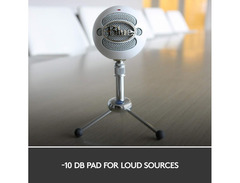
In terms of features, it has a switch for 3 settings: cardioid, cardioid with -10dB pad, and omni. Some users have complained of issues when recording sounds that are particularly soft or loud. For instance, one user mentioned to get the most defined sound when speaking into the mic, being within 12 inches is necessary (i.e. definition suffers from far away). Another user noted that when recording loud vocals or instruments, the “cardioid with -10dB pad” setting is the only one of the 3 that won’t result in peaking/distortion. Your milage may vary, but the point is you’ll have to experiment with the ideal settings and recording distance depending on your intended use. When you do dial in the right settings, the sound of the Blue Snowball has been described as crisp and clear.
The build quality is also excellent; Blue Microphones seem to know what they are doing in this department. This USB mic comes with a mini tripod, but note you won’t be able to mount it on a traditional microphone stand.
- Transducer Type: Condenser, Pressure Gradient w/USB Digital Output
- Polar Patterns: Omnidirectional or Cardioid
- Frequency Response: Position 1-3: 40-18kHz
- Sample Rate: 44.1 kHz/16 bit
- Weight: 460g
- Dimensions: 325mm (circumference)
See how artists use this






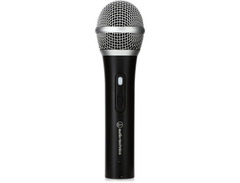
Audio-Technica ATR2100x-USB
4.0 (1)

- Excellent sound quality for podcasting and online meetings
- Dual USB and XLR interfaces offer flexibility
- Comes with all necessary cables and a desktop stand
- Easy to connect and use without installing drivers
- See 4 more
- Picks up handling noise, not ideal for handheld use
- Thick mic body makes finding a suitable shock mount difficult
- Headphone volume control hard to access with cables plugged in
- Stand adapter and threading may wear out quickly
- See 1 more
We were impressed with prior versions of Audio-Technica USB mics, so we approached the Audio-Technica ATR2100x-USB with high expectations (especially since it often seems to get mentioned in discussions around USB mic recommendations). Known for its reliability, this versatile microphone indeed stands out in several key areas while having a couple minor drawbacks.
Right out of the box, the ATR2100x-USB impressed us with its substantial feel. It has a nice heft, making it clear that it's built to last. However, the included stand left us wanting more; it felt flimsy and plastic, and didn't match the solid build of the mic itself.
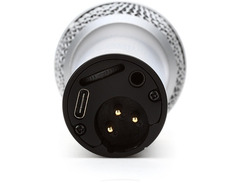
The dual connectivity feature is a game-changer. We appreciated the convenience of both USB-C digital output and XLR analog output. This microphone comes with both XLR and USB-C cables, making setup a breeze whether you're in a home studio or on the go. The cardioid polar pattern efficiently reduces unwanted noises from the sides and rear, and the built-in headphone jack for monitoring is a thoughtful inclusion. The high-resolution 192 KHz 24-bit recording capability is another strong point, offering professional-grade sound quality.
In our tests, the ATR2100x-USB indeed did deliver phenomenal sound quality. The audio was crisp, clear, and radio-quality, particularly when paired with a windscreen and pop filter (we had to buy those separately). It's similar in sound quality to the Samson Q2U, but not necessarily better. If you opt to hold the mic in your hand instead of using the flimsy stand, be aware it picks up a fair amount of handling noise, which might be a concern for some.
Bottom Line: For musicians and podcasters on a budget, the ATR2100x-USB offers incredible value coming in at sub-$100. While the low-quality stand detracts slightly from its overall value, it's hard to find any other major flaws with it. It’s an ideal choice for beginners and pros alike, providing exceptional sound without significantly denting your budget.
.jpg?v=1781913368)

Samson Q2U
5.0 (1)

Average Price: $88
Standard/Professional
$75
$201+
Budget
Standard
High-end
- Rich, podcasty sound quality
- Extremely easy to set up with USB
- Dual functionality with USB and XLR
- Effectively reduces off-axis and background noise
- See 6 more
- Sensitive to interference with certain electronics
- USB cable is too short for boom arm routing
- Stand and clamp are flimsy and awkward
- Picks up some background noise like keyboard clicks
- See 1 more
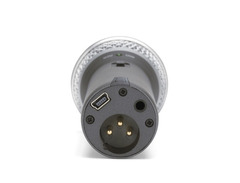
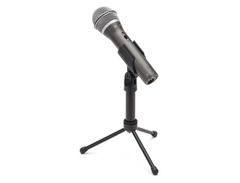
We took the Samson Q2U through its paces over several weeks of podcasting, live streaming, and even a bit of music recording. From the outset, this mic impressed us with its robust reliability and versatility.
Our initial impressions of the Samson Q2U were positive, especially considering its sub-$100 price point. The build quality feels solid, and it has endured a few accidental drops without any issues. However, the stand included is somewhat flimsy and has a tendency to droop, so investing in a better stand might be a smart move.
The dual output feature is a standout, allowing for both USB and XLR connections. This gives the Q2U tremendous flexibility for different recording setups. The included accessories, such as the XLR cables, pop filter, and mic stand, are of good quality. No-lag monitoring worked flawlessly, which is a huge plus for live recordings and broadcasts.
When it comes to sound quality, the Q2U delivers rich, full vocals perfect for podcasts, voiceovers, and live performances. It excels in rejecting off-axis and background noises, making it a great choice for home studios with less-than-ideal acoustics. That said, it can pick up unwanted keyboard and mouse clicks and tends to be sensitive to certain electronic interferences. While the sound is superb for voices, it falls short in brightness when used for miking instruments.
Bottom Line: All in all, the Samson Q2U offers excellent value for money. Its features and sound quality make it an outstanding choice for podcasters, live streamers, and budget-conscious musicians. However, if you're willing to spend a bit more, there are mics out there that might offer better overall performance if you need to record instruments or vocals that require a bit more detail and nuance.
Top Ranked Microphones & Accessories on Equipboard

-m.webp?v=1782137738)


Recent updates
Jun 28, 2024
We audited this guide and removed our recommendations for both the Audio-Technica ATR2100-USB and AT2020USB mics, due to them being outdated models. We've replaced both with the newer, very capable and budget-friendly Audio-Technica ATR2100x-USB.
About the authors
Michael R. Pierce is the co-founder of Equipboard and a lifelong musician with over 25 years of experience as a guitarist and gear enthusiast. He blends solid music theory chops (thanks to formal training in guitar, piano, and trumpet) with real-world experience, always exploring and experimenting across genres like rock, blues, and hip-hop. Michael launched Equipboard in 2013 after graduating from The University of Texas at Austin, leveraging his unique blend of musical passion, technological acumen, and community building. His current go-to rig features a Fender American Original ‘50s Telecaster, Analogman King of Tone, Strymon Flint, and a Fender ‘57 Custom Champ. Read more
Giulio Chiarenza is the co-founder of Equipboard and a lifelong multi-instrumentalist with a deep passion for music gear. Born in Italy and raised in the U.S., he holds a Computer Science degree from The University of Texas at Austin and blends technical acumen with decades of hands-on experience across guitar, piano, drums, and electronic production. Early in his career, Giulio was signed to a San Francisco-based EDM label, releasing both remixes and original tracks. These days, he helps steer Equipboard’s vision while personally testing and reviewing gear. He's never too far from his go-to guitar: a vintage 1978 Fender Telecaster Custom. Read more
Comments
Sign Up or Log In to add comments

4934
We audited this guide and removed our recommendations for both the Audio-Technica ATR2100-USB and AT2020USB mics, due to them being outdated models. We've replaced both with the newer, very capable and budget-friendly Audio-Technica ATR2100x-USB.