

Pricing and availability
We compare 600+ stores and found this item at 6 stores. Prices updated .
Store
Reviews
Price








Average Price: $114
Standard/Professional
$100
$401+
Price Tier
Budget
Standard
High-end
Price History
Based on price data from 3 merchants for "Blue Microphones Yeti". Prices shown reflect NEW condition. Tracking began Apr 2, 2026.
* Product prices and availability are updated by Equipboard every 24hrs and are subject to change. Equipboard may receive compensation for purchases made at participating retailers linked on this site. This compensation does not affect what products or prices are displayed, or the order of prices listed. For more information, please refer to our affiliate disclosure.
Description
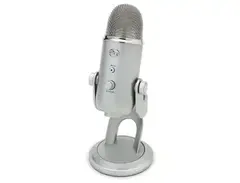
The Blue Microphones Yeti is your go-to USB condenser microphone designed to elevate your recording game, whether you’re podcasting, streaming, or laying down vocal tracks. Renowned for its versatility and stellar sound quality, the Yeti's tri-capsule array lets you switch between four distinct polar patterns: cardioid, bidirectional, omnidirectional, and stereo. This flexibility makes it easy to capture everything from solo vocals to roundtable discussions and ambient soundscapes.
Setting up the Yeti is a breeze—simply plug it into your computer via USB, and you're good to go. No need to fuss with external audio interfaces or a tangle of cables. The onboard controls, including a master volume dial, headphone output, mute button, and microphone gain control, give you precise command over your audio in real-time.
The Yeti's robust build and sleek design ensure it looks as good as it sounds, making it perfect for on-camera use. It even includes a desk stand for immediate use, or you can mount it on a traditional microphone stand thanks to its standard threading. Whether you’re a seasoned pro or just starting your audio journey, the Yeti offers studio-quality sound at an approachable price point.
Key Features:
- USB connectivity for plug-and-play simplicity
- Tri-capsule array with cardioid, bidirectional, omnidirectional, and stereo patterns
- Onboard controls: master volume, headphone output, mute button, and gain control
- 16-bit/48kHz audio resolution
- Included desk stand and standard threading for mic stands
- Ideal for podcasting, streaming, vocal recording, and more
Product specs
| Microphone Type | Condenser |
| Mono/Stereo | Stereo |
| Polar Pattern | Cardioid, Bidirectional, Omnidirectional |
| Diaphragm Size | 3 x 0.55" (14mm) |
| Frequency Response | 20Hz-20kHz |
| A/D Resolution | 16-bit/48kHz |
| Max SPL | 120dB SPL |
| Output Impedance | 16 ohms |
| Signal to Noise Ratio | 100dB |
| Connector | USB Mini-B, 1 x 1/8" (headphones) |
| Requirements - Mac | macOS 10.14 to later |
| Requirements - PC | Windows 10 or later |
| Mounting Options | 5/8-27 Mount Point, Desk Stand |
| Power Source | USB Powered |
| Dimensions | 11.61" x 4.92" x 4.72" |
| Weight | 1.2 lbs (mic), 2.2 lbs (stand) |
| Included Accessories | USB Cable |
FAQs
-
What are the different polar patterns available on the Blue Microphones Yeti?
-
The Blue Yeti offers four polar patterns: Cardioid, Bidirectional, Omnidirectional, and Stereo. This versatility allows you to select the best setting for various recording scenarios, such as podcasts, interviews, or ambient sound capture.
-
Is the Blue Yeti USB microphone compatible with Mac and Windows?
-
Yes, the Blue Yeti is compatible with both macOS (10.14 or later) and Windows (10 or later) systems. It connects via USB, making it easy to set up and use with most recording software.
-
Does the Blue Yeti require additional software to operate?
-
The Blue Yeti itself does not require additional software to function, but you will need recording software to capture and edit audio. Popular options include Audacity, GarageBand, and Adobe Audition.
-
What is the frequency response range of the Blue Yeti microphone?
-
The Blue Yeti has a frequency response range of 20Hz to 20kHz, which covers the full spectrum of human hearing and is suitable for capturing detailed audio across various applications.
-
Can I monitor my recordings directly from the Blue Yeti microphone?
-
Yes, the Blue Yeti features a built-in 1/8" headphone jack for zero-latency monitoring. This allows you to hear your recordings in real time without any delay, ensuring accurate audio capture.
Videos

Marques Brownlee
YouTube Gear #1 | Blue Yeti!
YouTube Gear #1 | Blue Yeti!
Marques Brownlee
Best USB Microphone! Blue Yeti Review + Mic Test

Andy Slye
Blue Yeti Review and Setup Guide - How to get the best sound

JayzTwoCents
Blue Yeti Nano Review / Test

Podcastage
Is The Blue Yeti Microphone Really That Bad?

Tom Buck

Industry Standard Vocals with Blue Yeti USB Mic: Honest Review

Kelli
Blue Yeti Review / Test
Podcastage

Blue Yeti Microphone | Long-Term Review – Absolutely Worth it

See Rooster Tech

Blue Yeti Review: Is it a good choice for podcasters?

Buzzsprout — Learn How to Podcast
Reviews
PROS
-
Exceptional sound quality for the price
-
Versatile with multiple recording patterns: cardioid, bidirectional, omnidirectional, stereo
-
Plug-and-play setup, no drivers needed
-
Sturdy, well-built design
-
Real-time feedback through headphone jack
-
Onboard audio controls for easy adjustments
-
Good for a wide range of uses: gaming, streaming, podcasting, and music recording
-
Minimal setup time, works straight out of the box
-
Comparable in sound quality to more expensive mics
-
Convenient hardware mute button
CONS
-
Picks up background noise with minimal gain
-
USB connector issues reported by some users
-
Heavy and bulky, might need a mic arm
-
Factory stand transmits desk vibrations
-
Not as suitable for professional studio work as XLR mics
-
Some users reported issues with the USB connection becoming obsolete in advanced setups
-
Prone to mysterious reverb issues despite room treatment
-
Limited flexibility in adjusting sound settings directly on the mic
Owner Insights
We analyzed real musician discussions from forums and Reddit to find what players love, question, and tweak about Blue Microphones Yeti.
Software and compatibility
-
The lack of integrated noise gate and compression software makes the Yeti less suitable for streaming without additional software.
Source
Use cases and applications
-
For typical streamers, a dynamic mic like the Q2u or Shure MV7 is recommended over the Yeti due to its sensitivity to ambient noise, making it less suitable for untreated rooms.
Source -
Blue Yeti's omni or stereo settings are beneficial for capturing group discussions or ambient sound, but not ideal for individual voice recordings in noisy environments.
Source
User experience
-
A Blue Yeti owner noted needing to use Apple earbuds instead of headsets due to comfort issues, highlighting individual user preferences for headphone alternatives.
Source -
Users with soft voices find the Yeti inadequate due to its sensitivity, which amplifies background noise in untreated rooms.
Source -
Owners have noted that the Yeti's metal build makes it heavier, potentially challenging for some boom arms to support properly.
Source
Comparisons
Features and functionality
-
The Blue Yeti requires less gain than the Samson Q2U, often needing PC gain near 90% while still maintaining clear sound with minimal mic gain.
Source -
The Yeti offers various polar patterns, but misuse of these settings can result in excessive ambient noise pickup, highlighting the need for proper setup knowledge.
Source -
The Yeti's built-in headphone bypass output allows for real-time monitoring, a feature particularly useful for home recording without an audio interface.
Source -
It's recommended to use the cardioid setting for most recordings, as other settings can introduce unnecessary complexity and potential for error.
Source
Setup and maintenance
Build quality
Value and pricing
-
It's recommended to purchase the Yeti only on sale or used for under $50, given the competitive market with better options at similar price points.
Source -
The Audio-Technica AT2020USB-XP offers significant value, especially when sourced used, with built-in auto gain and noise-canceling features.
Source
Critic Reviews
4.0 out of 5
Based on 46 Reviews and 155 Ratings

1785
It's Popular for a Reason
It's easy to use, easy to set up, and easy to manage. Only real issue is just how much backing noise it picks up with minimal gain.
That said, the Sherpa software from Blue helps cut all that out. With that, you can fairly effectively dial in exactly what you need, for podcasting and streaming.
I do not recommend this mic for vocal work, voice overs, or recording music. Get even a barebones basic XLR mic of ANY kind for that. Even the cheapest on Amazon will be better suited for that than a USB mic. No, this is not prejudice, I have both, and have ran side-by-side in a quintuple blind (or would it be deaf?) sound shoot out, and 7 out of 10 times, the Yeti lost to XLR mics.
THAT said, if it's what you've got, don't let that stop you from making music!

An excellent USB mic
This is my favourite USB microphone that I use to record audio for my YouTube tutorials, live instruments and vocals. I like that it has 4 settings: omnidirectional which is good for field recordings or conference calls as it picks up sound all the way around the microphone, cardioid which is ideal for recording one person's voice, bidirectional which is good for recording an interview between two people and stereo which is best for recording acoustic guitar or choir. It works straight out of the box with a minimal setup time. I really enjoy using it.

59
Great for anything
This microphone is an easy to use, USB plug and play work horse that is extremely versatile and great quality. It has different polar patterns for every scenerio and inbuilt gain and volume knobs. I use this mic for gaming and recording and it has a hardware mute button right on the front that is heaps more convenient than software options. If it was between this, and buying an XLR mic and an interface you could never match this mic's value. Yes there are mics better for professional studio work but unless you're prepared to spend thousands on the full setup this is the way to go.

213
A great mic
Just a great overall mic. For the price I don't have any negative things to say, other than it might be a bit heavy.

116
Short span and useful before pro audio.
This was my main driver for my mic until it broke down due to an issue I'm assuming to have been with the USB connector. Switching from cable to cable didn't help, and I had to switch to a headset mic (before my GSP 600), until I got into the realm of pro audio. At least for me, this and other USB mics become obsolete once you enter the realm of pro audio.

142
Decent mic for starting out, can get better for similar price
This is a decent mic for starting out in voice over, YouTube, podcasting, etc. I'm not sure I would recommend it for singing because it has a bit of a bass boost, so mileage would really vary per person, plus you can get better quality XLR microphones for the same price or cheaper. Of course then you get into interfaces and mixers and preamps and whatnot which cost money and take up space, so that is something to think about.

117
Great for the price and multi use!
I originally bought my Blue Yeti as a microphone to use when streaming games on twitch.tv. As I started getting into producing I really wanted to start singing and recording some of my own lyrics. I then remembered that I had the yeti on my gaming computer and quickly brought it over to my MacBook Pro. This thing is great! Pretty good quality recordings and does great for an intro level setup. I could have bought something else but honestly this is all I need!


1029
Really good!
I got this mic for Christmas, it's a dark blue colored version. Works well with instruments, meaning that it was more easy to record my piano, or amp, or my voice without using my bad phone mic! The mic barely clips with Audacity, I am still thinking about getting a Shure microphone, since that's more of a real instrument mic. But this will do!

121
Good for video making and conversation
Nice mic if you want to record your voice (for youtube videos for example) with something better than your usual integrated laptop microphone. I won't recommand it for serious voice recording or music production cause it only has USB and 3.5mm Headphones Jack outputs and the sound quality wont reach something like an electrostatic microphone. If it is your only solution for music recording it can do the job but don't expect crisp audio out of it.

62
Great Sound for Basic Mic
I purchased this mic through recommendation by Guitar Center employees. I asked for a simple starter mic for at home recordings with decent quality and this was what I came home with. It's easy and simple to work which is great. Nothing to difficult. I wish you could play a bit more with the sound settings on the actual microphone (if only the knob had a few more options to adjust its settings0 but it is pretty flexible overall. Besides, you can work with the sound on Pro Tools or Garageband or whatever you use to edit your voice. Sometimes it gives me a little trouble with Garageband and I have to plug it in, take it out, and plug it back in for the system to find it. But overall it's a great mic and I love using it. I also wish it had a different way to stand on its own so it doesn't fall and hit the side.
Artist usage
Add artist
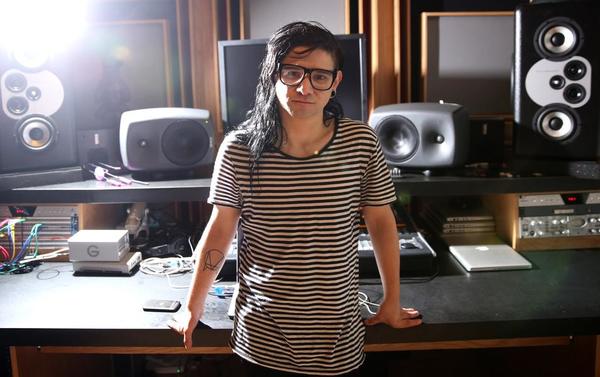
In this photo, The Blue Yeti USB Mic can be seen to the left, under the studio monitors. Photo is from this Forbes article.




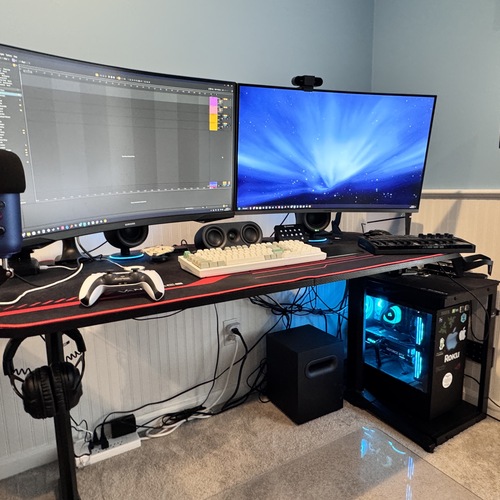
In this post jared promotes one of his. twitch streams. His streaming setup can be seen in this post. Jared uses a blue microphone to broadcast his voice on stream


In the video at 4:36 you can see Wilbur showing his setup. In the side of the screen you see his blue yeti microphone.


In an Instagram post by miss.jahseh on Toopics, XXXTENTACION is shown using a Blue Microphones Yeti, highlighting its role in his studio setup.




he used this mic for when he first started making music for projects such as feelz, LiL PEEP part one, mall music, garden and live forever. The mic can be seen at 0:44 and at 6:10 again. He also stated in an interview that he would plug in a blue yeti into his 2012 mac while using garageband


at 0:20 you can see jack stauber recording a rubber band with this microphone.


Used for the Hell and Silence EP and by extension Night Visions, as featured on Imagine Dragons' official Blue Microphones artist page and the now deleted Blue Microphones Podcast Session 7.
Artist Page
“Sometimes a demo recording captures magic that you can’t go back and recreate. The Yeti sounds so good that we actually used some inspired vocal demo performances on the new record.”
—Dan Reynolds, Imagine Dragons
Podcast Episode Summary
Imagine Dragons talk to Blue about their recent EP, "Hell and Silence"


Andrew owns a blue yeti mic. He uses this for any streaming that he may do


Seen on his back shelf from 0:13 onwards & frequently in the video


Album Usage
The Blue Microphones Yeti has been featured on the following albums:




Genre Usage
Based on how artists on Equipboard use this gear, it is most commonly found in the following genres.
Used With
Based on how musicians on Equipboard use Blue Microphones Yeti, it is most commonly used with the following gear.


Community setups
Show yours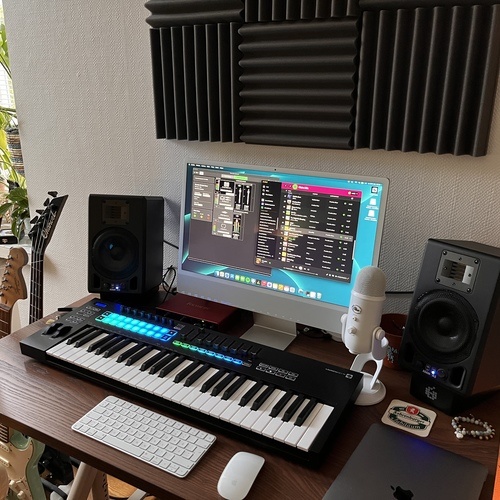

More Blue Condenser Microphones
-m.webp?v=1784891017)
$69.78 - $309.00
in Condenser Microphones Rank


$287.00 - $399.99
in Condenser Microphones Rank


$15.00 - $69.99
in Condenser Microphones Rank


$18.00 - $39.99
in Condenser Microphones Rank
.png?v=1772125295)


$74.11
in Condenser Microphones Rank


$169.99 - $299.99
in Condenser Microphones Rank


$3,134.05 - $3,999.99

.jpeg?v=1784917540)
.jpg?v=1784921365)


.jpg?v=1784055919)


$1,699.99 - $2,170.00


$519.00 - $799.00
in Condenser Microphones Rank


$899.00 - $1,295.00
in Condenser Microphones Rank


-m.webp?v=1784957937)
$2,349.00 - $3,995.00
in Condenser Microphones Rank


$759.05 - $1,299.00
in Condenser Microphones Rank


$159.00 - $251.24
in Condenser Microphones Rank


$75.23 - $119.00
in Condenser Microphones Rank


$303.00 - $419.00
in Condenser Microphones Rank


.png?v=1784328078)

$859.00 - $1,299.00
in Condenser Microphones Rank


Accessories & Related Items


Similar


Gear Guides







Most Popular Condenser Microphones
Most Popular Brands
-
Added to Equipboard on by
Bblue_kruegerGearIQ 414
-


