This page about Avid D-Verb is a stub. You can help improve it:


Pricing and availability


* Product prices and availability are updated by Equipboard every 24hrs and are subject to change. Equipboard may receive compensation for purchases made at participating retailers linked on this site. This compensation does not affect what products or prices are displayed, or the order of prices listed. For more information, please refer to our affiliate disclosure.
Description
Elevate your audio production with the Avid D-Verb, a versatile reverb plugin designed to enhance any musical track with depth and dimension. Whether you're working on a lush orchestral piece or a tight rock mix, the D-Verb offers a variety of reverb types to suit your creative needs. This plugin is crafted to integrate seamlessly within your digital audio workstation, ensuring that your workflow remains uninterrupted as you explore its vast capabilities.
The Avid D-Verb is renowned for its simplicity and efficiency, providing a user-friendly interface that allows quick adjustments and fine-tuning. With options ranging from halls and chambers to plates and non-linear effects, the D-Verb ensures that you have the right atmosphere for every project. Its low-latency operation makes it an ideal choice for both studio and live performance settings, keeping your sound crisp and clear without any delay.
Perfect for both beginners and seasoned audio engineers, the D-Verb is compatible with various formats and works smoothly with Avid’s Pro Tools software. Its lightweight design ensures that it won’t bog down your system, allowing more freedom to layer multiple instances and explore complex soundscapes without performance issues.
Key Features:
- Supports multiple reverb types: halls, rooms, plates, and more
- Low-latency operation suitable for live and studio use
- User-friendly interface for quick adjustments
- Seamlessly integrates with Avid Pro Tools
- Lightweight design ensures efficient performance
- Compatible with AAX, VST, and AU formats


Reviews
Owner Insights
We analyzed real musician discussions from forums and Reddit to find what players love, question, and tweak about Avid D-Verb.
Features and functionality
-
D-Verb is known for its bright, mid-rangey default setting that allows it to cut through mixes effectively, especially in pop music contexts.
Source -
It's noted for its utility in recording situations where low latency is critical, often used to provide vocalists with reverb during tracking sessions.
Source -
D-Verb defaults to -4 dB gain, which users often adjust to 0 dB for consistent volume levels when used directly on the mix bus.
Source -
The default send levels in setups using D-Verb are typically set to -inf, which may need adjustment depending on the desired mix balance.
Source
Comparisons
-
D-Verb's simplicity and ability to sit well in dense mixes is likened to simpler reverbs, offering contrast to richer, more complex reverb options like the Lexicon 480.
Source
User experience
-
Long-time users appreciate its low CPU usage and ease of dialing in, making it a go-to reverb plugin for quick and effective results.
Source -
Despite its reputation as a stock plugin, D-Verb has been part of the pop music sound for decades, contributing to its ongoing popularity in professional settings.
Source
Use cases and applications
-
The plugin is frequently used in non-linear mode to subtly push elements back in a mix without overwhelming them with reverb.
Source -
It's common to use D-Verb on an aux send, maintaining the dry signal's amplitude, and thus adding a wet signal to the overall output.
Source -
Some mixing engineers, like Andrew Wade, apply D-Verb directly on the lead vocal mix bus, adjusting the default -4 dB gain to 0 dB for optimal results.
Source
Critic Reviews
Based on 0 Reviews and 0 Ratings
Artist usage
Add artist
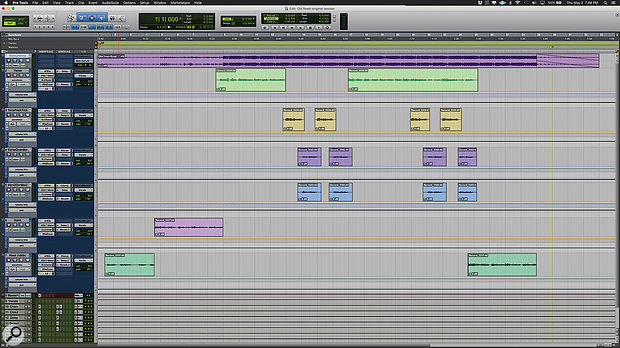
Used for Ray's vocals on "Old Town Road (Remix)", as stated by mix engineer Andrew "VoxGod" Bolooki in this August 2019 Sound on Sound interview.
Billy Ray Cyrus' verse lead vocal provides an example of the mind-boggling complexity of Bolooki's vocal treatments. The audio is spread over five tracks (36-40), four of them with the same insert effects chain of Melodyne, FabFilter Pro-Q 3, FabFilter Pro-DS and Waves CLA-76. The fifth track replaces the Pro-DS with the Avid ModDelay 3, and adds a send to the 'rvb2' aux with the Soundtoys Effect Rack. All five audio tracks are routed to an aux group track (35), which has the Pro-Q 3, Waves C6 and RVox, UA Distressor and SSL Channel, plus a whopping seven sends to delay and reverb aux tracks, and another Distressor aux. The quarter- and eighth-note delay auxes themselves each have four insert plug-ins (Waves H-Delay, Pro-Q 3, MetaFlanger, and DVerb) and a send to the 'rvb1' reverb aux. That means that the verse vocal alone has a total of 38 plug-ins, spread over five audio tracks, one group aux track, and seven aux effects tracks!
Bolooki: "I spoke to a mixer a couple of years ago and asked him how he got things to sound so polished. And he said: 'You can't just throw on a plug-in, you have to take more control, and make sure you purposely put things in different places in different ways.' So, for example, in this song I added the DVerb to the delay auxes, to create a distant effect, so it's not obvious. There are many effects going on, but none of them are overpowering. They are all set back. Nothing gets in the way of the lyrics and the vocal performance. I could probably delete half these effects and it would have sounded the same, but people liked it the way it was, so I left them all.
"This was the first time I used the UAD Distressors and I ended up having two on Billy's vocals: one as part of his main vocal aux, and another set much more aggressively in a parallel and blended back into the same lead vocal aux. This made his vocals really kick ass, and helped make each word crystal-clear. I also ended up copying the Waves SSL strip from Nas' vocals on some of Billy's vocal tracks too, just for some tonal continuity. I have no problem stacking plug-ins on plug-ins. If it's better, it's better.
"Just to highlight some of the other plug-ins I used, there's an aux called 'VoxDoubler' with the Waves Greg Wells VoiceCentric. It definitely adds a bit more of a finished feel and works well mixed in parallel. I put the Waves C6 multiband compressor on almost every single vocal bus, using the 'Pooch Vocal' preset. This cleans up some of the mud. You can solo the side-chain bands and sweep around until you find the annoying frequency, and then just cut that out. If I need to play back something for someone really fast, this is my emergency plug-in to get it to sound better really quickly. Also, the Melodyne plug-in is greyed out, because I printed it. I also like using the Pro-DS, and always put it before the CL76 compressor, because I think it just makes the most sense to fix issues before you boost the whole track with a compressor."

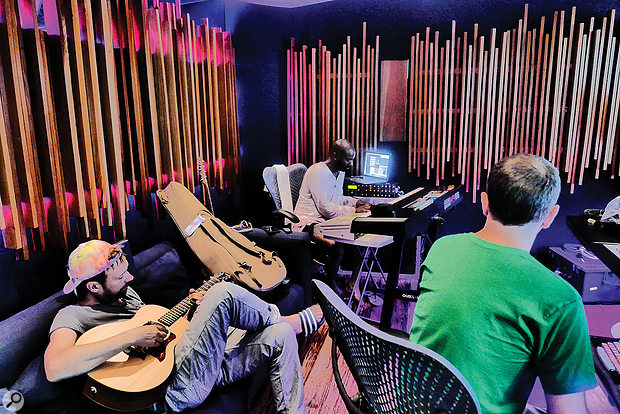
Used for Jones' vocals on Gorillaz's "Charger", as mentioned by recording engineer Stephen Sedgwick in this July 2017 Sound on Sound interview about the production of Humanz.
“Grace Jones’s vocal tracks were sent through the Roland RE201 Space Echo. I also had hardware compression on her, and then printed her vocals back in Pro Tools and added a Waves Renaissance Compressor just doing a bit of level control. Again, I just had fun with the Space Echo, and did loads of different passes. It’s more fun to use your hands like that, and you come up with stuff you would not do with a plug-in. All of a sudden the delay will hit a dirty bit of tape and you get a little glitch in there that repeats. These are the little bits of magic that you can’t get from the software. I presented what I had done to the guys and they edited it. You can still see this in the muted parts where I had done things they did not use. Tracks 75-77 are a reverse reverb on some of Grace’s vocals, leading into some words. I did these in Pro Tools. I would have taken her first word, printed it with a long reverb on it, probably just from the [Avid] D-verb, reversed it, and then put a UAD Dimension D on it to make it stereo.”


In this breakdown of Seth's mix on Future's song Draco. Seth states "The chain on the aux is Auto-Tune, going into Avid’s Extra Long Delay and then into the D-Verb. People were tripping and speculating about the reverb I used on his voice on DS2 which they said was so amazing, but it was just the generic Pro Tools D-Verb plug-in. People talk shit about factory plug-ins. There’s tons of other stuff out there, but give me good old D-Verb any time, and I can make it sound good. With bundled plug-ins it’s all about how you use them."
Album Usage
The Avid D-Verb has been featured on the following albums:
Sum 2 Prove
Lil Baby (2020)

Old Town Road (Remix)
Billy Ray Cyrus & Lil Nas X & Mason Ramsey (2019)

We Love You Tecca
Lil Tecca (2019)
Black Panther The Album Music From And Inspired By
Kendrick Lamar & SZA (2018)
Esskeetit
Lil Pump (2018)
Bodak Yellow (feat. Kodak Black)
Cardi B & Kodak Black (2017)
A Head Full of Dreams
Coldplay (2015)
Morning Phase
Beck (2014)
Genre Usage
Based on how artists on Equipboard use this gear, it is most commonly found in the following genres.
Used With
Based on how musicians on Equipboard use Avid D-Verb, it is most commonly used with the following gear.


More Avid Reverb Plugins


$29.99 - $99.00
in Reverb Plugins Rank


$179.00 - $199.00
in Reverb Plugins Rank


$34.00 - $349.00
in Reverb Plugins Rank


$33.00 - $39.99
in Reverb Plugins Rank


$33.00 - $39.99
in Reverb Plugins Rank


$33.00 - $39.99
in Reverb Plugins Rank


$141.00 - $149.00
in Reverb Plugins Rank


$34.99
in Reverb Plugins Rank


$99.00
in Reverb Plugins Rank


$33.00 - $39.99
in Reverb Plugins Rank


$59.00
in Reverb Plugins Rank

$49.00 - $99.00
in Reverb Plugins Rank


$33.00 - $249.00
in Reverb Plugins Rank


$77.00 - $282.00
in Reverb Plugins Rank


$6.00 - $29.50
in Reverb Plugins Rank

$68.00 - $299.00
in Reverb Plugins Rank


$299.00
in Reverb Plugins Rank


$299.00
in Reverb Plugins Rank


$144.00 - $149.00
in Reverb Plugins Rank

$253.00 - $299.00
in Reverb Plugins Rank

$129.00 - $149.00
in Reverb Plugins Rank

$99.00
in Reverb Plugins Rank


$14.99 - $129.00
in Reverb Plugins Rank

$33.00 - $39.99
in Reverb Plugins Rank


$69.00 - $169.00
in Reverb Plugins Rank

$58.00 - $69.00
in Reverb Plugins Rank

$74.25 - $99.00
in Reverb Plugins Rank

$94.00 - $99.00
in Reverb Plugins Rank

$381.00 - $474.00
in Reverb Plugins Rank


$43.00 - $199.00
in Reverb Plugins Rank


$144.00 - $149.00
in Reverb Plugins Rank

$10.00 - $29.00
in Reverb Plugins Rank

$96.00 - $99.00
in Reverb Plugins Rank
Community setups


Similar


Gear Guides









Most Popular Reverb Plugins
Most Popular Brands
-
Added to Equipboard on by
 eyeseeofficial
Gear IQ 161522
-


