

Pricing and availability
We compare 600+ stores and found this item at 6 stores. Prices updated .
Store
Reviews
Price






Price History
Based on price data from 5 merchants for "Waves DeEsser". Prices shown reflect NEW condition. Tracking began Apr 2, 2026.
* Product prices and availability are updated by Equipboard every 24hrs and are subject to change. Equipboard may receive compensation for purchases made at participating retailers linked on this site. This compensation does not affect what products or prices are displayed, or the order of prices listed. For more information, please refer to our affiliate disclosure.
Description
Unleash the full potential of your vocal recordings with the Waves DeEsser plugin, a precision tool designed to tackle sibilance with ease and finesse. Inspired by vintage gear, this plugin effortlessly eliminates harsh "ess" and "shh" sounds without compromising the natural warmth of your audio. Whether you're polishing vocals or taming unruly cymbals, the Waves DeEsser's intuitive interface ensures smooth and subtle de-essing, making it a must-have for any serious audio engineer.
At the heart of the Waves DeEsser is its innovative side-chain filtering technology, which allows for precise frequency targeting. This feature is complemented by the plugin's ability to switch between wide-band and split compression modes, offering flexibility to suit any audio situation. Whether you’re working in a mono or stereo setup, the Waves DeEsser operates seamlessly up to 24-bit/192kHz resolution, making it an ideal choice for both studio recordings and live performances.
Join the community of musicians and producers who trust the Waves DeEsser to deliver crystal-clear audio, free from the distractions of unwanted sibilance. With its user-friendly design and powerful features, this plugin is your go-to solution for achieving pristine vocal tracks.
Key Features:
- Classical hiss reduction inspired by vintage gear
- Sharp side-chain filters for precise processing
- Wide-band or split compression modes
- Audio or sidechain monitoring options
- Supports up to 24-bit/192kHz resolution
- Compatible with mono and stereo components
- SoundGrid license compatible with MultiRack Native, StudioRack Native, and more
Owner's manual
Waves DeEsser User ManualProduct specs
| Software Type | DeEsser |
| Platform | Mac, PC |
| Upgrade/Full | Full |
| Download/Boxed | Download |
| Bit Depth | 64-bit |
| Format | AAX Native, AudioSuite, VST, AU, SoundGrid |
| Hardware Requirements - Mac | Intel Core i7 or higher (M1 support), 8GB RAM minimum |
| Hardware Requirements - PC | Intel Core i5 / AMD Quad-core or higher (AVX required), 8GB RAM minimum |
| OS Requirements - Mac | macOS 10.15.7 or later |
| OS Requirements - PC | Windows 10 or later (21H2), 64-bit |
FAQs
-
What is the primary function of the Waves DeEsser plugin?
-
The Waves DeEsser plugin is designed to reduce excess sibilance, such as 'ess' and 'shh' sounds, from vocal tracks, providing smooth and natural-sounding de-essing.
-
Is the Waves DeEsser plugin compatible with my DAW?
-
The Waves DeEsser supports AAX Native, AudioSuite, VST, AU, and SoundGrid formats, making it compatible with most major DAWs on both Mac and PC platforms.
-
What are the system requirements for running the Waves DeEsser on a Mac?
-
To run the Waves DeEsser on a Mac, you'll need macOS 10.15.7 or later, an Intel Core i7 or higher (M1 support), and a minimum of 8GB RAM.
-
Can the Waves DeEsser be used for live sound applications?
-
Yes, the Waves DeEsser can be used in live sound environments through SoundGrid compatibility, allowing real-time processing with low latency.
-
What is the recommended frequency range to set on the Waves DeEsser for effective sibilance reduction?
-
For effective de-essing with the Waves DeEsser, it's recommended to set the filter frequency between 1800 Hz and 8000 Hz, depending on the specific vocal characteristics.
Videos

Waves Audio
Introducing Waves DeEsser
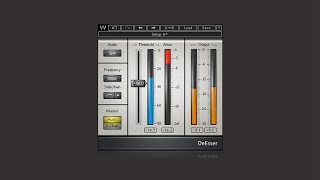
Introducing Waves DeEsser
Waves Audio
Fixing HARSH vocals with a De-Esser

Mix With Jerry
Reviews
PROS
-
Straightforward, user-friendly interface
-
Effective "S Chain" feature highlights frequency cuts
-
Works well on various vocal types
-
Intuitive presets enhance usability
-
Minimal resource consumption
-
Quick and easy integration with DAWs
-
Consistently reliable over years of use
-
Softens harsh sibilance while maintaining clarity
-
Versatile beyond vocal applications
CONS
Owner Insights
We analyzed real musician discussions from forums and Reddit to find what players love, question, and tweak about Waves DeEsser.
Comparisons
-
Some users find the Waves DeEsser more effective for live use due to its faster attack compared to Sibilance, which can struggle with quick sibilant sounds.
Source -
In some cases, when Sibilance didn't perform well, users switched to the Weiss De-Esser for a more suitable sound, although the Weiss generally isn't favored.
Source -
The Lindell 902 de-esser and Slate's FG-DS 902 both emulate the dbx 902 hardware model, providing an alternative to Waves DeEsser with a vintage touch.
Source -
Users note that the Waves R-DeEsser's "notch" shape can help with targeting sibilance effectively compared to the stock Pro Tools de-esser, which tends to darken vocals.
Source -
FabFilter's DeEsser is praised for its flexibility and the ability to avoid over-compressing vocals, making it a preferred choice over Waves for detailed control.
Source
User experience
-
The Waves DeEsser is praised for its simplicity and transparency, especially in wide mode, with multiple users preferring it over Sibilance for its sound quality.
Source -
The Waves DeEsser is favored by some professionals despite having access to more advanced and expensive options, citing its effectiveness and simplicity.
Source -
Some users find Logic's built-in DeEsser problematic, producing audible issues, whereas Waves R-DeEsser consistently delivers better results without compromising vocal quality.
Source
Features and functionality
-
Sibilance's interface is criticized by some users for not clearly displaying compression levels, making it less intuitive than the traditional DeEsser.
Source
Use cases and applications
-
For those who require moderate de-essing, some users prefer manual adjustments with clip gain in Pro Tools for remaining sibilance after using the DeEsser.
Source -
When using the Waves DeEsser, users often set it to wideband and adjust the threshold until sibilance is adequately controlled without noticeable artifacts.
Source -
Sonnox's Oxford Supresser is noted for maintaining the original audio quality while effectively controlling sibilance, making it a strong alternative to Waves.
Source
Value and pricing
-
Waves DeEsser remains functional without mandatory upgrades; however, users must pay over $100 for major OS updates after the first year.
Source
4.5 out of 5
Based on 2 Reviews and 16 Ratings

Artist usage
Add artist

Used on Grohl's vocals for "The Pretender", as stated by mix engineer Rich Costey in this March 2008 Sound on Sound interview.
Vocals: Mercury EQH, UA 175, Roger Mayer RM58, Waves DeEsser, Digidesign Reel Tape Saturation, Sound Toys Echoboy, Pultec EQP1A, SPL De-esser, Neve Portico 5042
"If I recall correctly, the lead vocal is doubled throughout the song. I used a Waves DeEsser plug-in on it, which I'm quite a fan of, as I've not heard a hardware de-esser that is competitive with it. The main signal chain after that was a Mercury EQH tube EQ and then a couple of vintage UA 175s. I hit the background vocals with the Roger Mayer RM58. I haven't mentioned any plug-ins yet, apart from the Waves DeEsser, because I hardly used them on 'The Pretender.' The only other ones I used were the Reel Tape Saturation and the Pultec EQP1A on the intro vocals, and the Sound Toys Echoboy on one of the end vocal overdubs.
"I used board EQ on all the vocals. The Pultec EQP1A plug-in on the intro vocals was to help them cut through. The Reel Tape Saturation was a plug-in that I had just bought. I wanted to warm the vocals up a little bit with it and make them a little bit crisper. Nothing too distorted. The Echoboy plug-in was used on a vocal overdub at the end for a tight delay. I don't tend to use plug-ins that much; they're really not that interesting, in my opinion. Finally, I also used an SPL De-esser on some vocals, and the Neve Designs Portico 5042 for a bit of crispness. It has its own sound, and I used it a lot on the whole Foo Fighters album.
"To complete the picture, I used an EMT plate and the room mics for general reverb, and my two EAR 660 limiters were my bus compressors, together with the Manley Massive Passive. We printed the mix to the ATR102, on half-inch analogue tape, from which it was mastered."


Kaskade uses the Waves DeEsser Plugin as part of his vocal processing chain, to clean up any sibilance.


The Waves DeEsser Plugin was used by Dyro on his track 'Against All Odds'.
via Splice.

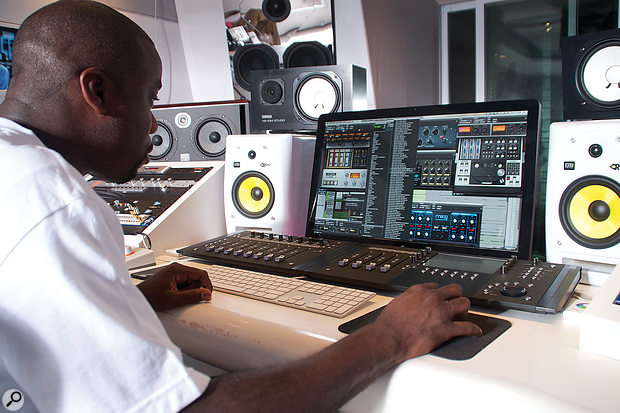
Mix Engineer Leslie Braithwaite on recording "Happy" : "You will note that I have the same three plug?ins on each individual vocal track: the Waves De?esser, the Waves Renaissance Compressor and the Universal Audio or Waves SSL Channel for EQ."


In the "Breaking the Mix Rules" Interview he mentions that he uses a little of the Waves DeEsser for sibilance


Engineer Derek Ali on recording To Pimp a Buterfly : "I use plug-ins on his vocals during recording, because it’s easier and quicker, and they tend to be the Waves Renaissance Compressor, Metaflanger, De-Esser, SSL Channel, S1 Imager and the [Avid] Air Chorus."

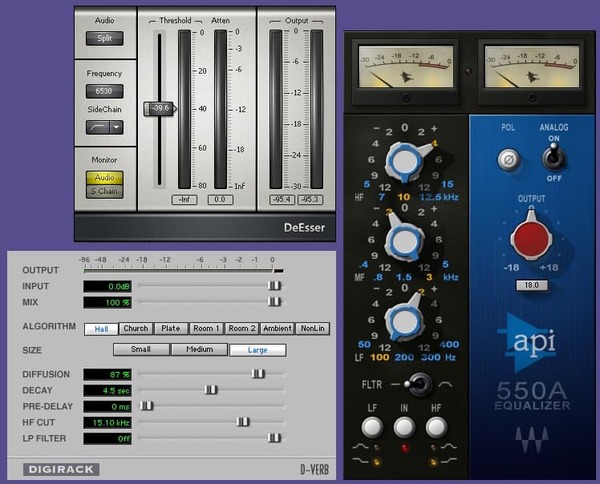
Used on vocals for Morning Phase, as stated in this May 4, 2014 Audio Technology interview with mix engineer Tom Elmhirst.
Elmhirst: “I love the Orban plug-in, and now also have a real Orban. But I didn’t use a lot of spring reverb on this album, because it had a different kind of sound. As I said earlier, the D-Verb Mark 1 was quite a big part of this record. Beck is a big fan of that plug-in, as am I. It’s very transparent. I probably EQ-ed it a bit on the way back in, and particularly on the vocals I used very long reverb settings, in some cases as long as 11 to 12 seconds. The other two plug-ins I used on the vocals are the Waves De-esser and a bit of brightening from the Waves API 550a.”
.jpg?v=1782886998)
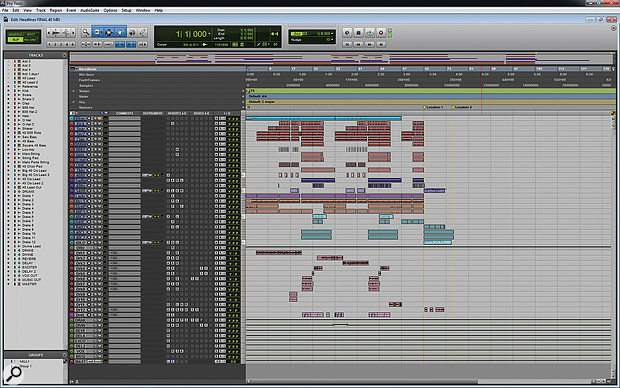
Noah Shebib tells that he uses the Waves DeEsser Plugin in Drake Lead Vocal of "Headlines".


In the Point Blank Music School's YouTube video "Cazzette - A State of Bliss Track Masterclass (FL Studio)," Cazzette discusses using the Waves DeEsser plugin, mentioning it as "also some Deesser" in their production setup.
.jpg?v=1783548432)
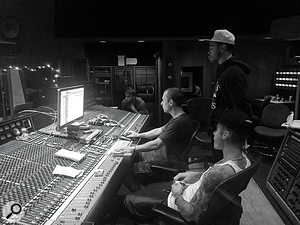
Used on Purpose, as stated by mix engineers Josh Gudwin and Andrew Wuepper in this May 2016 Sound on Sound interview about the mixing of the title track and others.
Gudwin picks out a few other interesting tracks, beginning with a vocal track named ‘vcls’. “That track contains a vocal sample that Blood made of Justin’s vocal. I’m just touching that with the LFO Tool for a bit of pumping, I take out some high frequencies with the Pro-Q 2, and then use the SoundToys Microshift for a slight pitch-shift/chorusing effect. ‘Sry1V’ below that is the vinyl sound in the track. ‘$JBU’ is the main lead vocal bus, on which I have the UAD 1176, Waves De-Esser, Manley Massive Passive, Metric Halo Channel Strip. The sends are to the generic aux tracks at the bottom of the sesion: verb, ping-pong delay, Dimension D. Below the lead vocal bus is the print track of a Bricasti outboard.”
Wuepper: “There are two tracks called ‘Bric’ around the main vocal bus; the one above is the print from the Bricasti effect that was used on the percussion, and the one below is the print of the Bricasti reverb on the vocal. Next are Josh’s vocal delays. Putting delays on audio snippets [ie. copying short vocal clips to new tracks and applying delays as inserts, rather than automating a send from the main vocal track] is a pretty interesting way of doing things. I’ve not seen anyone else do this, but it makes it easier for Josh to manipulate these delays and to go deeper into the effect. He can really fine tune the delay times and decay lengths and so on. Sometimes the feedback you get with plug-ins can act a little weird, and this approach allows him to have more control.”
Gudwin: “The five green tracks are all vocal throws and delays. I don’t like to automate delay throws via aux tracks. The top green track is the master track for the delays, ‘JB Throw All’, and it has a compressor and an SPL Vitalizer. The ‘1147’ delay track has the UAD Cooper Time Cube, with a quick ping-pong-y flutter delay that I use to widen, and the track called ‘1167’ has a basic eighth-note delay from the Echo Boy. The ‘A’ insert is Auto-Tune, but it’s not working on these tracks. When needed, our vocal tuning is normally done by Chris ‘Tek’ O’Ryan in Melodyne. I sometimes do it myself, if I have the time do it, in the stand-alone version.
“The blue vocal tracks below the vocal delay tracks are the main lead vocal comp tracks, and on many of them I have the UAD SSL Channel Strip, UAD LA-2A, and the Waves C6 multiband compressor, and sometimes also the Pro-Q 2 EQ. The ‘DLYP’ track has a delay pan effect, with the SoundToys Primal Tap delay and Panman auto-panner, SSL Channel Strip and the P&M Vinylizer. ‘White’ and ‘Master’ are printed reverbs recorded in two rooms at Henson. They are my main plug-in vocal reverbs, and the green tracks below are pitched with the Elastic Audio X-Form [in Pro Tools] and effected with the Waves H-Compressor for a pumping effect. I pitched the reverbs up an octave or two, and I mixed them in very low. The ‘PCM’ and ‘PC1’ tracks are prints from ping-pong delays from the Lexicon PCM42 outboard.
“Justin’s backing vocal tracks all go to the group track called ‘JBG1’, on which I have a Waves De-esser, an SSL Channel and the C6 multiband compressor, plus there are a number of delays and reverbs via the sends. Trevon’s backing vocals all go to ‘JBTR’, which has similar effects. I wanted to fill the song up a bit more, and sometimes it’s not the most enjoyable process for an artist to sing all these background parts. Plus a different vocalist will add a different texture to the song, as long as it complements the lead vocal and the record. As I mentioned, Julia added her vocals during the final mix in New York, and her group track also has the De-esser, SSl Channel and C6. Right at the bottom are some effects tracks, with the Dimension D and group delay throws, and so on.
(...) 'Love Yourself'
(...) Next are Justin’s vocals, with I overdubbed in New York. Almost all the regular vocal tracks have the UAD SSL Channel, LA2 and the Waves C6 multiband compressor. These three plug-ins work great on his vocals, so I tend to stick with them. Each of the vocal tracks has slightly different settings from them. They all go to Justin’s lead vocal bus above them, which has the FabFilter Pro-DS de-esser and the Pro-2 EQ. Justin’s lead vocals also go through the Bricasti, and the effect is printed. My own four backing vocals went through a vocal bus on which I had the SSL Channel, and a compressor, but they didn’t do much, nor did the sends. These vocals are very much in the background, I just wanted to add some texture really quickly. Finally, at the top of the session everything went through a Master track, on which I had the UAD SSL channel, mainly for compression set to mid-attack and auto-release — without drums you don’t need the slow attack and quick release — a Massey EQ, boosting 100Hz and 16kHz, a FabFilter Pro-L for level, and the Sonnox Oxford Inflator to add some sheen.”
'What Do You Mean?'
(...) “There were a few more complicated vocal effects, like the ‘JG FX’ track, on which I used the Vitalizer doing some spatial expanding, a UAD Fatso to thicken it up, and I then cut some low mids with an EQ, and used a de-esser. This effect track gave more depth to the vocal and made him sound more like an angel! Underneath that are two ‘Radio’ tracks [which sound like they could have come straight from Peter Gabriel’s ’80s Fairlight experiments]. I used Auto-Tune to pitch the vocals up, and then put on a SoundToys AlterBoy, which changed the formant, and then I’m filtering 350Hz and below.
“Below the ‘radio’ tracks are all my vocal delay tracks, in green as usual, with the bus for all delay throws at the top. One delay track, ‘Splaater’, is a flutter delay with Auto-Tune and the Cooper Time Cube, and the other two have the Waves H-Delay and SoundToys Echo Boy. They’re both quarter-note delays, but with different feels. Below the delay tracks are some ad lib tracks, and all the actual lead vocals, pulled out over several tracks. Most of them have my regular trio of UAD SSL Channel, LA2 and Waves C6 plug-ins, and all vocals are sent to the ‘JB Buss’, on which I have the FabFilter DS de-esser, a Manley EQ doing light cuts at 330Hz, 560Hz and 3kHz, and then a whole bunch of sends to my regular aux tracks at the bottom: a hall reverb, a plate reverb, a light quarter-inch delay, a light ping-pong delay and a Dimension D.
“Further down are four Justin backing vocal tracks, which go to a bus above them, ‘JBG1’, on which I have the SSL Channel, boosting highs and cutting lows and doing some heavy compression, a UAD 33609 compressor, and then the Waves Enigma [phaser/flanger] on a Mutron setting, adding some sweeping sounds. The sends are once again hall and plate reverbs, a quarter-note and a ping-pong delay and a UAD Roland Dimension D. Once Justin had decided to go with my rough mix, I spent another half hour on it, doing some EQ adjustments, and that was it.”


Used for the lead vocals on "Makes Me Wonder", as stated by mix engineer Mark Endert in this September 2007 Sound on Sound interview.
Lead vocal: Waves De–esser, Sony Oxford EQ, Tube–Tech CL1B, Lexicon PCM42, Lexicon 480L
“I love using digital de–essing on the lead vocals. On about every track I mix, the first plug–in insert is probably the Waves De–esser. From there I will do fine–tuning with the EQ. If there’s a narrow band that I want to eliminate or boost, I often use the Sony Oxford EQ immediately after the de–esser. In this case I boosted a little bit around 300Hz, made a small cut around 2500Hz and rolled off some extreme high end. I really like the Oxford EQ for pinpointing frequencies, but as far as sonic shaping is concerned, I prefer the outboard, like the SSL EQ, the GML, or my Neve 1073 modules. You are never going to pinpoint a perfect frequency on a three–band Neve EQ.
“After being treated with the De–Esser and the Oxford EQ, the lead vocals came to the SSL desk, on which I also used EQ, and inserted a compressor. In this case it was a Tube–Tech CL1B, set to a ratio of 5:1. For some reason I like 5:1 on vocals. I added delays on the lead vocals in the choruses — PCM42, eighth note or something like that — and there’s a reverb, most likely a 480L, set to a short reverb time.”


Album Usage
The Waves DeEsser has been featured on the following albums:

Ex Machina
Metrik (2020)

Sum 2 Prove
Lil Baby (2020)
Echoes
Ben Duffy & Kove (2019)

KIRK
DaBaby (2019)
How Does It Feel
M-22 (2018)
All The Stars (with SZA)
Kendrick Lamar & SZA (2018)

Bodak Yellow (feat. Kodak Black)
Cardi B & Kodak Black (2017)

Lost In You
Eddie Thoneick & Erick Morillo (2016)

Take Me Home
Thomas Gold (2015)
To Pimp A Butterfly
Kendrick Lamar (2015)

Rehab (Remixes & B Sides)
Amy Winehouse (2015)

Purpose (Deluxe)
Justin Bieber (2015)

Another Country
Rod Stewart (2015)

Hello
Adele (2015)
Morning Phase
Beck (2014)

Against All Odds
Dyro (2014)

Happy (Oktoberfest Mix)
Pharrell Williams (2014)
Happy (Live)
Pharrell Williams (2014)

Rolling in the Deep
Adele (2011)

Headlines
Drake (2011)
Genre Usage
Based on how artists on Equipboard use this gear, it is most commonly found in the following genres.
Used With
Based on how musicians on Equipboard use Waves DeEsser, it is most commonly used with the following gear.

-s.webp?v=1783661670)


More Waves De-Esser Plugins

$33.00 - $34.99
in De-Esser Plugins Rank


$29.99 - $34.99
in De-Esser Plugins Rank


$144.00 - $199.00
in De-Esser Plugins Rank

.jpeg?v=1783649500)

$56.00 - $216.00
in De-Esser Plugins Rank


$14.99 - $149.00
in De-Esser Plugins Rank

$39.99 - $49.00
in De-Esser Plugins Rank


$99.00
in De-Esser Plugins Rank


$17.90 - $89.00
in De-Esser Plugins Rank

$94.00 - $99.00
in De-Esser Plugins Rank

$79.00
in De-Esser Plugins Rank


$52.00 - $129.00
in De-Esser Plugins Rank


in De-Esser Plugins Rank

$47.00 - $100.00
in De-Esser Plugins Rank

$0.00
in De-Esser Plugins Rank


$49.00 - $89.99
in De-Esser Plugins Rank


$199.00
in De-Esser Plugins Rank


Accessories & Related Items


-s.webp?v=1783662576)
-s.webp?v=1783662573)
-s.webp?v=1783662592)


-s.webp?v=1783662054)


Community setups


Similar


Most Popular De-Esser Plugins
Most Popular Brands
-
Added to Equipboard on by
 equipboard
Gear IQ 4934
-