
Pricing and availability


* Product prices and availability are updated by Equipboard every 24hrs and are subject to change. Equipboard may receive compensation for purchases made at participating retailers linked on this site. This compensation does not affect what products or prices are displayed, or the order of prices listed. For more information, please refer to our affiliate disclosure.
Description
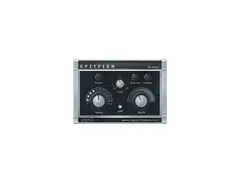
The Spitfish De-Esser Plugin is a precise tool designed for vocal processing, aimed at controlling and reducing sibilance in audio recordings. This intuitive plugin is part of the well-regarded Fish Fillets bundle, known for its effectiveness in vocal enhancement. The Spitfish algorithm stands out for its ability to identify and diminish harsh "s," "sh," and "ch" sounds, ensuring smoother and more polished vocal tracks.
Ideal for both budding producers and seasoned audio engineers, Spitfish offers a straightforward interface that makes it accessible without sacrificing depth or control. Users appreciate the real-time processing capabilities that allow for immediate auditory feedback. This plugin is compatible with most major digital audio workstations (DAWs), making it a versatile addition to any studio's toolkit.
Spitfish's design allows for seamless integration into your workflow, helping to improve vocal clarity without the need for complex adjustments. Whether you're working on a dynamic podcast or a nuanced music production, this plugin is engineered to deliver professional-grade results with minimal effort.
Key Features:
- Precision de-essing for reducing sibilance
- Part of the renowned Fish Fillets plugin bundle
- Simple, user-friendly interface for ease of use
- Real-time processing for immediate feedback
- Compatible with major DAWs for versatile application
- Designed for both novice and seasoned audio engineers
Videos

Sketch Almighty
How To Use A De-esser |FL Studio Spitfish (FREE VST)
How To Use A De-esser |FL Studio Spitfish (FREE VST)
Sketch Almighty
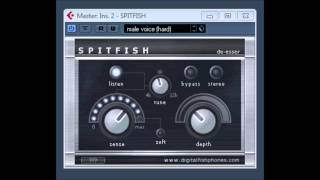
SpitFish De-esser by DigitalFishPhones

UPROAR 24

How To Download & Install Spitfish De-esser Free VST Plugins HINDI

Acoustic Akki

De Esser Tutorial - How To Use De Esser Vst Plugins Free (Spitfish Lisp and DD de esser)

YoungText
How To Use a De-esser // VEGAS PRO TUTORIALS ft SPITFISH De-esser // Tutorial Thursday's

Lo Knows
How to use DE-ESSER 🎤 | How to de-ess vocals and speech | JS De-esser, Spitfish, iZotope Nectar 3

Dominik „Wodzu” Bodzek
Reviews
Owner Insights
We analyzed real musician discussions from forums and Reddit to find what players love, question, and tweak about Digital Fish Phones Spitfish De-Esser Plugin.
Setup and maintenance
-
De-essing is most effective before volume automation, ideally after subtractive EQ and baseline compression for better audio dynamics.
Source
Features and functionality
-
Normalizing the vocal track before processing can enhance Spitfish's responsiveness in detecting softer audio levels.
Source -
Spitfish may intentionally add a "grimey" or colored sound as part of its design, potentially contributing to perceived distortion in high notes.
Source -
Users should verify if auto-gain is enabled, as it could unintentionally affect volume levels and contribute to distortion during high-frequency sibilance reduction.
Source
Software and compatibility
-
Using a "fruity balance" plugin after Spitfish can manage volume control while maintaining de-esser effectiveness in the effects chain.
Source -
Users mention using FL Studio's built-in tools like Maximus or Parametric EQ 2 with Fruity Peak Controller for effective de-essing, tailored to their specific setup.
Source
User experience
Use cases and applications
-
Spitfish's unique sound character might suit styles where a more raw or gritty vocal texture is desired, aligning with the "BLOCKFISH has 'soul'" philosophy.
Source -
Some users report that Spitfish might add unwanted coloration or a dull effect to the vocal chain, even when settings are neutral.
Source
4.0 out of 5
Based on 1 Review and 4 Ratings

Artist usage
Add artist

Genre Usage
Based on how artists on Equipboard use this gear, it is most commonly found in the following genres.
More Vocal Processing Plugins

$32.00 - $39.99
in Vocal Processing Plugins Rank


-m.webp?v=1784872185)
$49.00 - $99.00
in Vocal Processing Plugins Rank


$33.00
in Vocal Processing Plugins Rank


$199.00 - $207.00
in Vocal Processing Plugins Rank


$32.00 - $34.99
in Vocal Processing Plugins Rank

.jpeg?v=1784891088)


$34.99 - $37.00
in Vocal Processing Plugins Rank


$250.00 - $500.00
in Vocal Processing Plugins Rank


$34.99
in Vocal Processing Plugins Rank
.png?v=1784891692)


$309.00 - $399.00
in Vocal Processing Plugins Rank


$32.00 - $39.99
in Vocal Processing Plugins Rank


$0.00
in Vocal Processing Plugins Rank

$37.00 - $49.99
in Vocal Processing Plugins Rank


$122.00 - $330.00
in Vocal Processing Plugins Rank


in Vocal Processing Plugins Rank


$115.00 - $230.00
in Vocal Processing Plugins Rank


$205.00 - $349.00
in Vocal Processing Plugins Rank


$39.99 - $47.00
in Vocal Processing Plugins Rank


$70.00 - $79.00
in Vocal Processing Plugins Rank

$37.00 - $39.00
in Vocal Processing Plugins Rank

$29.99 - $34.99
in Vocal Processing Plugins Rank


$199.00
in Vocal Processing Plugins Rank

$87.00 - $169.00
in Vocal Processing Plugins Rank


$144.00 - $199.00
in Vocal Processing Plugins Rank


$149.00
in Vocal Processing Plugins Rank


$32.00 - $39.99
in Vocal Processing Plugins Rank

$34.99 - $37.00
in Vocal Processing Plugins Rank


$95.00 - $99.00
in Vocal Processing Plugins Rank

$29.99 - $34.99
in Vocal Processing Plugins Rank


$49.00 - $198.00
in Vocal Processing Plugins Rank

$199.00
in Vocal Processing Plugins Rank

$14.99 - $17.00
in Vocal Processing Plugins Rank

$75.00 - $80.00
in Vocal Processing Plugins Rank


$29.99 - $39.99
in Vocal Processing Plugins Rank

$143.00 - $160.00
in Vocal Processing Plugins Rank

$39.00 - $69.00
in Vocal Processing Plugins Rank
Community setups


Similar


Gear Guides









Most Popular Vocal Processing Plugins
Most Popular Brands
-
Added to Equipboard on by
 lilythewolf
GearIQ 6892
-


