


Pricing and availability
We compare 600+ stores and found this item at 6 stores. Prices updated .
Store
Reviews
Price








Average Price: $602
Standard/Professional
$200
$1001+
Price Tier
Budget
Standard
High-end
Price History
Based on price data from 6 merchants for "Mackie ProFX16v3". Prices shown reflect NEW condition. Tracking began Apr 2, 2026.
* Product prices and availability are updated by Equipboard every 24hrs and are subject to change. Equipboard may receive compensation for purchases made at participating retailers linked on this site. This compensation does not affect what products or prices are displayed, or the order of prices listed. For more information, please refer to our affiliate disclosure.
Description
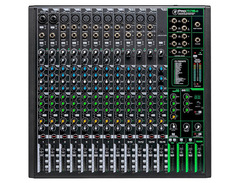
The Mackie ProFX16v3 16-Channel 4-Bus Professional Effects Mixer with USB is a powerhouse for live sound, home recording, and content creation. Equipped with Mackie's renowned Onyx mic preamps, it offers up to 60dB of gain, ensuring your microphones and instruments sound pristine. The mixer features the advanced GigFX effects engine, providing 24 built-in effects to add depth and character to your sound. Whether you're laying down tracks or performing live, the ProFX16v3 ensures high-quality audio with its 24-bit/192kHz recording capability.
With a robust design built to withstand the rigors of stage and studio, this mixer includes single-knob compression for streamlined control and a 3-band EQ with variable mid-frequency control for precise sound shaping. Its USB interface allows seamless recording and playback, making it an ideal choice for modern musicians and producers.
Key Features:
- 16 channels with 11 Onyx mic preamps for superior sound quality
- 24 GigFX onboard effects for creative flexibility
- 24-bit/192kHz 2x4 USB recording interface
- Single-knob compression on all microphone channels
- 3-band EQ with variable mid-frequency control
- 100Hz low-cut filter and 48V phantom power on all mic channels
- Hi-Z switches for direct connection of instruments
- Dual stereo subgroup outputs with per-channel assignment
- Rugged, durable construction ideal for live and studio use
- Includes Waveform OEM recording software and DAW Essentials Bundle
Owner's manual
Mackie ProFX16v3 User ManualProduct specs
| Type | Analog Mixer with USB Interface |
| Channels | 16 (8 x mono, 4 x stereo) |
| Computer Connectivity | USB (2 x 4) |
| A/D Resolution | 24-bit/192kHz |
| Faders | 16 x 60mm Faders |
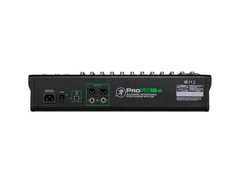
| Inputs - Mic Preamps | 2 x XLR-1/4" combo (mic/line/Hi-Z), 9 x XLR (mic) |
| Phantom Power | Yes |
| Inputs - Line | 6 x 1/4", 6 x 1/4" (3 x stereo), 1 x 1/8" (stereo) |
| Outputs - Main | 2 x XLR, 2 x 1/4" (L/R), 2 x 1/4" (control room) |
| Outputs - Other | 4 x 1/4" (subgroup out) |
| Aux Sends | 1 x FX Send (post), 2 x Monitor Send (pre), 1 x Monitor Send (pre/post) |
| Send/Return I/O | 1 x 1/4" (FX send), 3 x 1/4" (monitor send) |
| Busses/Groups | 2 x Subgroup |
| Inserts | 8 x 1/4" (channel) |
| Headphones | 1 x 1/4" |
| USB | 1 x Type B |
| Other I/O | 1 x 1/4" (footswitch) |
| EQ Bands | 3-band EQ with Variable Mid Frequency (mic channels), 100Hz Low-cut Filter |
| Signal Processing | 8 x Channel Compressors |
| Effects | GigFX Engine: Reverbs, Chorus, Delay, Flange, Auto-Wah |
| Software | Waveform OEM DAW, FX Plug-in Collection |
| Power Source | Standard IEC AC cable |
| Height | 4.4" |
| Width | 17.7" |
| Depth | 17.1" |
| Weight | 15.2 lbs. |
FAQs
-
What are the main connectivity options on the Mackie ProFX16v3 mixer?
-
The Mackie ProFX16v3 offers USB connectivity, allowing for direct computer interfacing, and features multiple XLR and 1/4" inputs for mics and instruments. It also includes main XLR and 1/4" outputs, subgroup outputs, and more, ensuring versatile connectivity for various setups.
-
Does the Mackie ProFX16v3 mixer come with built-in effects?
-
Yes, the Mackie ProFX16v3 features a GigFX effects engine, offering a range of effects such as reverbs, chorus, delay, flange, and auto-wah, providing creative options for live performances and studio sessions.
-
Is the Mackie ProFX16v3 suitable for recording and live sound applications?
-
The Mackie ProFX16v3 is designed for both recording and live sound. It provides USB connectivity for recording, high-quality mic preamps, and a variety of outputs, making it versatile for different audio environments.
-
What DAW software is compatible with the Mackie ProFX16v3 mixer?
-
The Mackie ProFX16v3 comes with Waveform OEM DAW software and an FX Plug-in Collection, but it can also be used with most DAWs that support USB audio interfaces, offering flexibility for different recording setups.
-
Does the Mackie ProFX16v3 provide phantom power for condenser microphones?
-
Yes, the Mackie ProFX16v3 includes phantom power, enabling the use of condenser microphones, which are often preferred for their sensitivity and sound quality in various recording and live sound applications.
Videos

Sweetwater
Mackie ProFX v3 Mixers Overview
Mackie ProFX v3 Mixers Overview
Sweetwater
🌴New Mackie ProFX16v3 16-Channel 4-bus Professional Effects Mixer with USB🌴

expert island
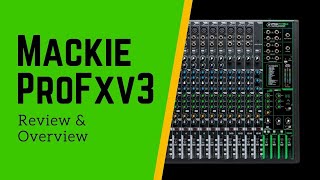
Mackie ProFX16v3 Review and Overview

Proclaim AV
![Video thumbnail for Mackie ProFX16 v3 Review with WYO [Part III] by Performer Magazine](https://img.youtube.com/vi/-TMQ3K-jUgs/mqdefault.jpg)
Mackie ProFX16 v3 Review with WYO [Part III]

Performer Magazine
Mackie ProFx16v3 rack mount

YeesSivlo
Mackie ProFX16v3 16 channel mixing console and Montarbo B108 8" active speaker. #soundcheck

Sound Square
Reviews
PROS
-
Versatile with multiple channel options for various setups
-
Integrated effects deliver excellent sound quality
-
Sturdy build with reliable faders and knobs
-
Zero latency monitoring for seamless audio experience
-
Great mic preamps considered best in its price range
-
USB connectivity for easy integration with computers
-
Smooth pairing with other Mackie products like Thump speakers
-
Simple to use with straightforward controls
-
Lightweight and portable for easy transportation
-
Minimal system noise enhances audio clarity
CONS
-
Mute button issues reported, affecting long-term reliability
-
Compressor functionality perceived as ineffective by some users
-
Channel 9/10 mixing with USB blend knob limits versatility
Owner Insights
We analyzed real musician discussions from forums and Reddit to find what players love, question, and tweak about Mackie ProFX16v3.
Features and functionality
Setup and maintenance
-
Using a pencil eraser as a probe can help detect cold solder joints by tapping components for crackling sounds.
Source
User experience
Comparisons
Critic Reviews
5.0 out of 5
Based on 0 Reviews and 2 Ratings
Genre Usage
Based on how artists on Equipboard use this gear, it is most commonly found in the following genres.
More Mackie Mixers

$120.00 - $449.99
in Mixers Rank


$218.00 - $329.99
in Mixers Rank


$180.25 - $219.99
in Mixers Rank


$75.00 - $329.99
in Mixers Rank


$999.00 - $1,049.99
in Mixers Rank


$363.00 - $449.99
in Mixers Rank


$99.90 - $149.99
in Mixers Rank


$399.95
in Mixers Rank


$142.52 - $379.99
in Mixers Rank


$113.90 - $159.99
in Mixers Rank


$712.49 - $749.99
in Mixers Rank

$25.00 - $1,049.99
in Mixers Rank

.png?v=1784984897)


$270.00
in Mixers Rank


$630.00 - $799.99
in Mixers Rank


.png?v=1785047567)


$311.00 - $379.99
in Mixers Rank


$25.00 - $1,049.99
in Mixers Rank


$113.90 - $159.99


$419.99 - $439.99

$269.99 - $329.99
Accessories & Related Items


-s.webp?v=1785135867)


Artist usage


Community setups


Similar


Gear Guides








Most Popular Mixers
Most Popular Brands
-
Added to Equipboard on by
 mandomvp
GearIQ 188
-


