

Pricing and availability
We compare 600+ stores and found this item at 2 stores. Prices updated .
Store
Reviews
Price




Average Price: $285
Standard/Professional
$200
$1001+
Price Tier
Budget
Standard
High-end
* Product prices and availability are updated by Equipboard every 24hrs and are subject to change. Equipboard may receive compensation for purchases made at participating retailers linked on this site. This compensation does not affect what products or prices are displayed, or the order of prices listed. For more information, please refer to our affiliate disclosure.
Description
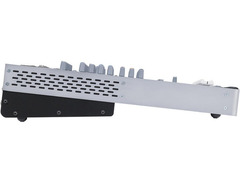
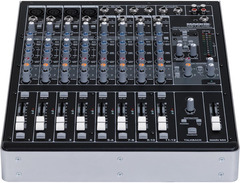
Immerse yourself in a seamless blend of analog warmth and digital precision with the Mackie Onyx 1220i, a 12-channel mixer that offers a rich palette of recording possibilities. Bridging the gap between traditional tactile control and modern computer interface, this mixer elevates your studio experience with its 24-bit/96kHz FireWire audio interface. Craft your sound with the renowned Onyx mic preamps known for their transparent, natural audio quality, and shape it further using the classic "British-style" 3-band Perkins EQ.
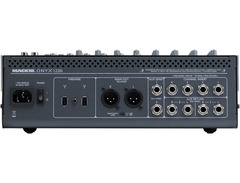
The Onyx 1220i is not just about high-fidelity sound; it’s about flexibility and control. Whether you're routing aux sends, master signals, or individual channels into your DAW, this mixer ensures a smooth workflow. It supports a variety of setups with its versatile I/O options, making it a prime choice for home studios or professional environments. Additionally, built-in features such as phantom power and direct instrument inputs on the first two channels make it versatile enough for diverse recording needs.
Whether you’re an aspiring producer or an experienced engineer, the Onyx 1220i offers a robust, intuitive platform to bring your musical ideas to life. It’s more than a mixer; it's your gateway to professional-grade recordings.
Key Features:
- 12-channel premium analog mixer with integrated 24-bit/96kHz FireWire I/O
- Four Onyx boutique-quality mic preamps
- 3-band Perkins EQ with sweepable mids on mic/line channels
- Flexible FireWire routing, including aux sends and pre/post EQ assignment
- Built-in DI on first two channels for direct instrument connection
- Individual 48V phantom power switches on all mic inputs
- Talkback section with built-in mic and flexible routing
- Compatible with all major DAWs
- Includes Tracktion 3 Music Production Software
Product specs
| Brand | Mackie |
| Model | Onyx 1220i 12-Channel Firewire Mixer |
| Finish | Black/Grey |
| Year | 2010 - 2017 |
| Categories | Audio Interfaces, Audio Mixers, Consoles and Summing Boxes |
| Bit Depth | 24-bit |
| Compatibility | Windows, macOS |
| Computer Connectivity | Firewire |
| Electronics | Analog, Digital, Solid State |
| Format | Desktop Standalone |
| Number of Analog Inputs | 34 |
| Number of Analog Outputs | 8 |
| Number of Channels | 12 |
| Number of Digital Inputs | 0 |
| Number of Digital Outputs | 0 |
| Number of Headphone Outputs | 1 |
| Number of MIDI Inputs | 0 |
| Number of MIDI Outputs | 0 |
| Number of Mic Preamps | 4 |
| Sample Rate | 96 khz |
| Simultaneous I/O | 16 x 2 |
FAQs
-
Does the Mackie Onyx 1220i work with my DAW software?
-
The Mackie Onyx 1220i is compatible with major DAWs, including Pro Tools M-Powered 8, Logic, SONAR, Cubase, Ableton Live, and Final Cut Pro, making it versatile for various recording and production setups.
-
What type of connectivity does the Mackie Onyx 1220i offer?
-
The Mackie Onyx 1220i features FireWire connectivity, providing a robust connection for high-quality audio transfer at 24-bit/96kHz resolution.
-
How many mic preamps are included in the Mackie Onyx 1220i?
-
The Mackie Onyx 1220i includes four Onyx boutique-quality mic preamps, ensuring professional-level sound for your recordings.
-
Can I use the Mackie Onyx 1220i for live performances?
-
Yes, with its 12-channel analog mixer, smooth 60mm faders, and robust routing options, the Mackie Onyx 1220i is suitable for both studio recording and live sound applications.
-
Does the Mackie Onyx 1220i require a specific power supply?
-
The Mackie Onyx 1220i features a "Planet Earth" switching power supply, which allows for worldwide use without needing an additional power converter.
Videos

musotalk
Mackie Onyx Mixer 1640i 1220i 820i Teil 1

Mackie Onyx Mixer 1640i 1220i 820i Teil 1
musotalk

Mackie Onyx-i Series: 820i, 1220i, 1620i, 1640i - NAMM 2012 - AudioSavings

audiosavings

Mackie Onyx i-Series 820i, 1220i, 1620i & 1640i Analog FireWire Mixer Teaser | Full Compass

Full Compass
Reviews
PROS
-
Multi-channel recording capability enhances flexibility for various setups and applications.
-
Firewire connectivity allows direct multi-track recording to DAWs.
-
Four XLR mic inputs enable individual mic setup for multiple hosts or performers.
-
Rugged build quality ensures durability in professional environments.
-
Compact and portable design, easy to transport for on-the-go recording.
-
Integration with "mix minus" for professional-grade Skype call management.
-
Additional firewire channels for AUX and main outputs increase routing options.
-
Seamlessly supports complex audio routing for live and recorded events.
CONS
-
Limited to two AUX buses, restricting the number of independent Skype callers.
-
Potential driver issues affecting sample rate recognition on some systems.
-
Learning curve for optimal setup and usage for inexperienced users.
Owner Insights
We analyzed real musician discussions from forums and Reddit to find what players love, question, and tweak about Mackie Onyx 1220i.
Software and compatibility
Features and functionality
User experience
-
Owners using Thunderbolt adapters report successful Firewire protocol support, highlighting adaptability for newer Mac systems.
Source -
Intermittent noise issues may be linked to failing semiconductors, which can complicate diagnosis and repair timing.
Source -
Adjusting sample rates can slightly affect crackling issues, indicating a potential area for troubleshooting.
Source
Setup and maintenance
-
Adjusting playback engine settings and resetting I/O defaults can resolve input visibility issues in digital audio workstations.
Source -
The crackling noise on channel 11-12 can occur even without a FireWire connection, indicating an internal issue, possibly a faulty op amp.
Source -
Monitoring the Activity Monitor on a Mac for CPU lag can help identify performance issues affecting audio output.
Source
Critic Reviews
4.5 out of 5
Based on 0 Reviews and 2 Ratings
Artist usage
Add artist
.jpg)

Genre Usage
Based on how artists on Equipboard use this gear, it is most commonly found in the following genres.
Used With
Based on how musicians on Equipboard use Mackie Onyx 1220i, it is most commonly used with the following gear.

More Mackie Mixers

$120.00 - $449.99
in Mixers Rank


$219.00 - $329.99
in Mixers Rank


$180.25 - $219.99
in Mixers Rank


$75.00 - $329.99
in Mixers Rank


$999.00 - $1,049.99
in Mixers Rank


$363.00 - $449.99
in Mixers Rank


$99.90 - $149.99
in Mixers Rank


$399.95
in Mixers Rank


$142.79 - $379.99
in Mixers Rank


$114.11 - $159.99
in Mixers Rank


$712.49 - $749.99
in Mixers Rank

$25.00 - $1,049.99
in Mixers Rank

.png?v=1784755332)


$440.35
in Mixers Rank


$630.00 - $799.99
in Mixers Rank


.png?v=1784755332)


$311.00 - $379.99
in Mixers Rank


$25.00 - $1,049.99
in Mixers Rank


$114.11 - $159.99


$419.99 - $439.99

$269.99 - $329.99
Accessories & Related Items


Community setups


Similar


Gear Guides








Most Popular Mixers
Most Popular Brands
-
Added to Equipboard on by
 denton_peter_mccabe
GearIQ 568
-


