Pricing and availability

* Product prices and availability are updated by Equipboard every 24hrs and are subject to change. Equipboard may receive compensation for purchases made at participating retailers linked on this site. This compensation does not affect what products or prices are displayed, or the order of prices listed. For more information, please refer to our affiliate disclosure.

Dave2D

Dave2D

Razer Blade Pro Review (GTX 1080) - The Best Laptop for Pros?
Video thumbnail for Razer Blade Pro Review (GTX 1080) - The Best Laptop for Pros? by Dave2D

Razer Blade Pro Review (GTX 1080) - The Best Laptop for Pros?

Dave2D
Dave2D

Video thumbnail for Razer Blade Pro 17 (2019) Review by MobileTechReview

Razer Blade Pro 17 (2019) Review

MobileTechReview

MobileTechReview

Reviews

Owner Insights

We analyzed real musician discussions from forums and Reddit to find what players love, question, and tweak about Razer Blade Pro Laptop.

Use cases and applications

  • Despite high temperatures, the laptop performs well in gaming, with a noted peak of 94°C during intense sessions.

    Source

User experience

  • Users report that the Razer Blade Pro is prone to significant backlight bleed, particularly in replacement monitor units after repairs.

    Source
  • Some users experience keyboard issues where it stops responding to the Synapse software, requiring a reboot to resolve.

    Source
  • Battery bloat is a common issue, with replacement costs around $150.

    Source
  • Owners express a strong attachment to the Razer Blade's aesthetics, despite outdated internals, highlighting its enduring design appeal.

    Source

Comparisons

  • The Zephyrus 14 is frequently mentioned as a more attractive upgrade option due to its performance and the potential for higher-end GPU pairings.

    Source
  • The Razer Blade Pro is often compared to Alienware laptops, with both experiencing high temperatures during use.

    Source
  • An Acer Nitro 5 with an i5 11400H and RTX 3060, priced at double, offers better performance than the Razer Blade Pro 17 2016.

    Source

Software and compatibility

  • Firmware updates and driver packages are inconvenient to access, requiring users to find the download link in PDFs.

    Source
  • The Razer Blade Pro's RAID setup often fails due to synchronization issues with the controller, rather than individual drive failures.

    Source

Mods and upgrades

  • It's recommended to use shrink tubing on the ribbon connecting the chassis to the screen to prevent shearing during frequent opening and closing.

    Source
  • Some owners have successfully modified BIOS to enable undervolting, reducing peak temperatures significantly.

    Source

Build quality

  • Owners report issues with the durability of power adapters and rubber feet, which tend to disintegrate within a year of use.

    Source
  • The Razer Blade Pro 17 2016 features a 4K panel with 60Hz and 100% Adobe RGB coverage, but slow response times may affect gaming performance.

    Source

Features and functionality

  • Users report the inability to undervolt 10th gen CPUs without BIOS modifications, impacting heat management.

    Source
  • The Razer Blade Pro 17 2016 is equipped with a GTX 1080 Desktop GPU, i7 6700HQ CPU, and 32GB RAM, which may struggle with modern software demands.

    Source

Setup and maintenance

  • Regular cleaning of fans and heat sinks is recommended, with many suggesting annual repasting for optimal thermals.

    Source

Value and pricing

  • At $350, the Razer Blade Pro 17 2016 is a tempting buy for its build, but performance lags behind newer, similarly priced desktop builds.

    Source

Critic Reviews

Razer Blade Pro FHD review: The screen is its best and worst trick - Ars Technica

arstechnica.com

The Razer Blade Pro FHD impresses with its slim design and stellar keyboard, but it falters in performance for its price point. While the 120Hz screen and compact build are appealing, the lack of variable refresh rate and occasional system bugs detract from the overall experience. Customization enthusiasts may enjoy the keyboard's lighting options, but the cumbersome Synapse software and obligatory online login are frustrating. Ultimately, this laptop suits a niche audience willing to accept its shortcomings in exchange for portability and design, but it struggles to justify its $2,000 cost against competitors.

Razer Blade Pro 17 (2020) Review | PCMag

pcmag.com

The Razer Blade Pro 17 (2020) impresses with its sleek, all-metal build and top-tier performance, powered by the Max-Q GeForce RTX 2080 Super GPU. Its 300Hz display and long battery life make it a standout for gamers on the go. However, its high price and limited 512GB storage for a 17-inch laptop could be deal-breakers for some. Additionally, the laptop's fan noise when gaming is louder than average. Despite these drawbacks, it remains one of the most portable and powerful 17-inch gaming laptops, making it a compelling choice for those with a big budget.

positive

Razer Blade Pro 17 Early 2021 Laptop Review: The GeForce RTX 30 Difference

notebookchat.com

The Razer Blade Pro 17 Early 2021 impresses with its GeForce RTX 30 series performance, making it the fastest Blade Pro yet. However, it falls short with a lackluster IPS panel and high price tag, leaving potential buyers questioning the value. While the gaming performance is solid, the 4K screen option seems misaligned with the i7 processor, especially when rivals offer better configurations. The laptop's noise and heat management also leave room for improvement, making it a tough sell for those seeking a top-tier gaming and productivity machine.

The Razer Blade Pro 17 Is a Great Gaming Laptop But I'm Struggling to Be Impressed

gizmodo.com

The Razer Blade Pro 17 is a visually stunning gaming laptop with a sleek design and impressive 300 Hz display. However, it struggles with thermal management, running hot during intensive tasks, and has a shorter battery life. While it offers a good selection of ports, including Ethernet and SD card slots, its performance is nearly on par with the Blade 15 Advanced, which has a superior GPU for the same price. Overall, it’s a solid choice for those prioritizing screen size and aesthetics over raw gaming performance, but thermal concerns and value for money may deter some buyers.

Add

4.5 out of 5

Based on 2 Reviews and 11 Ratings

5 star
4 star
3 star
2 star
1 star
jauquanturnup

The heart of my studio

The Razer Blade Pro is one of the nicest, if not the nicest piece of technology I have ever owned! There is nothing that this laptop does not have. Style, cutting edge technology, speed, storage, utilities , software , high speed ports, and did i mention the customizable LED's !

T

Good for gaming, good for editing in Premiere Pro.

Artist usage

Add artist
See how Avicii uses Razer Blade Pro Laptop

Avicii

Music Producer

Jovicii

...
Verified via Photo

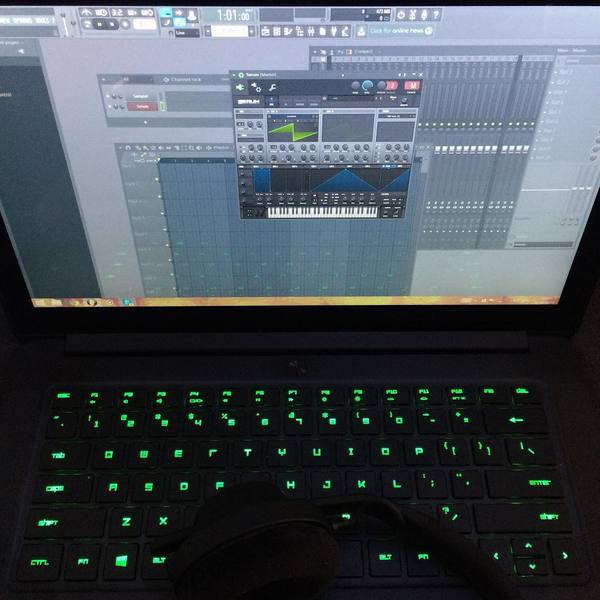
In a 2017 Instagram post by Avicii, a Razer Blade Pro Laptop is visible with FL Studio open, suggesting its use in his studio work.

See how Afrojack uses Razer Blade Pro Laptop

Afrojack

Music Producer

AJXJS

...
Verified via Razerzone

Here, Afrojack can be seen repeatedly using and promoting the Razer Blade Pro. This promotion emphasizes the Afrojack Production Studio App in conjunction with FL Studio. This promotion is one of three parts of the "Razer EDM Collaboration Series" which will soon feature Borgore and Flux Pavilion.


See how Flux Pavilion uses Razer Blade Pro Laptop

Flux Pavilion

Music Producer

...
Verified via Photo

This photo shows Flux Pavilion using a Razer Blade Pro Laptop.

See how Dyro uses Razer Blade Pro Laptop

Dyro

Music Producer

...
Verified via Photo

Dyro's photo is captioned "Hotel studiooo" which indicates this is his producing setup when he's out touring and staying in hotels. The laptop he's using is a Razer Blade Pro with a 17" display. He is also wearing what appear to be Beyerdynamic headphones, but it's impossible to tell the exact model without fully seeing the sides.

See how Metro Boomin uses Razer Blade Pro Laptop

Metro Boomin

Music Producer

NAV and Metro Boomin

...
Verified via Instagram

Metro Boomin can be seen working on his Razer Blade during recent studio sessions with Drake & Future

See how Feed Me uses Razer Blade Pro Laptop

Feed Me

Music Producer

Seventh Stitch

...
Verified via Photo

Feed Me can be seen using a Razer Blade 14" laptop when he travels out of his home studio via uploaded photos from his Instagram & Twitter pages

See how Borgore uses Razer Blade Pro Laptop

Borgore

Music Producer, DJ

Alphamale Primates

...
Verified via Photo

In this Instagram photo, Borgore jokes about how he uses his Razer Blade Pro in live performance: "mixing in and out of counter strike on me @razer laptop :E" Additionally, Razer specified that Borgore's collaboration with them involved the Razer Blade Pro specifically in a Press Release (http://www.razerzone.com/press/detail/press-releases/razer-blade-pro-notebook-updated-with-faster-graphics-and-new-integrated-switchblade-ui-apps ).

See how Julian Jordan uses Razer Blade Pro Laptop

Julian Jordan

Music Producer

...
Verified via Photo

In this pic u can see him using Razer blade laptop

See how Nick Mira uses Razer Blade Pro Laptop

Nick Mira

Music Producer

Internet Money

...
Verified via YouTube

Nick Mira use Razer Blade Pro in this video for Genius

See how Oliver Sykes uses Razer Blade Pro Laptop

Oliver Sykes

Singer, Keyboardist

Bring Me The Horizon

...
Verified via YouTube

we can see oli use it in this video
See how Sandro Silva uses Razer Blade Pro Laptop

Sandro Silva

Music Producer

...
Verified via Photo

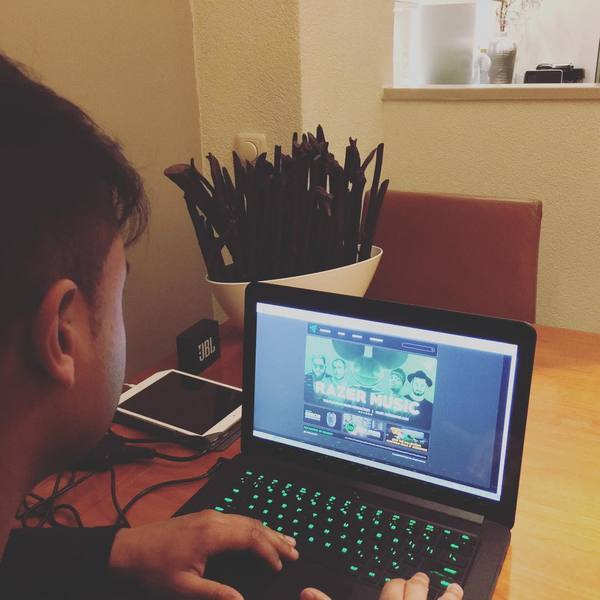
"Enjoying my #Razer laptop! Such a good computer to bring on the road." Sandro Silva appears to use a Razer Blade as his mobile production computer


See how Carnage uses Razer Blade Pro Laptop

Carnage

DJ

...
Verified via Razerzone

Razer Music lists Carnage as using their Razer Blade laptop.

Genre Usage

Based on how artists on Equipboard use this gear, it is most commonly found in the following genres.

Used With

Based on how musicians on Equipboard use Razer Blade Pro Laptop, it is most commonly used with the following gear.
More Razer Computers & Peripherals

Community setups

Similar

Gear Guides