This page about Avid S6 is a stub. You can help improve it:


Pricing and availability




* Product prices and availability are updated by Equipboard every 24hrs and are subject to change. Equipboard may receive compensation for purchases made at participating retailers linked on this site. This compensation does not affect what products or prices are displayed, or the order of prices listed. For more information, please refer to our affiliate disclosure.
Description
Step into the future of audio mixing with the Avid S6, a powerful, modular console that seamlessly integrates cutting-edge technology with intuitive design. This console is a game-changer for professionals seeking to elevate their studio recording experience. Drawing from the best of Avid’s ICON and System 5 families, the S6 is a customizable control surface offering superior ergonomics and intelligent studio control. Designed to grow with your business, its modular design allows you to tailor the setup to your exact needs, whether you're working in a small studio or a high-end facility.
The S6 is not just about flexibility; it's about delivering an immersive, efficient workflow. With its high-speed EUCON Ethernet connectivity, you can control up to eight DAWs simultaneously, making it a versatile addition to any studio environment. Its high-resolution TFT display modules provide unprecedented visual feedback, ensuring you stay on top of every detail in your mix. Whether it's accessing plug-ins with precision or viewing scrolling waveforms, the S6 acts as a physical extension of your software, making every project faster and more intuitive.
Tailored for the modern sound engineer, this console offers extensive customizability with a range of modules, including fader, knob, process, and display modules. Its deep integration with Pro Tools and other EUCON-enabled DAWs means you'll experience streamlined workflows and enhanced visual feedback. Whether you're mixing music or audio for post-production, the Avid S6 ensures you deliver the best sounding mixes possible.
Key Features:
- Modular design for customizable control surface
- High-speed EUCON Ethernet connectivity for multi-DAW integration
- Superior ergonomics for intuitive mixing experience
- High-resolution TFT display modules for enhanced visual feedback
- Deep integration with Pro Tools and other EUCON-enabled DAWs
- Supports up to 64 channel faders (M40 configurations)
- Extensive visual feedback with top-lit knobs, OLEDs, and TFT displays
Owner's manual
Avid S6 User ManualFAQs
-
What makes the Avid S6 mixer unique in terms of design?
-
The Avid S6 features a revolutionary modular design, allowing users to customize the control surface with up to 41 individual modules, tailoring it to their specific workflow and studio needs.
-
How does the Avid S6 integrate with Pro Tools and other DAWs?
-
The Avid S6 offers high-speed EUCON Ethernet connectivity for extremely intelligent control of Pro Tools, as well as flexible mixing options for other EUCON-enabled DAWs, providing deep integration and responsive handling.
-
What kind of visual feedback does the Avid S6 provide?
-
The Avid S6 includes four high-resolution TFT color displays that offer extensive visual feedback, enhancing the user's ability to monitor and control their sessions with precision.
-
Can the Avid S6 be expanded with additional modules?
-
Yes, the Avid S6's modular design allows users to add modules as needed, supporting up to a total of 41 individual modules for expanded functionality and customization.
-
How many channels does the Avid S6 support?
-
The Avid S6 supports 32 channels, each equipped with 9 knobs, allowing for detailed control and high-precision editing and mixing.
Videos

Eric Ferguson
AVID S6 - Getting Around on The S6
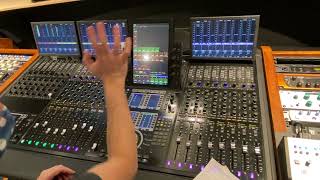
AVID S6 - Getting Around on The S6
Eric Ferguson
Reviews
Owner Insights
We analyzed real musician discussions from forums and Reddit to find what players love, question, and tweak about Avid S6.
Software and compatibility
-
Logic Pro reportedly crashes frequently with the Avid S6 due to a Eucon incompatibility issue, indicating a need for a fix to use both Pro Tools and Logic smoothly.
Source -
Despite not being listed officially, Reaper is known to work with the Avid S6, suggesting potential for other unlisted DAWs to be compatible with tweaks.
Source
Features and functionality
-
Using Select VCAs allows quick access to needed tracks by spilling only the necessary ones, improving workflow efficiency.
Source -
The console's meter bridge can show scrolling clips, providing visual cues that help locate desired audio quickly.
Source -
Displays above each fader bucket can be set to clip view, offering various metering options for detailed monitoring.
Source -
Ad-Hoc Select VCAs can be modified throughout the session to group tracks from different VCAs, enabling tailored workflow adjustments.
Source -
Shift + Ctrl + Select key on the S6 swiftly scrolls the Pro Tools window to the selected track, enhancing navigation efficiency.
Source -
Spill zones and custom plugin maps on the S6 enhance workflow by allowing users to quickly access selected areas and assign plugins to knobs or faders.
Source -
The S6's automation modes, particularly Preview, Capture, and Write to Selection, are highly recommended for mastering complex automation tasks.
Source -
The master module of the S6 is essential for daily commands, but over-customization can lead to issues when switching studios, as default locations are generally preferred.
Source
User experience
-
The S6's modular design allows for physical rearrangement of modules, offering flexibility but potentially resulting in broken solo and mute buttons, which require spares on hand.
Source -
The S6 is considered a large network of individual devices, each with embedded Windows 8 computers, necessitating a specific managed switch for optimal functionality.
Source
Critic Reviews
2.0 out of 5
Based on 0 Reviews and 1 Rating
Artist usage
Add artist

At 16:01 of the video titled "AR Rahman & Firdaus Studios: A Scoring Stage For The 21st Century" by Sound On Sound magazine, Firdaus Studios' head Aditya Modi states that the Avid S6 is integrated alongside the Rupert Neve Designs 5088 into the mixing desk and also digitally controls the Rupert Neve Designs 5088, confirming A.R. Rahman's use of the Avid S6.
Genre Usage
Based on how artists on Equipboard use this gear, it is most commonly found in the following genres.
Used With
Based on how musicians on Equipboard use Avid S6, it is most commonly used with the following gear.


More Avid Mixers


$28.00 - $415.00
in Mixers Rank


$677.00 - $989.00
in Mixers Rank


$1,462.00 - $2,249.00
in Mixers Rank


$213.37 - $294.99
in Mixers Rank


$175.00 - $449.99
in Mixers Rank


-m.webp?v=1783229793)
$338.46 - $429.99
in Mixers Rank


$222.00 - $329.99
in Mixers Rank


$45.30 - $89.00
in Mixers Rank


$180.25 - $219.99
in Mixers Rank


$200.00 - $674.99
in Mixers Rank


$129.00 - $209.00
in Mixers Rank


$310.00 - $479.99
in Mixers Rank


$75.00 - $329.99
in Mixers Rank


$189.00 - $309.00
in Mixers Rank


$139.79 - $175.00
in Mixers Rank


$65.00 - $219.50
in Mixers Rank


$1,379.99 - $1,899.00
in Mixers Rank

$279.00 - $382.00
in Mixers Rank


$244.00 - $399.99
in Mixers Rank


$849.99 - $1,049.99
in Mixers Rank


$35.00 - $295.00
in Mixers Rank


$205.00 - $329.00
in Mixers Rank


$550.00 - $1,271.95
in Mixers Rank


$99.00 - $179.00
in Mixers Rank


-m.webp?v=1783230516)
$1,900.00 - $2,999.99
in Mixers Rank


$1,006.00 - $1,499.99
in Mixers Rank


$14.70 - $45.00
in Mixers Rank


$666.00 - $1,159.99
in Mixers Rank


$129.99 - $176.99
in Mixers Rank


$190.75 - $229.99
in Mixers Rank


$416.00 - $679.99
in Mixers Rank


$1,049.00 - $1,649.00
in Mixers Rank


Community setups


Similar


Gear Guides






Most Popular Mixers
Most Popular Brands
-
Added to Equipboard on by
 hashimoto
Gear IQ 14698
-


