

Pricing and availability
We compare 600+ stores and found this item at 5 stores. Prices updated .
Store
Reviews
Price








Average Price: $123
Budget/Beginner
$200
$501+
Price Tier
Budget
Standard
High-end
Price History
Based on price data from 1 merchant for "iCON Pro Audio iKeyboard 3 Nano". Prices shown reflect NEW condition. Tracking began Apr 2, 2026.
* Product prices and availability are updated by Equipboard every 24hrs and are subject to change. Equipboard may receive compensation for purchases made at participating retailers linked on this site. This compensation does not affect what products or prices are displayed, or the order of prices listed. For more information, please refer to our affiliate disclosure.
Description
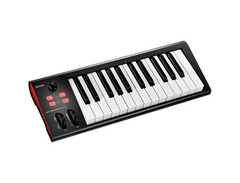
Designed for musicians and producers who demand precision and versatility, the iCON Pro Audio iKeyboard 3 Nano is a compact yet powerful 25-key MIDI controller. Its velocity-sensitive, semi-weighted keys provide a natural feel that enhances your performance, whether in the studio or on stage. The intuitive dual-function encoder with an LED ring simplifies navigation and control of your software, making real-time adjustments seamless.
Wrapped in a robust metal casing, this controller is built to withstand the rigors of frequent travel. Connectivity is a breeze with its USB 2.0 port, which powers the device and enables easy integration with your setup. The iKeyboard 3 Nano also supports Mackie Control and HUI protocols, ensuring compatibility with leading DAWs like Cubase, Logic Pro, and Pro Tools.
For those who seek flexibility in their playing style, the iKeyboard 3 Nano offers seven velocity curves, allowing you to tailor the response to your touch. Additional features include pitch-bend and modulation wheels, octave and transpose buttons, and inputs for sustain and expression pedals. Plus, the included iMap software makes customizing MIDI functions a straightforward affair, ensuring your controller is perfectly aligned with your creative workflow.
Key Features:
- 25 velocity-sensitive, semi-weighted keys
- Dual-function encoder with LED ring
- Supports Mackie Control and HUI protocols
- Robust metal casing for durability
- USB 2.0 connectivity for power and data
- 7 velocity curves for personalized response
- iMap software for easy MIDI mapping
- Pitch-bend and modulation wheels
- Octave and transpose buttons
- Inputs for sustain and expression pedals
- Compatible with Windows and macOS
Owner's manual
iCON Pro Audio iKeyboard 3 Nano User ManualProduct specs
| Brand | Icon |
| Model | iKeyboard 3 Nano 25-Key MIDI Controller |
| Finish | Black |
| Year | 2020 - 2025 |
| Categories | Keyboard MIDI Controllers |
| Key Size | Full Size |
| Keyboard Action | Semi-Weighted |
| MIDI I/O | USB MIDI |
| Number of Keys | 25 Keys |
FAQs
-
Is the iCON Pro Audio iKeyboard 3 Nano compatible with major DAWs like Ableton Live and Pro Tools?
-
Yes, the iKeyboard 3 Nano is compatible with major DAWs, including Ableton Live, Pro Tools, Cubase, Nuendo, Samplitude, Reason, and Logic Pro, thanks to its built-in Mackie Control and HUI protocols.
-
Does the iKeyboard 3 Nano offer velocity-sensitive keys?
-
Yes, the iKeyboard 3 Nano features a velocity-sensitive piano-style keyboard with full-size, semi-weighted keys, allowing for expressive playing dynamics.
-
Can I use the iKeyboard 3 Nano with both Windows and Mac operating systems?
-
The iKeyboard 3 Nano is class-compliant and works with Windows 7, 8, and 10 (32-bit and 64-bit), Mac OS X (IntelMac), and iOS, ensuring broad compatibility across platforms.
-
What connectivity options does the iKeyboard 3 Nano offer?
-
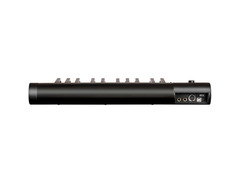
The iKeyboard 3 Nano includes USB MIDI for easy computer connectivity, a MIDI output jack, and TRS connectors for expression and sustain pedals, providing versatile connection options.
-
How does the iKeyboard 3 Nano handle MIDI mapping?
-
The iKeyboard 3 Nano comes with iMap software, which allows for easy mapping of MIDI functions, making it simple to customize and control your music production setup.


Reviews
Owner Insights
We analyzed real musician discussions from forums and Reddit to find what players love, question, and tweak about iCON Pro Audio iKeyboard 3 Nano.
Software and compatibility
-
The iKeyboard 3 Nano may require specific software installation to function correctly on certain computers; firmware updates could also be necessary.
Source -
If the device appears under USB Composite Device in Device Manager, it indicates a potential driver or resource issue, especially if error Code 10 appears.
Source
User experience
-
Some users experience no issues using the keyboard on another computer, suggesting compatibility varies between setups.
Source
Build quality
-
Owners report dissatisfaction with the iCON 88 key models, citing poor build quality and unreliable compatibility compared to M-Audio alternatives.
Source
Features and functionality
-
The additional controls on iCON models may be unnecessary for those primarily using the keyboard for piano, as most automation can be handled via a mouse.
Source
Based on 0 Reviews and 0 Ratings
More iCON Pro Audio MIDI Keyboard Controllers


$89.00 - $99.99


-m.webp?v=1783165677)
$85.00 - $149.50
in MIDI Keyboard Controllers Rank


$165.00 - $712.00
in MIDI Keyboard Controllers Rank


$166.00 - $199.00
in MIDI Keyboard Controllers Rank


$185.90 - $678.00
in MIDI Keyboard Controllers Rank


$32.84 - $59.00
in MIDI Keyboard Controllers Rank


$46.57
in MIDI Keyboard Controllers Rank


-m.webp?v=1783177167)
$403.95 - $469.00
in MIDI Keyboard Controllers Rank


$76.07 - $89.00
in MIDI Keyboard Controllers Rank


$277.00 - $440.00
in MIDI Keyboard Controllers Rank


$39.99 - $99.99
in MIDI Keyboard Controllers Rank


$676.87 - $1,301.63
in MIDI Keyboard Controllers Rank

$435.00 - $1,637.00
in MIDI Keyboard Controllers Rank


$80.00 - $119.99
in MIDI Keyboard Controllers Rank


$214.99
in MIDI Keyboard Controllers Rank


$119.00 - $199.99
in MIDI Keyboard Controllers Rank


$20.00 - $599.99
in MIDI Keyboard Controllers Rank


$260.80 - $780.99
in MIDI Keyboard Controllers Rank
.jpeg?v=1783110732)


-m.webp?v=1783091407)
$35.00 - $79.00
in MIDI Keyboard Controllers Rank


$99.99 - $149.99
in MIDI Keyboard Controllers Rank


$185.09 - $469.00
in MIDI Keyboard Controllers Rank


$134.99 - $269.00
in MIDI Keyboard Controllers Rank


$99.00 - $99.99
in MIDI Keyboard Controllers Rank


Artist usage


Community setups


Similar


Gear Guides








Most Popular MIDI Keyboard Controllers
Most Popular Brands
-
Added to Equipboard on by
 meb
mebGear IQ 2822
-


