

Pricing and availability
We compare 600+ stores and found this item at 10 stores. Prices updated .
Store
Reviews
Price








Average Price: $572
Standard/Professional
$200
$1001+
Price Tier
Budget
Standard
High-end
Price History
Based on price data from 7 merchants for "Mackie Onyx12 12-channel Analog Mixer with Multi-Track USB". Prices shown reflect NEW condition. Tracking began Apr 2, 2026.
* Product prices and availability are updated by Equipboard every 24hrs and are subject to change. Equipboard may receive compensation for purchases made at participating retailers linked on this site. This compensation does not affect what products or prices are displayed, or the order of prices listed. For more information, please refer to our affiliate disclosure.
Description
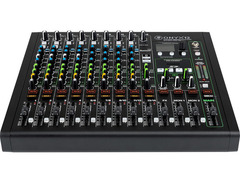
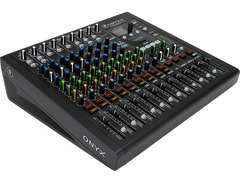
Elevate your live sound and studio recordings with the Mackie Onyx12, a versatile 12-channel analog mixer that combines classic analog warmth with cutting-edge digital capabilities. Whether you're mixing for a live gig, recording at home, or creating content, the Onyx12 offers an unbeatable blend of professional features and portable convenience. Its award-winning Onyx mic preamps deliver up to 60dB of gain, ensuring your audio signals remain pristine and dynamic. The legendary Perkins EQ adds a touch of classic British-style warmth, while the integrated DSP effects, including customizable reverbs and delays, provide endless creative possibilities.
This mixer is equally adept at handling high-resolution 24-bit/96kHz multitrack recording through its USB connection or directly to an SD card, ensuring your setups are as flexible as your imagination. Navigate effortlessly with its intuitive full-color display and single-knob interface, making it easy to tweak and tailor your sound on the fly. With Bluetooth streaming capabilities, you can wirelessly integrate audio from your devices, broadening your creative palette.
Built tough and designed for professional use, the Onyx12 is your all-in-one mixing solution that stands the test of time, making it indispensable for any serious musician or engineer.
Key Features:
- 8 Onyx mic preamps with up to 60dB of gain
- High-resolution 24-bit/96kHz multitrack recording via USB
- British-style Perkins EQ with sweepable midrange
- Customizable DSP effects including reverb, delay, and more
- Full-color display with single-knob navigation
- Bluetooth streaming for wireless audio input
- Direct-to-SD card stereo recording and playback
- Built-like-a-tank rugged chassis for durability
- Includes Waveform OEM recording software and DAW Essentials Bundle
Owner's manual
Mackie Onyx12 12-channel Analog Mixer with Multi-Track USB User ManualProduct specs
| Type | Analog Mixer |
| Channels | 12 |
| Computer Connectivity | USB, Bluetooth |
| A/D Resolution | 24-bit/96kHz |
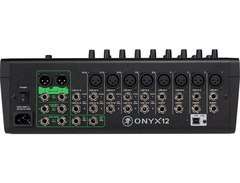
| Inputs - Mic Preamps | 8 x XLR |
| Phantom Power | Yes |
| Inputs - Line | 14 x 1/4", 1 x 1/8" |
| Outputs - Main | 2 x XLR (main), 2 x 1/4" (main), 2 x 1/4" (control room) |
| Send/Return I/O | 1 x 1/4" (FX), 2 x 1/4" (mon) |
| Inserts | 4 x 1/4" |
| Headphones | 1 x 1/4" |
| USB | 1 x Type B |
| Bluetooth | Yes |
| Other I/O | 1 x 1/4" (footswitch) |
| EQ Bands | 4-band EQ |
| Effects | Yes |
| Storage | SD card slot |
| Power Source | Standard IEC AC cable |
| Height | 5.4" |
| Width | 14.8" |
| Depth | 14" |
| Weight | 13 lbs. |
FAQs
-
What makes the Mackie Onyx12 mixer suitable for live audio and home recording?
-
The Mackie Onyx12 mixer features 24-bit/96kHz multitrack recording and high-gain Onyx mic preamps, ensuring superior sound quality for both live audio and home recording environments.
-
How many microphone inputs does the Mackie Onyx12 mixer have?
-
The Mackie Onyx12 mixer offers 8 XLR mic preamp inputs, providing ample connectivity for microphones during recording or live performances.
-
Can the Mackie Onyx12 mixer connect directly to a computer?
-
Yes, the Mackie Onyx12 mixer connects to a computer via USB, allowing for seamless integration with digital audio workstations for multitrack recording.
-
Does the Mackie Onyx12 support Bluetooth connectivity?
-
Yes, the Mackie Onyx12 mixer includes Bluetooth connectivity, enabling wireless streaming of audio directly to the mixer from compatible devices.
-
What EQ features are available on the Mackie Onyx12 mixer?
-
The Mackie Onyx12 mixer is equipped with a 4-band EQ, allowing users to fine-tune the sound of each channel for optimal audio performance.
-
Does the Mackie Onyx12 mixer have built-in effects?
-
Yes, the Mackie Onyx12 mixer includes built-in effects, providing users with additional options for enhancing their audio output during live performances or recordings.
-
Is phantom power available on the Mackie Onyx12 mixer for condenser microphones?
-
Yes, the Mackie Onyx12 mixer provides phantom power, making it compatible with condenser microphones that require this feature.
Videos

Performer Magazine
Mackie Across America: Devon Unboxes Mackie Onyx12 (Ep. 1 of 3)

Mackie Across America: Devon Unboxes Mackie Onyx12 (Ep. 1 of 3)
Performer Magazine

More Than Meets The Eye! Kevin Daniel Tests Out the MACKIE Onyx 12
Performer Magazine
Reviews
PROS
-
Exceptional sound quality with low preamp noise
-
Sturdy construction with smooth faders and solid feel
-
USB integration for multi-track recording to a DAW
-
Bluetooth connectivity for easy mobile device integration
-
Advanced EQ on first 4 mic channels, beyond basic treble, mid, bass
-
Built-in SD card recorder for convenient live recordings
-
Versatile for both live sound and studio recordings
CONS
-
Larger and heavier than expected for a compact mixer
-
Effects, especially reverb, reportedly underperform for vocals
-
Line inputs not adjustable with preamp volume control
-
EQ settings not transferred to DAW recordings
-
Limited to stereo recording on SD card, not multitrack
-
Only one fader for stereo sum (L+R)
Owner Insights
We analyzed real musician discussions from forums and Reddit to find what players love, question, and tweak about Mackie Onyx12 12-channel Analog Mixer with Multi-Track USB.
Features and functionality
-
The Onyx 12 has 4 returns from the computer, limiting software inserts across channels compared to other mixers with more returns.
Source -
The signal from the Onyx 12 is captured pre-EQ, so EQ, fader, and pan adjustments don’t affect the audio sent to the computer.
Source -
The Onyx allows recording from all input channel strips but limits computer output to 4 channels, restricting hardware-based mixing and insert effects from software instruments.
Source
Comparisons
Use cases and applications
-
With Onyx 12, processed DAW signals can be monitored through main outputs, but most mixing will occur within the DAW due to limited channel returns.
Source
User experience
-
Users appreciate the Onyx for its simplicity when only requiring an 8-channel setup, despite limitations in output flexibility compared to competitors.
Source -
Owners note that Mackie preamps, including those in Onyx mixers, deliver serviceable sound but can be noisy with gain concentrated towards the end.
Source
Build quality
Based on 0 Reviews and 0 Ratings
Genre Usage
Based on how artists on Equipboard use this gear, it is most commonly found in the following genres.
More Mackie Mixers

$120.00 - $449.99
in Mixers Rank


$218.00 - $329.99
in Mixers Rank


$180.25 - $219.99
in Mixers Rank


$75.00 - $329.99
in Mixers Rank


$999.00 - $1,049.99
in Mixers Rank


$363.00 - $449.99
in Mixers Rank


$99.90 - $149.99
in Mixers Rank


$399.95
in Mixers Rank


$142.52 - $379.99
in Mixers Rank


$113.90 - $159.99
in Mixers Rank


$712.49 - $749.99
in Mixers Rank

$25.00 - $1,049.99
in Mixers Rank

.png?v=1784984897)


$270.00
in Mixers Rank


$630.00 - $799.99
in Mixers Rank


.png?v=1785047567)


$311.00 - $379.99
in Mixers Rank


$25.00 - $1,049.99
in Mixers Rank


$113.90 - $159.99


$419.99 - $439.99
Accessories & Related Items


Artist usage


Community setups


Similar


Gear Guides








Most Popular Mixers
Most Popular Brands
-
Added to Equipboard on by
 stepanomelka
GearIQ 55
-


