

Pricing and availability
We compare 600+ stores and found this item at 7 stores. Prices updated .
Store
Reviews
Price









Average Price: $517
Standard/Professional
$200
$1001+
Price Tier
Budget
Standard
High-end
Price History
Based on price data from 5 merchants for "Soundcraft UI 16". Prices shown reflect NEW condition. Tracking began Apr 2, 2026.
* Product prices and availability are updated by Equipboard every 24hrs and are subject to change. Equipboard may receive compensation for purchases made at participating retailers linked on this site. This compensation does not affect what products or prices are displayed, or the order of prices listed. For more information, please refer to our affiliate disclosure.
Description
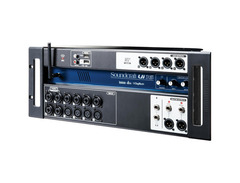
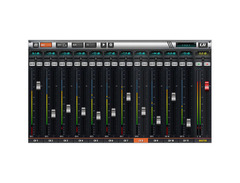
Step into the future of mixing with the Soundcraft UI 16, a 16-channel digital mixer that redefines live sound management. Designed to make professional-grade sound accessible and straightforward, this digital mixer is a powerhouse of flexibility and control. Whether you're performing on stage or recording in the studio, the UI 16 offers seamless integration with any device featuring an HTML5 browser—no apps, no OS constraints, just pure, uninhibited mixing freedom.
Equipped with integrated Wi-Fi, this mixer allows up to 10 devices to connect simultaneously, giving each band member the power to tweak their own mix. Soundcraft has loaded it with top-tier audio processing from Lexicon, dbx, and DigiTech, ensuring your sound is as pristine as it is powerful. With features like the dbx AFS2 feedback suppression and DigiTech amp modeling, you're equipped to handle any gig with ease.
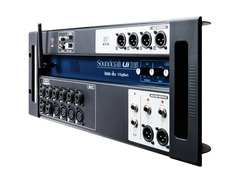
The UI 16's robust construction makes it a reliable partner for touring musicians, while its comprehensive I/O options include 12 microphone/line inputs and multiple output choices. Add to that a 2-channel USB media player and recorder, and you have a mixer that not only delivers but truly exceeds expectations.
Key Features:
- 16-channel digital mixer with tablet/PC/smartphone control
- Integrated Wi-Fi allows for up to 10 simultaneous device connections
- Cross-platform compatibility with iOS, Android, Windows, Mac OS, and Linux
- Signal processing from Lexicon, dbx, and DigiTech
- 4-band parametric EQ, high-pass filter, compressor, de-esser, and noise gate on input channels
- 31-band graphic EQ and compressor on all outputs
- Real-time frequency analyzer (RTA) on inputs and outputs
- 4 Lexicon effects buses: Reverb, Delay, Chorus, Room
- USB media player and recording capabilities
- Includes Ableton Live Lite for enhanced creativity
Owner's manual
Soundcraft UI 16 User ManualProduct specs
| Type | Digital |
| Channels | 16 |
| Inputs - Mic Preamps | 8 x XLR-1/4" combo, 4 x XLR |
| Inputs - Other | 1 x Stereo (RCA) |
| Outputs - Main | 2 x XLR, 2 x TRS |
| Outputs - Other | 4 x XLR (aux) |
| Data I/O | 1 x Ethernet, 1 x 1/4" (footswitch), 1 x HDMI |
| USB | 4 x Type A |
| Computer Connectivity | Ethernet, Wi-Fi |
| Headphones | 2 x 1/4" |
| EQ Bands | 4-band Parametric |
| Effects | Yes |
| Rackmountable | Yes (4U) |
| Height | 7" |
| Depth | 4.3" |
| Width | 19" |
| Weight | 7.9 lbs. |
FAQs
-
How can I control the Soundcraft Ui16 remotely?
-
The Soundcraft Ui16 can be controlled remotely via Wi-Fi using a smartphone, tablet, or computer. Simply connect your device to the 'Soundcraft Ui' wireless network and access the mixer interface through a web browser.
-
Does the Soundcraft Ui16 support multitrack recording?
-
The Soundcraft Ui16 records the Master Channel stereo output as a stereo file onto a connected USB storage device, but it does not support multitrack recording directly.
-
What types of inputs are available on the Soundcraft Ui16?
-
The Soundcraft Ui16 features 8 XLR-1/4" combo inputs, 4 XLR inputs, and 1 stereo RCA input, providing versatile connectivity for various audio sources.
-
Can the Soundcraft Ui16 be rack-mounted?
-
Yes, the Soundcraft Ui16 is rackmountable and fits into a 4U space, making it suitable for both portable and fixed installations.
-
What kind of effects does the Soundcraft Ui16 offer?
-
The Soundcraft Ui16 includes built-in Lexicon effects with three dedicated FX busses for Reverb, Delay, and Chorus, allowing you to enhance your live sound or recordings.
Videos

SamBaconDrums
Soundcraft Ui16 - The ULTIMATE Setup for Function Bands
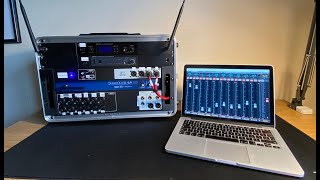
Soundcraft Ui16 - The ULTIMATE Setup for Function Bands
SamBaconDrums
SoundCraft UI16 HDMI Screen

프로사운드 시설음향
Soundcraft UI-16 Walkthrough and Features

Proclaim AV
Long Term Review: Soundcraft Ui16

DJ Lou (Tech, Weddings, & More)

Soundcraft UI16 AFS
The Gigging Guitar Player
This mixer is AMAZING for the money! Soundcraft Ui16 review

MaxSPL Videos
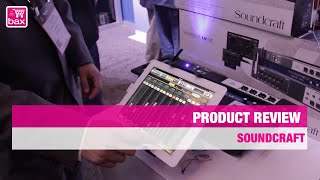
Soundcraft Ui16 Digital Mixer | NAMM SHOW 2015

Bax-shop | Bax Music Goes

Soundcraft UI16 Pre DSP vs. Post DSP Aux sends. Your choice!
The Gigging Guitar Player
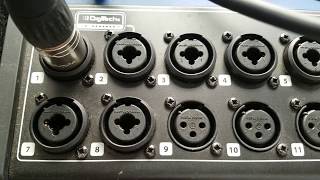
Soundcraft Ui16

ZIN DJ GABE CORDERO (Zin Gabe)
Reviews
PROS
-
Factory presets and easy operation instructions simplify learning curve
-
Excellent sound quality with super flexible routing and tons of processing options
-
Can function as a live click/backing track player
-
Surprisingly solid build quality, feels durable
-
Lightweight and portable, significantly reduces gear load
-
Built-in media player and USB recording feature
-
Intuitive software interface, easy for band setups and adjustments
-
Allows for saving and copying channel settings for different shows
-
Compatible with external WiFi setup for improved connectivity
-
Value for money given the comprehensive features and performance
CONS
-
Built-in WiFi not reliable, often requires an external router for stable connection
-
Only 12 "real" inputs, limiting its use for larger band setups
-
Some users report the FX are slightly hissy, though not noticeable during shows
-
Previous software updates had connectivity and dropping issues
-
Preamps can be noisy, causing inconsistency in audio quality
-
Lacks a clear, printed getting started guide or manual
-
Missing advanced features like cascade port for channel expansion and Waves plugins
-
Some found the digital sound to be a bit bright compared to analog mixers
Owner Insights
We analyzed real musician discussions from forums and Reddit to find what players love, question, and tweak about Soundcraft UI 16.
Features and functionality
-
The Ui16 lacks multitrack USB recording, available only on the Ui24R model, limiting recording flexibility for users needing simultaneous track outputs.
Source -
External routers, especially placed high up, improve connectivity significantly over the internal WiFi for venue-to-venue setups.
Source -
On the Ui16, a compressor ratio set all the way down is infinity:1, acting as a hard limiter, whereas all the way up is 1:1, doing nothing.
Source
Comparisons
-
Soundcraft Ui16 has fixed EQ options with 1/3 octave on outputs, unlike the parametric EQ on some more advanced models like the X32.
Source
User experience
-
Connectivity issues often occur with the internal WiFi, especially in crowded environments; many owners recommend using a 5GHz external router for stability.
Source -
Adjusting faders not onscreen is cumbersome, with a delay of around 4 seconds, highlighting a limitation in fast-paced environments.
Source
Use cases and applications
-
Owners use channels 1 and 2 as DI channels due to their Hi-Z input options, suitable for direct guitar or bass connections without a DI box.
Source -
Users have found that older iPads, particularly for stationary use like FOH, offer smoother performance compared to some newer Android tablets.
Source -
DJs often push levels too hot; using a fast attack and release with a 10:1 ratio on the compressor helps manage unexpected spikes in output.
Source -
Users recommend setting the threshold high initially and gradually lowering it to just start seeing gain reduction for optimal compressor setup.
Source
Software and compatibility
-
The Ui16's software interface features inline faders for EQ and dynamics, preferred by some over virtual rotary pots for precision adjustments.
Source -
Mixing Station app is favored for customization and smoothness on both iOS and Android, offering more flexibility than the default web interface.
Source -
Some Android tablets struggle with the interface, causing laggy audio levels and fader adjustments; older iPads appear to manage these tasks better.
Source
Value and pricing
-
Users found used Ui16 units for around $400 on Reverb, significantly below new prices of approximately $600, offering a cost-effective alternative for budget-conscious buyers.
Source
4.0 out of 5
Based on 0 Reviews and 1 Rating
Genre Usage
Based on how artists on Equipboard use this gear, it is most commonly found in the following genres.
More Soundcraft Mixers

$277.00 - $382.00
in Mixers Rank


$550.00 - $1,271.95
in Mixers Rank


$69.92 - $415.00
in Mixers Rank


$822.00 - $1,499.00
in Mixers Rank
.jpg?v=1784510867)

$758.00
in Mixers Rank


$344.00 - $565.00
in Mixers Rank


$37.00 - $619.00
in Mixers Rank


$1,990.00 - $2,220.00


Accessories & Related Items


Artist usage


Community setups


Similar


Gear Guides






Most Popular Mixers
Most Popular Brands
-
Added to Equipboard on by
TtripedalhumanoidGearIQ 71
-


