

Pricing and availability
We compare 600+ stores and found this item at 6 stores. Prices updated .
Store
Reviews
Price




Price History
Based on price data from 5 merchants for "Walrus Audio Canvas Clock". Prices shown reflect NEW condition. Tracking began Apr 2, 2026.
* Product prices and availability are updated by Equipboard every 24hrs and are subject to change. Equipboard may receive compensation for purchases made at participating retailers linked on this site. This compensation does not affect what products or prices are displayed, or the order of prices listed. For more information, please refer to our affiliate disclosure.
Description
In the world of music, precision is key, and the Walrus Audio Canvas Clock delivers it with unmatched versatility. This all-in-one tempo command center is designed to seamlessly integrate with any rig, providing the ultimate solution for synchronizing time-based effects. Whether you're delving into complex MIDI setups or working with analog devices, the Canvas Clock is your go-to accessory for keeping everything in perfect sync.
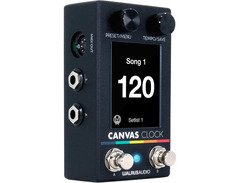
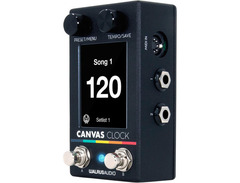
The Canvas Clock offers a myriad of connectivity options, including MIDI I/O, four 1/4-inch TRS outputs, a USB-C port, and a sync jack for Eurorack systems. These features ensure you can link up with everything from pedals and drum machines to DAWs and modular synths. Its web-based interface allows for easy customization of songs, setlists, and MIDI Macros, making real-time adjustments a breeze. With 128 song slots and the ability to group songs into setlists, this pedal is perfect for both live performances and studio sessions.
For those who crave more control, the Canvas Clock's MIDI Macros enable you to trigger multiple actions with a single button press, drastically simplifying complex orchestrations. Additionally, the built-in metronome output keeps you in time, while the expression input lets you dynamically control various parameters.
Whether you're an experienced musician or just starting to explore MIDI, the Canvas Clock is the perfect tool to unlock your creativity and streamline your workflow.
Key Features:
- MIDI In/Out for seamless integration with MIDI-equipped devices
- 4 x 1/4" TRS outputs for clock and expression to non-MIDI pedals
- USB-C connectivity for easy updates and configuration via the web interface
- Built-in metronome output for precise timing
- MIDI Macros for triggering multiple actions with a single button
- Sync In/Out for Eurorack and modular synth compatibility
- Expression input for dynamic parameter control
Product specs
| Type | Midi Clock |
| Inputs | 2 x 1/8" TRS (Midi in, Sync), 1 x 5-pin DIN (Midi in) |
| Outputs | 2 x 1/8" TRS (Midi out, Met out), 1 x 5-pin DIN (Midi out), 4 x 1/4" TRS |
| Connectivity | 1 x USB-C |
| Power Source | 9V DC 300mA power supply (sold separately) |
FAQs
-
What types of connections does the Walrus Audio Canvas MIDI Clock offer?
-
The Walrus Audio Canvas MIDI Clock provides multiple connectivity options including 2 x 1/8" TRS (MIDI in, Sync), 1 x 5-pin DIN (MIDI in), 2 x 1/8" TRS (MIDI out, Met out), 1 x 5-pin DIN (MIDI out), 4 x 1/4" TRS, and 1 x USB-C.
-
Can the Walrus Audio Canvas MIDI Clock be used with non-MIDI pedals?
-
Yes, the Canvas MIDI Clock allows you to sync or send expression to non-MIDI pedals using its 1/4" TRS outputs, making it versatile for various pedalboard setups.
-
How is the Walrus Audio Canvas MIDI Clock powered?
-
The Canvas MIDI Clock requires a 9V DC 300mA power supply, which is sold separately.
-
Can I update the Walrus Audio Canvas MIDI Clock's settings via computer?
-
Yes, you can configure and update the Canvas MIDI Clock using its USB-C connection and manage presets and settings through the web interface.
-
Does the Walrus Audio Canvas MIDI Clock offer metronome functionality?
-
Yes, the Canvas MIDI Clock features a Metronome Out, providing an audible click to help keep your performance in time.


Reviews
Owner Insights
We analyzed real musician discussions from forums and Reddit to find what players love, question, and tweak about Walrus Audio Canvas Clock.
Setup and maintenance
-
Using a TRS cable is essential for the Canvas Clock to function properly with both the Strymon Timeline and Avalanche Run.
Source
Software and compatibility
-
Timeline's expression pedal input requires configuration in the Global settings to work with the Canvas Clock.
Source
Features and functionality
-
The Avalanche Run is compatible with the Canvas Clock when connected with a TRS cable, unlike MIDI connections.
Source -
The Canvas Clock includes USB and standard MIDI input, allowing it to sync with a DAW by sending a click.
Source -
It provides both MIDI and analog outputs, featuring a metronome out for personal monitoring or band use.
Source
Use cases and applications
-
Can send MIDI clock signals to multiple pedals, supporting both TS and TRS cabling for different pedal input requirements.
Source
Comparisons
-
Some users are interested in comparisons between the Walrus Canvas Clock and the Disaster Area SmartClock, highlighting a niche interest.
Source
Critic Reviews
Based on 0 Reviews and 0 Ratings
Genre Usage
Based on how artists on Equipboard use this gear, it is most commonly found in the following genres.
More Walrus Audio Effects Pedal Accessories

$136.00 - $279.00
in Effects Pedal Accessories Rank


$92.00 - $169.00
in Effects Pedal Accessories Rank


$169.00 - $189.99
in Effects Pedal Accessories Rank


$278.00 - $299.99


$169.00 - $304.99


$185.28 - $219.00
in Effects Pedal Accessories Rank


$239.00 - $279.00
in Effects Pedal Accessories Rank


$127.93 - $179.99
in Effects Pedal Accessories Rank


$3.99 - $5.60
in Effects Pedal Accessories Rank

$137.00 - $150.00
in Effects Pedal Accessories Rank


$149.00 - $169.00
in Effects Pedal Accessories Rank


$187.65 - $229.99
in Effects Pedal Accessories Rank


$89.00 - $152.00
in Effects Pedal Accessories Rank


$191.20 - $220.00
in Effects Pedal Accessories Rank

.jpg?v=1784922067)


$99.00 - $105.99
in Effects Pedal Accessories Rank


$110.00 - $199.00
in Effects Pedal Accessories Rank


$279.99 - $299.99
in Effects Pedal Accessories Rank


$209.00 - $253.00
in Effects Pedal Accessories Rank


$39.27 - $49.00
in Effects Pedal Accessories Rank


$105.00 - $199.00
in Effects Pedal Accessories Rank


$132.66 - $169.99
in Effects Pedal Accessories Rank


$229.95 - $289.00
in Effects Pedal Accessories Rank


$42.00
in Effects Pedal Accessories Rank


$434.53 - $903.97
in Effects Pedal Accessories Rank


$35.99 - $49.99
in Effects Pedal Accessories Rank


$49.00 - $72.00
in Effects Pedal Accessories Rank


$263.40
in Effects Pedal Accessories Rank


$299.00 - $549.99
in Effects Pedal Accessories Rank
.jpg?v=1784917540)


$169.00 - $189.00
in Effects Pedal Accessories Rank


$99.99 - $111.00
in Effects Pedal Accessories Rank


$6.99 - $47.00
in Effects Pedal Accessories Rank

Accessories & Related Items


Artist usage


Community setups


Similar


Gear Guides




.jpg)

Most Popular Effects Pedal Accessories
Most Popular Brands
-
Added to Equipboard on by
 jasontmays
GearIQ 1203
-


