-s.webp?v=1770452516)
-xl.webp?v=1770452516)
Pricing and availability


* Product prices and availability are updated by Equipboard every 24hrs and are subject to change. Equipboard may receive compensation for purchases made at participating retailers linked on this site. This compensation does not affect what products or prices are displayed, or the order of prices listed. For more information, please refer to our affiliate disclosure.
Description
Step into the world of professional audio mastering with the Waves L1 Limiter, a staple in studios worldwide for its precision and reliability. This iconic limiter plugin from Waves is designed to bring your mixes to life by controlling peaks and enhancing loudness without sacrificing clarity or dynamic range. Whether you're working on a delicate acoustic track or a booming electronic composition, the L1 Limiter offers the flexibility you need to achieve a polished sound.
With its intuitive interface, the Waves L1 Limiter allows you to easily adjust threshold and output ceiling parameters, giving you full control over your mix’s dynamics. Its look-ahead peak limiting technology ensures that transients are captured with absolute accuracy, providing a smooth and transparent limiting process. Compatible with all major DAWs, this plugin integrates seamlessly into your workflow, making it an essential tool for any music producer or sound engineer.
Key Features:
- Iconic limiter plugin trusted by professionals
- Look-ahead peak limiting for accurate transient capture
- Intuitive interface with adjustable threshold and output ceiling
- Seamless integration with major DAWs
- Ideal for both mixing and mastering applications
- Provides a balance between loudness and dynamic range control
Videos

Fuego
You're Using It Wrong - Waves L1
You're Using It Wrong - Waves L1
Fuego
The WAVES L1 Ultramaximizer

Daily Beats
The Waves L1 Limiter Challenge... (Try this!)

Raytown Productions
How I'm using Waves L1 now

Andrei Martinez Agras
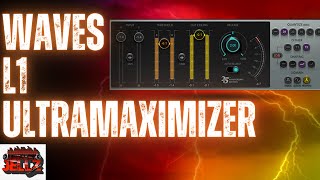
Does the Waves L1 Ultramaximizer live up to the Hype

Mixed By Jellz
Reviews
Owner Insights
We analyzed real musician discussions from forums and Reddit to find what players love, question, and tweak about Waves L1 Limiter.
Features and functionality
-
The Waves L1 Limiter was pivotal in the loudness wars, offering aggressive sound enhancement and loudness maximization crucial for the era's music production.
Source
Software and compatibility
-
Early L1 users needed dedicated Pro Tools PCI cards for running plugins, similar to modern UAD systems, highlighting compatibility challenges in the 1990s.
Source
User experience
-
The L1 was instrumental for mastering, requiring offline processing and long render times, which affected workflow efficiency during its initial years of use.
Source
Use cases and applications
-
The L1 was heavily used in the production of Oasis's "Definitely Maybe," providing the album its distinctive aggressive sound by heavily compressing all tracks.
Source
4.5 out of 5
Based on 1 Review and 6 Ratings

143
My favorite limiter
The L1 is better than any other limiter I have used. I find that does not distort the sound of the song as much as the stock limiters in FL Studio, or in Logic Pro X.
Artist usage
Add artist

This Snapshot was taken from the Deadmau5 Masterclass, proving that Deadmau5 is using this Plugin


Used for J. Cole's feature on 21 Savage's "A Lot", as mentioned by producer Maddmix in this March 2019 Sound on Sound article.
"The session was originally a 21 Savage track, and they later decided to add J Cole. His engineer sent me J Cole's vocal session with reverbs and delays already set, so I pretty much imported his vocal auxes, and just matched that to the mix that I had already going. However, the inserts are all mine, and similar to what I used on 21. There also are four Pro-Q2s here, plus two instances of the C6 multiband, and the Clariphonic EQ. The 'Slap' is a send to one of my aux effect tracks, just with a 30-millisecond EchoBoy delay, to widen the vocals a bit. I stripped all the other sends down, to match J Cole's vocals with a track that was more on the dry side, and actually disabled all the sends apart from the 'Slap' on the J Cole aux group track, 'Leads'. Finally, both '21 Leads' and 'Leads' go to the 'Lead All' [40] and parallel 'MadVoxComp' [41] tracks, and the latter has the Waves CLA-76 and L1, both for more presence and volume."
A downloadable picture of the "A Lot" Pro Tools session (available in this .zip file) shows that it is the L1 Limiter, rather than the L1 Ultramaximizer.


In this video at 1:50 the protools analysis of her unreleased song "Fantasize" shows the use of this plugin

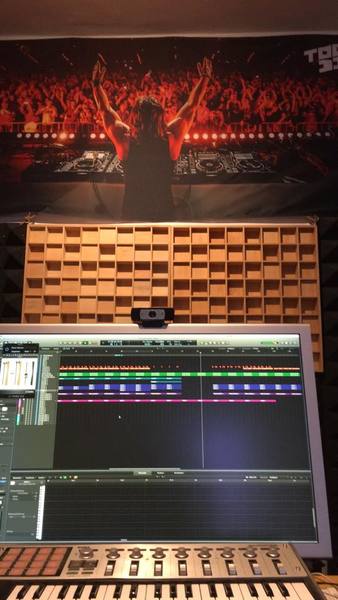
In a Facebook post by Tocadisco, the Waves L1 Limiter is visible within his Logic Pro project, highlighting its use in his music production process.


In a video on their Instagram, Dzeko & Torres are shown using the Waves L1 Limiter. The plugin is clearly visible at the top left of the screen, with "L1 Limiter" prominently displayed at the bottom of the VST interface.

When in the video Fluff shows the mixer, you can see on the first slot of the guitars buss the L1


Selena Gomez uses the Waves L1 Limiter, as confirmed by her engineer: "All drums and drum effect tracks are sent to the 'Drums Group' aux, which has Waves L1 limiter, which is catching peaks, making sure nothing overloads." This information is detailed in the article "Inside Track: Selena Gomez 'Rare'" by Sound On Sound.


Used on "A Lot", as mentioned by producer Maddmix in this March 2019 Sound on Sound interview and as visible in a downloadable photo of the "A Lot" Pro Tools session (available in this .zip file).
Although there are relatively few plug-ins on the drums and hardly any on the music, Maddox uses dozens on the vocals. 21 Savage's five vocal aux tracks, for example, all pass through a signal chain comprising Antares Auto-Tune, UAD 1176LN E, Waves Renaissance Vox, FabFilter Pro-DS, Waves C6, another Pro-DS, FabFilter Pro-Q2 and another C6, with only the latter one or two plug-ins dropping out on a couple of tracks.
All these tracks go the '21 Lead' aux (42), which has nine plug-ins, including compressors, de-essers, and four(!) more instances of Pro-Q2, as well as four sends. Both 21 Savage and J Cole's aux group vocal tracks then go to a vocal aux called 'MadVoxComp', and from there to the 'All Vocals' aux, each of which hosts two plug-ins; so in total, every 21 Savage vocal track passes through 19 to 21 insert plug-ins, as well as being sent to up to seven auxes. The situation with J Cole is even more elaborate, though complicated by the fact that some of the sends came with the vocal session that Maddox received from Cole's engineer.
"I guess my thought process behind my mixing is kind of messy!" laughs Maddox. "The thing is that I will start with adding compression and EQ on a vocal, and then if I hear something else that needs correcting, I will just add another compressor or EQ. I never go back and take plug-ins off or reset them, because I don't want to go back on what I already have, because I might mess it up. So I just keep going forward and adding plug-ins until I get the sound I want. That works for me. Some people like mixing with very few plug-ins, but I will mix with whatever I need to get what I want.
"The plug-ins I have on these inserts I use frequently. I guess you could call them my clean-up plug-ins. The 1176LN worked on 21's vocals in this session. I may also use the UAD Tube-Tech CL 1B or the Waves RCompressor. In this session the 1176 made 21's vocals really full and in your face. Next is the RVox, which is also is a good plug-in for bringing the vocals up front and making them really full. It is very subtle, but it makes a big difference. If I feel like the vocal does not sit up front enough I put that on, compress it a little bit, and it usually fixes the problem for me. The 1176 has a similar function, but I use it more for actual compression and the RVox more for tone and to make it sound bigger.
"Next is the Pro-DS, which as a de-esser obviously helps with the sibilance. Some vocals have more sibilance than others, and sometimes I use just one, but in this case I felt I needed two. I love using multiband compressors, and the C6 is here for some general compression, but there always are some frequencies that need adjusting, but that I don't want to take out with an EQ, because you need those frequencies. When I use a multiband, I find the frequency that bugs me, and set a threshold, so the frequency is only dipped when it needs to be dipped. If you look at my C6 plug-ins, they often address harsh frequencies that a de-esser can't take out. I'll have a really tight notch on the C6, and then just compress that frequency a couple of dB."
Of the '21 Lead' aux, Maddox says: "There are four instances of the Pro-Q2 on the signal chain, which is again an example of me working cumulatively. I now use the Pro-Q3 a lot, which is a dynamic EQ, which can do pretty much the same thing as the C6. Then insert 4 is the McDSP MC404 multiband compressor, which I use pretty often, and then I have the Eiosis Air EQ, the C6, the Kush Clariphonic EQ and the SSL G EQ. I use different EQs for different purposes. The Q2 has unlimited bands, so I use that to search and dip frequencies I don't like. I really like the high end on the Air, which opens up the vocal and makes it sound really good. I also often do some scooping in the lower mid-range with the Air, because it does a really good job of that. I use the Clariphonic mainly for the Clarity knob, which widens the vocal just by having that on. I really like that on vocals and use that in almost every session.
"The sends go to several aux effect tracks with delays and reverbs, but for this project they told me that they wanted the keep the vocals pretty dry, so I didn't use much reverb. Mostly just a small room reverb really subtly in the background to give it some space. The main reverbs that I have in my template are the Slate Digital VerbSuite Classics. They have great emulations of popular reverbs like the Bricasti and so on, that sound really good. I also use the UAD Lexicon 480 a lot. Those are my go-to reverbs. I occasionally use the Waves RVerb and TrueVerb. My main delays are the Soundtoys EchoBoy and the Waves H-Delay. For distortion I use the Soundtoys Decapitator and Devil-Loc, sometimes the Dada Life Sausage Fattener, which is fun, and the distortion pedal in the Waves GTR3 Stomps plug-in.
(...) Finally, both '21 Leads' and 'Leads' go to the 'Lead All' [40] and parallel 'MadVoxComp' [41] tracks, and the latter has the Waves CLA-76 and L1, both for more presence and volume."




In this video at the 18:24 timestamp, Reinier Zonneveld is observed utilizing the Waves L1 Limiter VST during his production process.


Used on Cardi B's vocals for "Bodak Yellow", as mentioned by mix engineer Evan LaRay in this February 2018 Sound on Sound interview. An image of the "VOX 1" settings can be found here, while an image of the "ELR" settings can be found here.
In his mix of ‘Bodak Yellow’, Evan LaRay used almost identical vocal chains on two auxiliary busses. The ‘Vox 1’ chain includes FabFilter’s Pro-DS de-esser and Waves’ C4 multiband compressor, plus the Waves CLA Vocals plug-in and SoundToys’ Decapitator saturation processor.
The main ‘Hook’ and ‘Verse’ vocal tracks have similar plug-in chains, incorporating the EQ3 seven-band, Waves CLA-76 and Waves De-esser, though the ‘Hook’ also has FabFilter’s Timeless 2 delay. LaRay explains, “The EQ on the ‘Hook’ has a high-pass, around 100Hz, and I’m also cutting 3dB at 300Hz, because the vocal sounded a bit muddy, and again 3dB at 4kHz, because there was a piercing frequency there. The CLA keeps the peaks in check, and the de-esser again takes some higher frequencies out, at 4270Hz, and the Timeless is another favourite plug-in. I think in general the FabFilter plug-ins are extremely dope. I wanted the ‘Hook’ vocal to stand out from the ‘Verse’ vocal, so I used a stereo delay preset, and then tweaked that. The presets on the FabFilter plug-ins are pretty good: you just run through all of them and then choose the best one. In this case I lowered the width and the wet value of the stereo delay preset, and that sounded good and gave the hook its own space. The three plug-ins on the ‘Verse’ track do pretty much the same.
“The ‘Inout’ tracks that are below the ‘Hook’ and the ‘Verse’ are vocal doubles. They are words or lines we use for emphasis and additional power on these lines and words. They come from one of her original vocal takes, which I just cut and cleaned up. Both ‘Inout’ tracks have the Waves RCompressor, just containing these words and lines so they don’t overwhelm the ‘Hook’ or the ‘Verse’ vocal, and then the FabFilter Pro-Q2, taking out some high frequencies, again to make sure it doesn’t clash with the leads, and also cutting below 200Hz. And there’s a delay on these tracks to put them in a slightly different space from the lead vocal tracks.
“In addition to the two ‘Inout’ tracks, both the ‘Hook’ and the ‘Verse’ tracks are also accompanied by an ‘Ad Libs’ track, which were some ad libs Cardi had recorded with Mike over at Krematorium. Mike had also set up a separate aux track for these ad libs, which is ‘Vox2’, and I liked that and kept two of the plug-ins he had on that: the [Avid] Sansamp for some distortion and the SoundToys Panman. I then added the D-Verb and the [Waves] CLA Vocals. I adore the CLA Vocals. I use it on every track I work on. When I don’t use it, the vocals sound completely different. I’d love to know what exactly it does! Finally, the inserts have the Waves L1, just to control the peaks.
“The other tracks — ‘EXF1’, ‘EXF2’, ‘EXF3’ and ‘EXF4’, are because I prefer to create a new track if I want to have a specific effect on specific words or phrases. I prefer doing that to automating the effects on a track. Automation is great, but I tend to only do volume automation. So I copy audio to another track, and then put the effect on that, and in this case I created four different effects tracks with four different delays. ‘EFX1’ is the main one, and has the same three plug-ins as the Verse tracks — EQ3 three-band, CLA76 and Waves De-esser — just with the EQ3 cutting more of the high frequencies. Then there’s an eighth-note ping-pong delay from the Waves H-Delay, and then a D-Verb set to ‘hall’ with 7s decay and a 15ms pre-delay. ‘EFX2’ has another H-Delay delay, ‘EFX3’ the Timeless 2 delay, and ‘EFX4’ again has the H-Delay plus a D-Verb.”
All the main vocal audio tracks go to LaRay’s ‘Vox1’ aux group track. This, he explains, has “A FabFilter Pro-DS de-esser, then the Waves RCompressor controlling the peaks, the Waves C4 multiband compressor boosting the high end and containing the lows in her voice, so it doesn’t cut through too much, and Waves CLA Vocals. Again, it’s really making my vocals sound good. I push the Pitch fader to stereo, spank it on the compressor, also push up the treble to brighten it up, turn the reverb down to ‘tight’, and lower the delay by 9dB because my own quarter delay is my main vocal delay, and it sounds great. There’s also a SoundToys Decapitator, to add more harmonic distortion, and then there’s the Waves RVox. That was supposed to be the final plug-in on the insert, but then I realised the vocal was still peaking too much once she began rapping loudly, so I put on the L1 [limiter] to control that.”
The ‘special sauce’ in Evan LaRay’s mixes comes from a parallel aux channel containing a blend of compression, saturation, EQ and other processors. Key ingredients are Waves’ PuigChild compressor and PuigTech equaliser.
The ‘Vox1’ and ‘Vox2’ tracks also each have a Trim plug-in on an insert, and sends to the ‘Verb’ aux and to the ‘ELR’ (LaRay’s initials) track. “I put the Trim on all my tracks at the end of the vocals, and at the end of the beat, because the vocals actually began distorting in places. These two tracks were too hot, and I wanted to make sure they had a good level before going to the ‘Sub Print’ track. I have the ‘ELR’ aux track in every session. It’s most of all parallel compression, but I also always try out new things with distortion, exciters and things like that, and I label that ‘ELR’. In this case it really is the ‘ELR’ track that makes the vocals cut through the mix.
“The compression on the ‘ELR’ track comes from the Waves PuigChild 670, which is a great compressor, and it’s compressing a lot, so the vocal stays right there in the middle. The signal is then going to the PuigTech EQP-1A, which is boosting some low end to add some warmth to the vocals, and some 5kHz, and then the Waves Aphex Vintage Aural Exciter, set to AX Mix 6, for some added crispness and clarity, then the EQ3 seven-band to control the low mids, and another De-Esser cutting 4398Hz, to finalise the vocal sound. The L1 also helps keep the vocals in the same place. Finally, the ‘Verb’ send on the ‘Vox1’ and ‘Vox2’ tracks goes to the ‘Verb’ aux, which has the Waves RVerb, and that pretty much glues everything together.”


Album Usage
The Waves L1 Limiter has been featured on the following albums:




Genre Usage
Based on how artists on Equipboard use this gear, it is most commonly found in the following genres.
Used With
Based on how musicians on Equipboard use Waves L1 Limiter, it is most commonly used with the following gear.

-s.webp?v=1784007078)


-s.webp?v=1784007290)


Similar
Add recommendation1 alternative for Waves L1 Limiter, curated by the Equipboard community.

More Waves Limiter Plugins

$34.99
in Limiter Plugins Rank


-m.webp?v=1784007999)
$32.00 - $35.99
in Limiter Plugins Rank


$34.99 - $39.99
in Limiter Plugins Rank


$35.99 - $39.99
in Limiter Plugins Rank


$179.00 - $199.00
in Limiter Plugins Rank


$36.00 - $399.00
in Limiter Plugins Rank
.jpg?v=1783787052)


$63.00 - $234.00
in Limiter Plugins Rank


$47.00 - $199.00
in Limiter Plugins Rank


$43.00
in Limiter Plugins Rank


-m.webp?v=1784007342)
$83.50 - $99.00
in Limiter Plugins Rank


$59.00
in Limiter Plugins Rank

$49.00
in Limiter Plugins Rank
.jpeg?v=1784002496)


$28.00 - $99.00
in Limiter Plugins Rank


$190.00 - $199.00
in Limiter Plugins Rank


$49.99
in Limiter Plugins Rank


$9.99 - $89.00
in Limiter Plugins Rank

$53.00 - $60.00
in Limiter Plugins Rank


$40.00 - $123.00
in Limiter Plugins Rank

$43.00
in Limiter Plugins Rank


$190.00 - $199.00
in Limiter Plugins Rank


$79.00 - $149.00
in Limiter Plugins Rank

$99.99 - $124.99
in Limiter Plugins Rank

$19.99 - $148.00
in Limiter Plugins Rank


$299.00
in Limiter Plugins Rank


$69.00 - $109.00
in Limiter Plugins Rank


$49.00
in Limiter Plugins Rank

$7.96 - $23.07
in Limiter Plugins Rank

$19.00
in Limiter Plugins Rank


Community setups


Most Popular Limiter Plugins
Most Popular Brands
-
Added to Equipboard on by
 urbancohor
GearIQ 426
-


