

Pricing and availability
We compare 600+ stores and found this item at 6 stores. Prices updated .
Store
Reviews
Price






Average Price: $39
Budget/Beginner
$49
$150+
Price Tier
Budget
Standard
High-end
Price History
Based on price data from 5 merchants for "Waves Renaissance Vox Plugin". Prices shown reflect NEW condition. Tracking began Apr 2, 2026.
* Product prices and availability are updated by Equipboard every 24hrs and are subject to change. Equipboard may receive compensation for purchases made at participating retailers linked on this site. This compensation does not affect what products or prices are displayed, or the order of prices listed. For more information, please refer to our affiliate disclosure.
Description
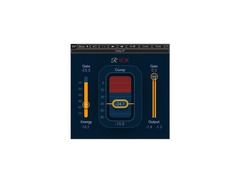
Achieve pristine vocal clarity with the Waves Renaissance Vox Plugin, a staple in professional and home studios alike. This intuitive vocal processing tool is designed to deliver broadcast-quality sound with minimal effort, making it perfect for musicians and sound engineers who crave simplicity without compromising on performance. The Renaissance Vox Plugin combines compression, gating, limiting, and level maximization into one streamlined interface, ensuring your vocals remain clear and focused in any mix.
Its soft-knee compressor with automatic gain control allows for smooth and natural dynamics, while the gentle downward expander effectively reduces unwanted noise, ensuring your vocal tracks are as clean as they are compelling. The plugin's user-friendly design makes it easy to enhance your vocal presence, whether you're in the studio or performing live.
With compatibility across Mono and Stereo components, and support for resolutions up to 24-bit/192 kHz, the Renaissance Vox Plugin ensures high-quality audio fidelity. Its Clip-Guard output limiter offers additional protection, preventing signal clipping and maintaining the integrity of your sound. This makes it an essential tool for anyone looking to refine their vocal tracks with precision and ease.
Key Features:
- Soft-knee compressor with automatic gain control
- Integrated compression, gating, limiting, and level maximization
- Gentle downward expander for effective noise gating
- Supports resolutions up to 24-bit/192 kHz
- Mono and stereo components compatibility
- Clip-Guard output limiter to prevent signal clipping
- User-friendly interface for quick and easy vocal enhancement
Owner's manual
Waves Renaissance Vox Plugin User ManualProduct specs
| Software Type | Dynamic Processor |
| Platform | Mac, PC |
| Upgrade/Full | Full |
| Download/Boxed | Download |
| Bit Depth | 64-bit |
| Format | AAX Native, AudioSuite, VST, AU, SoundGrid |
| Hardware Requirements - Mac | Intel Core i7 or higher (M1 support), 8GB RAM minimum |
| Hardware Requirements - PC | Intel Core i5 / AMD Quad-core or higher (AVX required), 8GB RAM minimum |
| OS Requirements - Mac | macOS 10.15.7 or later |
| OS Requirements - PC | Windows 10 or later (21H2), 64-bit |
FAQs
-
What is the primary function of the Waves Renaissance Vox Plugin?
-
The Waves Renaissance Vox Plugin is primarily designed as a dynamic processor for vocal tracks, offering compression, gating, and limiting to enhance vocal clarity and presence in a mix.
-
Is the Waves Renaissance Vox Plugin compatible with my DAW?
-
The Waves Renaissance Vox Plugin supports AAX Native, AudioSuite, VST, AU, and SoundGrid formats, making it compatible with most major DAWs on both Mac and PC platforms.
-
What system requirements are needed to run the Waves Renaissance Vox Plugin on a Mac?
-
To run the Waves Renaissance Vox Plugin on a Mac, you need macOS 10.15.7 or later, an Intel Core i7 processor or higher (M1 support available), and a minimum of 8GB RAM.
-
Can the Waves Renaissance Vox Plugin be used as a limiter?
-
Yes, the Waves Renaissance Vox Plugin includes a built-in limiter on its output, ensuring the signal does not clip when returning to the host DAW.
-
Is the Waves Renaissance Vox Plugin suitable for beginners?
-
Yes, the Waves Renaissance Vox Plugin is user-friendly with an intuitive interface, making it suitable for beginners looking to enhance their vocal tracks with professional-grade processing.
Videos

Waves Audio
Vocal Compression with Waves R-Vox and R-Comp

Vocal Compression with Waves R-Vox and R-Comp
Waves Audio

Waves Renaissance Vox: Why Is Everyone In Love With This Thing???

Geoff Manchester
How To Compress Vocals With Waves Rvox And RCompressor | Mixing With Waves Plugins

Jay TheMg

The BEST Vocal Compressor Plugin for Beginners - Waves RVox Tutorial

Mix With Jerry
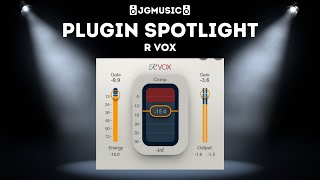
Plugin Spotlight - R Vox (Best Vocal Compressor!)

Joe Gautrey Music
Reviews
PROS
-
Effortlessly enhances vocal presence and clarity
-
Simple interface with minimal controls for easy use
-
Consistently delivers transparent and musical results
-
Ideal for both beginners and experienced producers
-
Effective in reducing dynamic range on vocals
-
Versatile for both light gating and compression
-
Reliable, fool-proof performance every time
-
Excellent pre-set settings for optimal vocal processing
CONS
-
Limited control may not suit advanced users seeking in-depth customization
-
Some users may dislike Waves' business practices
Owner Insights
We analyzed real musician discussions from forums and Reddit to find what players love, question, and tweak about Waves Renaissance Vox Plugin.
Use cases and applications
-
RVox excels as a secondary compressor in serial processing, especially for achieving upfront vocals in pop and modern rap without coloration.
Source -
RVox is effective on acoustic guitar, providing a favorite compression option for some users beyond vocal processing.
Source -
Vocal Rider is seen as a good starting point for automation, but not sufficient alone for comprehensive vocal control.
Source
Comparisons
Features and functionality
5.0 out of 5
Based on 3 Reviews and 16 Ratings


Artist usage
Add artist

Used for vocals on Continuum, as stated by recording engineer Chad Franscoviak in this October 1, 2006 Mix Online interview.
For Mayer's vocal chain, Franscoviak says that most of the songs were recorded with a Neumann U47. For a couple of songs, he sang into a Neumann M269c, and on “I'm Gonna Find Another You,” which was recorded at Royal Studios in Memphis, he sang into Al Green's RCA 77 ribbon mic. From there, the chain included a Neve sidecar stocked with 1073 mic pre's and then a UREI silver-face 1176. “On a couple of songs, we did experiment with splitting his vocals into two channels — one of them would be kind of a clean and one of them would be kind of a gritty — and we would take the second channel and put it through a Fairchild 670 and really crush it,” Franscoviak explains. “Then we would either blend it together or choose one or the other for the mix.
“[Mayer] loves hearing his vocals really compressed, so he can be as dynamic as he wants to and it always sounds present to him,” he continues. “He likes way too much reverb when he's tracking, and then when we proceed into the mix, it will be reeled in a little bit. Generally, I will compress lightly going to tape or Pro Tools, and then in Pro Tools cream it with usually the Renaissance Vox.”


After the Focusrite d2, Kaskade uses the Waves Renaissance Vox Plugin in a plugin chain to process vocals, for "smashing it up a little."


Used for Albarn's vocals on Gorillaz's "Charger", as mentioned by recording engineer and frequent collaborator Stephen Sedgwick in this July 2017 Sound on Sound interview about the production of Humanz.
“The vocals start at track 42, with Damon’s lead vocal. The main lo-fi telephone-like effect is the typical 2-D sound, because this is a 2-D song. I can’t tell you what it is, but it’s done with hardware. The plug-ins on the inserts are a Waves Renaissance De-esser and RVox, and the Waves Kramer PIE [compressor], which I use a lot on vocals. Below are two tracks of lead vocals with delays.
While recording, I often use the SoundToys EchoBoy for delays, but I replace that with hardware delays to get more character. In this case these two tracks are prints of me running Damon’s vocals through a Roland SDE 2000. I was having fun with that, doing fast delays and delays with modulation. Then there are some Damon harmonies, and the yellow tracks are him singing the chorus, and some of these are pitched down an octave with the Little AlterBoy. I usually compress vocals with outboard, either using Empirical Labs Distressors or sometimes the Summit TLA 100A or Tube-Tech CL1B compressor. If want to impose a lot of character I’ll engage an old Collins broadcast limiter. For reverbs on the vocals I often use the studio’s EMT 140 plate.


The Waves Renaissance Vox Plugin is listed among the plugins used on Dyro's track 'Against All Odds', in this Splice Project.


In The "Breaking the Mix Rules" Interview Mix Engineer Rob Kinelski mentions that R-VOX is go to vocal plugin and applied it to for Billie but didn’t use it as much on this record because a lot of the sources came to him already compressed.


Used on Lamar's vocals for "All the Stars" as stated by producer Matt Schaeffer in this May 2018 Sound on Sound interview.
Kendrick Lamar’s vocal audio tracks, named after his teenage stage name K.Dot, consist of his first verse rap track, ‘VS 1 LD’, and 10 tracks for three moments in the track where he sings the pre-hook in a robotic voice. The verse rap track only has the AIR Flanger on it, and is sent to the ‘Dot VS LD’ aux track, which has eight inserts and five sends. Nine of the 10 pre-hook tracks have Auto?Tune, while the top four have a number of plug-ins on the inserts, including the EQ3 seven-band, Waves RVox, UAD Galaxy Tape Echo, SoundToys Little AlterBoy, SoundToys MicroShift and Valhalla Vintage Verb. These four are sent to a ‘Hook Ref’ aux track higher up in the session with another four plug-ins on the inserts and five sends. The other six are backing vocals to the four other pre-hook tracks and have no other plug-ins, other than a Trim, and are sent to a ‘Hook Background’ aux, just below them, which itself also is sent to the ‘Hoof Ref’ track. It’s a pretty complicated vocal signal chain, as Schaeffer admits.
“The ‘Dot VS LD’ aux indeed has a lot of stuff on it! I did most of the processing on that bus. On the inserts there are the SSL E-Channel, Waves RComp, Waves Q10 EQ, Waves DeEsser, UAD LA2A, UAD Pultec EQP1A, SoundToys Decapitator and Pro?Q2. The SSL channel strip, Q10 and RCompressor remain from the tracking, and maybe the DeEsser as well, but I most likely messed with the settings more during mixing. The Q10 has a high-pass at 50Hz and I notched out a frequency that was bothering me around 8.5kHz with the Q2. I added the other plug-ins during mixing, and they all add something a bit different. I’m boosting 100Hz and 16kHz with the EQP1A. As I said, I like using several EQs on one thing.
“The sends go to a ‘FlangeVerb’ track, on which I put the RVerb and the UAD MXR Flanger, then the ‘Huge Verb’ with the [Audio Ease] Altiverb and EQ3, ‘Hook Valhalla’ with the Vintage Verb, and the SoundToys EchoBoy, the ‘EMT250’ aux with the UAD EMT250, Valhalla Plate and MicroShift, and then finally a send to the ‘Dot VS Delay’ track, with the EchoBoy, set to quarter note, the Reel Tape Flanger and the RCompressor. The EchoBoy is the main delay you can hear in the verse. The EMT250 is not set to a reverb, but to a phaser effect, which gives a cool stereo effect. The Valhalla adds a bit of reverb here, though it’s set to -12, so it only gives a tiny bit of ambience, and the MicroShift makes the whole thing a little wider. It probably still sounded a bit dry, which is why I sent the track to the ‘Huge Verb’ aux with the Altiverb, again taking out low end with the EQ3.


The Waves Renaissance Vox was one of the plugins used in Pro Tools to fine tune the tracks in Toro Y Moi's album "Anything in Return."


It’s all about getting something to sound the most inspiring as quickly as possible, to keep the momentum going. You would think that more advanced producers would want infinite parameters in their tools. But in truth, I’ll use something like Renaissance Compressor – I’m a big fan of optical compressors. Either that or the Renaissance Vox comp – it has a way of placing vocals perfectly in the mix without the compression being noticeable or harsh. Very transparent and smooth. I probably use it more than any comp; I can get good results fast and keep it moving.


Used for J. Cole's feature on 21 Savage's "A Lot", as is visible in track "CILdVrDIRTY" in a downloadable photo of the "A Lot" Pro Tools session (available in this .zip file) from this March 2019 Sound on Sound interview with producer Maddmix.
.jpg?v=1784758771)
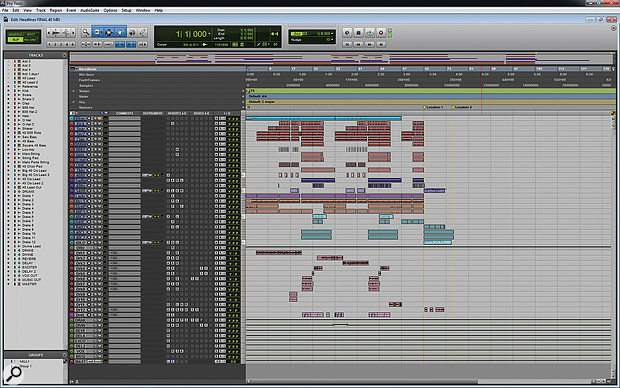
Noah Shebib tells that he used the Waves Renaissance Vox Plugin in Drake Lead Vocal of "Headlines"


In this interview with SOS, Dj Premier talks about his plugins, saying, "There are many plug-ins I haven't even experimented with yet. But I like the [Waves] Renaissance Vox and Bass plug-ins. I just play around until the sound has a nice shape."


Album Usage
The Waves Renaissance Vox Plugin has been featured on the following albums:

american dream (nightcore version)
21 Savage (2024)
Low
Flo Rida (2022)

Only Us (From The “Dear Evan Hansen” Original Motion Picture Soundtrack)
Carrie Underwood & Dan + Shay (2021)

Ex Machina
Metrik (2020)

Gravity
Metrik (2019)

We Love You Tecca
Lil Tecca (2019)

Old Town Road (Remix)
Billy Ray Cyrus & Lil Nas X & Mason Ramsey (2019)

KIRK
DaBaby (2019)

All The Stars (with SZA)
Kendrick Lamar & SZA (2018)

Dancing
Kylie Minogue (2018)

Humanz (Deluxe)
Gorillaz (2017)

Bodak Yellow (feat. Kodak Black)
Cardi B & Kodak Black (2017)
![Waves Renaissance Vox Plugin as heard on Bodak Yellow (feat. Messiah) [Latin Trap Remix] by Cardi B (2017)](https://images.equipboard.com/uploads/album/image/658146/bodak-yellow-feat-messiah-latin-trap-remix.jpg)
Bodak Yellow (feat. Messiah) [Latin Trap Remix]
Cardi B (2017)

Perfect Strangers
Jonas Blue & JP Cooper (2016)

Against All Odds
Dyro (2014)

Anything in Return
Toro y Moi (2013)

Diamonds
Rihanna (2012)

Headlines
Drake (2011)

Low (feat. T-Pain)
Flo Rida (2008)
Continuum
John Mayer (2006)
Genre Usage
Based on how artists on Equipboard use this gear, it is most commonly found in the following genres.
Used With
Based on how musicians on Equipboard use Waves Renaissance Vox Plugin, it is most commonly used with the following gear.



-s.webp?v=1784815394)


Community setups
Show yours
More Waves Compressor Plugins
-m.webp?v=1784815394)
$32.00 - $34.99
in Compressor Plugins Rank


-m.webp?v=1784815428)
$32.00 - $34.99
in Compressor Plugins Rank


$37.00 - $39.99
in Compressor Plugins Rank


$37.00 - $39.99
in Compressor Plugins Rank


-m.webp?v=1784815468)
$39.99
in Compressor Plugins Rank


$33.00 - $34.99
in Compressor Plugins Rank

.jpg?v=1784758771)

$37.00 - $39.99
in Compressor Plugins Rank


$33.00 - $34.99
in Compressor Plugins Rank

.jpg?v=1784733415)


$35.99 - $39.99
in Compressor Plugins Rank


$33.00 - $34.99
in Compressor Plugins Rank


$37.00 - $39.99
in Compressor Plugins Rank


-m.webp?v=1784815390)
$33.00 - $39.99
in Compressor Plugins Rank


$33.00 - $34.99
in Compressor Plugins Rank


$33.00 - $34.99
in Compressor Plugins Rank


$33.00 - $34.99
in Compressor Plugins Rank


$29.99
in Compressor Plugins Rank

$33.00 - $39.99
in Compressor Plugins Rank


$33.00 - $82.50
in Compressor Plugins Rank


$33.00 - $34.99
in Compressor Plugins Rank


$39.99 - $149.00
in Compressor Plugins Rank


$29.00 - $29.99
in Compressor Plugins Rank


$29.99 - $34.99
in Compressor Plugins Rank


$33.00 - $35.99


$191.00 - $199.00


$144.00 - $199.00
in Compressor Plugins Rank


$133.00 - $149.00
in Compressor Plugins Rank

$144.00 - $199.00
in Compressor Plugins Rank

-m.webp?v=1784815355)
$139.00 - $149.00
in Compressor Plugins Rank


$47.00 - $49.00
in Compressor Plugins Rank
.jpeg?v=1784733415)


$39.99 - $149.00
in Compressor Plugins Rank


$69.00
in Compressor Plugins Rank

$39.00 - $1,549.00
in Compressor Plugins Rank


$89.00
in Compressor Plugins Rank
Accessories & Related Items


-s.webp?v=1784815428)


-s.webp?v=1784815468)



-s.webp?v=1784815476)
-s.webp?v=1784785458)


Similar


Gear Guides




.webp)




Most Popular Compressor Plugins
Most Popular Brands
-
Added to Equipboard on by
 equipboard
GearIQ 4934
-