
Pricing and availability




Average Price: $337
Standard/Professional
$200
$1001+
Price Tier
Budget
Standard
High-end
* Product prices and availability are updated by Equipboard every 24hrs and are subject to change. Equipboard may receive compensation for purchases made at participating retailers linked on this site. This compensation does not affect what products or prices are displayed, or the order of prices listed. For more information, please refer to our affiliate disclosure.
Description
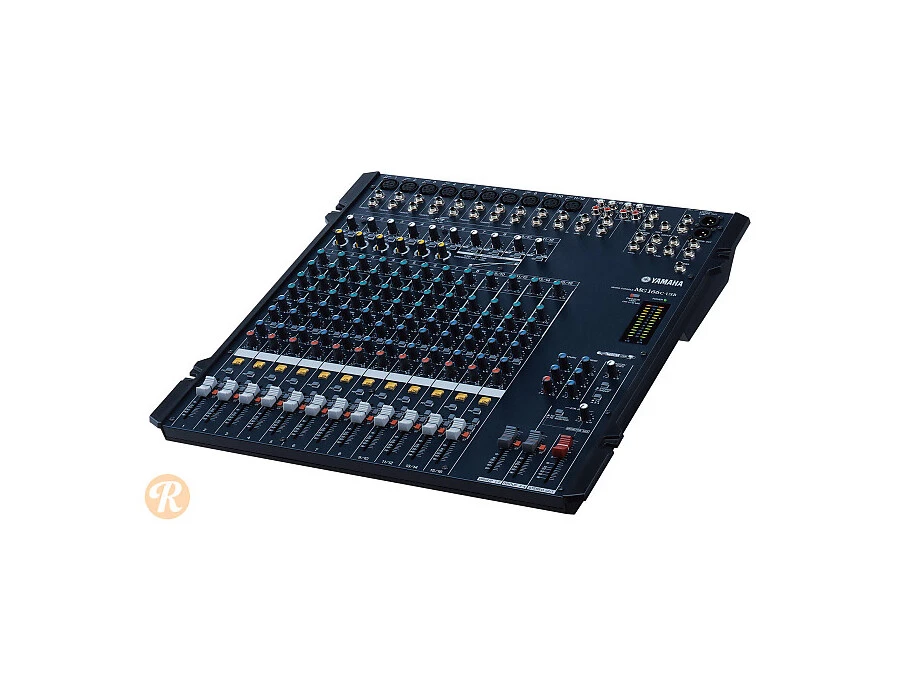
The Yamaha MG166C-USB 16-Channel Mixer with USB is your all-in-one solution for seamless audio mixing. Designed for both studio and live environments, this compact and lightweight mixer doesn't compromise on features or sound quality. Whether you're setting up in a small venue or a home studio, the Yamaha MG166C-USB offers the capacity and control you need.
What sets this mixer apart is its versatile connectivity options, including 10 mic inputs, 4 stereo line inputs, and 8 insert loops. This ensures you can hook up everything from microphones to keyboards with ease. The built-in USB audio interface allows for hassle-free recording and playback, making it a perfect fit for modern audio production needs. Additionally, the one-knob compression feature simplifies dynamic control, allowing you to achieve polished sound with minimal effort.
Complemented by top-notch mic preamps with switchable phantom power, the MG166C-USB ensures high-quality audio capture, regardless of the microphone type. Its intuitive 3-band channel EQ and digital effects add depth and character to your mix, while the SPX digital multi-effects processor enhances your sound with professional-grade reverbs and delays.
This mixer is not just about the specs but also about the user experience, offering top-mounted inputs and outputs for easy patching, illuminated channel ON switches, and a smooth 60mm fader. With the bundled Cubase AI4 software, you're ready to take your audio projects from concept to completion.
Key Features:
- 16 input channels, including 10 mic inputs and 4 stereo line inputs
- Built-in USB audio interface for seamless connectivity
- Yamaha’s one-knob compression on multiple channels
- High-quality mic preamps with switchable phantom power
- 3-band EQ on mono channels, 2-band EQ on stereo channels
- SPX digital multi-effects processor
- Lightweight and portable design
- Includes Cubase AI4 recording software
FAQs
-
What are the main connectivity options for the Yamaha MG166C-USB mixer?
-
The Yamaha MG166C-USB mixer offers a variety of connectivity options, including 16 input channels, USB connectivity for direct recording to a computer, and multiple output options for versatile audio routing.
-
Does the Yamaha MG166C-USB mixer have built-in effects?
-
Yes, the Yamaha MG166C-USB mixer features built-in effects, including compression and equalization, which provide enhanced sound shaping capabilities for live and studio applications.
-
Is the Yamaha MG166C-USB suitable for live performances?
-
The Yamaha MG166C-USB is well-suited for live performances, offering 16 channels and robust features like USB connectivity and built-in effects, making it ideal for managing complex audio setups.
-
How does the USB functionality of the Yamaha MG166C-USB benefit recording?
-
The USB functionality of the Yamaha MG166C-USB allows for easy digital recording to a computer, providing a straightforward way to capture high-quality audio from live performances or studio sessions.
-
What is the primary use case for the Yamaha MG166C-USB mixer?
-
The Yamaha MG166C-USB mixer is primarily used for live sound reinforcement and studio recording, offering versatile connectivity and built-in effects to accommodate various audio mixing needs.


Reviews
Owner Insights
We analyzed real musician discussions from forums and Reddit to find what players love, question, and tweak about Yamaha MG166C-USB 16 Channel Mixer with USB.
Features and functionality
Comparisons
-
Yamaha MG10XU is favored over the MG102c for users prioritizing live performance over multitrack recording.
Source
Use cases and applications
-
A multitrack USB audio interface is recommended for users planning to record directly into a computer.
Source -
Users suggest bypassing a mixer for an audio interface to enable live VST effects when recording on a computer.
Source -
Users needing multitrack recording should consider an audio interface, as this mixer's USB output combines all channels into a single track.
Source
Critic Reviews
Based on 0 Reviews and 0 Ratings
More Yamaha Mixers

$213.37 - $294.99
in Mixers Rank


-m.webp?v=1783346673)
$338.46 - $379.00
in Mixers Rank


$200.00 - $573.74
in Mixers Rank


$139.79 - $169.00
in Mixers Rank


$129.99 - $176.99
in Mixers Rank


$190.00 - $229.99
in Mixers Rank


$338.46 - $365.49
in Mixers Rank


$674.99 - $749.00
in Mixers Rank


$279.99 - $329.00
in Mixers Rank


$466.00 - $479.00
in Mixers Rank


.jpg?v=1783065525)


Accessories & Related Items
-s.webp?v=1783346673)


Artist usage


Community setups


Similar


Gear Guides





Most Popular Mixers
Most Popular Brands
-
Added to Equipboard on by
 equipboard
Gear IQ 4934
-


