

Pricing and availability




* Product prices and availability are updated by Equipboard every 24hrs and are subject to change. Equipboard may receive compensation for purchases made at participating retailers linked on this site. This compensation does not affect what products or prices are displayed, or the order of prices listed. For more information, please refer to our affiliate disclosure.
Description
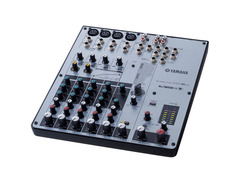
Unleash your creativity with the Yamaha MW8CX USB Mixing Studio, the perfect blend of compact design and professional-grade features. Ideal for solo musicians and traveling producers, this mixer transforms your desktop into a powerful recording studio. With eight versatile inputs, you can effortlessly connect microphones, instruments, and more. The MW8CX stands out with its one-knob compression, offering precise control over your sound without the fuss of multiple settings. This feature is especially beneficial for taming dynamic vocals and instruments, ensuring a polished output every time.
The built-in SPX digital effects unit expands your sonic palette with a variety of reverb, delay, modulation, and distortion effects, allowing you to enhance or completely transform your sound on the fly. The plug-and-play USB connection ensures seamless integration with your computer, while the included Cubase AI4 software provides an all-in-one solution for recording, sequencing, and production.
Designed with user-friendly features such as top-mounted input and output connectors, the MW8CX is both intuitive and efficient. The high-quality Neutrik balanced XLR connectors and long-throw faders ensure a professional touch to your recordings. Whether you're at home or on the road, the Yamaha MW8CX USB Mixing Studio is your reliable partner in capturing and crafting your musical ideas.
Key Features:
- Compact 8-channel configuration with four ultra-low noise mic preamps
- One-knob compression and monitor mix feature
- Built-in SPX digital effects with 16 editable programs
- Phantom power for condenser microphones
- Plug-and-play USB audio interface
- Includes Steinberg Cubase AI4 software for comprehensive music production
Product specs
| Frequency Response | ST OUT, REC OUT, AUX (EFFECT*) SEND, MONITOR OUT, -3.0, 0, 1.0 dB, GAIN: min (CH 1-2, CH 3/4-5/6), 20Hz-20kHz, nominal output level @1kHz |
| Total Harmonic Distortion (THD+N) | ST OUT, Less Than 0.1 %, +14dBu, 20Hz-20kHz, Input Gain Control at minimum |
| CH INPUT 1-4 MIC | -128 dBu, EIN (Equivalent Input Noise): Rs=150ohms, |
| GAIN | max |
| ST OUT, REC OUT | -87 dBu, ST MASTER CONTROL at nominal level and all Ch level controls at minimum. |
| AUX (EFFECT) SEND | -85 dB, All Ch AUX controls at minimum. |
| ST OUT | -100 dB, Residual Output Noise. |
| Crosstalk @ 1 kHz | Input to Output -70 dB, STEREO L/R, CH 1-2, PAN panned Hard left or right. |
| Phantom Voltage | MIC, +48 V |
| USB Audio I/O Sampling Frequency | 44.1, 48 kHz, Depend on the application of PC |
| Input HPF | CH 1-2 and CH 3/4-5/6, 80Hz, 12dB/oct |
| Input Equalization (+15,-15dB maximum. Turn over/roll-off frequency of shelving | 3dB blow maximum variable level.) |
| High | 10 kHz shelving (CH 7/8, CH 9/10**) |
| Mid | 2.5 kHz peaking (CH 1-2, CH 3/4-5/6) |
| Low | 100 Hz shelving (CH 7/8, CH 9/10**) |
| PEAK Indicator | Red LED turns on when post EQ (ST CH: or post Mic HA) signal reaches -3dB below clipping (17dBu). |
| Internal Digital Effects | 16 PROGRAM, PARAMETER control, Foot Switch (Digital Effect, on/off) |
| LED Level Meter | Pre MONITOR Level 2x7 points LED meter (PEAK,+6,+3,0,-5,-10,-20 dB) PEAK lights if the signal comes within 3 dB of the clipping level. |
| Power Supply Adapter | PA-10 |
| Power Consumption | 21 W |
| Dimensions (W x D x H) | 10.10 x 11.90 x 2.44 in. (256.6 x 302.5 x 62.2 mm) |
| Net Weight | 3.74 lbs. (1.7 kg) |
| Option | Microphone Stand Adaptor (BMS-10A) |
| Computer | Macintosh computer with built-in USB interface |
| OS | Mac OS X 10.4 or higher |
| CPU | Power Mac G4 1 GHz or Core Solo 1.5 GHz or better |
| Memory | More than 128 MB |
| Available Memory | More than 512 MB |
| Hard Disk | Free disk space of 400 MB or more; high-speed hard disk |
| Audio Interface | Windows DirectX / ASIO compatible |
FAQs
-
Does the Yamaha MW8CX USB Mixer require any driver installation?
-
No, the Yamaha MW8CX USB Mixer connects to your computer via a single USB cable and does not require any driver installation, making it easy to set up and use.
-
Can the Yamaha MW8CX USB Mixer be used with Mac computers?
-
Yes, the Yamaha MW8CX USB Mixer is compatible with Macintosh computers running Mac OS X 10.4 or higher and requires a built-in USB interface.
-
What type of power supply does the Yamaha MW8CX USB Mixer use?
-
The Yamaha MW8CX USB Mixer uses a PA-10 power supply adapter and has a power consumption of 21 watts.
-
Does the Yamaha MW8CX USB Mixer have built-in effects?
-
Yes, the Yamaha MW8CX USB Mixer features internal digital effects with 16 programs and parameter control, providing versatility for various audio applications.
-
What is the purpose of the 1-knob compression on the Yamaha MW8CX USB Mixer?
-
The 1-knob compression on the Yamaha MW8CX USB Mixer allows for easy dynamic control, helping to smooth out audio levels and enhance sound quality with minimal effort.
-
Is phantom power available on the Yamaha MW8CX USB Mixer?
-
Yes, the Yamaha MW8CX USB Mixer provides 48V phantom power, which is essential for powering condenser microphones.
Videos

djkit®
Yamaha MW8CX USB Mixing Studio with Compressor - DJkit.com
Yamaha MW8CX USB Mixing Studio with Compressor - DJkit.com
djkit®
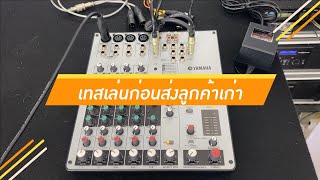
เล่นก่อนส่งสินค้า MIXER YAMAHA MW8CX ส่งลูกค้าเก่าเหมือนเคย คุณภาพคัดเกรด เสียงหวาน นุ่มนวล

หนึ่งซาวด์โปร นครปฐม เครื่องเสียงต่างประเทศคุณภาพ
Reviews
Owner Insights
We analyzed real musician discussions from forums and Reddit to find what players love, question, and tweak about Yamaha MW8CX USB Mixing Studio.
Features and functionality
-
The Yamaha MW8CX, released in 2007, provides seamless switching between audio outputs and includes various reverb settings, ideal for karaoke.
Source
User experience
-
Owners of the MW8CX report issues with volume knob flakiness over time, though they remain satisfied with overall performance.
Source
Software and compatibility
-
The Yamaha MW8CX connects via USB without requiring driver downloads, simplifying setup for users.
Source
Critic Reviews
Based on 0 Reviews and 0 Ratings
More Yamaha Mixers

$213.37 - $294.99
in Mixers Rank


-m.webp?v=1783205146)
$338.46 - $429.99
in Mixers Rank


$200.00 - $674.99
in Mixers Rank


$139.79 - $175.00
in Mixers Rank


$129.99 - $176.99
in Mixers Rank


$190.75 - $229.99
in Mixers Rank


$338.46 - $429.99
in Mixers Rank


$674.99 - $849.99
in Mixers Rank


$279.99 - $329.00
in Mixers Rank


$466.00 - $479.00
in Mixers Rank


.jpg?v=1783065525)


Artist usage


Community setups


Similar


Gear Guides






Most Popular Mixers
Most Popular Brands
-
Added to Equipboard on by
 fleshgoblin
Gear IQ 205
-


