

Pricing and availability




* Product prices and availability are updated by Equipboard every 24hrs and are subject to change. Equipboard may receive compensation for purchases made at participating retailers linked on this site. This compensation does not affect what products or prices are displayed, or the order of prices listed. For more information, please refer to our affiliate disclosure.
Description
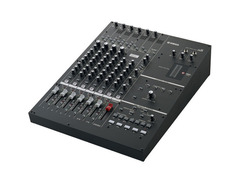
Step into the world of seamless mixing and recording with the Yamaha n8, a digital mixing console that masterfully combines the tactile feel of analog with the precision of digital technology. Ideal for both the seasoned producer and the budding musician, the n8 is crafted for intuitive use and exceptional sound quality. Its integration with Cubase via the IEEE 1394 FireWire port allows for a streamlined workflow, making it a go-to choice for any studio setup.
This versatile mixer handles up to 8 channel inputs, routing them effortlessly to stereo outputs while maintaining pristine 24-bit, 96-kHz digital quality. With Yamaha's newly developed Sweet Spot Morphing Compressors, every channel benefits from professional-grade dynamics control. The 3-band EQ on each channel, with a sweepable midrange, ensures all your sound sculpting needs are met with ease.
The n8 features four Yamaha preamps with switchable phantom power, accommodating everything from condenser mics to electric guitars, thanks to the built-in hi-Z input. Whether you're fine-tuning vocals or laying down guitar riffs, the n8's high-resolution Rev-X Reverb adds a lush, natural ambiance to your tracks.
With its intuitive interface, every knob and switch is dedicated to a single function, eliminating guesswork and keeping your creative process uninterrupted. The Yamaha n8 isn't just a mixer; it's a gateway to bringing your sonic visions to life with professional polish.
Key Features:
- 8-channel, 2-bus configuration
- 4 mic preamps with phantom power
- 3-band EQ with sweepable midrange
- Sweet Spot Morphing Compressors
- High-resolution Rev-X Reverb
- FireWire connectivity for seamless DAW integration
- Hi-Z input for direct guitar/bass connection
- 24-bit, 96-kHz digital quality
- MIDI I/O and footswitch input
- Cubase AI4 software included
Product specs
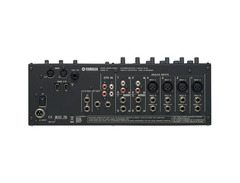
| Monaural inputs, channels 1-4 | XLR/TRS jacks with Inserts and +48V Phantom Power; Channel 4 supports Hi-Z input (switchable) |
| Stereo inputs | Channels 5”8: Unbalanced Phone jacks /RCA jacks |
| 2 Track In | RCA jacks |
| Stereo out | TRS/RCA jacks L/R |
| Control Room out | TRS jacks L/R |
| DAW I/O | 2x IEEE1394 (FireWire) |
| MIDI | IN, OUT |
| Footswitch | 1x |
| AC In | 1x |
| Accessories | Power adaptor, owner's manual, CD-ROM (includes Cubase AI4 DAW software) |
FAQs
-
How many channels does the Yamaha n8 mixer have?
-
The Yamaha n8 mixer features 8 channels, including 4 monaural inputs with XLR/TRS jacks and 4 stereo inputs with unbalanced phone/RCA jacks, providing versatile connectivity options for various audio sources.
-
Can the Yamaha n8 mixer connect to a computer for recording?
-
Yes, the Yamaha n8 mixer can connect to a computer via a single IEEE 1394 (FireWire) cable, allowing for seamless integration with digital audio workstations like Cubase for recording and playback.
-
Does the Yamaha n8 support phantom power for condenser microphones?
-
Yes, the Yamaha n8 mixer provides +48V phantom power on its monaural XLR inputs, enabling the use of condenser microphones for high-quality recording sessions.
-
What built-in effects does the Yamaha n8 mixer offer?
-
The Yamaha n8 mixer includes a digital reverb effect, allowing users to add depth and ambiance to their audio mix directly from the mixer.
-
Is the Yamaha n8 compatible with Cubase software?
-
Yes, the Yamaha n8 is designed to link seamlessly with Cubase software, offering enhanced control and integration for recording and mixing projects.


Reviews
Owner Insights
We analyzed real musician discussions from forums and Reddit to find what players love, question, and tweak about Yamaha n8.
Software and compatibility
-
Using the Yamaha N8's built-in IEEE1394 (FireWire) output with Adobe Audition on PC may contribute to audio drift issues without a common sync source.
Source
Features and functionality
-
The Yamaha N8 offers a DAW out, but for certain setups, using overhead mics directly into a Marantz recorder may bypass some audio drift problems.
Source
Use cases and applications
-
The Yamaha N8 is primarily used for music events and guest speakers, but its functionality might be limited during speaking events when attempting to prevent audio drift.
Source
Setup and maintenance
-
Ensuring both audio and video devices share the same frame and sample rate is crucial, yet not always sufficient, to prevent drift during long recordings.
Source
4.0 out of 5
Based on 1 Review and 1 Rating
Similar
Add recommendation1 alternative for Yamaha n8, curated by the Equipboard community.

More Yamaha Mixers

$214.78 - $250.74
in Mixers Rank


-m.webp?v=1784991681)
$340.69 - $379.00
in Mixers Rank


$200.00 - $573.74
in Mixers Rank


$140.72 - $169.00
in Mixers Rank


$129.99 - $176.99
in Mixers Rank


$190.75 - $229.99
in Mixers Rank


$340.69 - $365.49
in Mixers Rank


$711.02 - $758.00
in Mixers Rank


$279.99 - $325.00
in Mixers Rank


$459.00 - $479.00
in Mixers Rank


.jpg?v=1783959930)


Accessories & Related Items


Artist usage


Community setups


Gear Guides








Most Popular Mixers
Most Popular Brands
-
Added to Equipboard on by
 runemel
GearIQ 105
-


