

Pricing and availability
We compare 600+ stores and found this item at 7 stores. Prices updated .
Store
Reviews
Price








Price History
Based on price data from 6 merchants for "Nektar Panorama CS12 Channel Strip and DAW Plug-in Controller". Prices shown reflect NEW condition. Tracking began Apr 2, 2026.
* Product prices and availability are updated by Equipboard every 24hrs and are subject to change. Equipboard may receive compensation for purchases made at participating retailers linked on this site. This compensation does not affect what products or prices are displayed, or the order of prices listed. For more information, please refer to our affiliate disclosure.
Description
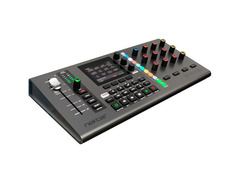
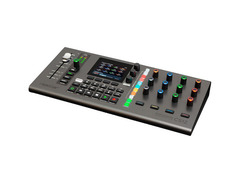
The Nektar Panorama CS12 Channel Strip and DAW Plug-in Controller is an essential tool for musicians seeking unparalleled control over their DAW environment. This device is designed to elevate your studio workflow with its innovative features and intuitive layout. Featuring a 100mm motorized fader with 14-bit resolution, it provides precise level adjustments, while dedicated pan controls and illuminated buttons for solo, mute, and record arm functions ensure you have comprehensive control at your fingertips.
The CS12 stands out with its 3.5-inch TFT display, offering real-time feedback for plug-in control and assignments. With 12 endless rotary pots, RGB-illuminated controls, and four display buttons, this controller is a powerhouse for managing up to 12 sends per channel. The Nektar Panorama CS12’s plug-in mapping is customizable through the Nektarine software, allowing you to tailor your hardware interface to suit any workflow, whether you're working with Logic Pro, Cubase, or Nuendo.
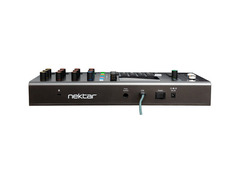
This controller isn't just about control—it's about enhancing creativity. The CS12 offers a footswitch socket for hands-free operation, USB-C connectivity for seamless integration, and bus-powered functionality for convenience. Whether you're setting automation points with a touch or navigating through your DAW with ease, the Panorama CS12 is designed to help you focus on the music, not the mechanics.
Key Features:
- 100mm motorized fader with 14-bit resolution
- Compatible with Logic Pro, Cubase, and Nuendo
- 3.5-inch TFT display for real-time feedback
- 12 endless rotary pots and RGB-illuminated controls
- Customizable plug-in mapping with Nektarine software
- USB-C and bus-powered for easy integration
- Footswitch socket for hands-free control
Product specs
| Type | Channel Strip Controller |
| Screen | 3.5" TFT Color Display |
| Faders | 1 x 100mm ALPS Motorized Fader |
| Transport Controls | Yes |
| Encoders/Pots | 13 x 360° Assignable Pots, 1 x Zoom Encoder, 1 x Tempo Encoder, 1 x Data/Menu Encoder |
| Pads | 4 x RGB LED Control Buttons, 11 x RGB LED Buttons (channel strip sections) |
| Controls | 4 x Display Buttons, 4 x Channel Strip Buttons |
| USB | 1 x USB-C |
| Other I/O | 1 x 1/4" (footswitch) |
| Software | Nektar DAW integration |
| Compatibility | Logic Pro, Cubase, Nuendo |
| OS Requirements - Mac | mac OS 11.5 or later |
| OS Requirements - PC | Windows 10 or later |
| Power | USB Powered (500mA, cable included, outlet adapter sold separately) |
| Height | 2.55" |
| Width | 15.35" |
| Depth | 7.28" |
| Weight | 1.08 lbs |
FAQs
-
Is the Nektar Panorama CS12 compatible with my DAW software?
-
The Nektar Panorama CS12 is compatible with Logic Pro, Cubase, and Nuendo. It offers Nektar DAW integration for seamless control within these platforms.
-
What type of display does the Nektar Panorama CS12 have?
-
The Nektar Panorama CS12 features a 3.5" TFT color display, providing clear visual feedback for your channel strip and DAW control tasks.
-
How many motorized faders does the Nektar Panorama CS12 include?
-
The Nektar Panorama CS12 includes one 100mm ALPS motorized fader, which allows for precise control and automation of your DAW's channel strip.
-
Can I use the Nektar Panorama CS12 with both Mac and PC?
-
Yes, the Nektar Panorama CS12 is compatible with macOS 11.5 or later and Windows 10 or later, making it versatile for use with both Mac and PC systems.
-
Does the Nektar Panorama CS12 require an external power source?
-
The Nektar Panorama CS12 is USB powered, requiring 500mA. A USB cable is included, but an outlet adapter is sold separately if needed for additional power options.


Reviews
PROS
-
Intuitive controller for seamless Logic integration
-
Comprehensive auto-mapping for Logic's channel functions and third-party plugins
-
Easy custom mapping with learn mode and editor
-
Well-priced for its feature set
-
Solid build with smooth fader and encoder operation
-
Streamlines workflow and enhances production efficiency
-
Direct hands-on control with any plugin
-
Compact size fits small workspaces
-
Regular updates for improved functionality
CONS
-
Weak LED visibility in daylight
-
Motorized fader issues and inconsistent performance
-
Some plugins not pre-mapped, requiring manual setup
-
Plastic knobs and chassis feel less durable
-
Cubase integration reported as unreliable
-
Installation process can be cumbersome
-
Device stability issues with buttons and knobs
-
Large size may require extra desk space
-
No USB-C to USB-C cable provided
Owner Insights
We analyzed real musician discussions from forums and Reddit to find what players love, question, and tweak about Nektar Panorama CS12 Channel Strip and DAW Plug-in Controller.
Features and functionality
-
The CS12 allows for plugin mapping, with Logic plugins pre-mapped in a usable order; third-party plugins require manual mapping.
Source -
The CS12 excels at offering physical control for plugin effects, enhancing focus on listening rather than visual screen interaction.
Source -
Users appreciate the ability to quickly navigate a song using markers and record with a button, improving workflow efficiency.
Source
User experience
Build quality
-
The controller has a solid build with enough weight to avoid feeling like cheap plastic.
Source
Software and compatibility
Critic Reviews
5.0 out of 5
Based on 0 Reviews and 2 Ratings
Genre Usage
Based on how artists on Equipboard use this gear, it is most commonly found in the following genres.
More Nektar DAW Controllers

$129.00 - $349.99
in DAW Controllers Rank


$133.00 - $240.00
in DAW Controllers Rank


$182.00 - $277.00
in DAW Controllers Rank


$53.00 - $119.99
in DAW Controllers Rank


$249.00 - $499.00
in DAW Controllers Rank


$80.00
in DAW Controllers Rank


$33.85 - $209.99
in DAW Controllers Rank


$285.00 - $419.00
in DAW Controllers Rank


$182.37 - $599.99
in DAW Controllers Rank


$1,045.00 - $1,399.99
in DAW Controllers Rank


$76.40 - $109.00
in DAW Controllers Rank


$57.00 - $1,299.99
in DAW Controllers Rank


in DAW Controllers Rank


$95.00
in DAW Controllers Rank


$99.00 - $229.00
in DAW Controllers Rank


$699.99 - $839.99
in DAW Controllers Rank


$169.00 - $209.99
in DAW Controllers Rank


$228.86 - $524.99
in DAW Controllers Rank


$1,295.00 - $1,495.00
in DAW Controllers Rank


$995.00 - $1,195.00
in DAW Controllers Rank


$79.95 - $109.00
in DAW Controllers Rank


$122.00 - $189.00
in DAW Controllers Rank


$184.42
in DAW Controllers Rank


$573.71 - $799.99
in DAW Controllers Rank

$120.00
in DAW Controllers Rank


$48.00 - $70.90
in DAW Controllers Rank


$1,191.76
in DAW Controllers Rank


$635.00 - $999.99
in DAW Controllers Rank


$995.00 - $1,195.00
in DAW Controllers Rank

$249.00
in DAW Controllers Rank


$539.00 - $699.99
in DAW Controllers Rank

$1,191.76
in DAW Controllers Rank


$199.00 - $409.00
in DAW Controllers Rank

$125.00 - $169.99
in DAW Controllers Rank

$377.73 - $699.00
in DAW Controllers Rank


$249.00 - $469.90
in DAW Controllers Rank


$249.00 - $1,399.99
in DAW Controllers Rank


$123.00 - $219.99
in DAW Controllers Rank

$199.99 - $249.99
in DAW Controllers Rank
Accessories & Related Items


Artist usage


Community setups


Similar


Gear Guides






Most Popular DAW Controllers
Most Popular Brands
-
Added to Equipboard on by
 thatlkjguy
GearIQ 4716
-


