
Pricing and availability
We compare 600+ stores and found this item at 1 store. Prices updated .
Store
Reviews
Price




Average Price: $100
Standard/Professional
$99
$300+
Price Tier
Budget
Standard
High-end
* Product prices and availability are updated by Equipboard every 24hrs and are subject to change. Equipboard may receive compensation for purchases made at participating retailers linked on this site. This compensation does not affect what products or prices are displayed, or the order of prices listed. For more information, please refer to our affiliate disclosure.
Description
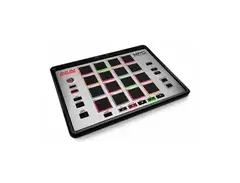
Unlock your creative potential with the Akai MPC Element, a sleek and portable hybrid pad controller designed to revolutionize your music production workflow. This compact powerhouse connects seamlessly to your computer via USB and integrates with Akai's renowned MPC software, making it an indispensable tool for musicians and producers who demand precision and performance.
The MPC Element features a bank of velocity-sensitive backlit pads, ensuring that each tap and strike is captured with accuracy and nuance. Dive into the world of beat-making and sequencing with intuitive transport controls and a range of functional buttons that put you in command of your creative process. Whether you're laying down beats in the studio or crafting rhythms on the go, the MPC Element provides the tactile response and versatility you need to bring your music to life.
Designed for portability without compromising on functionality, this MIDI pad controller is lightweight and slim, perfect for slipping into a backpack or laptop case. With its rugged build and dependable performance, the Akai MPC Element is your ticket to a dynamic and immersive music production experience.
Key Features:
- USB-powered hybrid pad controller
- Integrates with Akai's MPC software for seamless workflow
- 16 velocity-sensitive backlit pads for expressive performance
- Intuitive transport controls and functional buttons
- Slim, portable design for easy transport
- Compatible with both Mac and PC systems
Product specs
| Brand | Akai |
| Model | MPC Element Music Production Controller |
| Finish | White |
| Year | 2013 - 2017 |
| Categories | Pad MIDI Controllers |
| MIDI I/O | MIDI Input, MIDI Output, USB MIDI |
| Number of Pads | 16 Pads |
FAQs
-
How many pads does the Akai MPC Element have?
-
The Akai MPC Element features 16 velocity-sensitive pads, allowing for dynamic beat making and sample triggering.
-
What are the connectivity options for the Akai MPC Element?
-
The Akai MPC Element offers USB MIDI connectivity, allowing it to integrate easily with your computer and DAW software for seamless music production.
-
Is the Akai MPC Element compatible with popular DAWs?
-
Yes, the Akai MPC Element is compatible with most popular DAWs, providing the flexibility to use it in a variety of music production environments.
-
Does the Akai MPC Element require an external power supply?
-
No, the Akai MPC Element is USB-powered, which means it does not require an external power supply and can be powered directly from your computer.
-
Can the Akai MPC Element be used for live performances?
-
Yes, the Akai MPC Element is compact and portable, making it suitable for live performances as well as studio use, allowing for on-the-go music creation.
Videos

GAK
Akai - MPC Element WORLD EXCLUSIVE Demo at GAK
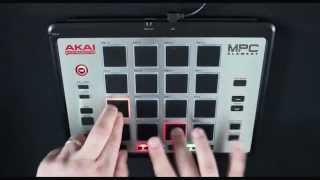
Akai - MPC Element WORLD EXCLUSIVE Demo at GAK
GAK
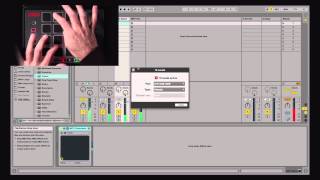
Akai Pro MPC Element & Essentials | MPC One-Shot

AkaiProVideo

MPC Element with 88-Keys | Akai Professional #AkaiProMPC
AkaiProVideo

MPC Element with David Heartbreak | Akai Professional #AkaiProMPC
AkaiProVideo
MPC Element — iMPC Pro Log

Retronyms
Akai MPC Element: Music Production Control - Dubspot @ NAMM 2014

Dubspot
Akai MPC Element - NAMM 2014

Sound On Sound magazine
Reviews
Owner Insights
We analyzed real musician discussions from forums and Reddit to find what players love, question, and tweak about Akai MPC Element.
Software and compatibility
-
Users report the MPC Element lacks mapping software, making it less compatible with the iMPC Pro2 app compared to the MPD218.
Source
Features and functionality
-
The MPD218 is noted for having assignable knobs, providing additional control compared to the MPC Element.
Source
User experience
-
MPC Element described as frustrating and unresponsive, suggesting a less satisfying experience for active music production.
Source
Critic Reviews
4.0 out of 5
Based on 1 Review and 6 Ratings

Genre Usage
Based on how artists on Equipboard use this gear, it is most commonly found in the following genres.
More Akai MIDI Pad Controllers

$299.00 - $350.00
in MIDI Pad Controllers Rank


-m.webp?v=1784585969)
$69.50 - $119.00
in MIDI Pad Controllers Rank


$39.00 - $177.00
in MIDI Pad Controllers Rank


$91.80 - $275.77
in MIDI Pad Controllers Rank


$30.07
in MIDI Pad Controllers Rank


$56.20 - $257.00
in MIDI Pad Controllers Rank


$83.52
in MIDI Pad Controllers Rank


$90.00 - $295.00
in MIDI Pad Controllers Rank


$64.00
in MIDI Pad Controllers Rank


$50.00
in MIDI Pad Controllers Rank


$49.79 - $177.00
in MIDI Pad Controllers Rank


-m.webp?v=1784386888)
$119.31
in MIDI Pad Controllers Rank


$119.31
in MIDI Pad Controllers Rank


$39.00 - $59.00
in MIDI Pad Controllers Rank


$39.99
in MIDI Pad Controllers Rank


$249.00 - $299.00
in MIDI Pad Controllers Rank


-m.webp?v=1784559619)
$101.41 - $799.00
in MIDI Pad Controllers Rank

.jpg?v=1784510867)

$409.14
in MIDI Pad Controllers Rank


$239.20 - $349.99
in MIDI Pad Controllers Rank


$23.86 - $216.30
in MIDI Pad Controllers Rank


$150.00 - $229.99
in MIDI Pad Controllers Rank

.jpeg?v=1784539049)

$40.00 - $299.00
in MIDI Pad Controllers Rank


$31.02 - $129.99
in MIDI Pad Controllers Rank


$477.23
in MIDI Pad Controllers Rank

$180.00 - $777.00
in MIDI Pad Controllers Rank


$118.00 - $124.44
in MIDI Pad Controllers Rank


$50.00
in MIDI Pad Controllers Rank


$82.32 - $269.00
in MIDI Pad Controllers Rank


$35.00
in MIDI Pad Controllers Rank


$150.00 - $189.99
in MIDI Pad Controllers Rank


$145.00 - $269.99
in MIDI Pad Controllers Rank


$129.99 - $134.88
in MIDI Pad Controllers Rank


$40.24 - $89.99
in MIDI Pad Controllers Rank


$80.90 - $129.99
in MIDI Pad Controllers Rank


$794.61 - $999.00
in MIDI Pad Controllers Rank


$55.00
in MIDI Pad Controllers Rank


Accessories & Related Items
-s.webp?v=1784502015)


Artist usage


Community setups


Similar


Most Popular MIDI Pad Controllers
Most Popular Brands
-
Added to Equipboard on by
 daviddamjanovic
GearIQ 49
-


