This page about Avid EQ III is a stub. You can help improve it:


Pricing and availability


* Product prices and availability are updated by Equipboard every 24hrs and are subject to change. Equipboard may receive compensation for purchases made at participating retailers linked on this site. This compensation does not affect what products or prices are displayed, or the order of prices listed. For more information, please refer to our affiliate disclosure.
Description
Elevate your audio production with the Avid EQ III, a powerful EQ plugin that seamlessly integrates into your digital audio workstation. Renowned for its precision and versatility, this plugin is a staple for both budding musicians and seasoned producers. It offers a seven-band equalizer, allowing you to fine-tune your tracks with pinpoint accuracy. Whether you're working on a high-energy EDM track or a mellow acoustic session, the Avid EQ III provides a broad range of frequency controls to shape your sound to perfection.
This plugin's intuitive interface ensures a smooth workflow, letting you focus on creativity without getting bogged down by complex processes. The Avid EQ III supports both mono and stereo sound processing, making it a versatile tool for any audio project. Its real-time analysis displays offer visual feedback, helping you make informed decisions about your sound adjustments. The plugin is compatible with most major DAWs, ensuring hassle-free integration into your existing setup.
With its robust set of features, the Avid EQ III is designed to meet the demands of modern music production. Whether you're looking to enhance specific frequencies or achieve a balanced mix, this plugin provides the tools you need to bring your musical vision to life.
Key Features:
- Seven-band equalizer for detailed sound shaping
- Compatible with mono and stereo processing
- Real-time frequency analysis for visual feedback
- Seamless integration with major DAWs
- User-friendly interface for efficient workflow
- Supports a wide range of audio formats
FAQs
-
What are the key features of Avid EQ III?
-
Avid EQ III is a versatile equalizer plugin that offers a 7-band parametric EQ, providing precise control over frequency adjustments. It includes high- and low-pass filters, notch filters, and a range of Q settings for detailed sound shaping.
-
Is Avid EQ III compatible with all DAWs?
-
Avid EQ III is primarily designed for Pro Tools, as it is part of the Avid plugin suite. However, it may not be compatible with other DAWs unless they support AAX plugin formats.
-
How does Avid EQ III differ from stock EQ plugins?
-
Avid EQ III offers professional-grade precision with its 7-band parametric EQ, allowing for more detailed frequency adjustments compared to many stock EQs. Its integration with Pro Tools ensures seamless workflow and enhanced audio processing capabilities.
-
Can Avid EQ III be used for both mixing and mastering?
-
Yes, Avid EQ III is suitable for both mixing and mastering applications, providing detailed frequency control to shape and refine audio tracks in various stages of production.
Videos

The CTRL Room
AVID DigiRack EQ III vs WAVES Q8 EQ
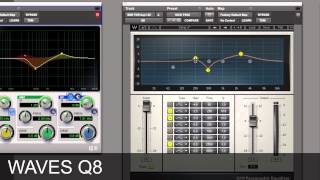
AVID DigiRack EQ III vs WAVES Q8 EQ
The CTRL Room
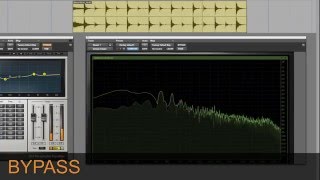
AVID DigiRack EQ III vs WAVES Q8 EQ

Age of Audio
Reviews
Owner Insights
We analyzed real musician discussions from forums and Reddit to find what players love, question, and tweak about Avid EQ III.
Comparisons
-
Avid EQ III is seen as a reliable standard but often compared to Fabfilter ProQ3, which is favored for its flexibility and ease of creating automation bands.
Source -
While Soothe isn't a dedicated de-esser, it's praised for handling harsh or shrill dialogue, offering a unique alternative to traditional de-essing plugins.
Source
Features and functionality
-
Fabfilter Pro Q3 offers dynamic mode and sidechain visualization, features that some users find particularly useful for detailed audio work.
Source
Software and compatibility
-
The Avid Pro Limiter is recognized for its true peak limiting capabilities, which some users prefer over the Waves L Series for post-production needs.
Source
Based on 0 Reviews and 0 Ratings
Artist usage
Add artist

Used on the guitar for Justin Bieber's "Love Yourself", as stated by Purpose mix engineers Josh Gudwin and Andrew Wuepper in this May 2016 Sound on Sound interview about the mixing of the title track and others.
“Ed’s original guitar was quite noisy and buzzy. It sounded like he was on the road and had just plugged in quickly to get an idea down. So I selfishly wanted a cleaner guitar sound and had a couple of guys coming in to replay the guitar part, but it never sounded anywhere near as good. It just kept sounding too different and without the right feel. So I decided to go with Ed’s guitar and treated it with the Waves NS1 noise suppressor, the Waves GTR plug-in, and filtered it with the FabFilter Pro-MB, and an Avid EQ, taking out around 3kHz."
.png?v=1783447610)
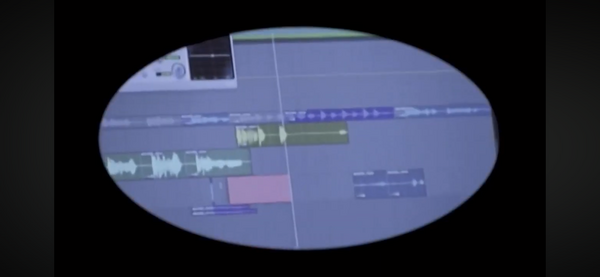
During a studio session in France for his Utopia album, the bottom-left section of Avid EQ III (1-Band version) can be seen in Pro Tools, confirming his use of this plugin. Its minimal layout distinguishes it from the standard multi-band EQ III interface.


I also have a Waves L2 and the seven-band Digirack EQ on some of the percussion tracks.
Sound on Sound article, 2013.


Used for "How to Talk", as stated by mix engineer Kesha Lee in this December 2017 Sound on Sound article.
“The intro track was a voice note Uzi had recorded on his phone, and he played it in the booth on his phone, and we recorded it through the mic like that. It sounded really telephone-y, which we wanted, but I tried to take out some of the highs with the Waves OneKnob. All audio vocal tracks apart from the intro have Antares Auto-Tune as the first plug-in. Uzi hears his Auto-Tuned vocals in his headphones while singing. We used to just have it on default, with a Retune speed of 20, but lately he has been like: ‘Give me more Auto-Tune!’ so now we have the Retune Speed set to anywhere from 12 to 5. The ‘D’ after Auto-Tune is the Waves De-Esser, the ‘Q’ the Avid EQ3 seven-band, and the ‘1’ is the Waves C1 gate. All vocal audio tracks also have sends to the delay and the reverb aux tracks. The delay aux track has the Avid Mod Delay II set to half notes, with feedback at 43 percent, the Waves Renaissance Reverberator, set to ‘Hall 1’ reverb, with the highs cut on the reverb EQ, and the Waves S1 stereo imager. The reverb aux has the Renaissance Reverberator.
“All audio vocal tracks go to the vocal aux track. I had two vocal aux tracks in this session, because I wanted to try something different, using plug-ins I don’t normally use. That’s why one of the aux tracks is muted. The vocal aux track that I did use has the Waves De-Esser acting around 4230Hz, then the EQ3 seven-band which has a high-pass at 96.4Hz, and I’m dipping out muddiness at 200 and 500 Hz. I’m also adding some high end at 6.52kHz. I don’t normally add EQ with the seven-band, but Seth would add some high end on Future’s voice and that worked well, so I tried it here. Next is the Waves Renaissance Compressor, to keep the dynamics in check, and then the Waves SSL E-channel, on which I am again dipping out various frequencies. The latter plug-in is more for colour and character. The Waves CLA-3A is more for the sound, and the RN Digital Detailer made Uzi’s vocals sound fuller and wider.
"The final plug-in in the chain is the Nomad Factory MCL-2269 limiter and compressor, again for the sound and for more volume. We always go for a warm, full, loud, in-your-face vocal sound, also because we like the vocals to be louder than the beat. I always turn the beat down 1-2 dB. There are no plug-ins on the master track, because I used to work for a producer who didn’t want that, as the mix would go to the mastering engineer. So I’m still used to doing it like that. I turn the master volume down anywhere between -7 to -9 dB before it goes to mastering, so they have room to work with.”


Used for vocals on "Sum 2 Prove", as stated by mix engineer Tillie in this June 2020 Sound on Sound interview. An image of the settings can be found here.
"All Lil Baby's vocals go through an aux track," says Tillie, "on which I have the Waves DeEsser, Avid EQ3 7-band, Waves SSL Channel and Compressor, Waves RCompressor, UAD J37 and the FabFilter Pro‑DS de-esser. There are two sends to reverb aux tracks and one to a half–note delay. The Waves DeEsser is there because I felt the vocal was too bright. The EQ3 has a pretty involved curve, with a low cut at 69.8Hz, notches at 184.7Hz and 425.2Hz, and me adding at 2kHz and high end at 5.37kHz, because I wanted some more presence. The SSL Compressor is not doing much, it's just there for vibe. I do the actual compression with the RCompressor.
"The J37 adds analogue vibe — it's one of my favourite plug–ins on vocals. It really brings them to life. I did all the heavy lifting with the first de-esser, and the Pro‑DS is just to catch anything that's the result of the EQ curve that I added. There's also a Vocal Parallel aux with the Softube Tube‑Tech CL‑1B to add more body and a bit of beef. I think that compressor just makes everything sound better. It gives you a different tonal character.
"The first send goes to the Verb aux track, which has the DVerb, set to a Large Hall, and an EQ3 7-band, taking out low end below 100Hz. The second send goes to the Verb 2 aux, with the Waves RVerb, the Waves REQ, again rolling off low end, and the Waves S1 Stereo Imager. I use the Imager on my reverbs probably 75 percent of the time. My style of mixing is very wide, so I tend to spread out my instruments and my effects, and I place things in different places in the stereo mix. I always like to add width and depth, so you can feel things and they are not necessarily right up in your face. But I leave the vocals to be the centre point of the mix."


EQ7 was used for the vocals on "Intro", as stated by Kirk mix engineer Kevin "Black Pearl" McCloskey in this December 2019 Sound on Sound interview.
"The two red tracks are the main verse vocals. Vibe is very important for rappers, and they will fill in words to get the right feeling. This happens by punching in, and if the lines don't overlap, I may have them on the same track, but if they're overlapping sometimes and need to be processed separately, I'll have them on two tracks, like here with the A line and the B line. They both have the Avid EQ7 EQ, which was sent to me with the session, with a shelf at almost 6kHz. It enhanced it a bit, so I left it.
(...) "Typically, my processing on vocals here is EQ-compression, EQ-compression, EQ-compression and so on. When vocals are recorded well, I don't have to do that, but in this case, because of the hotel room sound, I had to do many corrections. Because speed was of the essence, I just added more plug-ins as I encountered issues — I did not have the time to go into settings of plug-ins already there. The plug-ins on the vocal busses, with a number of variations, start with the Waves DeEsser, and then the UAD SSL-E Channel strip, thinning things out, and the Waves CLA76 knocking off 3dB to flatten peaks, as they did not track with a compressor. I also use the Avid EQ7, and the Waves MV2 compressor, which acts more like an expander."

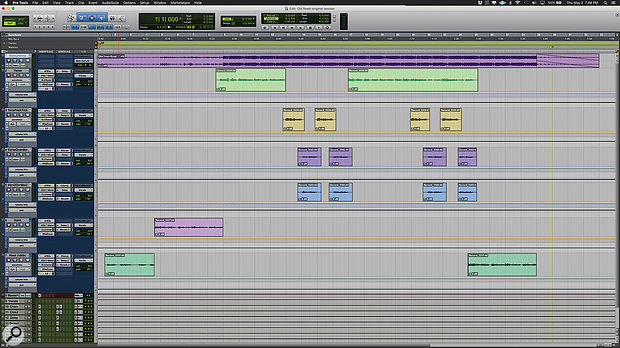
Used for the vocals on "Old Town Road (Remix)", as stated by mix engineer Andrew "VoxGod" Bolooki in this August 2019 Sound on Sound interview. An image of the settings can be found here.
Bolooki's 'Old Town Road' session also has an incredibly [sic] amount of plug-ins. Most tracks have plug-ins on the inserts, in some cases up to six, and many tracks also have sends to the aux tracks. A complete analysis of exactly what they all do would take up several pages, so Bolooki selected some of the most important processors, starting with Nas X's tracks.
"I did not really mess much with what they sent me. If you listen to the original, there were some Auto‑Tune anomalies, because the plug-in had some notes out of scale. The key of the song is a little weird, so I had to do automation on Nas' Auto‑Tune EFX instances to bypass certain notes in certain passages, to make sure the AT did not warp notes in the wrong way. I also did a lot of vocal riding, nudging the volume of each phrase, so that every single word was crystal-clear, and I did some panning automation in the stacked parts. They wanted Billy and Nas to sing at the same time in the pre-choruses, and I wanted to prevent Billy's harmonies from overwhelming Nas' lead vocals, so I used panning to give them each their own space.
"All Nas X's vocal tracks have an insert effect chain that consists of Antares Auto‑Tune EFX, Avid EQ3 7-band, Waves SSL Channel, Waves Renaissance De-Esser and Waves L2. I made some basic changes, also to some of the delay and reverb sends, but nothing crazy. There's a lazy half-note delay in the intro of the song, that becomes part of the flow of the song, and I did not want to mess with that. The aux track with the AIR Phaser added some modulation in the pre-chorus, and the Waves RVox and UAD Precision K-Stereo made Nas' lead vocal stand out a bit more.
"Also, the original engineer who recorded Nas' vocals did something that I would not normally do, but that made a big difference. I picked it up as a trick. It's having the L2 hit really hard at the end of the effects chain for every single vocal track. Initially I thought: that is pretty extreme to put that on every single vocal track, and it breaks all the rules for gain-staging, so I took it off, but then I realised he had put it there for a saturation effect, and it greatly helped the tone of his vocal. It was part of Nas' sound."


Used for the drum tracks on "Beggin", as described by Alessandro Marcantoni in this October 2021 Sound on Sound interview.
“The main sonic treatment on the drums came from the aux effects tracks: the Drums Ambient, which had a UAD EMT140 for some plate reverb with a small decay and some predelay, and the Drums Amp, with the SansAmp for parallel distortion. All drums go through the MF Drums group track, which has the UAD SSL G‑channel and Avid EQ3 7‑band, for some compression and minor EQ adjustments.


Used for the vocal tracks on "Beggin", as described by as described by Alessandro Marcantoni in this October 2021 Sound on Sound interview.
“All vocal tracks have the same inserts: Avid EQ3 7‑band, UAD 1176 LN, Mäag EQ4, and again the 7‑band. The main difference is in the plug‑in settings and in the sends. The a cappella at the beginning of the song is sent to the Very Large Hall aux with the Avid ReVibe II, as well as the Hall aux with the UAD Precision Delay Mod, and the V Hall which has another instance of the Lexicon 224. I wanted the a cappella to sound larger than the other vocals, which have only the 224 and a send to the V Slap aux, with a delay from the UAD Galaxy Tape Echo.
“The main vocal tracks also have a send to the V Amp track, on which I had the SansAmp, for some more edge. The singer has a very raspy voice, which I think sounds great, and the SansAmp enhances this. All vocal tracks go to the Group track, on which I have two EQs and the UAD Precision De‑Esser. I use volume automation a lot on individual tracks, so if I use de‑essers on them, it can emphasise the esses. For that reason I prefer to have the de‑esser on the subgroup at the end of the chain. It makes it easier to control things.”

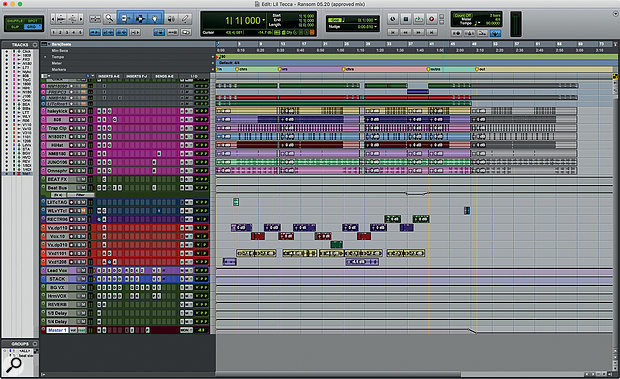
EQ7 was used on vocals for "Ransom", as mentioned by mix engineer Joseph Colmenero in this November 2019 Sound on Sound interview.
"Many of the plug-ins on the vocal tracks came with the session. The vocal audio tracks all have Antares Auto-Tune Pro because the session came with Auto-Tune Live, and I didn't have my licence with me, so I put Auto-Tune Pro on. Without seeing the Live plug-in I had to use my ears to make sure that the settings were exactly right. They had recorded Tecca's vocals with Auto-Tune on, playing Auto-Tune like an instrument.
"All audio tracks go to the LeadVox bus, on which there is a stack of plug-ins. Again many of them came with the session. The chain starts with the Waves Q6 EQ, the FabFilter Pro-C2 compressor, then a Waves SSL Channel, two Waves De-Essers, a Waves RVox used as a noise gate, the SoundToys Decapitator for vibe, and a Waves C4 to bang down some peak frequencies. There's a track with distant ad-libs that goes to the Harmony Vox aux, which has some similar plug-ins, and adds a D-Verb for some extra reverb. There are sends on the vocal busses to the reverb aux, with the Waves RVerb, and delay quarter-note aux, with the Waves H-Delay. I also have the Avid EQ7 before the reverb, to take out the low end and high end. You don't want to have esses all over your reverb. The other two aux tracks that I did not use are part of the producer's template."


Used on Cardi B's vocals for "Bodak Yellow", as mentioned by mix engineer Evan LaRay in this February 2018 Sound on Sound interview.
In his mix of ‘Bodak Yellow’, Evan LaRay used almost identical vocal chains on two auxiliary busses. The ‘Vox 1’ chain includes FabFilter’s Pro-DS de-esser and Waves’ C4 multiband compressor, plus the Waves CLA Vocals plug-in and SoundToys’ Decapitator saturation processor.
The main ‘Hook’ and ‘Verse’ vocal tracks have similar plug-in chains, incorporating the EQ3 seven-band, Waves CLA-76 and Waves De-esser, though the ‘Hook’ also has FabFilter’s Timeless 2 delay. LaRay explains, “The EQ on the ‘Hook’ has a high-pass, around 100Hz, and I’m also cutting 3dB at 300Hz, because the vocal sounded a bit muddy, and again 3dB at 4kHz, because there was a piercing frequency there. The CLA keeps the peaks in check, and the de-esser again takes some higher frequencies out, at 4270Hz, and the Timeless is another favourite plug-in. I think in general the FabFilter plug-ins are extremely dope. I wanted the ‘Hook’ vocal to stand out from the ‘Verse’ vocal, so I used a stereo delay preset, and then tweaked that. The presets on the FabFilter plug-ins are pretty good: you just run through all of them and then choose the best one. In this case I lowered the width and the wet value of the stereo delay preset, and that sounded good and gave the hook its own space. The three plug-ins on the ‘Verse’ track do pretty much the same.
“The ‘Inout’ tracks that are below the ‘Hook’ and the ‘Verse’ are vocal doubles. They are words or lines we use for emphasis and additional power on these lines and words. They come from one of her original vocal takes, which I just cut and cleaned up. Both ‘Inout’ tracks have the Waves RCompressor, just containing these words and lines so they don’t overwhelm the ‘Hook’ or the ‘Verse’ vocal, and then the FabFilter Pro-Q2, taking out some high frequencies, again to make sure it doesn’t clash with the leads, and also cutting below 200Hz. And there’s a delay on these tracks to put them in a slightly different space from the lead vocal tracks.
“In addition to the two ‘Inout’ tracks, both the ‘Hook’ and the ‘Verse’ tracks are also accompanied by an ‘Ad Libs’ track, which were some ad libs Cardi had recorded with Mike over at Krematorium. Mike had also set up a separate aux track for these ad libs, which is ‘Vox2’, and I liked that and kept two of the plug-ins he had on that: the [Avid] Sansamp for some distortion and the SoundToys Panman. I then added the D-Verb and the [Waves] CLA Vocals. I adore the CLA Vocals. I use it on every track I work on. When I don’t use it, the vocals sound completely different. I’d love to know what exactly it does! Finally, the inserts have the Waves L1, just to control the peaks.
“The other tracks — ‘EXF1’, ‘EXF2’, ‘EXF3’ and ‘EXF4’, are because I prefer to create a new track if I want to have a specific effect on specific words or phrases. I prefer doing that to automating the effects on a track. Automation is great, but I tend to only do volume automation. So I copy audio to another track, and then put the effect on that, and in this case I created four different effects tracks with four different delays. ‘EFX1’ is the main one, and has the same three plug-ins as the Verse tracks — EQ3 three-band, CLA76 and Waves De-esser — just with the EQ3 cutting more of the high frequencies. Then there’s an eighth-note ping-pong delay from the Waves H-Delay, and then a D-Verb set to ‘hall’ with 7s decay and a 15ms pre-delay. ‘EFX2’ has another H-Delay delay, ‘EFX3’ the Timeless 2 delay, and ‘EFX4’ again has the H-Delay plus a D-Verb.”
All the main vocal audio tracks go to LaRay’s ‘Vox1’ aux group track. This, he explains, has “A FabFilter Pro-DS de-esser, then the Waves RCompressor controlling the peaks, the Waves C4 multiband compressor boosting the high end and containing the lows in her voice, so it doesn’t cut through too much, and Waves CLA Vocals. Again, it’s really making my vocals sound good. I push the Pitch fader to stereo, spank it on the compressor, also push up the treble to brighten it up, turn the reverb down to ‘tight’, and lower the delay by 9dB because my own quarter delay is my main vocal delay, and it sounds great. There’s also a SoundToys Decapitator, to add more harmonic distortion, and then there’s the Waves RVox. That was supposed to be the final plug-in on the insert, but then I realised the vocal was still peaking too much once she began rapping loudly, so I put on the L1 [limiter] to control that.”
The ‘special sauce’ in Evan LaRay’s mixes comes from a parallel aux channel containing a blend of compression, saturation, EQ and other processors. Key ingredients are Waves’ PuigChild compressor and PuigTech equaliser.
The ‘Vox1’ and ‘Vox2’ tracks also each have a Trim plug-in on an insert, and sends to the ‘Verb’ aux and to the ‘ELR’ (LaRay’s initials) track. “I put the Trim on all my tracks at the end of the vocals, and at the end of the beat, because the vocals actually began distorting in places. These two tracks were too hot, and I wanted to make sure they had a good level before going to the ‘Sub Print’ track. I have the ‘ELR’ aux track in every session. It’s most of all parallel compression, but I also always try out new things with distortion, exciters and things like that, and I label that ‘ELR’. In this case it really is the ‘ELR’ track that makes the vocals cut through the mix.
“The compression on the ‘ELR’ track comes from the Waves PuigChild 670, which is a great compressor, and it’s compressing a lot, so the vocal stays right there in the middle. The signal is then going to the PuigTech EQP-1A, which is boosting some low end to add some warmth to the vocals, and some 5kHz, and then the Waves Aphex Vintage Aural Exciter, set to AX Mix 6, for some added crispness and clarity, then the EQ3 seven-band to control the low mids, and another De-Esser cutting 4398Hz, to finalise the vocal sound. The L1 also helps keep the vocals in the same place. Finally, the ‘Verb’ send on the ‘Vox1’ and ‘Vox2’ tracks goes to the ‘Verb’ aux, which has the Waves RVerb, and that pretty much glues everything together.”
Album Usage
The Avid EQ III has been featured on the following albums:
DOPAMINE
Lil Tecca (2025)
UTOPIA
Travis Scott (2023)
Beggin' (Live)
Måneskin (2021)
Sum 2 Prove
Lil Baby (2020)
KIRK
DaBaby (2019)

Old Town Road (Remix)
Billy Ray Cyrus & Lil Nas X & Mason Ramsey (2019)

ASTROWORLD
Travis Scott (2018)
![Avid EQ III as heard on Bodak Yellow (feat. Messiah) [Latin Trap Remix] by Cardi B (2017)](https://images.equipboard.com/uploads/album/image/658146/bodak-yellow-feat-messiah-latin-trap-remix.jpg)
Bodak Yellow (feat. Messiah) [Latin Trap Remix]
Cardi B (2017)

Bodak Yellow (feat. Kodak Black)
Cardi B & Kodak Black (2017)
Genre Usage
Based on how artists on Equipboard use this gear, it is most commonly found in the following genres.
Used With
Based on how musicians on Equipboard use Avid EQ III, it is most commonly used with the following gear.


-s.webp?v=1783661975)
More Avid EQ Plugins


$169.00 - $199.00
in EQ Plugins Rank


-m.webp?v=1783662282)
$32.00 - $34.99
in EQ Plugins Rank


$1,015.75 - $1,195.00
in EQ Plugins Rank


$37.00 - $49.99
in EQ Plugins Rank


$63.00 - $240.00
in EQ Plugins Rank


$33.00 - $34.99
in EQ Plugins Rank


$33.00 - $34.99
in EQ Plugins Rank


.jpg?v=1782886998)

$33.00 - $35.99
in EQ Plugins Rank


$34.99 - $85.00
in EQ Plugins Rank


$33.00 - $34.99
in EQ Plugins Rank


$33.00 - $35.99
in EQ Plugins Rank


$33.00 - $34.99
in EQ Plugins Rank


$39.00
in EQ Plugins Rank


$39.00 - $49.00
in EQ Plugins Rank
.jpeg?v=1783649500)


$0.00
in EQ Plugins Rank


$33.00 - $34.99
in EQ Plugins Rank


$29.99 - $34.99
in EQ Plugins Rank


$32.00
in EQ Plugins Rank


$21.90 - $99.00
in EQ Plugins Rank


$33.00 - $249.00
in EQ Plugins Rank

$80.00 - $99.00
in EQ Plugins Rank


$725.00 - $849.00
in EQ Plugins Rank


$190.00 - $199.00
in EQ Plugins Rank


$89.00 - $149.00
in EQ Plugins Rank

$29.00 - $29.99
in EQ Plugins Rank


$94.00 - $109.00
in EQ Plugins Rank


Community setups


Similar


Gear Guides








Most Popular EQ Plugins
Most Popular Brands
-
Added to Equipboard on by
 kkolar
Gear IQ 120946
-


