

Pricing and availability




* Product prices and availability are updated by Equipboard every 24hrs and are subject to change. Equipboard may receive compensation for purchases made at participating retailers linked on this site. This compensation does not affect what products or prices are displayed, or the order of prices listed. For more information, please refer to our affiliate disclosure.
Description
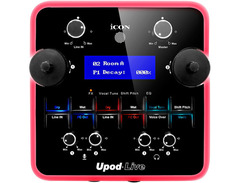
Unlock your musical potential with the iCON Pro Audio UPod Live, the audio interface designed to elevate your livestreams and recordings. This dynamic device seamlessly connects to your mobile device or computer, transforming your space into a professional studio with minimal setup. With 16 built-in DSP effects, the UPod Live offers an expansive sound palette, including echo, reverb, delay, EQ, and even a voice changer. These effects, paired with its user-friendly interface, empower you to craft the perfect sound for your audience without the hassle of external software.
The UPod Live's plug and play USB connectivity ensures that you can dive into your creative process without the need for additional drivers. Its intuitive layout features two large encoder knobs and a crisp LCD display, allowing you to effortlessly navigate and adjust your settings. Whether you're a podcaster, musician, or content creator, the UPod Live's versatility makes it an essential tool for bringing your projects to life.
Key Features:
- 16 unique DSP effects including echo, reverb, delay, EQ, and voice changer
- 16-bit / 48kHz audio resolution for pristine sound quality
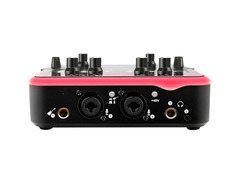
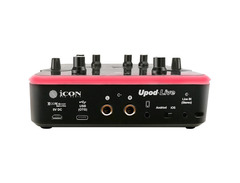
- 2-mic input, 1-guitar input, and 2-output USB audio interface
- Large encoder knobs for easy DSP effect selection and adjustment
- LCD display for clear visualization of settings and parameters
- Attenuator (Voice-Over) function to automatically lower music volume when mic signal is present
- Monitor signal control button for dry/wet signal management
- Digital & analog connections for direct smartphone connectivity
- Plug & play functionality with no driver installation required
FAQs
-
What are the main connectivity options for the iCON Pro Audio UPod Live?
-
The iCON Pro Audio UPod Live offers digital and analog connections, including 2 mic inputs, 1 guitar input, and 2 outputs. It also allows for direct smartphone connection, making it versatile for various recording setups.
-
Does the iCON Pro Audio UPod Live require driver installation?
-
No, the iCON Pro Audio UPod Live is plug-and-play and does not require any driver installation, allowing for easy setup and use.
-
What DSP effects are included in the iCON Pro Audio UPod Live?
-
The iCON Pro Audio UPod Live features 16 DSP effects, including echo, reverb, delay, EQ, and voice change, which can be adjusted using the large encoder knobs and viewed on the LCD display.
-
Can the iCON Pro Audio UPod Live automatically lower music volume during voice-over?
-
Yes, the iCON Pro Audio UPod Live is equipped with an attenuator (Voice-Over) function button that automatically lowers the music volume when a mic signal is detected.
-
Is the iCON Pro Audio UPod Live suitable for monitoring both dry and wet signals?
-
Yes, the iCON Pro Audio UPod Live includes a monitor signal control button that allows you to switch between dry and wet monitoring, providing flexibility during recording and mixing.


Reviews
Owner Insights
We analyzed real musician discussions from forums and Reddit to find what players love, question, and tweak about iCON Pro Audio UPod Live.
Comparisons
-
Audient ID4 is praised for its solid performance, suggesting it's a worthwhile option for those seeking reliability in budget interfaces.
Source -
The 4th gen Scarlett 2i2 has a superior headphone amp compared to the 3rd gen, important for those using high-impedance headphones like 250 ohm models.
Source
Features and functionality
-
The MOTU M series is noted for having impressive conversion specs, making it a strong contender for those prioritizing sound quality.
Source -
The Arturia Minifuse series is highlighted for its robust feature set, including low latency and integrated loopback, appealing to users seeking extensive capabilities.
Source
Use cases and applications
-
Open-backed headphones like the DT990s are recommended for mixing due to their transparency and reduced ear fatigue, though they may not suit vocal tracking due to sound bleed.
Source
Software and compatibility
-
Julian Krause’s independent measurement reviews, including latency tests, are recommended for objective comparisons of audio interfaces.
Source
Based on 0 Reviews and 0 Ratings
More iCON Pro Audio Audio Interfaces


$159.99 - $224.99
in Audio Interfaces Rank


-m.webp?v=1783090753)
$749.99
in Audio Interfaces Rank


$79.00 - $299.99
in Audio Interfaces Rank


$375.00 - $799.00
in Audio Interfaces Rank


$335.00 - $535.00
in Audio Interfaces Rank


$84.00
in Audio Interfaces Rank


$50.00 - $149.99
in Audio Interfaces Rank
.jpg?v=1783050953)


$749.00 - $999.00
in Audio Interfaces Rank

.png?v=1783050948)


$799.00 - $1,299.00
in Audio Interfaces Rank


$118.00 - $189.99
in Audio Interfaces Rank


$1,000.00
in Audio Interfaces Rank


$335.00 - $799.00
in Audio Interfaces Rank


$85.00 - $391.13
in Audio Interfaces Rank


$300.00 - $872.49
in Audio Interfaces Rank


$440.00
in Audio Interfaces Rank

.jpg?v=1783063093)


$224.99
in Audio Interfaces Rank


$689.00 - $899.00
in Audio Interfaces Rank


$59.76
in Audio Interfaces Rank


$97.00 - $299.99
in Audio Interfaces Rank


$1,468.00 - $1,999.00
in Audio Interfaces Rank

.jpeg?v=1783065967)

$869.00 - $1,199.00
in Audio Interfaces Rank

.jpg?v=1782923559)
-m.webp?v=1783090767)
$95.00
in Audio Interfaces Rank


$69.73 - $149.99
in Audio Interfaces Rank


in Audio Interfaces Rank


$23.56 - $1,899.00
in Audio Interfaces Rank


$262.94
in Audio Interfaces Rank


$427.88
in Audio Interfaces Rank


$1,000.00
in Audio Interfaces Rank


$199.99 - $349.99
in Audio Interfaces Rank


$144.99 - $279.00
in Audio Interfaces Rank


Artist usage


Community setups


Similar


Gear Guides







Most Popular Audio Interfaces
Most Popular Brands
-
Added to Equipboard on by
 meb
mebGear IQ 2822
-


