

Pricing and availability
We compare 600+ stores and found this item at 7 stores. Prices updated .
Store
Reviews
Price







Price History
Based on price data from 6 merchants for "FabFilter Pro-DS De-Esser Plugin". Prices shown reflect NEW condition. Tracking began Apr 2, 2026.
* Product prices and availability are updated by Equipboard every 24hrs and are subject to change. Equipboard may receive compensation for purchases made at participating retailers linked on this site. This compensation does not affect what products or prices are displayed, or the order of prices listed. For more information, please refer to our affiliate disclosure.
Description
Achieve pristine vocal clarity with the FabFilter Pro-DS De-Esser Plugin, your go-to tool for taming unwanted sibilance in your recordings. Whether you're working with pristine studio vocals or raw live performances, this plugin's sophisticated algorithms detect and reduce sibilance with surgical precision, ensuring your vocal tracks shine without harshness.
FabFilter Pro-DS is powered by its intelligent 'Single Vocal' detection mode, which identifies sibilance with remarkable accuracy. For broader applications, switch to 'Allround' mode and effortlessly control high frequencies on other audio materials like drums or full mixes. The user-friendly interface makes complex processing intuitive, offering a suite of options from wide band to linear-phase split band processing. With up to 15 ms of optional look-ahead and adjustable stereo linking, you can customize your de-essing to fit any project.
Moreover, the Pro-DS is packed with the signature FabFilter touches: real-time de-essing display, a side-chain input meter, and a robust spectrum analyzer that offers visual insight into your adjustments. Its high-quality 64-bit internal processing and GPU-powered graphics acceleration ensure smooth and efficient performance, making it a favorite among professionals.
Key Features:
- Highly intelligent 'Single Vocal' and classic 'Allround' detection modes
- Transparent program-dependent compression/limiting
- Wide Band or linear-phase Split Band processing
- Optional look-ahead time up to 15 ms
- Adjustable stereo linking with mid-only or side-only processing
- Up to four times linear-phase oversampling
- Real-time spectrum analyzer built into the HP/LP filter controller
- High-quality 64-bit internal processing with GPU-powered graphics acceleration
- Extensive help file with interactive help hints
Compatible with both Mac and Windows, and available in VST, VST3, AU, AAX Native, and AudioSuite formats, FabFilter Pro-DS seamlessly integrates into any digital audio workstation environment.
Owner's manual
FabFilter Pro-DS De-Esser Plugin User ManualProduct specs
| Software Type | De-esser |
| Platform | Mac, PC |
| Upgrade/Full | Full |
| Download/Boxed | Download |
| Bit Depth | 64-bit |
| Format | AAX Native, VST, VST3, AU, AudioSuite, CLAP |
| Hardware Requirements - Mac | Intel Core 2 Duo or higher, 4GB RAM minimum |
| Hardware Requirements - PC | Intel Core 2 Duo / AMD Athlon 64 X2 or higher, 4GB RAM minimum |
| OS Requirements - Mac | macOS 10.13 or later |
| OS Requirements - PC | Windows 7 SP1 or later |
FAQs
-
Is the FabFilter Pro-DS De-Esser compatible with my DAW?
-
The FabFilter Pro-DS is compatible with most major DAWs as it supports AAX Native, VST, VST3, AU, AudioSuite, and CLAP formats.
-
What operating systems are supported by the FabFilter Pro-DS?
-
The FabFilter Pro-DS supports macOS 10.13 or later and Windows 7 SP1 or later, making it versatile for both Mac and PC users.
-
What are the key features of the FabFilter Pro-DS De-Esser?
-
The FabFilter Pro-DS features intelligent sibilance detection, wideband and split-band processing, and a real-time spectrum analyzer for precise de-essing.
-
What are the hardware requirements for running FabFilter Pro-DS?
-
The minimum hardware requirements are an Intel Core 2 Duo or AMD Athlon 64 X2 processor and 4GB of RAM for both Mac and PC.
-
How does the FabFilter Pro-DS improve vocal recordings?
-
The FabFilter Pro-DS effectively reduces sibilance in vocal recordings, providing a smoother and more balanced sound without affecting the overall vocal quality.
Videos

FabFilter
Introduction to FabFilter Pro-DS intelligent de-esser
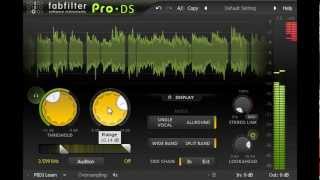
Introduction to FabFilter Pro-DS intelligent de-esser
FabFilter
How To Use a De-Esser on Vocals (with FabFilter Pro DS)

5piece
Fabfilter Pro-DS Plugin - Vocal De-esser Plugin

KdW Mixing & Mastering

Klein aber Fein! Der DE-ESSER von Fabfilter | Pro DS Erklärt DEUTSCH

Mix dich zum Master

Why Fabfilter Pro DS is So Popular

Warrior Sound - Unders
De-Esser aber wer ist besser? FabFilter Pro-DS De-Esser Plug-In

musotalk
Reviews
PROS
-
Effectively reduces sibilance without tone gouging
-
Simple licensing with multi-computer support for non-commercial use
-
Excellent presets for quick and effective de-essing
-
Versatile on vocals, instruments, and full mixes
-
Easy to use with minimal tweaks needed
-
Consistently delivers clear and natural vocals
-
Demo available to test before purchasing
CONS
Owner Insights
We analyzed real musician discussions from forums and Reddit to find what players love, question, and tweak about FabFilter Pro-DS De-Esser Plugin.
Features and functionality
-
Pro-DS is praised for its intuitive UI, allowing quick adjustments without over-processing. It's particularly effective on single vocal tracks.
Source -
Some users find that FabFilter Pro-DS dulls highs without effectively taming harshness, suggesting Pro-MB or Pro-Q3 as alternatives for better results.
Source -
Users appreciate the visual feedback in FabFilter Pro-DS, which allows for precise control by showing a graphic of the effect, aiding in avoiding over-processing.
Source
Comparisons
-
Users note a preference for Pro-DS over Waves for its cleaner sound, avoiding the "fizzy" effect that Waves can produce.
Source -
The Weiss De-Esser is praised for its natural attenuation, often preferred over FabFilter Pro-DS for its ability to control high-end outliers musically.
Source -
Lindell 902 is compared favorably to the hardware DBX 902, noted for its similarity and effectiveness in de-essing.
Source -
Some users find Soothe 2 overpriced for its features, suggesting DSEQ3 as a more affordable alternative that offers similar dynamic EQ capabilities.
Source -
FabFilter Pro-DS is often favored over Waves RDeesser for its graphic interface and ease of use, making it a preferred choice for users who want straightforward operation.
Source
Use cases and applications
-
While effective on vocals, it's less favored for drum overheads or mastering due to its unique sidechain filter behavior.
Source -
Pro-DS may work better before applying heavy compression, where its smart detector can enhance performance compared to frequency-dependent detectors.
Source -
FabFilter Pro-DS is noted for its ease of use, with some describing it as feeling like "cheating" due to its effective performance with minimal adjustments.
Source
Value and pricing
User experience
-
Minimal tweaking is required to achieve desired results, making it highly efficient for those who have tried various de-essers.
Source -
Some users prefer using Melodyne for sibilance reduction, citing its natural output over FabFilter Pro-DS, especially when manually adjusting sibilance during editing.
Source
Critic Reviews
5.0 out of 5
Based on 2 Reviews and 25 Ratings

238
One of the best De-essers
Great for catching sibilance of any kind, on any instrument. I treat snares and hats with this to remove harshness all the time.

Artist usage
Add artist

In this video at 12:37 we can see FabFilter Pro-DS De-Esser Plugin

At the 12:58 mark of the "IRON" Project Breakdown Twitch Stream, Luke is seen using the FabFilter Pro-DS De-Esser Plugin as part of his vocal processing chain.


In this video at 1:09:58 minutes see FabFilter Pro-DS De-Esser Plugin


The main chorus lead vocal has the FabFilter Pro–Q 2 EQ, the Waves Rennaissance Vox, again the UBK1, two instances of the FabFilter Pro–DS de–esser, two instances of the UAD Pultec EQP–1A, and the FabFilter Pro–MB


Used on Cardi B's vocals for "Bodak Yellow", as mentioned by mix engineer Evan LaRay in this February 2018 Sound on Sound interview. An image of the settings can be seen here.
In his mix of ‘Bodak Yellow’, Evan LaRay used almost identical vocal chains on two auxiliary busses. The ‘Vox 1’ chain includes FabFilter’s Pro-DS de-esser and Waves’ C4 multiband compressor, plus the Waves CLA Vocals plug-in and SoundToys’ Decapitator saturation processor.

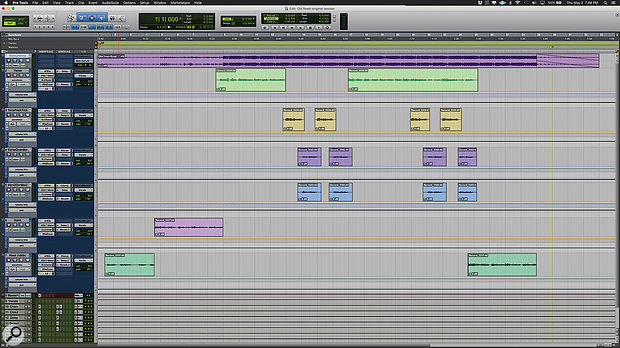
Used for Ray's vocals on "Old Town Road (Remix)", as stated by mix engineer Andrew "VoxGod" Bolooki in this August 2019 Sound on Sound interview.
Billy Ray Cyrus' verse lead vocal provides an example of the mind-boggling complexity of Bolooki's vocal treatments. The audio is spread over five tracks (36-40), four of them with the same insert effects chain of Melodyne, FabFilter Pro-Q 3, FabFilter Pro-DS and Waves CLA-76. The fifth track replaces the Pro-DS with the Avid ModDelay 3, and adds a send to the 'rvb2' aux with the Soundtoys Effect Rack. All five audio tracks are routed to an aux group track (35), which has the Pro-Q 3, Waves C6 and RVox, UA Distressor and SSL Channel, plus a whopping seven sends to delay and reverb aux tracks, and another Distressor aux. The quarter- and eighth-note delay auxes themselves each have four insert plug-ins (Waves H-Delay, Pro-Q 3, MetaFlanger, and DVerb) and a send to the 'rvb1' reverb aux. That means that the verse vocal alone has a total of 38 plug-ins, spread over five audio tracks, one group aux track, and seven aux effects tracks!
Bolooki: "I spoke to a mixer a couple of years ago and asked him how he got things to sound so polished. And he said: 'You can't just throw on a plug-in, you have to take more control, and make sure you purposely put things in different places in different ways.' So, for example, in this song I added the DVerb to the delay auxes, to create a distant effect, so it's not obvious. There are many effects going on, but none of them are overpowering. They are all set back. Nothing gets in the way of the lyrics and the vocal performance. I could probably delete half these effects and it would have sounded the same, but people liked it the way it was, so I left them all.
"This was the first time I used the UAD Distressors and I ended up having two on Billy's vocals: one as part of his main vocal aux, and another set much more aggressively in a parallel and blended back into the same lead vocal aux. This made his vocals really kick ass, and helped make each word crystal-clear. I also ended up copying the Waves SSL strip from Nas' vocals on some of Billy's vocal tracks too, just for some tonal continuity. I have no problem stacking plug-ins on plug-ins. If it's better, it's better.
"Just to highlight some of the other plug-ins I used, there's an aux called 'VoxDoubler' with the Waves Greg Wells VoiceCentric. It definitely adds a bit more of a finished feel and works well mixed in parallel. I put the Waves C6 multiband compressor on almost every single vocal bus, using the 'Pooch Vocal' preset. This cleans up some of the mud. You can solo the side-chain bands and sweep around until you find the annoying frequency, and then just cut that out. If I need to play back something for someone really fast, this is my emergency plug-in to get it to sound better really quickly. Also, the Melodyne plug-in is greyed out, because I printed it. I also like using the Pro-DS, and always put it before the CL76 compressor, because I think it just makes the most sense to fix issues before you boost the whole track with a compressor."


This plugin can clearly be seen at 0:52, listed as 'FF Pro-DS'


In the video titled "Vance Powell: Recording Rock" by Sound On Sound magazine, at 26:20, music producer and audio engineer Vance Powell is seen using the FabFilter Pro-DS De-Esser Plugin within Pro Tools.


You can see Fabfilter's DS for de-essing vocals in 'Can You Hear Me'.


Album Usage
The FabFilter Pro-DS De-Esser Plugin has been featured on the following albums:

BREAK MY SOUL
Beyoncé (2022)
Neon Medusa
The Midnight (2021)

Sum 2 Prove
Lil Baby (2020)
Ex Machina
Metrik (2020)

Rare
Selena Gomez (2020)

Old Town Road (Remix)
Billy Ray Cyrus & Lil Nas X & Mason Ramsey (2019)

Gravity
Metrik (2019)

FAKE LOVE/Airplane pt.2
BTS (2018)

Ain't No Love
Kove (2017)

Bodak Yellow (feat. Kodak Black)
Cardi B & Kodak Black (2017)

Issa Album
21 Savage (2017)
Hymn for the Weekend (Seeb Remix)
Coldplay & seeB (2016)

A Head Full of Dreams
Coldplay (2015)

Purpose (Deluxe)
Justin Bieber (2015)

Can You Hear Me
Denis Kenzo (2015)
Genre Usage
Based on how artists on Equipboard use this gear, it is most commonly found in the following genres.
Used With
Based on how musicians on Equipboard use FabFilter Pro-DS De-Esser Plugin, it is most commonly used with the following gear.


-s.webp?v=1783260085)
-s.webp?v=1783260059)


-s.webp?v=1770452516)


More FabFilter De-Esser Plugins

$29.99 - $34.99
in De-Esser Plugins Rank


$33.00 - $34.99
in De-Esser Plugins Rank


$57.00 - $216.00
in De-Esser Plugins Rank


$29.99 - $34.99
in De-Esser Plugins Rank


$14.99 - $149.00
in De-Esser Plugins Rank

$23.90 - $40.00
in De-Esser Plugins Rank


$99.00
in De-Esser Plugins Rank


$18.30 - $89.00
in De-Esser Plugins Rank

$96.00 - $99.00
in De-Esser Plugins Rank

$79.00
in De-Esser Plugins Rank


$59.00 - $129.00
in De-Esser Plugins Rank


in De-Esser Plugins Rank

$47.00 - $100.00
in De-Esser Plugins Rank

$0.00
in De-Esser Plugins Rank


$49.00 - $89.99
in De-Esser Plugins Rank


$199.00
in De-Esser Plugins Rank


Accessories & Related Items


-s.webp?v=1783260109)
Community setups


Similar


Most Popular De-Esser Plugins
Most Popular Brands
-
Added to Equipboard on by
 equipboard
Gear IQ 4934
-


