
Pricing and availability


* Product prices and availability are updated by Equipboard every 24hrs and are subject to change. Equipboard may receive compensation for purchases made at participating retailers linked on this site. This compensation does not affect what products or prices are displayed, or the order of prices listed. For more information, please refer to our affiliate disclosure.
Description
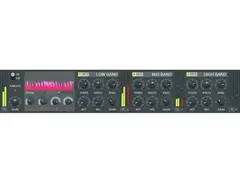
Unleash the full potential of your mix with the Image-Line Fruity Multiband Compressor, a versatile plugin designed to elevate your sound with precision and clarity. Perfect for both budding producers and seasoned professionals, this dynamic tool divides your audio into multiple frequency bands, allowing you to apply compression with surgical precision across each band. Whether you're tightening up a drum track or adding warmth to a vocal performance, this compressor ensures every element of your mix shines.
The Fruity Multiband Compressor is known for its intuitive interface, making it accessible for users at any skill level. Its real-time visual feedback gives you clear insights into how each band of your audio is being affected, simplifying the process of achieving a balanced mix. With customizable attack, release, and ratio settings, you can tailor the compression to suit any genre or style.
Compatible with most DAWs, the Fruity Multiband Compressor integrates seamlessly into your production setup, offering reliable performance and excellent sound quality. Experience the advantage of precise control and flexibility that can transform your tracks from good to truly exceptional.
Key Features:
- Multiband compression with up to three adjustable bands
- Intuitive interface with real-time visual feedback
- Customizable attack, release, and ratio settings
- Compatible with most Digital Audio Workstations (DAWs)
- High-quality sound processing for professional-grade audio
- Ideal for a wide range of musical styles and applications
Videos

XDizzle
How to use Fruity Multi-band Compressor // Mixing in FL Studio
How to use Fruity Multi-band Compressor // Mixing in FL Studio
XDizzle
Fruity Multi-band Compressor and How to use it

Composing Gloves
FL 12 Effects 38 - Fruity Multiband Compressor
Composing Gloves
Reviews
Owner Insights
We analyzed real musician discussions from forums and Reddit to find what players love, question, and tweak about Image-Line Fruity Multiband Compressor.
Features and functionality
-
The gain reduction meter displays larger negative values as the threshold is lowered, indicating increased compression, which may confuse some users expecting smaller dB values.
Source -
Automating the mix level, low frequency, and high frequency can cause unexpected pops if not carefully adjusted, particularly with fast transitions.
Source -
Identifying cutoff frequencies where pops do not occur can help in tuning the slope for smoother transitions in automated sections.
Source -
Users emphasize the importance of learning with a standard compressor before tackling the more complex Fruity Multiband Compressor for better foundational understanding.
Source -
The Fruity Multiband Compressor allows for compression of different frequency ranges, providing versatility but requiring cautious handling to avoid mistakes.
Source
Use cases and applications
-
Users aiming for 2 to 5 dB gain reduction on low-end frequencies like kick and bass may find the meter's readings challenging to interpret accurately without additional monitoring tools.
Source -
In complex mixes, such as those with chords, the compressor may struggle with abrupt frequency changes, emphasizing the need for precise automation adjustments.
Source -
The Fruity Multiband Compressor is recommended for addressing specific frequency issues like high-pitched guitar pick noises and harsh bass distortion.
Source
Software and compatibility
-
Some users find that using external tools like Wave Candy for monitoring can provide a clearer understanding of the actual gain reduction being applied.
Source
Setup and maintenance
-
Adjusting the attack all the way down can eliminate popping issues during automation transitions, allowing for smoother operation.
Source
4.0 out of 5
Based on 1 Review and 6 Ratings

Artist usage
Add artist


"I personally love this compressor even though it's a inside daw plugin" (8:01). At 7:36 you can see the Image-Line Fruity Multiband Compressor on the mixer.


Genre Usage
Based on how artists on Equipboard use this gear, it is most commonly found in the following genres.
Used With
Based on how musicians on Equipboard use Image-Line Fruity Multiband Compressor, it is most commonly used with the following gear.

-s.webp?v=1783936804)





More Image-Line Compressor Plugins


$144.00 - $199.00
in Compressor Plugins Rank


.jpeg?v=1784191363)

$133.00 - $149.00
in Compressor Plugins Rank


-m.webp?v=1784179861)
$33.00 - $34.99
in Compressor Plugins Rank


-m.webp?v=1784180142)
$33.00 - $34.99
in Compressor Plugins Rank


$33.00 - $39.99
in Compressor Plugins Rank


$33.00 - $39.99
in Compressor Plugins Rank


$37.00 - $39.99
in Compressor Plugins Rank

-m.webp?v=1784181133)
$34.99 - $39.99
in Compressor Plugins Rank


$144.00 - $199.00
in Compressor Plugins Rank


$69.00
in Compressor Plugins Rank
-m.webp?v=1784180727)
$139.00 - $149.00
in Compressor Plugins Rank


$47.00 - $49.00
in Compressor Plugins Rank


$39.99 - $148.00
in Compressor Plugins Rank


$32.00 - $34.99
in Compressor Plugins Rank


$39.00 - $1,549.00
in Compressor Plugins Rank


$37.00 - $99.00
in Compressor Plugins Rank


$32.00 - $34.99
in Compressor Plugins Rank
.jpg?v=1784138439)


$35.99 - $39.99
in Compressor Plugins Rank


$89.00
in Compressor Plugins Rank

$32.00 - $34.99
in Compressor Plugins Rank


$33.00 - $39.99
in Compressor Plugins Rank


-m.webp?v=1784180610)
$32.00 - $39.99
in Compressor Plugins Rank


$29.99 - $49.00
in Compressor Plugins Rank


$32.00 - $34.99
in Compressor Plugins Rank


$65.00
in Compressor Plugins Rank


$0.00
in Compressor Plugins Rank


$49.00 - $149.00
in Compressor Plugins Rank

$57.00 - $69.00
in Compressor Plugins Rank


$20.00 - $149.00
in Compressor Plugins Rank


$0.00
in Compressor Plugins Rank

$28.00 - $49.00
in Compressor Plugins Rank


$32.00 - $34.99
in Compressor Plugins Rank


$32.00 - $34.99
in Compressor Plugins Rank


$49.00 - $163.00
in Compressor Plugins Rank
Community setups


Similar


Gear Guides








Most Popular Compressor Plugins
Most Popular Brands
-
Added to Equipboard on by
 caedes
GearIQ 4601
-


