

Pricing and availability
We compare 600+ stores and found this item at 5 stores. Prices updated .
Store
Reviews
Price


Price History
Based on price data from 4 merchants for "Waves H-Comp Hybrid Compressor Plugin". Prices shown reflect NEW condition. Tracking began Apr 2, 2026.
* Product prices and availability are updated by Equipboard every 24hrs and are subject to change. Equipboard may receive compensation for purchases made at participating retailers linked on this site. This compensation does not affect what products or prices are displayed, or the order of prices listed. For more information, please refer to our affiliate disclosure.
Description
Unleash the power of vintage compression with the Waves H-Comp Hybrid Compressor Plugin, an essential tool for any modern producer looking to blend the warmth of analog sound with the precision of digital technology. This versatile plugin brings you a palette of compression colors that will transform your mixes, whether you're working on punchy pop tracks or smooth jazz sessions. The H-Comp stands out with its unique ability to deliver the warmth and punch of classic hardware units, all from the convenience of your DAW.
Dive into the creative possibilities with its parallel compression feature, allowing you to adjust the wet/dry mix for precise dynamic control. The exclusive BPM-sync release function ensures your tracks maintain their rhythmic integrity, perfectly locking in with the beat. Four analog character modes offer a range of sonic textures, while the innovative punch control preserves natural transients, ensuring your sound remains dynamic and lively.
Whether you're a seasoned engineer or just starting out, the H-Comp's intuitive interface and powerful capabilities make it an invaluable addition to your plugin arsenal. Experience the fusion of classic and contemporary compression techniques and elevate your production quality effortlessly.
Key Features:
- Novel compressor concept combining vintage sound and plug-in technology
- Parallel compression with adjustable wet/dry mix
- Punch control for preserving natural transients
- Release time synchronization with DAW BPM
- Four distinct analog character modes
- Output with limiter and clipper functions
- External sidechain support for advanced compression techniques
Product specs
| Software Type | Compressor |
| Platform | Mac, PC |
| Upgrade/Full | Full |
| Download/Boxed | Download |
| Bit Depth | 64-bit |
| Format | AAX Native, AudioSuite, VST, AU, SoundGrid |
| Hardware Requirements - Mac | Intel Core i7 or higher (M1 support), 8GB RAM minimum |
| Hardware Requirements - PC | Intel Core i5 / AMD Quad-core or higher (AVX required), 8GB RAM minimum |
| OS Requirements - Mac | macOS 10.15.7 or later |
| OS Requirements - PC | Windows 10 or later (21H2), 64-bit |
FAQs
-
What type of compressor is the Waves H-Comp Hybrid Compressor?
-
The Waves H-Comp Hybrid Compressor is a dynamics processor that combines the characteristics of analog transformers, tubes, and transistors with the precision of digital technology.
-
Is the Waves H-Comp compatible with my DAW?
-
The Waves H-Comp is compatible with most major DAWs, supporting formats like AAX Native, AudioSuite, VST, AU, and SoundGrid on both Mac and PC platforms.
-
What are the system requirements for running Waves H-Comp on a Mac?
-
To run Waves H-Comp on a Mac, you need macOS 10.15.7 or later, with at least an Intel Core i7 processor or M1 support and a minimum of 8GB RAM.
-
Can I use Waves H-Comp on a Windows PC?
-
Yes, Waves H-Comp runs on Windows 10 or later (21H2), requiring an Intel Core i5 or AMD Quad-core processor with AVX support and at least 8GB of RAM.
-
What makes the Waves H-Comp Hybrid Compressor unique?
-
The Waves H-Comp Hybrid Compressor stands out due to its combination of analog warmth and digital precision, offering unique features like analog modeled release behavior and a mix knob for parallel compression.
Videos

Chris Selim - Mixdown Online
3 COMPRESSION TRICKS to add PUNCH to your Drums with the WAVES H-COMP
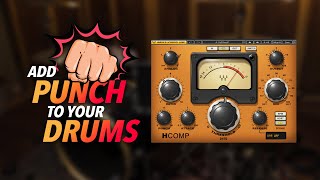
3 COMPRESSION TRICKS to add PUNCH to your Drums with the WAVES H-COMP
Chris Selim - Mixdown Online
Mixing Vocals - Compression - Logic Pro X Tutorial - Waves - HComp

Loyal Fire Tuts
Waves Mix Bus Compression - Episode #4 SSL H-Comp Hybrid Compressor

Production Expert
Waves H-Comp Compressor Plugin | In-Depth Tutorial!

Audio Sorcerer
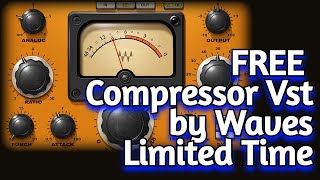
Limited Time FREE Hybrid Compressor VST PLUGIN by Waves Audio - H Comp - Review & Demo

Amner Hunter
H-Comp Hybrid Compressor #udiaudio

UDi Audio
FREE (Limited Time) Hybrid Compressor VST PLUGIN by Waves Audio - H Comp - Compression Tutorial
Amner Hunter
Reviews
PROS
-
Excellent for parallel compression without routing to a new track
-
Versatile, suitable for a variety of instruments and vocals
-
Hybrid of modern and vintage sound with tempo sync feature
-
Intuitive interface with easy control via knobs and double-click for precision
-
Highly praised mix knob for direct parallel compression
-
Useful dry/wet setting for convenient blending
-
Easy to get good results quickly, especially on drums
-
Versatile with multiple modes for diverse sonic expressions
CONS
-
Update policy of Waves criticized for being costly over time
-
Limiter component considered odd and unwieldy
-
Analog settings sometimes dull the sound without noticeable improvement
-
Interface may lack inspiration for some users
-
Doesn't always sound good according to some reviews
Owner Insights
We analyzed real musician discussions from forums and Reddit to find what players love, question, and tweak about Waves H-Comp Hybrid Compressor Plugin.
Features and functionality
Use cases and applications
-
Known for its versatility, the H-Comp excels on drum buses and can perform extreme compression, making it a valuable tool for dynamic range management.
Source
Comparisons
-
Unlike RVox or CLA-76, H-Comp offers greater versatility with its unique tempo-synced release and extreme squash capability, making it suitable for varied applications.
Source
4.5 out of 5
Based on 4 Reviews and 50 Ratings

544
My absolute favourite compressor
I don't know why. There's something about this one that makes it real easy to get instantly good results, whereas other compressors are far harder to use for me personally. I wouldn't use it in all situations for sure, but I use it a lot on drums and it honestly just works out really well like 95% of the time.
There's just a character that behaves real nice with transients like that, maybe it's one of the Analog settings (but if it is, I don't know what it's even emulating, you just have 4 modes and OFF)
Much like most of the other Waves stuff I own, I got this for free via a promotion of theirs, and well this is certainly my most used freebie of theirs even to this day.

41013
you made me want to revisit this, I never use it and I do compress in the box at times for various reasons.... I think a lot of people have a lot of trouble with compressors because they haven't touched a real one or only cheaper VCA units, they're ment to solve problems but do it indifferent ways, or rather the hardware all has flaws you can exploit because they're better at a certain job on a certain type of sound or maybe have a flaw that cna be exploited creatively like to duck microphone bleed in overheads by relying on a sluggish opto design to miss those percussion transients and then grab the background noise down for example....or certain things 'group' transients certain ways on busses and you kinda hafta bond with certain tools.... or I'm off my nut. Either way.
198
Another GREAT WAVES product.
The versatility that this plugin offers is beyond description. With multiple applications stemming from each of its modes a variety of 'emotions' can be expressed sonically. Great for Parallel drum and bass tracks (but the creative options are endless....!)

Artist usage
Add artist

In the 6th paragraph, Skrillex mentions that he uses Waves Hybrid Compressor.


Photo of Zedd with Waves H-Comp Compressor Plugin visible on screen. Original source here, Zedd @ Interscope Studio - August 23-24, 2011.


The third plugin MAKJ shows in his mastering chain is the Waves H-Comp Hybrid Compressor.
.jpg?v=1783787052)

Used on "Purpose", as stated by Purpose mix engineers Josh Gudwin and Andrew Wuepper in this May 2016 Sound on Sound interview about the mixing of the title track and others.
Gudwin picks out a few other interesting tracks, beginning with a vocal track named ‘vcls’. “That track contains a vocal sample that Blood made of Justin’s vocal. I’m just touching that with the LFO Tool for a bit of pumping, I take out some high frequencies with the Pro-Q 2, and then use the SoundToys Microshift for a slight pitch-shift/chorusing effect. ‘Sry1V’ below that is the vinyl sound in the track. ‘$JBU’ is the main lead vocal bus, on which I have the UAD 1176, Waves De-Esser, Manley Massive Passive, Metric Halo Channel Strip. The sends are to the generic aux tracks at the bottom of the sesion: verb, ping-pong delay, Dimension D. Below the lead vocal bus is the print track of a Bricasti outboard.”
Wuepper: “There are two tracks called ‘Bric’ around the main vocal bus; the one above is the print from the Bricasti effect that was used on the percussion, and the one below is the print of the Bricasti reverb on the vocal. Next are Josh’s vocal delays. Putting delays on audio snippets [ie. copying short vocal clips to new tracks and applying delays as inserts, rather than automating a send from the main vocal track] is a pretty interesting way of doing things. I’ve not seen anyone else do this, but it makes it easier for Josh to manipulate these delays and to go deeper into the effect. He can really fine tune the delay times and decay lengths and so on. Sometimes the feedback you get with plug-ins can act a little weird, and this approach allows him to have more control.”
Gudwin: “The five green tracks are all vocal throws and delays. I don’t like to automate delay throws via aux tracks. The top green track is the master track for the delays, ‘JB Throw All’, and it has a compressor and an SPL Vitalizer. The ‘1147’ delay track has the UAD Cooper Time Cube, with a quick ping-pong-y flutter delay that I use to widen, and the track called ‘1167’ has a basic eighth-note delay from the Echo Boy. The ‘A’ insert is Auto-Tune, but it’s not working on these tracks. When needed, our vocal tuning is normally done by Chris ‘Tek’ O’Ryan in Melodyne. I sometimes do it myself, if I have the time do it, in the stand-alone version.
“The blue vocal tracks below the vocal delay tracks are the main lead vocal comp tracks, and on many of them I have the UAD SSL Channel Strip, UAD LA-2A, and the Waves C6 multiband compressor, and sometimes also the Pro-Q 2 EQ. The ‘DLYP’ track has a delay pan effect, with the SoundToys Primal Tap delay and Panman auto-panner, SSL Channel Strip and the P&M Vinylizer. ‘White’ and ‘Master’ are printed reverbs recorded in two rooms at Henson. They are my main plug-in vocal reverbs, and the green tracks below are pitched with the Elastic Audio X-Form [in Pro Tools] and effected with the Waves H-Compressor for a pumping effect. I pitched the reverbs up an octave or two, and I mixed them in very low. The ‘PCM’ and ‘PC1’ tracks are prints from ping-pong delays from the Lexicon PCM42 outboard.
“Justin’s backing vocal tracks all go to the group track called ‘JBG1’, on which I have a Waves De-esser, an SSL Channel and the C6 multiband compressor, plus there are a number of delays and reverbs via the sends. Trevon’s backing vocals all go to ‘JBTR’, which has similar effects. I wanted to fill the song up a bit more, and sometimes it’s not the most enjoyable process for an artist to sing all these background parts. Plus a different vocalist will add a different texture to the song, as long as it complements the lead vocal and the record. As I mentioned, Julia added her vocals during the final mix in New York, and her group track also has the De-esser, SSl Channel and C6. Right at the bottom are some effects tracks, with the Dimension D and group delay throws, and so on.
(...) 'Love Yourself'
(...) Next are Justin’s vocals, with I overdubbed in New York. Almost all the regular vocal tracks have the UAD SSL Channel, LA2 and the Waves C6 multiband compressor. These three plug-ins work great on his vocals, so I tend to stick with them. Each of the vocal tracks has slightly different settings from them. They all go to Justin’s lead vocal bus above them, which has the FabFilter Pro-DS de-esser and the Pro-2 EQ. Justin’s lead vocals also go through the Bricasti, and the effect is printed. My own four backing vocals went through a vocal bus on which I had the SSL Channel, and a compressor, but they didn’t do much, nor did the sends. These vocals are very much in the background, I just wanted to add some texture really quickly. Finally, at the top of the session everything went through a Master track, on which I had the UAD SSL channel, mainly for compression set to mid-attack and auto-release — without drums you don’t need the slow attack and quick release — a Massey EQ, boosting 100Hz and 16kHz, a FabFilter Pro-L for level, and the Sonnox Oxford Inflator to add some sheen.”
'What Do You Mean?'
(...) “There were a few more complicated vocal effects, like the ‘JG FX’ track, on which I used the Vitalizer doing some spatial expanding, a UAD Fatso to thicken it up, and I then cut some low mids with an EQ, and used a de-esser. This effect track gave more depth to the vocal and made him sound more like an angel! Underneath that are two ‘Radio’ tracks [which sound like they could have come straight from Peter Gabriel’s ’80s Fairlight experiments]. I used Auto-Tune to pitch the vocals up, and then put on a SoundToys AlterBoy, which changed the formant, and then I’m filtering 350Hz and below.
“Below the ‘radio’ tracks are all my vocal delay tracks, in green as usual, with the bus for all delay throws at the top. One delay track, ‘Splaater’, is a flutter delay with Auto-Tune and the Cooper Time Cube, and the other two have the Waves H-Delay and SoundToys Echo Boy. They’re both quarter-note delays, but with different feels. Below the delay tracks are some ad lib tracks, and all the actual lead vocals, pulled out over several tracks. Most of them have my regular trio of UAD SSL Channel, LA2 and Waves C6 plug-ins, and all vocals are sent to the ‘JB Buss’, on which I have the FabFilter DS de-esser, a Manley EQ doing light cuts at 330Hz, 560Hz and 3kHz, and then a whole bunch of sends to my regular aux tracks at the bottom: a hall reverb, a plate reverb, a light quarter-inch delay, a light ping-pong delay and a Dimension D.
“Further down are four Justin backing vocal tracks, which go to a bus above them, ‘JBG1’, on which I have the SSL Channel, boosting highs and cutting lows and doing some heavy compression, a UAD 33609 compressor, and then the Waves Enigma [phaser/flanger] on a Mutron setting, adding some sweeping sounds. The sends are once again hall and plate reverbs, a quarter-note and a ping-pong delay and a UAD Roland Dimension D. Once Justin had decided to go with my rough mix, I spent another half hour on it, doing some EQ adjustments, and that was it.”

.jpg)
in the middle channel you can see a plugin called H-Comp


In this instagram post, Waves Hybrid Compressor can be seen on the Mac computer running Pro Tools.


Mentioned under the official H-Comp product page.
“My new favorite compressor. Why hasn't anyone ever thought before of having a wet/dry control, or of release times in musical values?”

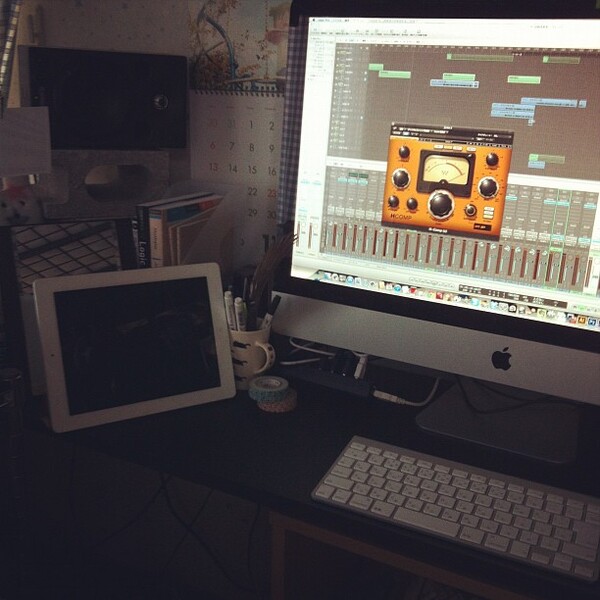
Siinamota is confirmed to use the Waves H-Comp Hybrid Compressor Plugin, as evidenced by a photo shared on his Instagram on July 25, 2012.


Used in Japodian Echoes studio with Logic X.


Genre Usage
Based on how artists on Equipboard use this gear, it is most commonly found in the following genres.
Used With
Based on how musicians on Equipboard use Waves H-Comp Hybrid Compressor Plugin, it is most commonly used with the following gear.

-s.webp?v=1783864832)



-s.webp?v=1783790956)
-s.webp?v=1783864856)

More Waves Compressor Plugins
-m.webp?v=1783864856)
$34.99 - $37.00
in Compressor Plugins Rank


-m.webp?v=1783864943)
$34.99 - $37.00
in Compressor Plugins Rank


$34.99 - $37.00
in Compressor Plugins Rank


$34.99 - $37.00
in Compressor Plugins Rank


$37.00 - $39.99
in Compressor Plugins Rank


$33.00 - $34.99
in Compressor Plugins Rank


$37.00 - $99.00
in Compressor Plugins Rank


$35.99 - $39.99
in Compressor Plugins Rank


$33.00 - $34.99
in Compressor Plugins Rank


$34.99 - $37.00
in Compressor Plugins Rank

-m.webp?v=1783864924)
$33.00 - $39.99
in Compressor Plugins Rank


-m.webp?v=1783864943)
$34.99
in Compressor Plugins Rank


$33.00 - $34.99
in Compressor Plugins Rank


$33.00 - $34.99
in Compressor Plugins Rank


$33.00 - $34.99
in Compressor Plugins Rank


$29.99
in Compressor Plugins Rank

$33.00 - $39.99
in Compressor Plugins Rank


$33.00 - $82.50
in Compressor Plugins Rank


$33.00 - $34.99
in Compressor Plugins Rank


$34.99 - $149.00
in Compressor Plugins Rank


$29.00 - $29.99
in Compressor Plugins Rank


$29.99 - $34.99
in Compressor Plugins Rank


$33.00 - $35.99


$39.99 - $199.00


$144.00 - $199.00
in Compressor Plugins Rank

.jpeg?v=1783771101)

$133.00 - $149.00
in Compressor Plugins Rank


$144.00 - $199.00
in Compressor Plugins Rank

-m.webp?v=1783864832)
$139.00 - $149.00
in Compressor Plugins Rank


$47.00 - $49.00
in Compressor Plugins Rank
.jpeg?v=1783852063)


$39.00 - $1,549.00
in Compressor Plugins Rank


$49.00 - $149.00
in Compressor Plugins Rank


.jpg?v=1783787052)

$28.00 - $49.00
in Compressor Plugins Rank


Accessories & Related Items


-s.webp?v=1783864924)
-s.webp?v=1783864943)


-s.webp?v=1783864846)


Community setups


Similar


Gear Guides








Most Popular Compressor Plugins
Most Popular Brands
-
Added to Equipboard on by
 equipboard
GearIQ 4934
-