

Pricing and availability


* Product prices and availability are updated by Equipboard every 24hrs and are subject to change. Equipboard may receive compensation for purchases made at participating retailers linked on this site. This compensation does not affect what products or prices are displayed, or the order of prices listed. For more information, please refer to our affiliate disclosure.
Description
Adobe Audition is a powerful tool for musicians and audio professionals looking to craft, edit, and refine sound with precision and ease. Known for its robust audio editing capabilities, this industry-standard DAW software combines a multitrack, non-destructive mix/edit environment with a destructive-approach waveform editing view, allowing you to shape your audio just the way you envision it. Whether you're recording live instruments, mixing tracks, or restoring audio, Audition offers a comprehensive set of tools to enhance your workflow.
This software integrates seamlessly with other Adobe Creative Cloud applications, making it an ideal choice for creatives already using Adobe's ecosystem. Its real-time clip stretching, automatic speech alignment, and intuitive interface make it accessible for both beginners and seasoned audio engineers. With its powerful audio restoration tools, including the Spectral Frequency Display, Audition provides unparalleled control and precision for cleaning and improving sound quality.
Key Features:
- Comprehensive multitrack editing and mixing environment
- Seamless integration with Adobe Creative Cloud
- Real-time clip stretching for flexible editing
- Automatic speech alignment for easy ADR
- Advanced audio restoration tools including noise reduction
- Intuitive interface with customizable workspaces
- Support for VST and AU plug-ins
- Robust spectral display for detailed frequency analysis
Videos

Mike Russell
Adobe Audition CC Tutorial for Beginners - Getting Started
Adobe Audition CC Tutorial for Beginners - Getting Started
Mike Russell
Mastering Your Audio in Under 5 Minutes | Adobe Audition Tutorial - Get the best sound quality

Jordan Hauser
How to Remove Background Noise in Adobe Audition 2024
Mike Russell
Adobe Audition 2024 - Tutorial for beginners | Pro Audition in under 7 Minutes!
Mike Russell
Getting Started with Adobe Audition - Complete Beginner Tutorial
Mike Russell

How to Improve Audio Quality - Adobe Audition Tutorial
Mike Russell
Learn How to Use Adobe Audition in 8 minutes!

Scott Luu

Audition 2024 Tutorial: Basic Rundown Of Tools and Overview - Complete Beginners Guide

Dusty Porter
Reviews
Owner Insights
We analyzed real musician discussions from forums and Reddit to find what players love, question, and tweak about Adobe Audition.
Features and functionality
-
The waveform editor and spectral frequency analyzer are praised for cleaning up dialogue, akin to Izotope RX, but Audition struggles with multitrack projects over 20 tracks.
Source -
Native noise reduction and the Doppler effect plug-ins are helpful in specific scenarios, but Audition typically struggles with larger, more involved projects.
Source -
Lacks VSTI and MIDI support, which limits its use for music production to primarily working with samples.
Source -
Audition lacks the ability to easily detect tempo for clips, which can hinder seamless music production and editing.
Source -
Although Audition can timestretch with a good algorithm, it doesn't offer warping or transient detection like Ableton Live or Studio One.
Source
Software and compatibility
-
Audition performs poorly with high CPU usage when playing back 1080 ProRes files at full resolution, often causing skipping and crashing even on high-end workstations.
Source -
Audition's routing system is considered clunky, making it difficult for users accustomed to more streamlined DAWs.
Source -
Users report synchronization issues with external drum samplers like Elektron Digitakt, which can fall out of sync with Audition's click track.
Source -
Changing the time view to bars and beats is a workaround for aligning samples manually in Audition due to its lack of MIDI support.
Source
Use cases and applications
-
It's noted as suitable for quick fixes in podcasting and small audio editing tasks but not ideal for complex multitrack film projects.
Source -
Particularly effective for live audio recording and editing, focusing on post-production tasks like mixing and mastering.
Source -
Audition is primarily valued for mixing, mastering, and working with stems in media production rather than comprehensive music creation.
Source
User experience
4.5 out of 5
Based on 1 Review and 2 Ratings

my primary sample editor
I sample from many different sources and this is a great way for me to edit samples taken from films and other media.
Artist usage
Add artist

At 0:34 he said "So i started off using Adobe Audition probably 10 years ago"

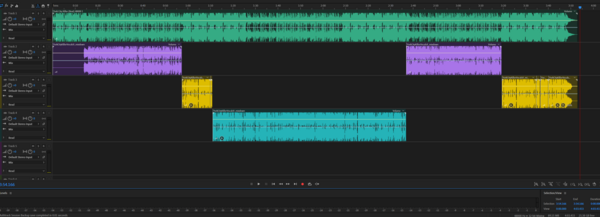
Genre Usage
Based on how artists on Equipboard use this gear, it is most commonly found in the following genres.
More Adobe DAW Software


$225.00 - $599.00
in DAW Software Rank


$398.00
in DAW Software Rank

$266.00 - $349.00
in DAW Software Rank


-m.webp?v=1783418446)
$99.99 - $344.00
in DAW Software Rank


$99.00 - $399.99
in DAW Software Rank


$179.00
in DAW Software Rank


-m.webp?v=1783418442)
$409.00 - $499.00
in DAW Software Rank


$119.00 - $295.00
in DAW Software Rank


$209.00 - $329.99
in DAW Software Rank


$199.99
in DAW Software Rank
.jpg?v=1783709979)


$199.00
in DAW Software Rank


$524.00 - $579.99
in DAW Software Rank


.png?v=1783711142)


$75.00
in DAW Software Rank


$449.00 - $477.00
in DAW Software Rank


$129.00 - $189.00
in DAW Software Rank


$395.00 - $499.00
in DAW Software Rank


$136.00 - $179.00
in DAW Software Rank

$139.99 - $199.99
in DAW Software Rank


$366.00 - $579.99
in DAW Software Rank


$477.00 - $528.00
in DAW Software Rank

$579.99
in DAW Software Rank


$245.00 - $285.00
in DAW Software Rank


$149.00 - $201.00
in DAW Software Rank


$375.00 - $399.95
in DAW Software Rank

$579.99
in DAW Software Rank

Community setups


Similar


Gear Guides











Most Popular DAW Software
Most Popular Brands
-
Added to Equipboard on by
LlamplighterGear IQ 31
-


