

Pricing and availability
We compare 600+ stores and found this item at 3 stores. Prices updated .
Store
Reviews
Price


Average Price: $238
Standard/Professional
$199
$500+
Price Tier
Budget
Standard
High-end
* Product prices and availability are updated by Equipboard every 24hrs and are subject to change. Equipboard may receive compensation for purchases made at participating retailers linked on this site. This compensation does not affect what products or prices are displayed, or the order of prices listed. For more information, please refer to our affiliate disclosure.
Description
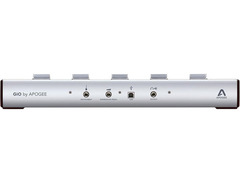
Unleash your inner rock star with the Apogee GiO USB Guitar Interface and Controller, a must-have for any guitarist looking to streamline their recording and performance setup. This innovative device is not just an interface; it's a dynamic MIDI foot controller that seamlessly integrates with your Mac, turning it into a professional guitar recording studio. Whether you're jamming with GarageBand, crafting hits in Logic Pro, or commanding the stage with MainStage, the GiO puts unrivaled control at your feet.
Designed for the modern musician, the GiO allows you to toggle virtual stompboxes and effects without leaving your guitar's side. With five stompbox buttons color-coded to match your software and five transport control buttons for hands-free navigation, this interface lets you focus entirely on your music. No more juggling between your guitar and computer; GiO keeps your flow uninterrupted.
Perfect for home studios, live performances, or spontaneous jam sessions, the GiO ensures your guitar tones are captured with Apogee's renowned clarity. Simply connect it via USB, and you're ready to rock the digital realm with analog precision.
Key Features:
- Unbalanced 1/4" high impedance instrument input
- 1/4" MIDI Expression pedal input
- Line-level, 1/4" stereo output for headphones or powered monitors
- A/D and D/A conversion at 44.1/48kHz, 24-bit
- 5 dynamically color-coded stompbox buttons
- 5 transport control buttons with dynamic lighting
- 2 "Previous/Next" preset selection buttons
- Compatible with Apple's GarageBand, Logic Pro, and MainStage software
- Powered via USB connection to your Mac
Product specs
| Brand | Apogee |
| Model | GiO USB Audio Interface |
| Finish | White |
| Year | 2010s |
| Made In | United States |
| Categories | Audio Interfaces |
| Bit Depth | 24-bit |
| Bus-Powered | Yes |
| Compatibility | macOS |
| Computer Connectivity | USB |
| Electronics | Analog, Digital, Solid State |
| Format | Desktop Standalone |
| Number of Analog Inputs | 1 |
| Number of Analog Outputs | 1 |
| Number of Channels | 2 |
| Number of Digital Inputs | 0 |
| Number of Digital Outputs | 0 |
| Number of Headphone Outputs | 1 |
| Number of MIDI Inputs | 0 |
| Number of MIDI Outputs | 0 |
| Number of Mic Preamps | 0 |
| Sample Rate | 48 khz |
FAQs
-
Is the Apogee GiO USB Guitar Interface compatible with Windows operating systems?
-
No, the Apogee GiO USB Guitar Interface is only compatible with macOS, making it ideal for users with Mac computers.
-
How does the Apogee GiO connect to a computer?
-
The Apogee GiO connects to a computer via USB, providing both power and data transfer through the same connection.
-
Does the Apogee GiO USB Guitar Interface require an external power source?
-
No, the Apogee GiO is bus-powered, meaning it draws power directly from the USB connection to your Mac, eliminating the need for an external power source.
-
How many input and output channels does the Apogee GiO have?
-
The Apogee GiO features one analog input and one analog output channel, making it suitable for straightforward guitar recording setups.
-
Can I use the Apogee GiO to control effects in my DAW?
-
Yes, the Apogee GiO functions as a MIDI foot controller, allowing you to control effects and other parameters in compatible DAWs on macOS.
Videos

Apogee Electronics
Apogee GiO and GarageBand '11
Apogee GiO and GarageBand '11
Apogee Electronics
Apogee Gio Review - USB Guitar Interface - Garageband 09 / Logic Pro 9 / Mainstage

llmreviews
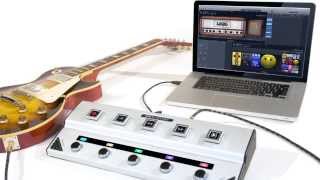
Apogee GiO - Turn your Mac into the ultimate guitar rig
Apogee Electronics
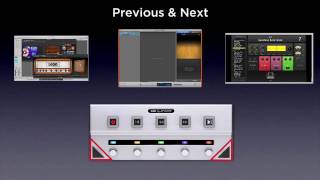
Apogee GiO - The Guitar Interface for the Mac
Apogee Electronics
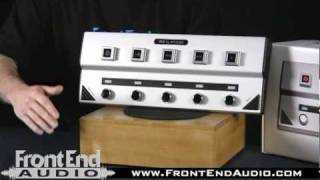
Apogee GiO USB Guitar Interface and Controller @ FrontEndAudio.com

Front End Audio
Mat Mitchell: On stage and in the Studio with Apogee GiO
Apogee Electronics
AES 2009 Apogee Gio First Look

SamAshdotcom

Apogee GiO Overview | UniqueSquared.com

UniqueSquared

Apogee Gio Demo at Titos Handmade Sessions

Notaspringchick
Reviews
PROS
-
Solid hardware build, durable for guitarists
-
Zero latency for real-time playing
-
Works well with headphones or amps
-
Offers limitless customization options
-
Ideal for GarageBand and MainStage users
-
Seamless integration with Logic Pro X
-
Enables hands-free recording and control
-
High-quality A/D and D/A converters
-
User-friendly, easy to learn and use
-
Eliminates need for other pedals on stage
CONS
-
No updates for drivers post MacOS Catalina
-
Becomes a basic USB sound interface without control functionality on newer MacOS versions
Owner Insights
We analyzed real musician discussions from forums and Reddit to find what players love, question, and tweak about Apogee GiO USB Guitar Interface and Controller.
Features and functionality
-
GiO is limited to handling single guitar inputs, lacking support for dual-output guitars or microphone inputs.
Source
Comparisons
-
Users compare the GiO unfavorably with the Roland FC-300, citing similar pricing but more comprehensive features on the Roland.
Source
Use cases and applications
-
The GiO may not be ideal for users with complex setups needing multiple guitar outputs or microphone integration.
Source
4.5 out of 5
Based on 2 Reviews and 3 Ratings

1038
Great Tech
I was a ProTools user for the longest time running it on a Mac from 1997. In 2010 I decided to upgrade the studio and move to Logic and I decided that after I saw the demo of this device. I've recorded several songs using this pedalboard paired with the guitar features in Logic. Amazing and super useful.

Artist usage
Add artist

When I play with Mental 99, I use my favorite guitar — a Trussart Steelcaster — tuned CGCDFA, low to high (like droped-D, but transposed down a whole step. I use an Apogee GIO as I/O and a MIDI controller — all processing is in the computer.
Genre Usage
Based on how artists on Equipboard use this gear, it is most commonly found in the following genres.
Used With
Based on how musicians on Equipboard use Apogee GiO USB Guitar Interface and Controller, it is most commonly used with the following gear.
-s.webp?v=1784818699)
More MIDI Foot Controllers

$427.17 - $484.00
in MIDI Foot Controllers Rank


$19.95 - $139.00
in MIDI Foot Controllers Rank


$381.00 - $679.99
in MIDI Foot Controllers Rank


$119.00 - $151.00
in MIDI Foot Controllers Rank


$499.00
in MIDI Foot Controllers Rank


in MIDI Foot Controllers Rank


$113.04 - $229.99
in MIDI Foot Controllers Rank


$435.00 - $699.95
in MIDI Foot Controllers Rank


$50.00 - $254.88
in MIDI Foot Controllers Rank


$129.99 - $249.99
in MIDI Foot Controllers Rank


$219.00 - $319.00
in MIDI Foot Controllers Rank


$2,250.00
in MIDI Foot Controllers Rank


$395.99 - $427.17
in MIDI Foot Controllers Rank


in MIDI Foot Controllers Rank


$139.99
in MIDI Foot Controllers Rank


in MIDI Foot Controllers Rank


$151.00
in MIDI Foot Controllers Rank


$91.00 - $119.99
in MIDI Foot Controllers Rank


$488.46
in MIDI Foot Controllers Rank
.png?v=1784755332)


$67.84 - $79.00
in MIDI Foot Controllers Rank

$191.30 - $499.99
in MIDI Foot Controllers Rank


$299.00
in MIDI Foot Controllers Rank


$172.00 - $300.00
in MIDI Foot Controllers Rank

$34.99
in MIDI Foot Controllers Rank


$1,880.00 - $3,087.00
in MIDI Foot Controllers Rank


$209.99
in MIDI Foot Controllers Rank


$179.00
in MIDI Foot Controllers Rank

$79.99 - $309.00
in MIDI Foot Controllers Rank

$79.99 - $110.00
in MIDI Foot Controllers Rank

$189.99
in MIDI Foot Controllers Rank


$200.00
in MIDI Foot Controllers Rank


$559.24
in MIDI Foot Controllers Rank


$350.00
in MIDI Foot Controllers Rank


.jpg?v=1784782132)

$427.17
in MIDI Foot Controllers Rank


$60.00
in MIDI Foot Controllers Rank


$488.00 - $999.95
in MIDI Foot Controllers Rank
.jpeg?v=1784474176)


$123.00 - $249.00
in MIDI Foot Controllers Rank


Accessories & Related Items


Community setups


Similar


Gear Guides







Most Popular MIDI Foot Controllers
Most Popular Brands
-
Added to Equipboard on by
 equipboard
GearIQ 4934
-



