

Pricing and availability
We compare 600+ stores and found this item at 6 stores. Prices updated .
Store
Reviews
Price




Average Price: $99
Standard/Professional
$49
$150+
Price Tier
Budget
Standard
High-end
Price History
Based on price data from 6 merchants for "Apogee Opto-3A". Prices shown reflect NEW condition. Tracking began Apr 2, 2026.
* Product prices and availability are updated by Equipboard every 24hrs and are subject to change. Equipboard may receive compensation for purchases made at participating retailers linked on this site. This compensation does not affect what products or prices are displayed, or the order of prices listed. For more information, please refer to our affiliate disclosure.
Description
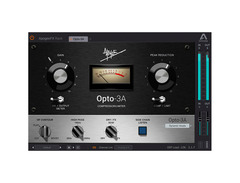
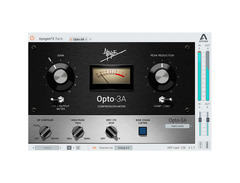
Unleash the essence of vintage compression with the Apogee Opto-3A, a masterful blend of classic warmth and modern flexibility. This optical compressor/limiter plugin seamlessly integrates into your digital audio workstation, bringing the legendary sound of its hardware predecessors to your fingertips. Whether you're a seasoned producer or an aspiring musician, the Opto-3A offers a harmonious fusion of intuitive control and rich tonal character.
Designed for the diverse needs of today's musicians, the Opto-3A is a standout in the Apogee FX Rack & ApogeeChannelFX suite. It runs natively in your favorite DAW, so you won’t need Apogee hardware to get started. However, if you're already an Apogee user, enjoy the DualPath™ functionality, which allows the plugins to run on hardware DSP in Symphony Desktop, Element Series, and Ensemble Thunderbolt interfaces, offering unparalleled processing power and efficiency.
The Opto-3A doesn’t just emulate; it innovates. With extended high-frequency emphasis, a sidechain high-pass filter, and a dry/FX mix control, it provides a versatile toolkit for sculpting your unique sound. Whether you’re smoothing out vocals or adding punch to your drum tracks, the Opto-3A delivers dynamic nuance and clarity.
Key Features:
- Optical Compressor/Limiter
- Reproduces reactive compression characteristics of modeled hardware
- Extended high-frequency emphasis functionality
- Sidechain high-pass filter
- Dry/FX mix control
- Runs natively in DAWs; no Apogee hardware required
- DualPath™ functionality for Apogee hardware DSP compatibility with Symphony Desktop, Element Series, and Ensemble Thunderbolt interfaces
- Compatible with macOS 10.14.6 or higher and Windows 10 and higher (64-bit only)
- Supported formats: VST, VST3, AU, AAX
Product specs
| Available since | December 2018 |
| Los artikel / bundelartikel | Los artikel |
| Delay | No |
| Dynamics | Yes |
| Effect Filter | No |
| Encoder/Decoder | No |
| Equalizer | No |
| Guitar amps/-effects | No |
| Channel Strip | No |
| Metering / Analysis / Correction | No |
| Modulation Effects | No |
| Multieffect / Plugin-Host | No |
| Overdrive/Distortion | No |
| Preamp / Saturation | No |
| Psychoacoustic tool / Enhancer / Exciter | No |
| Restauration | No |
| Reverb | No |
| Special FX | No |
| Summer / Mixing Consoles | No |
| Tape Simulation | No |
| Pitch Shifter / Harmonizer / Timestretching | No |
| Transient Processing | No |
| Vocoder / Vocal effect | No |
| Mastering Tools | No |
| Hardware Controller | No |
| Download | 1 |
FAQs
-
What type of compression does the Apogee Opto-3A offer?
-
The Apogee Opto-3A provides vintage-style opto compression, known for its smooth and musical response, making it ideal for vocals and instruments needing a warm, natural compression.
-
Is the Apogee Opto-3A compatible with all major DAWs?
-
Yes, the Apogee Opto-3A is compatible with major DAWs such as Ableton Live, Pro Tools, and Logic Pro, ensuring seamless integration into your existing setup.
-
Does the Apogee Opto-3A include any additional effects besides compression?
-
No, the Apogee Opto-3A is focused solely on delivering high-quality opto compression without additional effects like reverb or equalization.
-
Can the Apogee Opto-3A be used for mastering purposes?
-
While the Apogee Opto-3A is primarily designed for mixing applications, its smooth compression characteristics can also be beneficial in certain mastering scenarios, depending on the desired sound.
-
Is the Apogee Opto-3A suitable for both beginners and advanced users?
-
Yes, the Apogee Opto-3A's intuitive interface and high-quality sound make it suitable for beginners seeking ease of use, as well as advanced users looking for professional-grade compression.
Videos

MusicMarketingTV
MMTV: Apogee - Opto-3A In Action | Eric Burgess
MMTV: Apogee - Opto-3A In Action | Eric Burgess
MusicMarketingTV

Bob Clearmountain on the Apogee Opto 3A Plugin

Apogee Electronics
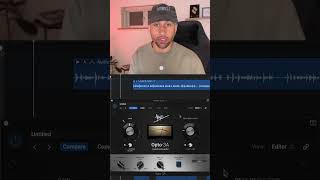
Vocal Compression 🎤 check out the Opto-3A here: https://apogeedigital.com #apogeedigital #opto3a

Fabian Mazur
Reviews
Critic Reviews
Based on 0 Reviews and 0 Ratings
Genre Usage
Based on how artists on Equipboard use this gear, it is most commonly found in the following genres.
More Apogee Compressor Plugins


$144.00 - $199.00
in Compressor Plugins Rank


$133.00 - $149.00
in Compressor Plugins Rank


-m.webp?v=1784871029)
$32.00 - $34.99
in Compressor Plugins Rank


-m.webp?v=1784871289)
$32.00 - $34.99
in Compressor Plugins Rank


$35.99 - $39.99
in Compressor Plugins Rank


$37.00 - $39.99
in Compressor Plugins Rank


$37.00 - $39.99
in Compressor Plugins Rank

-m.webp?v=1784871993)
$39.99
in Compressor Plugins Rank


$144.00 - $199.00
in Compressor Plugins Rank

-m.webp?v=1784871779)
$139.00 - $149.00
in Compressor Plugins Rank


$47.00 - $49.00
in Compressor Plugins Rank
.jpeg?v=1784733415)


$39.99 - $149.00
in Compressor Plugins Rank


$69.00
in Compressor Plugins Rank

$33.00 - $34.99
in Compressor Plugins Rank
.jpg?v=1784758771)

$39.00 - $1,549.00
in Compressor Plugins Rank


$37.00 - $39.99
in Compressor Plugins Rank


$33.00 - $34.99
in Compressor Plugins Rank
.jpg?v=1784733415)


$35.99 - $39.99
in Compressor Plugins Rank


$89.00
in Compressor Plugins Rank

$33.00 - $34.99
in Compressor Plugins Rank


$37.00 - $39.99
in Compressor Plugins Rank

-m.webp?v=1784871558)
$33.00 - $39.99
in Compressor Plugins Rank


$29.99 - $49.00
in Compressor Plugins Rank


$33.00 - $34.99
in Compressor Plugins Rank


$65.00
in Compressor Plugins Rank


$0.00
in Compressor Plugins Rank


$49.00 - $149.00
in Compressor Plugins Rank

$57.00 - $69.00
in Compressor Plugins Rank


$20.00 - $149.00
in Compressor Plugins Rank


$0.00
in Compressor Plugins Rank

$28.00 - $49.00
in Compressor Plugins Rank


$33.00 - $34.99
in Compressor Plugins Rank


$33.00 - $34.99
in Compressor Plugins Rank


$49.00 - $164.00
in Compressor Plugins Rank


$95.00 - $149.00
in Compressor Plugins Rank

Accessories & Related Items



Artist usage


Community setups


Similar


Gear Guides




.webp)




Most Popular Compressor Plugins
Most Popular Brands
-
Added to Equipboard on by
 equipboard
GearIQ 4934
-


