


Pricing and availability


* Product prices and availability are updated by Equipboard every 24hrs and are subject to change. Equipboard may receive compensation for purchases made at participating retailers linked on this site. This compensation does not affect what products or prices are displayed, or the order of prices listed. For more information, please refer to our affiliate disclosure.
Description
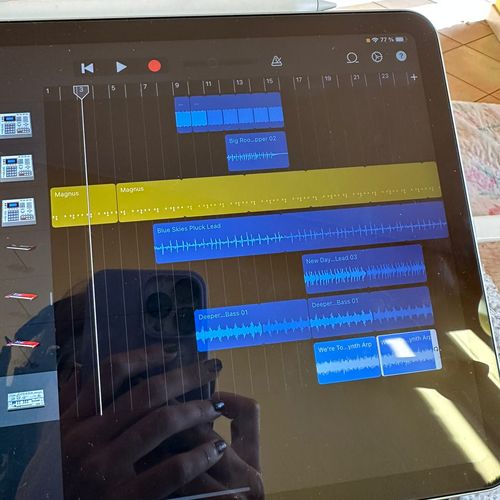
Unleash your inner maestro with Apple GarageBand iOS, a dynamic Digital Audio Workstation (DAW) designed to transform your iOS device into a fully-fledged music studio. Perfect for musicians of all levels, GarageBand provides an intuitive interface combined with powerful features that make creating professional-quality music accessible to everyone. Whether you’re laying down tracks for the first time or fine-tuning your next hit, GarageBand offers a seamless blend of ease and sophistication.
With Live Loops, you can create music like a DJ, simply tapping cells and columns in a grid to trigger musical loops. The built-in library boasts a vast collection of sounds, including a variety of instruments and loops to suit any genre. Take your music on the go with the ability to record and edit anywhere you have your iOS device. GarageBand also supports multi-track recording, allowing you to capture up to 32 tracks of audio simultaneously.
For those looking to collaborate, GarageBand offers compatibility with Logic Pro for seamless transitions between projects. Plus, with iCloud integration, you can easily work on your projects across multiple devices without missing a beat. Whether you're strumming a virtual guitar, playing with Smart Drums, or crafting your own synth sounds, GarageBand iOS provides the tools you need to bring your musical visions to life.
Key Features:
- Intuitive touch interface optimized for iOS
- Live Loops feature for DJ-style music creation
- Vast sound library with a variety of instruments and loops
- Multi-track recording with up to 32 tracks of audio
- Compatibility with Logic Pro for seamless project transitions
- iCloud integration for cross-device project access
- Smart Instruments for quick, professional-sounding results
- Built-in lessons for learning and experimenting with new instruments
Videos

Dean Davis
GarageBand iPad/iPhone Tutorial For Brand New Beginners! // How To Make A Song In GarageBand iOS
GarageBand iPad/iPhone Tutorial For Brand New Beginners! // How To Make A Song In GarageBand iOS
Dean Davis
How To Make A FULL SONG on iPHONE & iPAD (Garageband iOS Tutorial) | Studio Vlog

IAMLXGEND
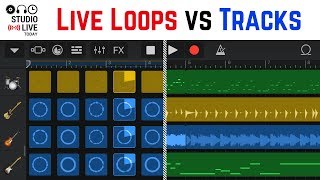
How to use Live Loops and Tracks view in GarageBand iOS? (iPad/iPhone)

Pete Johns - Studio Live Today
GarageBand iPad/iPhone Tutorial for Beginners

The GarageBand Guide
GarageBand iOS for Beginners | How to start a new song (iPad/iPhone)
Pete Johns - Studio Live Today
Garageband IOS #1 Tutorial Deutsch Ipad Iphone

Thomas Foster Musikproduktion
Apple Actually IMPROVED GarageBand?
The GarageBand Guide
Which iPad will run GarageBand iOS? (Latest version)
Pete Johns - Studio Live Today
GarageBand iOS to Mac (and back to iOS?)
Pete Johns - Studio Live Today
Reviews
PROS
-
Great for beginners, teaching basics without overwhelming them
-
Effective sequencer and effects processor for live sets
-
Strong selection of pianos, synths, effects, and drum machines
-
Convenient for capturing ideas on the go
-
Large collection of high-quality samples and loops
-
Excellent for quickly writing demos
-
Diverse synthesizers and audio manipulation possibilities
-
Affordable option for iOS users
CONS
-
Limited mixing capabilities compared to full DAWs
-
Amp simulators require additional accessories for optimal sound
-
Some features are restricted or limited
-
Better suited for beginners than experienced producers
-
Not easily updatable, which may limit functionality over time
Owner Insights
We analyzed real musician discussions from forums and Reddit to find what players love, question, and tweak about Apple Garageband iOS.
Features and functionality
-
iOS GarageBand maxes out at 32 tracks, significantly less than the 256 tracks available on the Mac version.
Source -
Limited time signature options, such as the inability to write in 5/4, restricts creative possibilities for certain compositions.
Source -
iOS GarageBand features a unique touch keyboard allowing pitch slides, absent in the Mac version for users relying on physical keyboards.
Source -
The iOS version includes a step/beat sequencer that's particularly useful for quick drum programming, despite lacking MIDI export capabilities.
Source -
The iOS version includes exclusive touch instruments like string ensembles and folk instruments not available on the Mac version.
Source -
The iOS version's step sequencer is highly praised for its ease of use and is considered among the best for quick beat creation.
Source
Software and compatibility
-
iOS version lacks support for exporting projects as MIDI files, which limits flexibility in transferring work between different DAWs.
Source -
The iOS version offers fewer internal voices and limited external VST options compared to the Mac version, hindering sound variety.
Source -
Logic Remote app enables iOS's touch interface to control Mac GarageBand, offering a hybrid workflow for those who prefer touchscreen interaction.
Source -
Users transitioning to Mac from iOS note the need for online resources to locate features due to differing interfaces.
Source
User experience
-
Touchscreen controls on iOS are considered more intuitive by some users, making it preferable for on-the-go composing compared to desktop versions.
Source -
Users transitioning from iOS to Mac often struggle with the absence of touchscreen and the complex toolbar interactions on the Mac version.
Source -
Some users find the touch interface velocity sensitivity on iOS to be inconsistent for keyboard use, but it translates well for drum pads.
Source -
iOS on iPad is preferred for its larger interface, making it more user-friendly for detailed work compared to the iPhone's smaller screen.
Source
Critic Reviews
4.0 out of 5
Based on 16 Reviews and 70 Ratings

1798
A perfect substitute
I don't use this as a DAW, but rather as a sequencer and effects processor for my backing tracks and samples during my live sets when I'm playing a more minimal set. I love it mainly for it's bitcrusher, reverb, and tremolo. Also it's amp simulators aren't the best, but it does make Xynthesizer sound really degraded. I'm not going to lie though I have made one song on my upcoming album with GarageBand. It's got great pianos and synths, effects, and drum machines. I recommend it to anyone who wants a beginner DAW or cheap and affordable sequencer. Especially if you got IOS.
.jpeg?v=1783356731)
9717
Not bad
Honestly, could have been bigger, but I guess I’ll have to install the pc version.

165
Great for getting ideas saved
This is where I began. I love this app. It's great for beginners to teach the basics without scaring them with all the fancy stuff, and I use it from time to time to get ideas down fast when on the go.

9938
It's fun
i've been using it for years but haven't really taken it seriously until i've watched that steve lacy video for wired then it became really interesting. just waiting until i get the irig piece so my instruments would sound better.

144
Always Amazing
Iv'e always found the IOS version easier to use than the Mac version. The Mac version is better, but i've learned a lot of tricks for the mobile version, and usually just import sounds from my computer.

250
Awesome Songwriting Platform
Can't be comparable to real daws, impossible to mix music normally, but we use that to write demos for our music


143
A fairly good DAW
I used this for a long time, but besides mixing loops, there wasn't much for me to do since I couldn't update the app. There is a humongous collection of high quality samples and loops to pick and choose from, however, putting the price near pretty close to worth it.


Artist usage
Add artist

Enrico mostly uses GarageBand to record his covers, even without FL Studio. This is what he mostly uses.


Justin Rissmiller uses Apple Garageband iOS, as confirmed by T&R Solutions/T&R Recordings.

Album Usage
The Apple Garageband iOS has been featured on the following albums:
Genre Usage
Based on how artists on Equipboard use this gear, it is most commonly found in the following genres.
Used With
Based on how musicians on Equipboard use Apple Garageband iOS, it is most commonly used with the following gear.




Community setups
Show yours

Similar
Add recommendation1 alternative for Apple Garageband iOS, curated by the Equipboard community.

More expansive to say the least. Also, better for audio interfaces.
More Apple DAW Software


$225.00 - $599.00
in DAW Software Rank


$398.00
in DAW Software Rank

$266.00 - $439.00
in DAW Software Rank


-m.webp?v=1782900043)
$99.99 - $344.00
in DAW Software Rank


$99.00 - $399.99
in DAW Software Rank


$179.00
in DAW Software Rank


-m.webp?v=1782900039)
$409.00 - $499.00
in DAW Software Rank


$119.00 - $299.00
in DAW Software Rank


$209.00 - $329.99
in DAW Software Rank


$199.99
in DAW Software Rank
.jpg?v=1783318437)


$199.00
in DAW Software Rank


$524.00 - $579.99
in DAW Software Rank


$75.00
in DAW Software Rank


$449.00 - $485.00
in DAW Software Rank


$129.00 - $195.00
in DAW Software Rank


$395.00 - $499.00
in DAW Software Rank


$485.00 - $528.00
in DAW Software Rank

$136.00 - $179.00
in DAW Software Rank

$139.99 - $199.99
in DAW Software Rank


$366.00 - $579.99
in DAW Software Rank


$579.99
in DAW Software Rank


$245.00 - $285.00
in DAW Software Rank

Gear Guides







Most Popular DAW Software
Most Popular Brands
-
Added to Equipboard on by
 prism
prismGear IQ 52
-


