

Pricing and availability
We compare 600+ stores and found this item at 1 store. Prices updated .
Store
Reviews
Price




Average Price: $220
Standard/Professional
$200
$1001+
Price Tier
Budget
Standard
High-end
* Product prices and availability are updated by Equipboard every 24hrs and are subject to change. Equipboard may receive compensation for purchases made at participating retailers linked on this site. This compensation does not affect what products or prices are displayed, or the order of prices listed. For more information, please refer to our affiliate disclosure.
Description
Elevate your studio production experience with the CONTROL 24, a versatile and robust mixer designed to seamlessly integrate with your Pro Tools system. This state-of-the-art controller is equipped with 24 touch-sensitive motorized faders, ensuring precise control over your sessions. Its intuitive design allows you to switch effortlessly between recording, mixing, and editing tasks, making it an essential tool for both seasoned professionals and aspiring producers.
One of the standout features of the CONTROL 24 is its inclusion of 16 pristine Focusrite Class A mic preamps. Known for their smooth and transparent sound, these preamps deliver exceptional audio quality, capturing every nuance of your performance. The comprehensive analog routing section further enhances its versatility, making it the ideal centerpiece for your studio setup.
The CONTROL 24 offers a hands-on approach with dedicated switches for essential functions like mute, solo, and record arm, ensuring quick and efficient workflow. The integrated submixer with 8 stereo inputs and a comprehensive control room section capable of up to 5.1 surround monitoring provide all the flexibility you need for complex sessions. Each channel features dedicated EQ and dynamics switches, complemented by illuminated switches and 26 scribble strips to keep your creative flow uninterrupted.
Key Features:
- 24 touch-sensitive motorized faders
- 16 Focusrite Class A mic preamps
- Hands-on access to Pro Tools recording, routing, mixing, and editing
- Comprehensive control room section for up to 5.1 surround monitoring
- Illuminated switches for mute, solo, record arm, and more
- Dedicated EQ and dynamics switches on every channel
- 26 scribble strips for easy system feedback
- Connects to Pro Tools TDM systems via high-speed Ethernet
- High-resolution LED display for transport location
- Integrated submixer with 8 stereo inputs
- Touch-sensitive automation of plug-in parameters via faders in plug-in flip mode
Product specs
| Brand | Digidesign |
| Model | Control 24 Pro Tools Controller |
| Finish | Gray |
| Year | 2000s |
| Categories | Audio Mixers, Consoles and Summing Boxes |
FAQs
-
What DAWs are compatible with the Digidesign Control 24?
-
The Digidesign Control 24 is primarily designed for Pro Tools but can also work with other DAWs like Logic Pro, Cubase, and Ableton Live using third-party software such as Neyrinck V Control Pro.
-
What are the key features of the Digidesign Control 24?
-
The Digidesign Control 24 features 24 motorized faders, an ergonomic design, and a comprehensive control surface that integrates seamlessly with Pro Tools, offering hands-on control over mixing and recording functions.
-
Is the Digidesign Control 24 still supported by Avid?
-
Avid has discontinued official support for the Control 24, but it remains functional with existing systems and compatible DAWs through third-party solutions.
-
Can the Digidesign Control 24 be used in a modern home studio setup?
-
Yes, the Digidesign Control 24 can be integrated into a modern home studio, especially when paired with Pro Tools or compatible DAWs, providing professional-level control over audio mixing and editing tasks.
-
Does the Digidesign Control 24 require any specific software or drivers?
-
The Digidesign Control 24 requires compatible software like Pro Tools for optimal functionality and may need third-party drivers or software for integration with other DAWs.
Videos

Josh Taylor
Digidesign Control 24 - An Overview
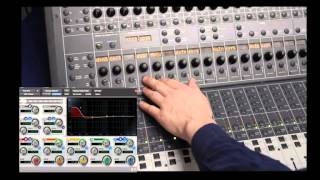
Digidesign Control 24 - An Overview
Josh Taylor
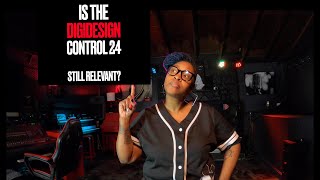
Is the Digidesign Control 24 still relevant?

JLaToiya

|Digidesign Control 24 Setup (2023)|
JLaToiya
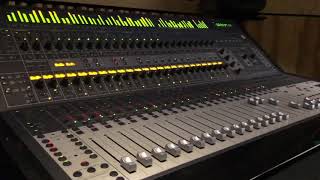
Digidesign Control 24

Rikardo Gallegos
Reviews
PROS
-
Capable of powering on and activating faders
-
Great functionality when well-maintained and cared for
CONS
-
Susceptible to rubber deterioration and sticky residue
-
Vulnerable to extensive wear from constant use
-
Prone to hidden internal damage, such as liquid spills
-
Deeper issues beyond superficial power supply concerns
-
Often misrepresented in condition upon sale
-
Requires substantial cleaning and maintenance for optimal performance
Owner Insights
We analyzed real musician discussions from forums and Reddit to find what players love, question, and tweak about CONTROL 24.
Setup and maintenance
-
Signal issues may arise with Control 24 and Digi 192 configurations; checking hardware setup and routing is critical for troubleshooting.
Source
Features and functionality
-
A 192 interface can support 16 inputs and 8 outputs if equipped with an 8-channel ADC expansion card.
Source
Software and compatibility
-
The combination of OSX Mavericks 10.9.5 and Pro Tools 10 can handle these legacy systems, but configuration challenges are common.
Source
Use cases and applications
-
It's suggested to test and configure one channel at a time for effective troubleshooting with the Control 24.
Source
Critic Reviews
5.0 out of 5
Based on 0 Reviews and 1 Rating
Artist usage
Add artist

At 3:05 in this video, Joe Duplantier's studio is shown to consist of Control 24 mixer, Genelec 1031A and Adam Audio A7 studio monitors.


In this interview, Dj Premier talks about gear, plugins and more, saying "Once I have done all the programming with the MPC60, I load everything into Pro Tools, and then I begin shaping the final sounds and track. When everything is printed in Pro Tools, I start experimenting with how to enhance it. I have a fully loaded HD Accel system, stocked with plug-ins. There are many plug-ins I haven't even experimented with yet. But I like the [Waves] Renaissance Vox and Bass plug-ins. I just play around until the sound has a nice shape. I can't just use mouse and keyboard when I work in Pro Tools, so I use the Control 24 board. I love that board, it's a beautiful thing. If I don't have buttons and faders, I lose interest."

Genre Usage
Based on how artists on Equipboard use this gear, it is most commonly found in the following genres.
Used With
Based on how musicians on Equipboard use CONTROL 24, it is most commonly used with the following gear.


-s.webp?v=1784757930)


More Mixers

$28.00 - $415.00
in Mixers Rank


$677.00 - $989.00
in Mixers Rank


$1,462.00 - $1,999.00
in Mixers Rank


$214.95 - $250.74
in Mixers Rank


$120.00 - $449.99
in Mixers Rank


-m.webp?v=1784758269)
$340.96 - $379.00
in Mixers Rank


$219.00 - $329.99
in Mixers Rank


$45.30 - $89.00
in Mixers Rank


$180.25 - $219.99
in Mixers Rank


$200.00 - $573.74
in Mixers Rank


$129.00 - $209.00
in Mixers Rank


$1,751.29 - $3,299.99
in Mixers Rank


$310.00 - $479.99
in Mixers Rank


$188.00 - $309.00
in Mixers Rank


$75.00 - $329.99
in Mixers Rank


$140.83 - $169.00
in Mixers Rank


$65.00 - $219.50
in Mixers Rank


$277.00 - $382.00
in Mixers Rank


$244.00 - $399.99
in Mixers Rank


$35.00 - $295.00
in Mixers Rank


$205.00 - $329.00
in Mixers Rank


$665.93 - $1,271.95
in Mixers Rank


$99.00 - $179.00
in Mixers Rank


-m.webp?v=1784728878)
$1,900.00 - $2,999.99
in Mixers Rank


$1,006.00 - $1,499.99
in Mixers Rank


$14.60 - $45.00
in Mixers Rank


$659.00 - $1,159.99
in Mixers Rank


$849.99 - $1,049.99
in Mixers Rank


$190.75 - $229.99
in Mixers Rank


$129.99 - $176.99
in Mixers Rank


$416.00 - $679.99
in Mixers Rank


$979.00 - $1,199.00
in Mixers Rank


$1,049.00 - $1,649.00
in Mixers Rank


$362.00 - $449.99
in Mixers Rank


$539.00 - $799.99
in Mixers Rank
Accessories & Related Items


Community setups


Similar


Gear Guides








Most Popular Brands
-
Added to Equipboard on by
 mattara
GearIQ 60
-


