


Pricing and availability
We compare 600+ stores and found this item at 6 stores. Prices updated .
Store
Reviews
Price








Average Price: $140
Budget/Beginner
$200
$501+
Price Tier
Budget
Standard
High-end
Price History
Based on price data from 4 merchants for "Hotone Omni IR". Prices shown reflect NEW condition. Tracking began Apr 2, 2026.
* Product prices and availability are updated by Equipboard every 24hrs and are subject to change. Equipboard may receive compensation for purchases made at participating retailers linked on this site. This compensation does not affect what products or prices are displayed, or the order of prices listed. For more information, please refer to our affiliate disclosure.
Description
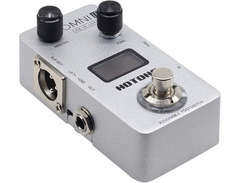
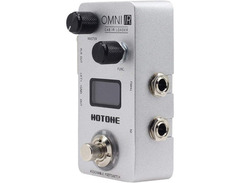
Unleash the power of your guitar rig with the Hotone Omni IR, a compact yet mighty amp and cabinet simulator that brings studio-quality sound to your pedalboard. Whether you're gigging or practicing at home, this pedal offers a seamless blend of portability and performance. With advanced DSP technology and a collection of 40 premium presets, the Omni IR recreates the authentic tones of legendary guitar and bass cabinets, allowing you to leave your cumbersome gear at home without compromising on sound. The high-precision 4-band EQ provides endless possibilities for tonal sculpting, ensuring your sound is always just right.
Equipped with high-quality 24-bit conversion and an internal voltage boost circuit, the Omni IR guarantees excellent dynamic range and headroom, making it a reliable choice for any musical style. Its user-friendly interface includes an easy-to-read OLED screen and an assignable LED-equipped footswitch, offering intuitive control at your fingertips. Plus, the USB port makes loading custom IRs and updating firmware a breeze. With auxiliary input and headphone output, you can effortlessly jam along with your favorite tracks or practice quietly.
Key Features:
- Compact stompbox with DSP-driven cabinet simulations
- 24-bit conversion for high dynamic range and headroom
- 40 flexible presets emulating legendary cabinets
- 4-band EQ for precise sound shaping
- Supports third-party impulse responses
- Auxiliary input and headphone output for practice sessions
- High-resolution OLED screen for clear display
- USB port for easy IR loading and firmware updates
- Assignable LED-equipped footswitch for versatile control
Product specs
| Pedal Type | Impulse Response Cabinet Simulator |
| Analog/Digital | Digital |
| Form Factor | Pedal |
| EQ | 4-band EQ |
| Presets | 40 User |
| Impulse Response | 40 x Cabinet IRs, 3rd Party IR Support |
| Inputs | 1 x 1/4" (instrument), 1 x 1/8" (aux in) |
| Outputs | 1 x XLR (balanced out), 2 x 1/4" (unbalanced out, thru) |
| USB | 1 x USB-C |
| Headphones | 1 x 1/8" |
| Bypass Switching | Bypass, Mute |
| Software | Omni Editor |
| Power Source | 9V DC 200mA power supply (Sold Separately) |
| Height | 1.85" |
| Width | 2.28" |
| Depth | 3.97" |
| Weight | 0.48 lbs. |
FAQs
-
Can the Hotone Omni IR be used with both guitar and bass?
-
Yes, the Hotone Omni IR is designed to work with both guitar and bass, providing versatile cabinet simulations suitable for a wide range of instruments.
-
Does the Hotone Omni IR support third-party impulse responses?
-
Yes, the Hotone Omni IR allows you to load third-party impulse responses, offering flexibility to customize your cabinet simulations beyond the 40 built-in options.
-
What type of power supply does the Hotone Omni IR require?
-
The Hotone Omni IR requires a 9V DC 200mA power supply, which is sold separately.
-
How does the Hotone Omni IR connect to an audio interface or PA system?
-
The Hotone Omni IR features a balanced XLR output and unbalanced 1/4" outputs, making it easy to connect to an audio interface or PA system for live or studio use.
-
Is there software available to edit the settings on the Hotone Omni IR?
-
Yes, the Hotone Omni IR can be edited using the Omni Editor software, which allows for detailed control over your cabinet simulations and presets.
Videos

HotoneAudio
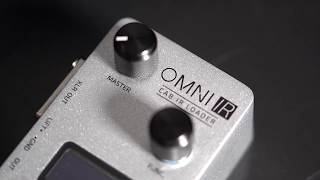
Hotone Omni IR - Introduction
Hotone Omni IR - Introduction
HotoneAudio
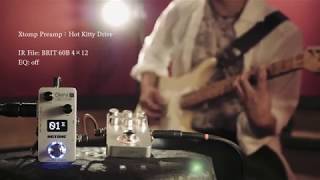
Hotone OMNI Series: Omni IR
HotoneAudio
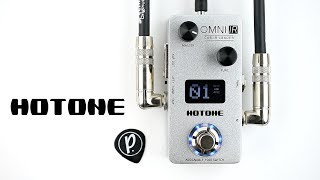
Hotone Audio Omni IR Impulse Response Cabinet Simulator

Pedal of the Day
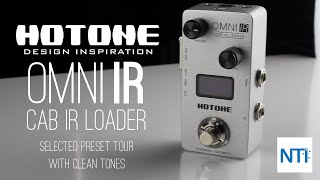
Hotone Audio OMNI IR - Cab IR Loader - First Look

Noise Toys Imports TV
Reviews
PROS
-
Compact design with intuitive interface
-
Supports 3rd party impulse responses
-
High-quality cabinet emulations with authentic feel
-
Balanced XLR output for direct console connectivity
-
Includes headphone jack for silent monitoring
-
Parametric EQ with minimal need for adjustments
-
Noise-free sound quality
-
40 factory presets with room for 60 total IRs
-
Easy integration into effects chain
-
Good alternative to traditional amp miking
CONS
-
Noticeable latency for some users
-
Volume adjustment needed to prevent crackling
Owner Insights
We analyzed real musician discussions from forums and Reddit to find what players love, question, and tweak about Hotone Omni IR.
Features and functionality
-
The Hotone Omni IR provides headphone output and aux input, making it versatile for silent practice or jamming along with external audio sources.
Source -
It serves as a DI box, cab sim platform, and headphone amp, offering EQ settings for each preset, although these settings are reportedly underutilized by some users.
Source -
The Hotone Omni IR includes XLR and 1/4" outputs, as well as a thru for cab monitoring, enhancing connectivity options for various setups.
Source -
User feedback highlights the Omni IR's ability to handle both silent practice and live performance scenarios due to its aux in and headphone out.
Source
Use cases and applications
-
The compact size (9" x 6") allows the Omni IR to fit in the front pocket of a bass bag, enhancing portability for on-the-go musicians.
Source -
Some users have successfully used the Omni IR with a separate load box for silent recording, appreciating its capability for demo creation and pedal testing.
Source
Software and compatibility
-
Audio recordings can be transferred via USB or Bluetooth as standard WAV files, ensuring compatibility with any DAW or audio software.
Source
Mods and upgrades
-
Users can load custom IRs into the Hotone Omni IR, allowing for personalized tone shaping and experimentation with different sound profiles.
Source
Comparisons
-
The Omni IR is compared favorably to the Two Notes Cab M and DSM/Humboldt Simplifier, with users noting its flexibility in cab simulation and monitoring features.
Source
Critic Reviews
Based on 0 Reviews and 0 Ratings
More Hotone Amp & Cabinet Simulators


$1,249.00 - $1,479.00
in Amp & Cabinet Simulators Rank


$99.00 - $258.00
in Amp & Cabinet Simulators Rank


$1,449.00 - $2,049.99
in Amp & Cabinet Simulators Rank


$130.00
in Amp & Cabinet Simulators Rank


$359.00 - $399.00
in Amp & Cabinet Simulators Rank


.jpg?v=1784940345)

$1,390.00 - $1,990.00
in Amp & Cabinet Simulators Rank

.jpg?v=1785033483)


$299.00 - $399.00
in Amp & Cabinet Simulators Rank


.png?v=1785038939)

$125.90 - $149.00
in Amp & Cabinet Simulators Rank


$42.45
in Amp & Cabinet Simulators Rank


$799.99 - $835.00
in Amp & Cabinet Simulators Rank


$39.99
in Amp & Cabinet Simulators Rank


$80.00 - $90.62
in Amp & Cabinet Simulators Rank


$274.00 - $399.00
in Amp & Cabinet Simulators Rank


$453.00 - $829.00
in Amp & Cabinet Simulators Rank


$297.49 - $399.99
in Amp & Cabinet Simulators Rank


$99.00 - $588.01
in Amp & Cabinet Simulators Rank


$299.99 - $380.28
in Amp & Cabinet Simulators Rank


$227.63 - $299.99
in Amp & Cabinet Simulators Rank


$244.42 - $299.99
in Amp & Cabinet Simulators Rank


$125.00
in Amp & Cabinet Simulators Rank


$20.60 - $36.90
in Amp & Cabinet Simulators Rank


$224.10
in Amp & Cabinet Simulators Rank
.png?v=1785033483)

$131.99 - $219.99
in Amp & Cabinet Simulators Rank


$24.00 - $28.90
in Amp & Cabinet Simulators Rank
.JPG?v=1784934260)

$99.00 - $179.00
in Amp & Cabinet Simulators Rank


$35.54 - $42.99
in Amp & Cabinet Simulators Rank


$249.00
in Amp & Cabinet Simulators Rank


$422.00 - $499.99
in Amp & Cabinet Simulators Rank


$99.97
in Amp & Cabinet Simulators Rank


$79.20 - $99.00
in Amp & Cabinet Simulators Rank


$130.00 - $366.93
in Amp & Cabinet Simulators Rank

$297.98 - $384.99
in Amp & Cabinet Simulators Rank


$135.00 - $149.99
in Amp & Cabinet Simulators Rank


$85.00 - $139.00
in Amp & Cabinet Simulators Rank


$66.00 - $75.99
in Amp & Cabinet Simulators Rank


$75.00
in Amp & Cabinet Simulators Rank


$115.00 - $169.00
in Amp & Cabinet Simulators Rank

Accessories & Related Items


Artist usage


Community setups


Similar


Gear Guides




.jpg)

Most Popular Amp & Cabinet Simulators
Most Popular Brands
-
Added to Equipboard on by
 equipboard
GearIQ 4934
-


