

Pricing and availability
We compare 600+ stores and found this item at 5 stores. Prices updated .
Store
Reviews
Price




Price History
Based on price data from 3 merchants for "Antares Auto-Tune Pro". Prices shown reflect NEW condition. Tracking began Apr 2, 2026.
* Product prices and availability are updated by Equipboard every 24hrs and are subject to change. Equipboard may receive compensation for purchases made at participating retailers linked on this site. This compensation does not affect what products or prices are displayed, or the order of prices listed. For more information, please refer to our affiliate disclosure.
Description
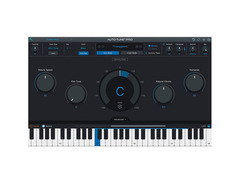
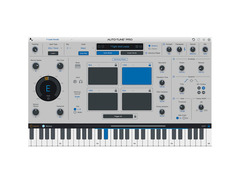
Transform your vocal performances with the Antares Auto-Tune Pro, the industry-standard for pitch and time correction. This powerful software offers a sleek, intuitive interface, making it accessible for both beginners and seasoned producers. Whether you're fine-tuning a single note or crafting complex vocal harmonies, Auto-Tune Pro’s diverse features cater to all your creative needs.
The enhanced Auto-Key feature automatically detects the key and scale of your project, streamlining your workflow and saving you precious time. Dive into nostalgia with Classic Mode, delivering the iconic "Auto-Tune 5 sound" cherished by pop artists over the years. For those who love hands-on control, the MIDI Parameter Control lets you manipulate retune speed, vibrato, and more in real-time, transforming your MIDI controller into an expressive instrument controller.
Auto-Tune Pro also boasts ARA support for seamless integration with your digital audio workstation, ensuring efficient data exchange and enhanced creative possibilities. From basic pitch correction to innovative vocal effects, Auto-Tune Pro is an indispensable tool for any modern music producer striving for perfection.
Key Features:
- Streamlined user interface for ease of use and efficient workflow
- Auto-Key automatically detects the key and scale of your music
- Classic Mode for the "Auto-Tune 5 sound"
- Real-time control of key parameters via MIDI controller
- Industry-standard pitch and time correction
- Flex-Tune and Humanize technologies for natural vocal tuning
- Low Latency Mode for real-time performance without delay
- ARA support for closer DAW integration
Owner's manual
Antares Auto-Tune Pro User ManualProduct specs
| Available since | April 2024 |
| Los artikel / bundelartikel | Los artikel |
| Delay | No |
| Dynamics | No |
| Effect Filter | No |
| Encoder/Decoder | No |
| Equalizer | No |
| Guitar amps/-effects | No |
| Channel Strip | No |
| Metering / Analysis / Correction | No |
| Modulation Effects | Yes |
| Multieffect / Plugin-Host | No |
| Overdrive/Distortion | No |
| Preamp / Saturation | No |
| Psychoacoustic tool / Enhancer / Exciter | No |
| Restauration | No |
| Reverb | No |
| Special FX | No |
| Summer / Mixing Consoles | No |
| Tape Simulation | No |
| Pitch Shifter / Harmonizer / Timestretching | Yes |
| Transient Processing | No |
| Vocoder / Vocal effect | Yes |
| Mastering Tools | No |
| Hardware Controller | No |
| Download | 1 |
FAQs
-
What DAWs is Antares Auto-Tune Pro compatible with?
-
Antares Auto-Tune Pro is compatible with popular DAWs such as Logic Pro, Studio One, and Cubase/Nuendo, supporting ARA2 for enhanced integration and real-time processing.
-
Can Antares Auto-Tune Pro be used for live performances?
-
Yes, Antares Auto-Tune Pro offers real-time pitch correction, making it suitable for live performances where immediate vocal tuning is required.
-
What are the main features of Antares Auto-Tune Pro?
-
Antares Auto-Tune Pro features advanced pitch correction, real-time processing, and a comprehensive set of modulation effects, making it ideal for both subtle tuning and creative vocal effects.
-
Is Antares Auto-Tune Pro suitable for beginners?
-
While Antares Auto-Tune Pro offers advanced features, it also includes user-friendly interfaces and presets, making it accessible for beginners who want to explore vocal tuning.
-
Does Antares Auto-Tune Pro support polyphonic tuning?
-
Antares Auto-Tune Pro is primarily designed for monophonic vocal tuning, focusing on precise pitch correction and modulation effects for single vocal tracks.
Videos

Sweetwater
How To Auto-Tune Vocals Using Antares Auto-Tune Pro
How To Auto-Tune Vocals Using Antares Auto-Tune Pro
Sweetwater
Complete Guide to AutoTune Pro 11 | All New Features

Reid Stefan
Tutorial - Auto-Tune Pro - Basic Vocal Tuning

Auto-Tune® / Antares Audio Technologies
Auto-Tune Pro 11 - Harmony Player Tutorial with Bradley Denniston
Auto-Tune® / Antares Audio Technologies
Reviews
PROS
-
Unparalleled precision and flexibility in pitch correction and vocal processing
-
Offers both real-time pitch correction and detailed pitch/time editing
-
Advanced features like vocal effects mode and scale detection
-
Seamless integration with DAWs, including support for ARA
-
Renowned for its iconic "Auto-Tune Effect"
-
Highly user-friendly and easy to use
-
Permanent license option available, avoiding monthly subscriptions
-
Recognized as the best and most natural pitch correction VST
CONS
-
Hefty price point compared to other options
-
Performance for price may not meet expectations for some users
Owner Insights
We analyzed real musician discussions from forums and Reddit to find what players love, question, and tweak about Antares Auto-Tune Pro.
Features and functionality
-
Auto-Tune Pro provides a characteristic sheen to vocals, enhancing pop, hip-hop, and metal genres, while Melodyne offers a more transparent, subtle pitch correction.
Source -
Antares Auto-Tune Artist is noted for having no latency during recording, which some users prefer over the Pro version for real-time applications.
Source -
Auto-Tune Pro includes additional tweakable options for mixing, providing more control over the final sound compared to the Artist version.
Source
Use cases and applications
-
Combining Melodyne for initial manual tuning with Auto-Tune's auto mode can achieve a polished pop sound without the exaggerated T-Pain effect.
Source -
Auto-Tune's live tuning capability is essential for those requiring real-time pitch correction, unlike Melodyne, which is post-production only.
Source -
It's suggested that Auto-Tune Artist is more suited for recording sessions due to its low latency, while Pro is better for post-recording mixing.
Source
Software and compatibility
Critic Reviews
5.0 out of 5
Based on 1 Review and 13 Ratings

Artist usage
Add artist
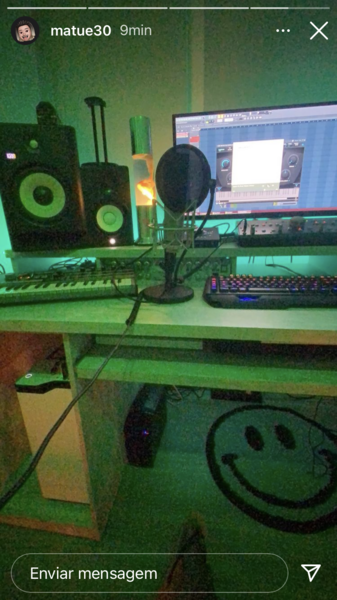
(English) On the computer screen you can see him using Antares Auto Tune Pro. / (Portuguese) Na tela do computador dá pra ver ele usando o Antares Auto Tune Pro.

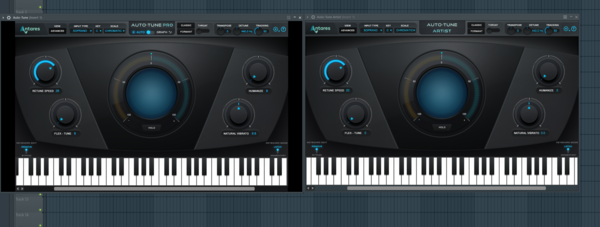
Cobra Maltase uses Antares Autotune to Improve his Crystal Clear Vocals

Album Usage
The Antares Auto-Tune Pro has been featured on the following albums:

Genre Usage
Based on how artists on Equipboard use this gear, it is most commonly found in the following genres.
Used With
Based on how musicians on Equipboard use Antares Auto-Tune Pro, it is most commonly used with the following gear.




-s.webp?v=1783321611)

Similar
Add recommendation1 alternative for Antares Auto-Tune Pro, curated by the Equipboard community.

$245.00 - $359.00
The Headrush VX5 features the Antares Autotune software along with compression and harmony effects, neatly housed in a physical hardware unit designed for touring.
More Antares Vocal Processing Plugins

$122.00 - $330.00
in Vocal Processing Plugins Rank


in Vocal Processing Plugins Rank

.jpeg?v=1783244343)


$115.00 - $230.00
in Vocal Processing Plugins Rank


$205.00 - $349.00
in Vocal Processing Plugins Rank


$38.00 - $79.00
in Vocal Processing Plugins Rank


$72.00 - $160.00
in Vocal Processing Plugins Rank

$23.90
in Vocal Processing Plugins Rank
.png?v=1783050948)

$77.00 - $80.00
in Vocal Processing Plugins Rank

$25.00 - $50.00
in Vocal Processing Plugins Rank


$150.00 - $180.00
in Vocal Processing Plugins Rank


$38.00 - $80.00
in Vocal Processing Plugins Rank


in Vocal Processing Plugins Rank

.jpeg?v=1783323499)


$49.99 - $210.00
in Vocal Processing Plugins Rank


.png?v=1783335870)


$33.00 - $39.99
in Vocal Processing Plugins Rank


-m.webp?v=1783346546)
$83.50 - $99.00
in Vocal Processing Plugins Rank


$33.00 - $39.99
in Vocal Processing Plugins Rank


Community setups


Most Popular Vocal Processing Plugins
Most Popular Brands
-
Added to Equipboard on by
 thatlkjguy
Gear IQ 4735
-


