

Pricing and availability


* Product prices and availability are updated by Equipboard every 24hrs and are subject to change. Equipboard may receive compensation for purchases made at participating retailers linked on this site. This compensation does not affect what products or prices are displayed, or the order of prices listed. For more information, please refer to our affiliate disclosure.
Description
When it comes to vocal processing, Antares Auto-Tune 7 - Native stands out as an essential tool for both studio professionals and budding musicians. Renowned for its cutting-edge pitch correction, this plugin introduces an advanced time correction engine, setting new standards in music production. Whether you're striving for polished perfection or the iconic T-Pain effect, Auto-Tune 7 caters to all your vocal needs.
At the heart of this powerhouse lies the second-generation Evo vocal processing technology, offering seamless and realistic pitch correction. The intuitive interface allows you to define scales effortlessly and adjust retuning speeds, making it adaptable for any musical style. Additionally, the Graphical Mode provides a visual representation of your vocal track, enabling precise edits with a simple drag-and-drop functionality.
But Auto-Tune 7 is not just about correcting pitch. Its comprehensive suite of tools includes an enhanced amplitude envelope display and an integrated data file management system, providing a streamlined workflow. The software also supports MIDI note detection, allowing for creative manipulation of your vocal tracks. With expanded keyboard shortcuts, all essential functions are at your fingertips, ensuring a smooth and efficient editing process.
Whether you're fine-tuning a vocal performance or experimenting with innovative soundscapes, Auto-Tune 7 delivers impeccable results with minimal effort. Dive into a world where pitch and time correction meet artistry, and elevate your music production to new heights.
Key Features:
- Second generation Evo voice processing technology
- High-quality pitch and time correction system
- Enhanced amplitude envelope display
- Integrated data file management system
- Adjustable Throat Length per correction object
- MIDI note information recording in Graphical Mode
- Smooth continuous scrolling of graphical audio data
- Expanded key binding shortcuts
- Available in AAX, RTAS, AU, and VST formats for Mac and PC
Product specs
| Brand | Antares |
| Model | Auto-Tune 7 - Native |
| Finish | Black |
| Year | 2010s |
| Categories | Boxed Audio Plugins and Recording Software |
FAQs
-
What are the key features of Antares Auto-Tune 7 - Native?
-
Antares Auto-Tune 7 - Native offers real-time pitch correction and shifting, formant correction, and a new time-manipulation feature for rhythmic editing. It is designed to provide both subtle pitch correction and the iconic Auto-Tune effect.
-
Is Antares Auto-Tune 7 - Native compatible with my DAW?
-
Antares Auto-Tune 7 - Native is compatible with most major DAWs, including Pro Tools, Logic Pro, and Ableton Live, as long as they support VST, AU, or RTAS plugin formats.
-
Can I use Antares Auto-Tune 7 - Native for live performances?
-
Yes, Antares Auto-Tune 7 - Native can be used for live performances, providing real-time pitch correction and effects to enhance vocal performances on stage.
-
Does Antares Auto-Tune 7 - Native support formant correction?
-
Yes, Antares Auto-Tune 7 - Native includes formant correction, allowing you to maintain the natural characteristics of a voice while adjusting pitch.
-
What are the system requirements for Antares Auto-Tune 7 - Native?
-
The system requirements for Antares Auto-Tune 7 - Native include a compatible DAW and a computer with sufficient processing power to run audio plugins, typically a multi-core processor and at least 2GB of RAM.


Reviews
Owner Insights
We analyzed real musician discussions from forums and Reddit to find what players love, question, and tweak about Antares Auto Tune 7 - Native.
Features and functionality
-
Auto-Tune Pro X's Graphical Mode suffers from laggy scrolling and reversed mouse scrolling direction, making precise edits challenging.
Source -
The grid lines in Graphical Mode are too light, and waveforms too dark, leading to poor visual contrast and editing difficulty.
Source -
Autotune Artist is noted for a user-friendly interface that works seamlessly without needing an Apollo interface, preferred for ease of use in DAW automation.
Source
Software and compatibility
User experience
-
Antares Central often fails to display licenses correctly, requiring multiple logins and attempts to manage licenses, causing frustration during sessions.
Source -
Antares customer support is criticized for slow, unhelpful responses, with unresolved tech issues and poor communication cited frequently.
Source -
Some users prefer Autotune Artist for its flexibility and ability to incorporate more plugins, such as Waves PSE, in live setups.
Source
Comparisons
-
Melodyne is noted for having fewer artifacts during tuning, though Auto-Tune can achieve a tight pop vocal sound without sounding over-tuned.
Source -
Users report minimal latency differences between UAD Autotune Real-Time X and Autotune Artist, with Artist preferred for integration into non-UAD live rigs.
Source
Use cases and applications
-
Owners recommend ensuring a clean line to the FoH as a backup in live settings to prevent issues if the tuning fails.
Source
Critic Reviews
3.5 out of 5
Based on 0 Reviews and 3 Ratings
Artist usage
Add artist

When Rob Swire moved to his new studio in 2014, he posted all the plugins that he has installed.

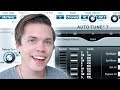
This YouTube video shows Roomie using Auto Tune 7.


Genre Usage
Based on how artists on Equipboard use this gear, it is most commonly found in the following genres.
Used With
Based on how musicians on Equipboard use Antares Auto Tune 7 - Native, it is most commonly used with the following gear.



-s.webp?v=1784732528)

More Antares Vocal Processing Plugins

$250.00 - $500.00
in Vocal Processing Plugins Rank


$122.00 - $330.00
in Vocal Processing Plugins Rank


in Vocal Processing Plugins Rank

.jpeg?v=1784733415)


$115.00 - $230.00
in Vocal Processing Plugins Rank


$205.00 - $349.00
in Vocal Processing Plugins Rank


$75.00 - $80.00
in Vocal Processing Plugins Rank


$143.00 - $160.00
in Vocal Processing Plugins Rank

$41.00
in Vocal Processing Plugins Rank
.png?v=1784580320)

$77.00 - $80.00
in Vocal Processing Plugins Rank


$150.00 - $180.00
in Vocal Processing Plugins Rank


$32.00 - $39.99
in Vocal Processing Plugins Rank

-m.webp?v=1784815472)
$49.00 - $99.00
in Vocal Processing Plugins Rank

$33.00
in Vocal Processing Plugins Rank


Accessories & Related Items


Community setups


Similar


Gear Guides









Most Popular Vocal Processing Plugins
Most Popular Brands
-
Added to Equipboard on by
 mattinho
GearIQ 124
-


